Microsoft-authentication-library-for-js: acquireTokensilent return null accessToken randomly.
I'm submitting a...
[ ] Regression (a behavior that used to work and stopped working in a new release)
[ ] Bug report
[ ] Performance issue
[ ] Feature request
[ ] Documentation issue or request
[ x] Other... Please describe:
Technical doubt and possibly a bug.
Browser:
- [ X] Chrome
- [ ] Firefox version XX
- [ ] IE version XX
- [ ] Edge version XX
- [ ] Safari version XX
Library version
<
Library version: 1.0.0
Current behavior
accessToken from acquireTokenSilent is null sometimes
Expected behavior
accessToken from acquireTokenSilent is never null. Any error should come in the error function.
Minimal reproduction of the problem with instructions
I have an apihelper that every time is going to do a call contacts my clientApplication wrapper like this:
 getAuthorizationCookie = async function () {
        var token = await Ab2c.getTokenAsync()
        if (!token)
        {
            console.log(token);
        }
        return 'Bearer ' + token;
    }
The implementation of Ab2c.getTokenAsync is this:
let authCallback = function (error, response) {
  if (error)
    console.log(error);
};
const clientApplication = new UserAgentApplication(config);
clientApplication.handleRedirectCallback(authCallback);
//FIXME: this temporary catch token is wrong and should be  removed. It is here as a workaround because ab2c to sometimes returns a valid response with a null token.
let tempCacheToken="";**

class Ab2c {
....

static getTokenAsync = async () => {
    let tokenRequest = {
      scopes: config.auth.b2cScopes,
      authority: config.auth.authority,
      extraQueryParameters: config.auth.extraQueryParameters
    };
    return new Promise((resolve,reject) =>{
    clientApplication.acquireTokenSilent(tokenRequest).then(function (loginResponse) {
      if (!loginResponse.accessToken)
      {
         **//This If happens sometimes when I refresh the page**
          console.log("null token");
          loginResponse.accessToken = tempCacheToken;
      }
      else
      {
             console.log("valid token")
          tempCacheToken = loginResponse.accessToken;
      }
      return resolve(loginResponse.accessToken);
    }).catch(function (error) {
      console.log(error);
      Ab2c.logout()
      let newError = new Error(error);
      newError.fromMsal = true;
      return reject(newError);
    });
    });
  }
....
}
So, basically I'm relying in clientApplication to handle the cached token for me since I understood that's what I'm supposed to do when using msal. But sometimes when I hit F5 in my page I get a valid loginResponse with a null accessToken.
When I refresh I do like 4 or 5 different requests which means 4 or 5 different calls to acquiretokensilent. What I see is that sometimes all of them work and sometimes the first actually works and returns a token but the following return a null value, most of the times all of them work...
Log example.
valid token
null token
valid token
valid token
valid token
valid token
I think it might be related to refreshing while some request is still pending but I can't prove it.
Any ideas?
Miguel
 mmuarc
All 42 comments
@mmuarc thank you for explaining your issue so well
@pkanher617 can you investigate this?
 DarylThayil
on 3 Jun 2019
DarylThayil
on 3 Jun 2019
This looks like the issue I experienced in issue #722.
 raikoss
on 7 Jun 2019
raikoss
on 7 Jun 2019
MSAL.JS version 1.0.1
I am seeing this issue as well. After logging in, I make a few API calls, and each call gets an access token. I notice that sometimes the access token response is successful but the token is null. This only seems to happen on a fresh incognito browser instance.
I am able to get around this issue by checking for a null token on a successful response, and calling calling my login function (without prompt since the user is already authenticated at this point).
Login Function
public login(noPrompt: boolean = false): void {
        this.loggingService.getSessionId(true);
        const params: Msal.AuthenticationParameters = {
            scopes: this.msalConfig.scopes,
            authority: this.loginAuthOptions.authority,
        };
        if (!noPrompt) {
            params.prompt = 'login';
        }

        this.msalContext.loginRedirect(params);
    }
Get Token Method
    public getToken(): Observable<string> {
        const result = new Subject<string>();

            const params: Msal.AuthenticationParameters = {
                scopes: this.msalConfig.scopes,

            };

            return Observable.create(observer => {
                this.msalContext.acquireTokenSilent(params).then((response: Msal.AuthResponse) => {
                    // TODO: Log
                    if (!response.accessToken) {
                        // There appears to be a bug in MSAL.JS where on a fresh incognito session the token response
                        // returns successful yet the token is null
                        console.log('Access token is null with a success response');
                        this.login(true); // boolean flag means login without a prompt.
                    } else {
                        observer.next(response.accessToken);
                        observer.complete();
                    }
                }, rejected => {
                    // TODO: Log
                    this.logoutMsal();
                    this.login();
                }).catch(err => {
                    // TODO Log
                    observer.next('');
                    observer.complete();
                });
            });
    }
 sfigie
on 7 Jun 2019
sfigie
on 7 Jun 2019
@mmuarc @raikoss @sfigie Thank you for describing the issue with detail and examples. I am looking into this, I will try to get back ASAP.
 pkanher617
on 10 Jun 2019
pkanher617
on 10 Jun 2019
I'm experiencing this problem too.
 fristys
on 13 Jun 2019
fristys
on 13 Jun 2019
Still in progress, thanks for patience
DarylThayil
on 14 Jun 2019
@mmuarc @raikoss @sfigie Thanks for your patience. I have pushed a fix in PR #768. Please feel free to pull this branch and let me know if this fix works. I will push this as a patch as soon as I have verified that it works for you.
pkanher617
on 19 Jun 2019
This seems to fix the issue on my end :) Good job!
raikoss
on 19 Jun 2019
@raikoss Thanks for testing this. I will push a patch tonight to npm and CDN,
pkanher617
on 19 Jun 2019
Hi, @pkanher617 thanks for your work.
This is embarrassing but although I pulled the branch I don't know exactly what to do to test it in my app since I'm using an npm package for msal..
Any place where I can find how to generate the package locally and maybe replace the current package manually in node_modules?
mmuarc
on 19 Jun 2019
@mmuarc What I did was:
- Clone the project
- Switch to the branch
- Run
npm installandnpm run buildin the/lib/msal-corefolder - In my project where I use msal, run
npm uninstall msalto remove the npm hosted package - Run
npm install file:<path_to_msal-core_folder>to install the package locally
Though this may be different than what others may do, this is what enabled me to test the new version.
Don't forget to remove the reference to the local package by running npm uninstall msal and then npm install msal again when you are done testing.
Hope this was helpful to you.
raikoss
on 19 Jun 2019
@raikoss Thanks for the steps. We would suggest the same @mmuarc. Please let us know if this doesn't work for you.
 sameerag
on 19 Jun 2019
sameerag
on 19 Jun 2019
Thanks for your help @raikoss, @sameerag . I finally tested it.
@pkanher617, this fixed the issue for me. Great job
mmuarc
on 19 Jun 2019
I have published 1.0.2. Thanks for all your feedback!
pkanher617
on 21 Jun 2019
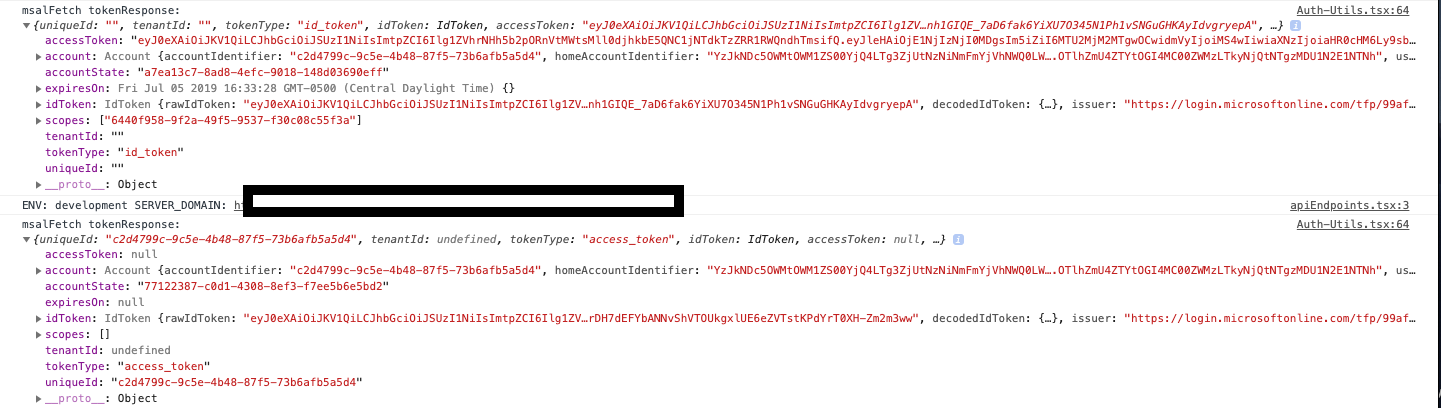
I am using 1.0.2 but I am still seeing this issue. I have tested with sessionStorage as well as localStorage. It happens consistently after the token expires. I will get a tokenResponse from acquireTokenSilent() but accessToken is null. If I wait a bit and try acquireTokenSilent() again, it has an accessToken.
Some other interesting differences between a tokenResponse with an accessToken and a tokenResponse with a null accessToken:
- expiresOn is null rather than a date object
- scopes is an empty array rather than my scopes
- tokenType is 'access_token' rather than 'id_token'
here is a screenshot of the two tokenResponses logged out (first is right before it expires, second is after the token expired):
 jfbloom22
on 5 Jul 2019
jfbloom22
on 5 Jul 2019
Never mind my comment. I am including the clientid as the only scope. I learned that doing this causes the idToken to be renewed rather than the accessToken.
jfbloom22
on 6 Jul 2019
@jfbloom22
Hi,
What is your solution to the problem then?
I have the same issue -- after clearing app storage, calling acquireTokenSilent will go renew idToken (my app also has a scope of just clientId), which results to changing the scope to ['openid', 'profile'], hence the tokenResponse.accessToken is null, although tokenReponse.token_type is access_token.
How did you solve this?
 ayuspark
on 18 Jul 2019
ayuspark
on 18 Jul 2019
@DarylThayil Sorry to ping you -- I am still seeing the same issue using 1.0.2
scope: [ clientId ],
in incognito mode on fresh load, call acquireTokenSilent, then the tokenResponse returned has a tokenType: access_token, but accessToken: null
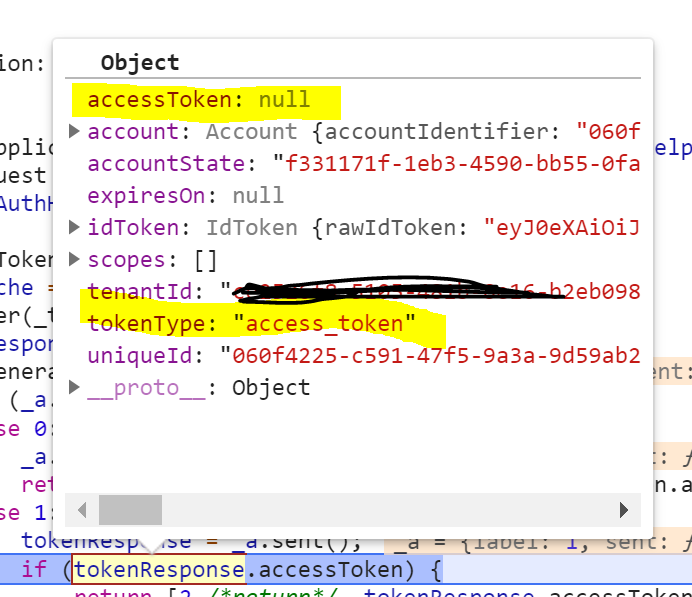
Meanwhile, the scope I have locally has been changed to ['openid', 'profile'], originally the scope was [ clientId ]. as a result of renewIdToken() inside the UserAgentApplication. It looks like ServerRequestParameters.translateclientIdUsedInScope is modifying the scope for renewIdToken.
Is it expected to modify the original scope when renewIdToken gets called?
When would the accessToken: null be solved?
ayuspark
on 18 Jul 2019
@ayuspark what solved it for me was passing in a single scope similar too: “https://B2CBlog.onmicrosoft.com/notes/read”
I followed this guide to setup my Web API and Client Application and put together a working scope. https://azure.microsoft.com/en-us/blog/azure-ad-b2c-access-tokens-now-in-public-preview/
Making a request to Azure AD B2C for an access token is similar to the way requests are made for id tokens. The main difference is the value entered in the “scope” parameter. The “scope” parameter contains the specific resource and its permissions your app is requesting. For example, to access the “read” permission for the resource application with an App ID URI of “https://B2CBlog.onmicrosoft.com/notes”, the scope in your request would be “https://B2CBlog.onmicrosoft.com/notes/read”.
jfbloom22
on 18 Jul 2019
By passing Client ID as the only scope, you are renewing your ID token, not any access tokens you may have acquired beforehand. This is most likely why the access token is null, but as you can see you have a new ID token in the response.
If you want to silently renew access tokens, you pass the same scopes as when you acquired them when you used AcquireTokenRedirect or AcquireTokenPopup.
Since you want the ID token, just check the idToken key on the response object.
raikoss
on 18 Jul 2019
How I learned that passing in the clientid as the only scope would result in the idToken being renewed was by stepping through the source code and finding this comment:
jfbloom22
on 18 Jul 2019
Yeah I can't really find it either, I remember it was back in the old v0.2.4 documentstion at least. I would suggest creating a new issue for this, maybe someone will document it somewhere :)
raikoss
on 18 Jul 2019
@negoe We need to document this. We have tokenrenewal documented here, but we may need to add the nuance that passing client-id issues/renews idToken.
sameerag
on 18 Jul 2019
Thank you peeps for the response.
@jfbloom22 Thanks for the reference. Our app has the apis behind the same clientId. It means, the resource/scope we are accessing is using the same clientId. Hence the scope is always scopes: [ clientId ].
This is how I tested the app:
(1) I login the app (idToken and accessToken will be set in cache)
(2) I clear the application cache
(3) I open some page that would make an API call, which will invoke acquireTokenSilent. Then this func will call renewIdToken as a result of the cleared application cache.
(4) In the process of renewIdToken, since I only have clientId as the scope, the scope is swapped to [ 'openid', 'profile' ].
(5) I can see in saveTokenFromHash, the response didn't have accessToken first, but saveAccessToken was called in the process.
(6) But eventually the saveTokenFromHash returns the response WITHOUT an accessToken, because hashParam returned from renewal does not have scope in it, then the response.accessToken did not get assigned.
In this scenario, when passing a scope of just clientId and cleared cache, we are expecting MSAL to go renew the idToken and returns an accessToken for our API call, but the accessToken is null, even though it WAS saved.
Hope this help clarify the question a bit more.
Questions:
(1) When cache is null, and we call acquireTokenSilent, in order to get an accessToken, we need to call acquireTokenSilent again, is that correct?
(2) The token shown in the above screenshot, why does it have the type as "access_token" but the value is null? (from the previous answer, it looks like the type should be id_token?)
(3) During the entire process, auth request were modified by reference (so after token renewal, my scopes changed from clientId (what I set), to "openid profile" (what MSAL set). Does MSAL expect user to pass in new auth request for every call?
ping @sameerag
ayuspark
on 19 Jul 2019
@ayuspark I will try to answer your questions.
1) When the cache is null, acquireTokenSilent should fetch a token for the scopes that you have given. You should get the token in the authResponse, and should not be required to call ATS again.
2) This may be a bug in our token response handling, I am checking this now.
3) The auth request object given does not get modified by MSAL. We simply append "openid" and "profile" to the end of the scopes sent to the server. This is a requirement by the token service. The scopes returned in the response object are given by the token service, and will include openid and profile since they were consented to. You are expected to give an auth request for every call, but if the same scopes are given, MSAL will give you the cached token instead of going to the wire again (if you use acquireTokenSilent).
Please let me know if I haven't answered any questions. I will update when I have more info about this issue.
pkanher617
on 23 Jul 2019
@pkanher617
Please see the following comments
(1). Like I said the previous post, the authReponse does not have the accessToken. It is null :(.
(2) Yes, please do. Thank you.
(3). scope in the authRequest is modified by reference. This means, my static scope is modified by MSAL.js. And MSAL does not simply append "openid" and "profile", it removes the clientId.
I understand authRequest is required for every call, but since it is modified by reference, after the renewId call happened, my local scope is then changed.
ayuspark
on 23 Jul 2019
@pkanher617 thoughts on just adding code to null check a successful response and throw an error if it is a false positive?
DarylThayil
on 23 Jul 2019
@pkanher617 just making sure you saw this code comment I mentioned above. I believe the 'null' access token is intentional when the 'clientid' is used as the only scope.
How I learned that passing in the clientid as the only scope would result in the idToken being renewed was by stepping through the source code and finding this comment:
If you ask me, changing the type of token returned based on which scope is passed in, is a confusing side effect. Might consider adding a config option for tokenType so that we can clearly request the type of token we want.
jfbloom22
on 25 Jul 2019
@jfbloom22 In some apps, the services/apis can be behind the same clientId as the client app, hence calling with just the clientId as scopes when idToken exists, can return accessToken.
The issue I raised was when calling renewIdToken, it is true that it returns an idToken, but with a tokenType as access_token, meanwhile the accessToken property is null.
I have addressed the issue with the msal team internally, and I'll follow up to see when to add new issues.
ayuspark
on 26 Jul 2019
@jfbloom22 As ayuspark says, in the cases where services and apis are behind the same clientId, the clientid scope will return an idToken and an accessToken (which are incidentally the same) which will grant access. I am pushing two separate PRs to address the fact that when you are returned ONLY an id_token, the tokenType will reflect that, and the scopes you give us will not be mutated.
@ayuspark Thank you for the response, I am pushing these fixes now and will hopefully have a patch release out by Monday.
pkanher617
on 26 Jul 2019
Any news on this?
It's September now, I am on msal v.1.1.3 (the latest) and I'm experiencing exactly the same trouble - accessToken randomly returned as null (when setting scopes to my own AAD app Client ID).
 scale-tone
on 23 Sep 2019
scale-tone
on 23 Sep 2019
@scale-tone So I chatted with @pkanher617 who works on MSAL.js, when using your own AAD app clientId as your scope, you are doing a self-authorizing, and id_token == access_token. And in this case, when you call acquireTokenSilent (ATS) when there's no id_token in cache, it'd first get you an id_token, and at this time, acess_token will be null. And if you call ATS the second time, it'd return you access_token, which is the same token as id_token.
So when you see null access_token, maybe there's no id_token in cache at the time ATS is called?
Right now it works as expected for our product team.
ayuspark
on 24 Sep 2019
@ayuspark ,
So when you see null access_token, maybe there's no id_token in cache at the time ATS is called?
I don't know whether there is or there isn't id_token in cache (how do I get to know that?).
But the repro steps are simple:
- call acquireTokenSilent()
- drink coffee for > 1 hour (access token TTL)
- call acquireTokenSilent() again.
The call succeeds, the returned authResponse.accessToken is null, while authResponse.idToken.rawIdToken contains a valid (and even not expired) token. Are you saying this behavior is expected?
scale-tone
on 26 Sep 2019
@scale-tone
Yep, this is expected.
Because after you finish the 20oz/600ml pumpkin spice latte, access token expired, and the first call to acquireTokenSilent() went to call the renewIdToken. So IdToken was renewed. I stepped through from there, and I can see this.saveAccessToken() didn't get assigned to the response.. And you can see there is comment above it to explain.
Hope it helps.
ayuspark
on 28 Sep 2019
@ayuspark ,
Thanks for explanation, I do now understand why this bug appears to happen, but I do still believe it is a bug. So do expect some feedback from the team...
scale-tone
on 1 Oct 2019
@scale-tone access tokens expire every hour. If the application needs to keep the token valid for longer times, please call acquireTokenSilent before the expiry (in this case ~55 mins) to have a valid token in the cache.
The documentation for this can be found here.
Let us know if you have any more questions.
sameerag
on 3 Oct 2019
@mmuarc @scale-tone The new beta: msal.1.2.0-beta.3 should support concurrency more seamlessly. Please test it with the beta and let us know if this issue still persists.
Closing this. Please raise a new issue if needed.
sameerag
on 13 Nov 2019
quoting @ayuspark from above:
Our app has the apis behind the same clientId. It means, the resource/scope we are accessing is using the same clientId. Hence the scope is always scopes: [ clientId ].
It just hit me that it is the same situation in my application and it is not clear that the only reason I created a new scope was to avoid sending the clientId as the only scope. The scope I created does not serve any other purpose. Quoting myself from above:
what solved it for me was passing in a single scope similar too: “https://B2CBlog.onmicrosoft.com/notes/read”
I followed this guide to setup my Web API and Client Application and put together a working scope. https://azure.microsoft.com/en-us/blog/azure-ad-b2c-access-tokens-now-in-public-preview/
Thanks for woking on this everyone who contributed! Looks like the issue with mutating the scope has been resolved. Unless I am missing something in this thread, the only way to avoid a null accessToken for those who are sending in the clientID as the only scope is to do what I have suggested. Can anyone confirm or deny this?
jfbloom22
on 15 Jan 2020
@scale-tone access tokens expire every hour. If the application needs to keep the token valid for longer times, please call
acquireTokenSilentbefore the expiry (in this case ~55 mins) to have a valid token in the cache.The documentation for this can be found here.
Let us know if you have any more questions.
Are you really suggesting to time the expiry in the client?
Isn't the normal way to refresh the token if a call fails?
I don't think people can put a timer in their client app to check if it's time to refresh the token..
 Mathijs003
on 13 May 2020
Mathijs003
on 13 May 2020
@scale-tone access tokens expire every hour. If the application needs to keep the token valid for longer times, please call
acquireTokenSilentbefore the expiry (in this case ~55 mins) to have a valid token in the cache.
The documentation for this can be found here.
Let us know if you have any more questions.Are you really suggesting to time the expiry in the client?
Isn't the normal way to refresh the token if a call fails?I don't think people can put a timer in their client app to check if it's time to refresh the token..
Sadly this is what I ended doing. Putting a timer in my client to keep refreshing the token every X minutes or you lose your session and the calls will fail. I don't think it is a good approach at all but we are forced to do this as per the current implementation
mmuarc
on 13 May 2020
@scale-tone access tokens expire every hour. If the application needs to keep the token valid for longer times, please call
acquireTokenSilentbefore the expiry (in this case ~55 mins) to have a valid token in the cache.
The documentation for this can be found here.
Let us know if you have any more questions.Are you really suggesting to time the expiry in the client?
Isn't the normal way to refresh the token if a call fails?
I don't think people can put a timer in their client app to check if it's time to refresh the token..Sadly this is what I ended doing. Putting a timer in my client to keep refreshing the token every X minutes or you lose your session and the calls will fail. I don't think it is a good approach at all but we are forced to do this as per the current implementation
That's indeed sad :( What I did was intercepting my calls (with axios in React) and checking for a 401, then I would call the 'acuireTokenSilent' to get a new token and add it to the request. Have a look at this, maybe it can help :)
client.interceptors.response.use(
  (response: AxiosResponse) => {
    return response
  },
  async (error: AxiosError) => {
    const originalRequest: AxiosRequestConfig & {_retry?: boolean} = error.config;
    if(error.response && error.response.status === 401 && !originalRequest._retry) {
      originalRequest._retry = true;
      const tokenResponse = await msalAcquireTokenSilent() as AuthResponse;
      LocalStorageUtil.setIDToken(tokenResponse.idToken.rawIdToken);
      axios.defaults.headers.common['Authorization'] = 'Bearer ' + LocalStorageUtil.getIDToken();
      return axios(originalRequest);
    }
    return Promise.reject(error);
  }
);
@scale-tone access tokens expire every hour. If the application needs to keep the token valid for longer times, please call
acquireTokenSilentbefore the expiry (in this case ~55 mins) to have a valid token in the cache.
The documentation for this can be found here.
Let us know if you have any more questions.Are you really suggesting to time the expiry in the client?
Isn't the normal way to refresh the token if a call fails?
I don't think people can put a timer in their client app to check if it's time to refresh the token..Sadly this is what I ended doing. Putting a timer in my client to keep refreshing the token every X minutes or you lose your session and the calls will fail. I don't think it is a good approach at all but we are forced to do this as per the current implementation
That's indeed sad :( What I did was intercepting my calls (with axios in React) and checking for a 401, then I would call the 'acuireTokenSilent' to get a new token and add it to the request. Have a look at this, maybe it can help :)
client.interceptors.response.use(
  (response: AxiosResponse) => {
    return response
  },
  async (error: AxiosError) => {
    const originalRequest: AxiosRequestConfig & {_retry?: boolean} = error.config;
    if(error.response && error.response.status === 401 && !originalRequest._retry) {
      originalRequest._retry = true;
      const tokenResponse = await msalAcquireTokenSilent() as AuthResponse;
      LocalStorageUtil.setIDToken(tokenResponse.idToken.rawIdToken);
      axios.defaults.headers.common['Authorization'] = 'Bearer ' + LocalStorageUtil.getIDToken();
      return axios(originalRequest);
    }
    return Promise.reject(error);
  }
);
I have something similar (using fetch). But still if your application, like mine, needs to stay logged for long periods without doing any request to the server you need to keep refreshing the token periodically ( I specifically refresh the idtoken) or when you try to do a request after let's say 1 hour and a half idle the access token renew won't work without user interaction, which means redirecting the user to the login page. I didn't want to do that so I had to put the timer to keep the session alive.
I don't think there is a way around that since azure b2c doesn't support renew tokens in the flow they support for single page applications.
mmuarc
on 14 May 2020
Related issues
 ssuvorov
·
3Comments
ssuvorov
·
3Comments
 baltuonis
·
4Comments
baltuonis
·
4Comments
 atvoid
·
3Comments
atvoid
·
3Comments
 Anees-Raja
·
3Comments
Anees-Raja
·
3Comments
 spottedmahn
·
4Comments
spottedmahn
·
4Comments
Most helpful comment
@mmuarc What I did was:
npm installandnpm run buildin the/lib/msal-corefoldernpm uninstall msalto remove the npm hosted packagenpm install file:<path_to_msal-core_folder>to install the package locallyThough this may be different than what others may do, this is what enabled me to test the new version.
Don't forget to remove the reference to the local package by running
npm uninstall msaland thennpm install msalagain when you are done testing.Hope this was helpful to you.