Microsoft-authentication-library-for-js: Login redirect loop in v1.0.0
I'm submitting a...
[ ] Regression (a behavior that used to work and stopped working in a new release)
[x] Bug report
[ ] Performance issue
[ ] Feature request
[ ] Documentation issue or request
[ ] Other... Please describe:
Browser:
- [x] Chrome version 74.0.3729.131 (Official Build) (64-bit)
- [ ] Firefox version XX
- [ ] IE version XX
- [ ] Edge version XX
- [ ] Safari version XX
Library version
Library version: 1.0.0
Current behavior
In the following code login is in infinite loop and getToken is never called:
login() {
        const loginRequest = {
            scopes: ['openid'],
            prompt: 'select_account',
            authority: 'https://login.microsoftonline.com/[RESOURCE]',
        };

        this.myMSALObj.loginRedirect(loginRequest);
    }

componentDidMount() {
if (!this.myMSALObj.getAccount()) {
            this.login();
        } else {
            this.getToken();
        }
}
Config looks like this:
const config = {
            auth: {
                clientId: '[CLIENT_ID]',
                authority: 'https://login.microsoftonline.com/[RESOURCE]',
                navigateToLoginRequestUrl: false,
            },
            cache: {
                cacheLocation: 'sessionStorage',
                storeAuthStateInCookie: true
            },
        };
Expected behavior
getAccount() returns some value when called after loginRedirect(), so acquireTokenSilent() can be called.
Minimal reproduction of the problem with instructions
I'm having this redirect loop in react application. After calling loginRedirect() it does not set msal.idtoken in session storage (I see only msal.nonce.idtoken set there) after the redirect - I see this id token in browser address bar for several milliseconds and then redirect happens again and it does not set it in session storage.
If I am checking if "msal.nonce.idtoken" is set in the session storage (I think check should be for msal.idtoken - but login loops in this case, because msal.idtoken is not set (also I have tried checking if getAccount() returns something, instead of msal.idtoken - but same login loop happens)) and try calling acquireTokenSilent() after that - it always times out (even if timeout is set to 30 seconds) and I see no errors in console and session storage error items are also not set, so not sure how to debug this further. I think it may be a bug in MSAL. Can someone help resolving this?
 kest85
All 28 comments
@kest85 is the getAccount() null when called?
 DarylThayil
on 14 May 2019
DarylThayil
on 14 May 2019
cc @pkanher617 for visibility
DarylThayil
on 14 May 2019
@kest85 This could be a regression of a bug we thought we solved, can you try a small hack, and put a 500ms wait around your code check, so that after it comes back to the app, you wait before running your check
If this is the problem, getAccount() should return an account after the 500ms, and we could be in this race condition.
DarylThayil
on 14 May 2019
Yes, getAccount() always returns null. I have tried adding wait, but this did not change anything (tried even waiting for as long as 5 seconds).
kest85
on 15 May 2019
We have this problem in our Teams integration. The library works fine in Teams web, but not in Teams native app, where we find the loop.
We got success with this solution:
- Initial login view: if getAccount() we try to get the token with "acquireTokenSilent" else with "loginRedirect" with redirectUri value to a callback view.
- Callback view: we try it only with "acquireTokenSilent" and return the success or error.
It seems to work at the moment, altough I don't know the reason. I thought that waiting some seconds it could work, but it continue in loop.
 Navega
on 15 May 2019
Navega
on 15 May 2019
That is interesting @kest85, @sameerag @pkanher617 do you have any thoughts on Kest situation?
Sounds like login is returning but the right attributes are either not returned or set.
@kest85 can you capture fiddler logs and share them with us ?
DarylThayil
on 16 May 2019
I run into the same problem, you can reproduce it if you set the navigateToLoginRequestUrl to false.
In the handleAuthenticationResponse method you have this condition:
  if (!this.redirectCallbacksSet) {
    // We reached this point too early, return and come back later
    return;
  }
The window hash is emptied and processcallback is not called. There will be no user account stored.
Anyway, the handleAuthenticationResponse is called from the constructor. How may I set redirect callbacks for an instance before the instance is constructed?
 tamasmj
on 16 May 2019
tamasmj
on 16 May 2019
@tamasmj I believe the ‘navigateToLiginRequestUrl’ issue is resolved with #696. Can you pull the latest dev and try this out? If it is still seen, fiddler logs and the sample code will help us debug this further.
 sameerag
on 16 May 2019
sameerag
on 16 May 2019
Same here, using React. I have used the latest dev version to reproduce this error and even added a dirty sleep(5000) before calling
userAgentApplication.loginRedirect
without success.
 MariuszKogut
on 21 May 2019
MariuszKogut
on 21 May 2019
@tamasmj thanks for the repro! Still investigating will get back asap
DarylThayil
on 21 May 2019
@tamasmj a fix for the codepath you shared got merged last week, will be deployed today. If you could pull latest patch tomorrow morning and let us know if it fixes, that would help a lot
DarylThayil
on 22 May 2019
Same here. I'm using a react app. I see that the cookie gets loaded with bunch of msal.authority, msal.nonce.idtoken and msal.state.login fields for every redirect loop.
 hadaromash
on 28 May 2019
hadaromash
on 28 May 2019
Please install 1.0.1 and see if this fixes the issue. We believe it may be fixed
DarylThayil
on 5 Jun 2019
@DarylThayil can you please update MSAL CDN.
There is no 1.0.1 msal js file on cdn- https://secure.aadcdn.microsoftonline-p.com/lib/1.0.1/js/msal.js
 dipesh-wadhwa
on 10 Jun 2019
dipesh-wadhwa
on 10 Jun 2019
1.0.1 should be pushed today to cdn, apologies for the hold up.
DarylThayil
on 12 Jun 2019
@DarylThayil I am trying to implement msal in my web app. When I am calling acquireTokenSilent() method on landing page it throws "token renewal operation failed due to timeout" error. After research I found that loadIframeTimeout can be used to increase timeout but it does not help.
Below is the visual of my implementation:
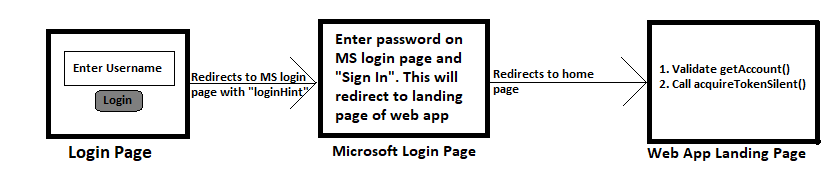
PS: It is difficult to share code sample.
dipesh-wadhwa
on 12 Jun 2019
@dipesh-wadhwa Sorry for the delay, we are having some access issues on our end for CDN release. Please expect a release either today or tomorrow.
 pkanher617
on 12 Jun 2019
pkanher617
on 12 Jun 2019
@DarylThayil i see the new msal version in npm. Are you going to put the fix in MSAL Provider too?
 PraveenVerma17
on 13 Jun 2019
PraveenVerma17
on 13 Jun 2019
@PraveenVerma17 what do you mean by msal provider? Do you mean angular?
DarylThayil
on 14 Jun 2019
I am using Microsoft graph toolkit which has msalprovider.
Sent from my iPhone
On Jun 14, 2019, at 10:35 PM, Daryl Thayil notifications@github.com wrote:
@PraveenVerma17 what do you mean by msal provider? Do you mean angular?
—
You are receiving this because you were mentioned.
Reply to this email directly, view it on GitHub, or mute the thread.
PraveenVerma17
on 14 Jun 2019
@dipesh-wadhwa The CDN should now be published.
https://secure.aadcdn.microsoftonline-p.com/lib/1.0.1/js/msal.min.js
https://secure.aadcdn.microsoftonline-p.com/lib/1.0.1/js/msal.js
pkanher617
on 14 Jun 2019
@DarylThayil I am trying to implement msal in my web app. When I am calling
acquireTokenSilent()method on landing page it throws "token renewal operation failed due to timeout" error. After research I found thatloadIframeTimeoutcan be used to increase timeout but it does not help.
Below is the visual of my implementation:
PS: It is difficult to share code sample.
@pkanher617 Thanks for updating CDN. Can you please help to resolve above issue?
Long story short accquireTokenSilentmethod throws "token renewal operation failed due to timeout" error even after upgrading to 1.0.1.
dipesh-wadhwa
on 17 Jun 2019
@pkanher617 @dipesh-wadhwa facing similar issue on IE 11. Any fix or solution for this issue?
 tushneem
on 22 Aug 2019
tushneem
on 22 Aug 2019
"Token renewal operation failed due to timeout" issue still exist.. You can do workaround.
Handle exception in catch block and if error is equal to timeout. Then re-call accquireTokenSilent().
This will hit application performance but never fail.
dipesh-wadhwa
on 24 Aug 2019
We have also the same problem, but an different error, just after calling accquireTokenSilent():
error!!! InteractionRequiredAuthError: AADSTS50058: A silent sign-in request was sent but none of the currently signed in user(s) match the requested login hint.
MariuszKogut
on 12 Sep 2019
@MariuszKogut Youe
We have also the same problem, but an different error, just after calling accquireTokenSilent():
error!!! InteractionRequiredAuthError: AADSTS50058: A silent sign-in request was sent but none of the currently signed in user(s) match the requested login hint.
Basically this means that the login hint you are sending does not match with the signed in user. For example the signed in user can be [email protected] and the login hint you are sending is [email protected]. You need to figure out a way to get the signed in user. Your issue is not related to the current login redirect loop issue.
tushneem
on 12 Sep 2019
@kest85 Can you please try the latest version (1.1.3) and let us know if you are still seeing this issue?
 jasonnutter
on 25 Sep 2019
jasonnutter
on 25 Sep 2019
@kest85 Closing this for lack of response. Please let us know if this still an issue and raise a new ticket for the same.
sameerag
on 3 Oct 2019
Related issues
 Anees-Raja
·
3Comments
Anees-Raja
·
3Comments
 jviney
·
3Comments
jviney
·
3Comments
 DarkLite1
·
3Comments
DarkLite1
·
3Comments
 Calamari
·
3Comments
Calamari
·
3Comments
 spottedmahn
·
3Comments
spottedmahn
·
3Comments
Most helpful comment
@pkanher617 Thanks for updating CDN. Can you please help to resolve above issue?
Long story short
accquireTokenSilentmethod throws "token renewal operation failed due to timeout" error even after upgrading to 1.0.1.