Microsoft-authentication-library-for-js: acquireTokenSilent fails with a timeout error when interaction is required
I'm submitting a...
[x] Regression (a behavior that used to work and stopped working in a new release)
[x] Bug report
[ ] Performance issue
[ ] Feature request
[ ] Documentation issue or request
[ ] Other... Please describe:
Browser:
[x] Chrome version 72
[x] Firefox version 56
[ ] IE version XX
[ ] Edge version XX
[ ] Safari version XX
Library version
Library version: 1.0.0
Current behavior
When interaction is required (e.g. there is no active login), acquireTokenSilent throws ClientAuthError: Token renewal operation failed due to timeout.
Expected behavior
acquireTokenSilent should throw InteractionRequiredAuthError instead.
Minimal reproduction of the problem with instructions
This happens because acquireTokenSilent fails to set response_mode=fragment on the authorize call. The documentation claims:
response_mode | optional | Specifies the method that should be used to send the resulting token back to your app. Defaults to query for an access token, but fragment if the request includes an id_token.
I guess that's why it used to work, but that claim doesn't hold true anymore. Try opening this sample link from the documentation in a private browser tab (to ensure there will be an error response): [link with response_type=id_token and prompt=none]
It redirects to http://localhost/myapp/?error=interaction_required&error_description=%0d%0aTrace+ID%3a+a1a12b2c-1c6f-4ae1-a405-543093995000%0d%0aCorrelation+ID%3a+9f4b899c-289e-4abf-9b6f-00a4296e6986%0d%0aTimestamp%3a+2019-05-09+03%3a23%3a02Z - passing error via query instead of fragment. MSAL only processes fragments, so it never communicates with the parent window thus causing acquireTokenSilent to time-out.
I also cannot work around this issue by passing extraQueryParameters: { 'response_mode': 'fragment' } because apparently extraQueryParameters are ignored by acquireTokenSilent which is probably a bug on its own.
 Torvin
All 17 comments
@Torvin That is not the reason why you have seen this failure. Please read the documentation on token renewals and lifetimes in our FAQs
The error is not regarding "interaction required", it is because you no longer have a session. And yes, it is on the "developer" library to fall back on acquireTokenPopup() in this case or renew it silently in the background.
Hope this clarifies it.
 sameerag
on 9 May 2019
sameerag
on 9 May 2019
Also "extraQueryParameters" are not ignored by MSAL, they are passed as is to the service and the service usually decides to honor, ignore or throw an error depending on the parameters sent.
sameerag
on 9 May 2019
@sameerag thank you for a quick reply. Unfortunately, I have to disagree:
- I understand that it's my job to fallback to
acquireTokenPopup. However, MSAL's job is to deliver the server's error message to me, so I can decide what to do next. I repeat: right now the error I get isToken renewal operation failed due to timeoutbecause the invisible iframe created by MSAL never communicates to the parent window. I can see the correct redirect in my browser's Network tab (tohttps://.../my-callback?error=interaction_required), but MSAL never returns that error fromacquireTokenSilentto me. It fails with a timeout instead. Does that explanation make sense? extraQueryParametersare ignored byacquireTokenSilent. I can see the outgoing request to theauthorizeendpoint in my browser's Network tab and it doesn't contain theresponse_modeparamenter that I added. It's an MSAL issue, not the service's issue.
Please let me know if you need any further information from me.
Torvin
on 9 May 2019
@Torvin
1) "_but MSAL never returns that error from acquireTokenSilent to me_." - This is an issue. Can you please send the detailed steps to repro adding your 'configuration' and 'request' sample code for us to debug at our end?
2) Same thing regarding extraQueryParameters, please send me what and how you are sending them to the msal js object, we can debug and see if msal js is manipulating that data somehow.
sameerag
on 9 May 2019
@sameerag thanks. I created a sample app to demostrate. Source code is here: https://codesandbox.io/s/q3wn0p4rlw
To be able to see the bugs, open this link _in a private browser tab_: https://q3wn0p4rlw.codesandbox.io/
Open 'Console' tab in your Dev Tools, click the 'Test' button and observe:
sandbox.517cc37e.js:1 ClientAuthError: Token renewal operation failed due to timeout.
    at ClientAuthError.AuthError [as constructor] (https://q3wn0p4rlw.codesandbox.io/node_modules/msal/lib-commonjs/error/AuthError.js:18:28)
    at new ClientAuthError (https://q3wn0p4rlw.codesandbox.io/node_modules/msal/lib-commonjs/error/ClientAuthError.js:93:28)
    at Function.ClientAuthError.createTokenRenewalTimeoutError (https://q3wn0p4rlw.codesandbox.io/node_modules/msal/lib-commonjs/error/ClientAuthError.js:119:16)
    at eval (https://q3wn0p4rlw.codesandbox.io/node_modules/msal/lib-commonjs/UserAgentApplication.js:819:111)
Now switch to 'Network' tab. Here's the real error sent via query params instead of fragment:
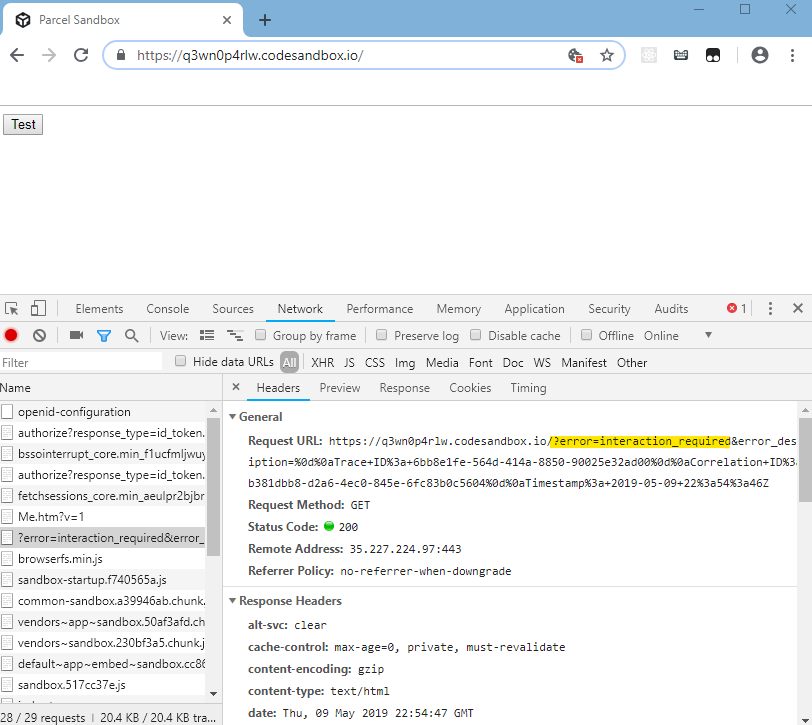
Now, to see the bug # 2, click on the authorize request. Additional parameters that I supplied are missing:

As you can see in the source code, I supplied these:
extraQueryParameters: {
  response_mode: "fragment",
  my_custom_param: "with a value"
}
https://github.com/microsoftgraph/microsoft-graph-toolkit/issues/113
i am facing the same issue. after opening the new incognito window then it works fine.
 PraveenVerma17
on 17 Jul 2019
PraveenVerma17
on 17 Jul 2019
@sameerag is anybody working on this?
Torvin
on 18 Jul 2019
Ah! Apologies, I can take a look this week. Some of the issues were on the back burner as we are sorting them.
sameerag
on 18 Jul 2019
I have tested in below browsers
Accounts | Chrome | Edge | IE11
Corp Id | Works | Works | Works
Gmail Id | Works | Fail | Works
Yahoo Id | Works | Works | Works
For gmail id in edge we are keep getting undefined token. Sometimes we get undefined in other browsers also but works fine after using private or incognito mode. Hoping this would help you.
PraveenVerma17
on 18 Jul 2019
Any workaround for this while it is being investigated?
 rafaeltscs
on 20 Aug 2019
rafaeltscs
on 20 Aug 2019
@sameerag can you provide update here?
 DarylThayil
on 28 Aug 2019
DarylThayil
on 28 Aug 2019
@Torvin @rafaeltscs can you try upgrading to latest msal and see if this is still an issue?
DarylThayil
on 28 Aug 2019
I believe this is an issue for me on v1.1.3. Browser-wise it's the same behaviour on Chrome and Firefox.
Relatedly I tested with a couple of different timeout lifetime lengths on a B2C instance:
| token lifetime (mins) | time till first renewal failure (minutes) |
|----------------------|----------------------------|
| 30 | 10-17 |
| 60 | 55 +/- 1 |
I noticed this because we have a regular xhr request happening every 30 seconds.
From the above admittedly small dataset I have to conclude that higher lifetimes may lead to more predictable (smaller range) time-to-first-renewal attempt, which isn't ideal and doesn't seem to be documented. Is there/should there be some consistency in how long it takes to request the first token renewal?
 RossBarnie
on 13 Sep 2019
RossBarnie
on 13 Sep 2019
Regarding the main issue raised in this ticket: The "error" from STS not reaching MSAL JS in a fragment and hence the timeout: @Torvin I checked the link you provided in the description here and I see the error as a fragment now instead of query Parameter
@RossBarnie The timeout is usually set ~5min before the token lifetime for an hour as you mentioned. We have to check the consistency for various timeout ranges to document it, but in the code we do the same check: either the user i/p for 'tokenRenewalOffsetSeconds' in the Configuration or the 300s (5 min) i/p we default to.
@PraveenVerma17 I am unable to reproduce the issue you mentioned. Clicking the link you mentioned, it throws an appropriate error for user interaction and we expect the developers to handle that by calling an interactive API (loginPopup() or acquireTokenPopup() etc).
Any steps for repro or a trace of the issue you are seeing?
sameerag
on 13 Sep 2019
@sameerag
I have noticed that we receive timeout error on working browsers also after using the app sometime and until and unless we remove history and clear data browser we don't get the token back.
its because our client does not have habit to logout the application they just close the browser.
Every browser behaves differently.
1: -Firefox, edge, IE, chrome, safari - they all need cookies to be enabled to work properly.
- Safari/Safari-mobile - Prevent Cross site analytics should be unchecked.
we need to identify a cookies less solution.
PraveenVerma17
on 16 Sep 2019
Apologies, there was an error unrelated to MSAL causing my issue. Running the following and observing the console log verified that I couldn't recreate the bug outside of my main project.
const loggerCallback = (logLevel, message) => {
  console.log(`[MSAL] ${LogLevel[logLevel]}: ${message}`);
};

const logger = new Logger(
  loggerCallback,
  { level: LogLevel.verbose },
);

const app = new UserAgentApplication({
  auth: {
    clientId: CLIENT_ID,
    authority: AUTHORITY,
    validateAuthority: false,
    postLogoutRedirectUri: window.origin,
  },
  cache: {
    cacheLocation: 'sessionStorage',
    storeAuthStateInCookie: false,
  },
  system: {
    logger,
    tokenRenewalOffsetSeconds: 59 * 60,
  },
});

app.handleRedirectCallback(response => { console.log(response) });
const idTokenScope = { scopes: [CLIENT_ID] }

const handleError = (error) => {
  if (error.errorCode === 'consent_required'
    || error.errorCode === 'interaction_required'
    || error.errorCode === 'login_required') {
    app.loginRedirect(idTokenScope);
    return;
  }
  throw error;
};

const getToken = () => {
  const date = new Date();
  const user = app.getAccount();
  if (!user) {
    app.loginRedirect(idTokenScope);
    return;
  }
  app.acquireTokenSilent(idTokenScope).then(response => {
    console.log(`${date.toLocaleTimeString()}`, response);
  }).catch(handleError);
}

const poller = setInterval(getToken, 60 * 1000);

getToken();
Closing this with #1015. Please open a new issue if it does not cover your use case.
sameerag
on 25 Sep 2019
Related issues
 baltuonis
·
4Comments
baltuonis
·
4Comments
 spottedmahn
·
4Comments
spottedmahn
·
4Comments
 lecaillon
·
3Comments
lecaillon
·
3Comments
 jviney
·
3Comments
jviney
·
3Comments
 Calamari
·
3Comments
Calamari
·
3Comments