Microsoft-authentication-library-for-js: MSAL for Angular not working in IE 11
I'm submitting a...
[ ] Regression (a behavior that used to work and stopped working in a new release)
[x] Bug report
[ ] Performance issue
[ ] Feature request
[ ] Documentation issue or request
[ ] Other... Please describe:
Browser:
- [ ] Chrome version XX
- [ ] Firefox version XX
- [ x] IE version 11
- [ ] Edge version XX
- [ ] Safari version XX
Library version
Library version: 0.1.1


## Current behavior

I followed your MSAL for Angular tutorial and it works perfectly in Chrome. When I navigate to https://localhost:4200/ in IE 11 the application simply will not load. I'm getting a 'SCRIPT1002: Syntax Error'.

From looking at the IE 11 Debugger, I can see that it doesn't like the BroadcastService class. See screenshots attached.


 BenBullock1992
All 133 comments
@BenBullock1992 IE support was only added for MSAL.js and not for angular wrappers. It's a known issue and we are working on the fix. We will release it soon.
 nehaagrawal
on 30 Aug 2018
nehaagrawal
on 30 Aug 2018
@nehaagrawal - Thank you for letting me know. Do you have an ETA and/or possible workaround?
BenBullock1992
on 31 Aug 2018
Thanks @nehaagrawal! If I can help in any way, please let me know 😀👍
BenBullock1992
on 1 Sep 2018
@nehaagrawal, did you make any progress on this?
BenBullock1992
on 3 Sep 2018
@nehaagrawal - any update on this please?
BenBullock1992
on 11 Sep 2018
Just wondering if there is any update on this issue as well?
 rjmiezin
on 20 Sep 2018
rjmiezin
on 20 Sep 2018
@nehaagrawal any progress on this issue?
 Weschk
on 10 Oct 2018
Weschk
on 10 Oct 2018
@BenBullock1992 @Weschk I was on leave and just checking back this issue. I apologize for the delay. I will get back to you on this soon.
nehaagrawal
on 16 Oct 2018
@nehaagrawal Any update on this?
 bwronin
on 25 Oct 2018
bwronin
on 25 Oct 2018
@nehaagrawal Any updates or ETA for this issue ?
 sbanerjee302
on 29 Oct 2018
sbanerjee302
on 29 Oct 2018
please, and thank you for your time.
 taivu
on 1 Nov 2018
taivu
on 1 Nov 2018
I'm having the same issue. ETA would be great.
Unfortunately, I didn't realize this issue existed and created a stackoverflow question here:
Could this be a build error with webpack and es5?
 217Wilder-User1
on 7 Nov 2018
217Wilder-User1
on 7 Nov 2018
Hi @nehaagrawal. Is there an ETA of when a fix will be provided? If it is not soon then we will have to search for another alternative. Please let us know.
 ddbardsley
on 8 Nov 2018
ddbardsley
on 8 Nov 2018
I think I found the issue. The fix is currently working for me. There maybe a better fix, but it works NOW!
Problem:
The dist folder(@azuremsal-angulardist) in NPM package @azure/msal-angular is compiled incorrectly for IE11.
Fix:
Recompile the ts files (https://github.com/AzureAD/microsoft-authentication-library-for-js/tree/dev/lib/msal-angular) and add to your projects node_modules\@azure\msal-angular\dist
Steps
- clone and npm install https://github.com/AzureAD/microsoft-authentication-library-for-js/tree/dev/lib/msal-angular
- npm run
build:modulesand change to tsc && tsc -m es2015 --outDir lib-es6 - copy the newly created files from
lib-es6 - paste
lib-es6files to your angular projectsnode_modules\@azure\msal-angular\dist
npm start your angular project. Thumbs up if it works for you.
 DeanB2015
on 9 Nov 2018
DeanB2015
on 9 Nov 2018
Hi @DeanB2015...Thank you for the instructions that you provided...it did work for IE 11 but it does not work for Microsoft Edge (see attached image that I captured).

Also, do you know when a new release will be available to us so that we do not have to copy the contents of the lib-es6 to the node-modules\@azuremsal-angulardist folder?
ddbardsley
on 12 Nov 2018
@ddbardsley What version of Edge are you using?
Mine = Microsoft Edge 41.16299.726.0 Microsoft EdgeHTML 16.16299
What version of Angular are you using? Mine = "@angular/http": "~7.0.0",
What version endpoint are you using V1 or V2? https://docs.microsoft.com/en-us/azure/active-directory/develop/azure-ad-endpoint-comparison
What type of account are you using? Work, School, Guest, personal? I'm using Work.
DeanB2015
on 12 Nov 2018
@DeanB2015 Here is the information that you requested:
Microsoft Edge 42.17134.1.0 Microsoft EdgeHTML 17.17134
"@angular/http": "7.0.0"
V1
Work
ddbardsley
on 13 Nov 2018
@DeanB2015 Do you know when a new release will be available to us so that we do not have to copy the contents of the lib-es6 to the node-modules@azuremsal-angulardist folder?
ddbardsley
on 13 Nov 2018
@ddbardsley I too am getting an error using Microsoft Edge 42.17134.1.0 Microsoft EdgeHTML 17.17134 and es2015 dist files.

I created a basic Angular 7 project to test @azure/msal-angular. https://github.com/217Wilder/msal_onenote_api_azure_lab. Unfortunately, this is not an Angular issue. The problem is with the way the msal framework has been written. not great when I see found 10 vulnerabilities (1 low, 5 moderate, 2 high, 2 critical) on NPM install.
DeanB2015
on 14 Nov 2018
@ddbardsley I don't know when a release will be available.
@navyasric & @nehaagrawal Thoughts on possible updates to the MSAL framework? Any help is greatly appreciated.
DeanB2015
on 14 Nov 2018
Any news on this?
Why is this issue being marked as an enhancement?
If, as explained by @DeanB2015, the module is not compiled correctly, it means that this is a bug not an enhancement.
Any idea of how to use the workaround on an automated pipeline?
 leonixyz
on 22 Nov 2018
leonixyz
on 22 Nov 2018
We need to have this fixed as well, the workaround is not really suited for our build pipeline
 tstaals
on 23 Nov 2018
tstaals
on 23 Nov 2018
@navyasric & @nehaagrawal please provide all of us with an update as to when an updated release will be provided to fix the inability to use the IE browser with your currently released version.
ddbardsley
on 29 Nov 2018
@navyasric & @nehaagrawal We are also running into the same issue. An update on this issue would be highly appreciated.
 mohsinma
on 30 Nov 2018
mohsinma
on 30 Nov 2018
@navyasric @nehaagrawal
you may have labeled the issue incorrectly.
We are also waiting for this fix, any update would be very appreciated.
Thanks for your support!
 patriziofilloramo
on 1 Dec 2018
patriziofilloramo
on 1 Dec 2018
Same problem here, are there any news on this?
 lkarolak
on 4 Dec 2018
lkarolak
on 4 Dec 2018
Here same problem too... any ETA for this issue? It would be nice to get a fix before the end of the year at least
 AStan
on 5 Dec 2018
AStan
on 5 Dec 2018
Please tell us at least when we can expect a release that will fix this issue.
We need it or have to opt for an other solution like Auth0.
 KevinWils
on 5 Dec 2018
KevinWils
on 5 Dec 2018
@navyasric @nehaagrawal
Any updates would be greatly appreciated.
bwronin
on 10 Dec 2018
Any updates on this issue? It really is a blocker.
Thank you!
 maxxt
on 12 Dec 2018
maxxt
on 12 Dec 2018
Sorry for the delay in response. We have been working on improvements in the Msal core library. The fix for this issue in the Angular wrapper is planned for Q1 of next year(2019).
Meanwhile, please try the workarounds described here.
 navyasric
on 18 Dec 2018
navyasric
on 18 Dec 2018
Hi @navyasric, none of the workarounds worked for us. Is there a reason why your team cannot rebuild the MSAL CORE library with the appropriate build process outlined by @DeanB2015 on Nov 9th? Please see above message from @DeanB2015 if your team is unfamiliar with this build issue because he determined that the "NPM package @azure/msal-angular is compiled incorrectly for IE11". We downloaded the code base and executed his steps which solved the IE11 issue. We need your team to create a release build package ASAP with this updated process so that it will work on IE11. We cannot wait til Q1 of 2019 because we have clients that need this updated release.
ddbardsley
on 18 Dec 2018
Yes, we are in the same boat as @ddbardsley and I agree with him. There is a lot of pressure from the clients about deliverables. Please fix this at the earliest. Otherwise, Microsoft should officially stop IE11 support.
mohsinma
on 19 Dec 2018
i was able to move forward by creating a new module in my project, and copy over the source from the angular wrapper code 1:1. I had to add msal as a project dependency. Doing this i was able to build and run with IE10/11. I know this isnt ideal for most organizations due to security policies, but for now, building the angular wrapper as part of my project instead of importing as a library works until this is updated.
this is indeed related to @DeanB2015 's comment (https://github.com/AzureAD/microsoft-authentication-library-for-js/issues/414#issuecomment-438498783), as my project is set to compile down to es5 for IE10/11
taivu
on 19 Dec 2018
@ddbardsley I'm sorry I misunderstood this to be a different issue with redirects in IE. Thank you for pointing out and clarifying that this is a build issue with the library.We will classify this as a bug and prioritize with the team.
Is this issue happening only for specific versions of Angular?
navyasric
on 20 Dec 2018
@navyasric Thank you for expediting this BUG. I am using angular 7.0.0. Would you please let all of us know when an updated release will be available. I have a client that requires this fix ASAP because we are going into PRODUCTION PILOT the second week in January 2019.
ddbardsley
on 21 Dec 2018
I'm getting this in my vendor.js making MSAL only break in IE11 and below.
__webpack_require__.r(__webpack_exports__);
/* harmony export (binding) */ __webpack_require__.d(__webpack_exports__, "AuthenticationResult", function() { return AuthenticationResult; });
class AuthenticationResult {
    constructor(token, tokenType) {
This is happening to me with Angular 6. It is not being transpiled correctly.
 acarrau
on 28 Dec 2018
acarrau
on 28 Dec 2018
@navyasric, we have not heard anything back from you for over 2 weeks. When will your team will fix the BUILD issue and re-distribute the package so that all of us can use this package within IE 11 browser? Please provide all of us with an answer.
ddbardsley
on 3 Jan 2019
@acarrau if you're getting that error, follow my instructions above and do the following:
npm run buildon https://github.com/AzureAD/microsoft-authentication-library-for-js/tree/dev/lib/msal-angular. it will create adistfolder with the following: msal-angular.js, msal-angular.js.map, msal-angular.min.js, msal-angular.min.js.map.- Copy the files to your applications
node_modules\@azure\msal-angular\dist. - npm start to test your application. The error should go away.
DeanB2015
on 8 Jan 2019
@DeanB2015 Thanks for the solution. This workaround worked for me but we cannot use this solution for production. We need to have something concrete coming from the msal-angular library itself.
 Tush2890
on 9 Jan 2019
Tush2890
on 9 Jan 2019
@Tush2890 you could always do this:
- Add the "msal" package to your package.json file.
- Add the angular wrapper files to your project in its own folder. (Angular Classes for MSAL)
- Fix the errors that are due to newer versions of rxjs and Angular.
You can then use it like normal and when a fix comes up, just remove the folder you created in step 2 and point to the fixed package.
bwronin
on 14 Jan 2019
@bwronin
We tried the steps mentioned by you. By following the steps syntax error is not there. But acquireSilentLogin() is not getting success.
This workaround is giving problem for us. Can we get stable angular library fix?
 vramasam
on 16 Jan 2019
vramasam
on 16 Jan 2019
@vramasam
I'm not a part of the development team for this project, or a contributor. I needed to use this library and ran into this IE11 issue months ago and have been waiting for a fix. Unfortunately, my project timeline has come to a point where I needed a solution and a fix hadn't been released yet. My steps above solved my issue, but my configuration and yours may be different so you may need to do a bit more research into what's happening with your setup.
bwronin
on 16 Jan 2019
The part that's super frustrating about the syntax error in IE11 is that it's all because their package.json "build:modules" command targets es6 rather than es2015. If they changed less than a single line of code it would solve the problem, and save us the trouble of having to copy the code into our projects.
FYI, I strongly recommend path mapping so you can keep the standard "import { MsalService } from "@azure/msal-angular";" in your files while waiting for a fix.
 Josh015
on 17 Jan 2019
Josh015
on 17 Jan 2019
@Microsoft team
We Observe the same issue in Safari 9 and also in Opera mini browsers.
vramasam
on 18 Jan 2019
@vramasam I have tried the dev branch and it seems to work in IE. Please try the following:
- Clone or download the dev branch, run npm install and build
- Run npm pack, and extract the files somewhere on your machine
- Replace the files in node_modules/@azure/msal-angular with the contents of the tar file from "npm pack"
- Copy the files from lib-es6 to the dist folder
- Try running your application in IE
Please test this and let me know if it is working for you. If this is verified to work I can go ahead and prepare a release.
 pkanher617
on 25 Jan 2019
pkanher617
on 25 Jan 2019
@pkanher617 We tested with IE by following the above steps. Syntax error is not coming. Can you please make this fix and release it.
vramasam
on 28 Jan 2019
@pkanher617 Above solution is giving compilation error when we give production build. (ng serve --prod).
Error Details:
ERROR in Error during template compile of 'AppModule'
Function calls are not supported in decorators but 'MsalModule' was called.
vramasam
on 31 Jan 2019
@vramasam Thank you for trying it out and providing the feedback. The msal-angular files cannot be referenced from the dev branch in a production environment. We are not ready to patch release this as there are issues and dependencies that need to be investigated and handled before making a release.
navyasric
on 1 Feb 2019
Apologies for the delay in response to this thread. Based on discussion in the team, we recognize that the issues and feedback for preview version of Angular wrapper require further investigation and work. We are currently focused on addressing changes and improvements to the core MSAL.js library based on feedback.
Following this, we will target a release to address the Angular wrapper issues and requests. Please watch this Roadmap for updates.
navyasric
on 1 Feb 2019
I am having the same issue. Any ETA would be greatly appreciated.
 PrasannaKolla
on 19 Feb 2019
PrasannaKolla
on 19 Feb 2019
i have some extra feedback on this, might help people blocked (or something), but i have found, when you sign in and the singin window does some redirects it does not pass the token back, could be a really short timeout window or just that the internal redirect drops the parent reference), however if you have the one-click-signin option (saved auth) it works. so i found that sign in is possible with the popup but you have to do it twice.
 Dedme
on 4 Mar 2019
Dedme
on 4 Mar 2019
hi @nehaagrawal any updates about angular wrappers ?
 Ward-Jaabary
on 8 Mar 2019
Ward-Jaabary
on 8 Mar 2019
@navyasric @miwri
Hi Navya, our team is also waiting to get these issues fixed more than 2 months now. Many our customers, who have a huge user base use only IE as their default browser. It would also help if you can provide tentative dates by which we can expect these fixes.
 subasreeg
on 26 Apr 2019
subasreeg
on 26 Apr 2019
@subasreeg Please see @bwronin comment above. It worked for me on ie11. Not great, but it appears to be working. Basic idea: Copy the msal .ts file from azure/msal to your project. Remove azure/msal from package.json. Add the latest msal library (not azure/msal) to you package.json. Add a comment if this works.
217Wilder-User1
on 27 Apr 2019
I've tried the steps outlined by @DeanB2015 (both posts) and I cannot get this to work in IE11. Chrome works great. Am I doing something wrong? When will an official fix be made available?

Thank you.
 vbucchar
on 28 May 2019
vbucchar
on 28 May 2019
@vbucchar I also tried a lot of the above and did not get it to work without breaking something else.
As @navyasric pointed out, we should not expect something in the next 2-3 month, as the roadmap shows Angular MSAL is beeing focused arround July-Sep 2019.
Luckily my organisation is shifting to chrome as default browser in the next weeks or month so i could stop wasting time, trying to fix this in a clean way.
 tkoenig89
on 29 May 2019
tkoenig89
on 29 May 2019
@vbucchar @nehaagrawal @tkoenig89 @DeanB2015
I couldn't make it work either. it breaks graph client API as @vbucchar mentioned. Would be nice if the fix is available sooner as a patch.
 arunprasathv
on 17 Jun 2019
arunprasathv
on 17 Jun 2019
what is the status of this bug - it's breaking all users of IE11 using Azure AD authentication.
 sgentile
on 18 Jun 2019
sgentile
on 18 Jun 2019
what is the status of this. We are waiting for this fix since 5 months, Still there is no update.
Are there any plans to address this issue? If so, Please provide a date so that we will communicate to our customers.
 GNMurthy1982
on 18 Jun 2019
GNMurthy1982
on 18 Jun 2019
The Microsoft team is/was focusing on the 1.0 release of msal-core. Based on the often communicated roadmap the Angular wrapper will get an upgrade in Q3 2019: https://github.com/AzureAD/microsoft-authentication-library-for-js/wiki. I wouldn't expect this issue to be resolved before then.
@pkanher617's instructions worked for me and are straight forward.
 mattwiz
on 18 Jun 2019
mattwiz
on 18 Jun 2019
@mattwiz after following the steps below as mentioned by @DeanB2015 it worked but the login popup goes in a loop and I see security errors in the IE Console.
Are you following the same steps and use login popup ?
Can we make it working in IE11 or its not possible to do it? Can someone update please ? @DarylThayil
Steps
clone and npm install https://github.com/AzureAD/microsoft-authentication-library-for-js/tree/dev/lib/msal-angular
npm run build:modules and change to tsc && tsc -m es2015 --outDir lib-es6
copy the newly created files from lib-es6
paste lib-es6 files to your angular projects node_modules\@azuremsal-angulardist
npm start your angular project. Thumbs up if it works for you.
arunprasathv
on 18 Jun 2019
That is correct. I used these steps. The only additional step I did was to publish the modified msal-angular to my own NPM repository and list it as a dependency in my application. I don't use the pop up however.
@mattwiz after following the steps below as mentioned by @DeanB2015 it worked but the login popup goes in a loop and I see security errors in the IE Console.
Are you following the same steps and use login popup ?
Steps
clone and npm install https://github.com/AzureAD/microsoft-authentication-library-for-js/tree/dev/lib/msal-angular
npm run build:modules and change to tsc && tsc -m es2015 --outDir lib-es6
copy the newly created files from lib-es6
paste lib-es6 files to your angular projects node_modules@azuremsal-angulardist
npm start your angular project. Thumbs up if it works for you.
mattwiz
on 18 Jun 2019
@mattwiz are you using loginRedirect ?
arunprasathv
on 18 Jun 2019
@mattwiz are you using loginRedirect ?
yes
mattwiz
on 18 Jun 2019
@mattwiz are you able to get accesstoken using loginRedirect
arunprasathv
on 18 Jun 2019
@mattwiz @pkanher617 this is what the README says . "We would like to get to a monthly minor release schedule, with patches coming as often as needed."
That seems to imply we wouldn't be waiting for months to get something as important as making sure this works with IE11... considering this is where all the Angular Azure AD instructions say to use this library ???
Is there a workaround ? I've pulled all the typescript code in locally - how do we get this working with, ie. loginRedirect ?
sgentile
on 18 Jun 2019
@sgentile I followed the steps below, I could do loginRedirect and it works fine. but loginRedirect doesn't provide accessToken. If you don't need accessTojen your fine.
Steps
clone and npm install https://github.com/AzureAD/microsoft-authentication-library-for-js/tree/dev/lib/msal-angular
npm run build:modules and change to tsc && tsc -m es2015 --outDir lib-es6
copy the newly created files from lib-es6
paste lib-es6 files to your angular projects node_modules@azuremsal-angulardist
npm start your angular project. Thumbs up if it works for you.
arunprasathv
on 18 Jun 2019
@sgentile I followed the steps below, I could do loginRedirect and it works fine. but loginRedirect doesn't provide accessToken. If you don't need accessTojen your fine.
Steps
clone and npm install https://github.com/AzureAD/microsoft-authentication-library-for-js/tree/dev/lib/msal-angular
npm run build:modules and change to tsc && tsc -m es2015 --outDir lib-es6
copy the newly created files from lib-es6
paste lib-es6 files to your angular projects node_modules@azuremsal-angulardist
npm start your angular project. Thumbs up if it works for you.
I use loginRedirect and require an access token for the API. It works for me just fine. I use AAD B2C in case that makes a difference.
mattwiz
on 18 Jun 2019
I just get stuck in an infinite loop of login, redirect, login
On Tue, Jun 18, 2019 at 12:44 PM mattwiz notifications@github.com wrote:
@sgentile https://github.com/sgentile I followed the steps below, I
could do loginRedirect and it works fine. but loginRedirect doesn't provide
accessToken. If you don't need accessTojen your fine.Steps
clone and npm install
https://github.com/AzureAD/microsoft-authentication-library-for-js/tree/dev/lib/msal-angular
npm run build:modules and change to tsc && tsc -m es2015 --outDir lib-es6
copy the newly created files from lib-es6
paste lib-es6 files to your angular projects node_modules@azure
msal-angulardist
npm start your angular project. Thumbs up if it works for you.I use loginRedirect and require an access token for the API. It works for
me just fine. I use AAD B2C in case that makes a difference.—
You are receiving this because you were mentioned.
Reply to this email directly, view it on GitHub
https://github.com/AzureAD/microsoft-authentication-library-for-js/issues/414?email_source=notifications&email_token=AABAKNG3HFIVJ7BAWYZ36ZTP3EGFXA5CNFSM4FSNLT32YY3PNVWWK3TUL52HS4DFVREXG43VMVBW63LNMVXHJKTDN5WW2ZLOORPWSZGODX7HX2Y#issuecomment-503217131,
or mute the thread
https://github.com/notifications/unsubscribe-auth/AABAKNF35L7JJO56OI26R63P3EGFXANCNFSM4FSNLT3Q
.
sgentile
on 18 Jun 2019
I get this error:
{"_error":"Token renewal operation failed due to
timeout","_errorDesc":"Token Renewal Failed","_scopes":""}
Same code works fine in Chrome - only fails in IE
On Tue, Jun 18, 2019 at 12:44 PM mattwiz notifications@github.com wrote:
@sgentile https://github.com/sgentile I followed the steps below, I
could do loginRedirect and it works fine. but loginRedirect doesn't provide
accessToken. If you don't need accessTojen your fine.Steps
clone and npm install
https://github.com/AzureAD/microsoft-authentication-library-for-js/tree/dev/lib/msal-angular
npm run build:modules and change to tsc && tsc -m es2015 --outDir lib-es6
copy the newly created files from lib-es6
paste lib-es6 files to your angular projects node_modules@azure
msal-angulardist
npm start your angular project. Thumbs up if it works for you.I use loginRedirect and require an access token for the API. It works for
me just fine. I use AAD B2C in case that makes a difference.—
You are receiving this because you were mentioned.
Reply to this email directly, view it on GitHub
https://github.com/AzureAD/microsoft-authentication-library-for-js/issues/414?email_source=notifications&email_token=AABAKNG3HFIVJ7BAWYZ36ZTP3EGFXA5CNFSM4FSNLT32YY3PNVWWK3TUL52HS4DFVREXG43VMVBW63LNMVXHJKTDN5WW2ZLOORPWSZGODX7HX2Y#issuecomment-503217131,
or mute the thread
https://github.com/notifications/unsubscribe-auth/AABAKNF35L7JJO56OI26R63P3EGFXANCNFSM4FSNLT3Q
.
sgentile
on 18 Jun 2019
Here is the error I'm seeing:
Request URL:
http://localhost:49731/#error=login_required&error_description=
AADSTS50058%3a+
A+silent+sign-in+request+was+sent+but+none+of+the+currently+signed+in+user(s)+match+the+requested+login+hint
.%0d%0aTrace+ID%3a+cb2e8fd4-b530-47bb-8148-dafd068b2b00%0d%0aCorrelation+ID%3a+685837d7-30ce-4bf7-a856-277d0a310430%0d%0aTimestamp%3a+2019-06-18+17%3a11%3a43Z&state=bfe375e5-c99d-4d82-bdb8-aa48561921cf
On Tue, Jun 18, 2019 at 12:44 PM mattwiz notifications@github.com wrote:
@sgentile https://github.com/sgentile I followed the steps below, I
could do loginRedirect and it works fine. but loginRedirect doesn't provide
accessToken. If you don't need accessTojen your fine.Steps
clone and npm install
https://github.com/AzureAD/microsoft-authentication-library-for-js/tree/dev/lib/msal-angular
npm run build:modules and change to tsc && tsc -m es2015 --outDir lib-es6
copy the newly created files from lib-es6
paste lib-es6 files to your angular projects node_modules@azure
msal-angulardist
npm start your angular project. Thumbs up if it works for you.I use loginRedirect and require an access token for the API. It works for
me just fine. I use AAD B2C in case that makes a difference.—
You are receiving this because you were mentioned.
Reply to this email directly, view it on GitHub
https://github.com/AzureAD/microsoft-authentication-library-for-js/issues/414?email_source=notifications&email_token=AABAKNG3HFIVJ7BAWYZ36ZTP3EGFXA5CNFSM4FSNLT32YY3PNVWWK3TUL52HS4DFVREXG43VMVBW63LNMVXHJKTDN5WW2ZLOORPWSZGODX7HX2Y#issuecomment-503217131,
or mute the thread
https://github.com/notifications/unsubscribe-auth/AABAKNF35L7JJO56OI26R63P3EGFXANCNFSM4FSNLT3Q
.
sgentile
on 18 Jun 2019
Here is the error I'm seeing: Request URL: http://localhost:49731/#error=login_required&error_description= AADSTS50058%3a+ A+silent+sign-in+request+was+sent+but+none+of+the+currently+signed+in+user(s)+match+the+requested+login+hint .%0d%0aTrace+ID%3a+cb2e8fd4-b530-47bb-8148-dafd068b2b00%0d%0aCorrelation+ID%3a+685837d7-30ce-4bf7-a856-277d0a310430%0d%0aTimestamp%3a+2019-06-18+17%3a11%3a43Z&state=bfe375e5-c99d-4d82-bdb8-aa48561921cf
…
On Tue, Jun 18, 2019 at 12:44 PM mattwiz @.> wrote: @sgentile https://github.com/sgentile I followed the steps below, I could do loginRedirect and it works fine. but loginRedirect doesn't provide accessToken. If you don't need accessTojen your fine. Steps clone and npm install https://github.com/AzureAD/microsoft-authentication-library-for-js/tree/dev/lib/msal-angular npm run build:modules and change to tsc && tsc -m es2015 --outDir lib-es6 copy the newly created files from lib-es6 paste lib-es6 files to your angular projects *@.* msal-angulardist npm start your angular project. Thumbs up if it works for you. I use loginRedirect and require an access token for the API. It works for me just fine. I use AAD B2C in case that makes a difference. — You are receiving this because you were mentioned. Reply to this email directly, view it on GitHub <#414?email_source=notifications&email_token=AABAKNG3HFIVJ7BAWYZ36ZTP3EGFXA5CNFSM4FSNLT32YY3PNVWWK3TUL52HS4DFVREXG43VMVBW63LNMVXHJKTDN5WW2ZLOORPWSZGODX7HX2Y#issuecomment-503217131>, or mute the thread https://github.com/notifications/unsubscribe-auth/AABAKNF35L7JJO56OI26R63P3EGFXANCNFSM4FSNLT3Q .
The silent operation works only in Chrome. It also doesn't work in Safari. I refrain from using it.
mattwiz
on 18 Jun 2019
@mattwiz Are you not using the MsalInterceptor (update) then - as I believe the interceptor is making this call when making the API request
return Observable.fromPromise(this.auth.acquireTokenSilent(scopes).then(token => {
                const JWT = `Bearer ${token}`;
                return req.clone({
                    setHeaders: {
                        Authorization: JWT,
                    },
                });
            }
What is odd, this issue I'm seeing is only now when using localhost
sgentile
on 18 Jun 2019
@mattwiz Are you not using the MsalInterceptor (update) then - as I believe the interceptor is making this call when making the API request
return Observable.fromPromise(this.auth.acquireTokenSilent(scopes).then(token => {
                const JWT = `Bearer ${token}`;
                return req.clone({
                    setHeaders: {
                        Authorization: JWT,
                    },
                });
            }
You are correct. I had to implement my own API Interceptor with the MsalGuard code base
mattwiz
on 18 Jun 2019
Would you be willing to share your custom interceptor ? I'd like to see
how you handle this scenario.
On Tue, Jun 18, 2019 at 5:28 PM mattwiz notifications@github.com wrote:
@mattwiz https://github.com/mattwiz Are you not using the
MsalInterceptor (update) then - as I believe the interceptor is making this
call when making the API requestreturn Observable.fromPromise(this.auth.acquireTokenSilent(scopes).then(token => {
const JWT =Bearer ${token};
return req.clone({
setHeaders: {
Authorization: JWT,
},
});
}You are correct. I had to implement my own API Interceptor with the
MsalGuard code base—
You are receiving this because you were mentioned.
Reply to this email directly, view it on GitHub
https://github.com/AzureAD/microsoft-authentication-library-for-js/issues/414?email_source=notifications&email_token=AABAKNDVF2SL6B6BWUI7XZTP3FHPNA5CNFSM4FSNLT32YY3PNVWWK3TUL52HS4DFVREXG43VMVBW63LNMVXHJKTDN5WW2ZLOORPWSZGODYAATSY#issuecomment-503318987,
or mute the thread
https://github.com/notifications/unsubscribe-auth/AABAKNHYOS5XJQEXY4S663DP3FHPNANCNFSM4FSNLT3Q
.
sgentile
on 19 Jun 2019
I've followed the work-around listed and it still does not work for me. I get the blank white screen in IE 11 with an error on vendor.js, same error as I posted above. Am I building the DEV branch incorrectly? Is there a way to tell what I'm doing wrong?
vbucchar
on 20 Jun 2019
@vbucchar Can you try building from dev again? I merged a fix that should address this issue.
 jasonnutter
on 24 Jun 2019
jasonnutter
on 24 Jun 2019
Will there be any update on npm with this fix "anytime soon"?
 ingarhillestad
on 26 Jun 2019
ingarhillestad
on 26 Jun 2019
@ingarhillestad We'll work to get this published soon, apologies for the delay.
jasonnutter
on 26 Jun 2019
Will this address the IE issue with silent tokens ?
This is used where web is getting a token for separate Azure API
On Wed, Jun 26, 2019, 11:21 AM Jason Nutter notifications@github.com
wrote:
@ingarhillestad https://github.com/ingarhillestad We'll work to get
this published soon, apologies for the delay.—
You are receiving this because you were mentioned.
Reply to this email directly, view it on GitHub
https://github.com/AzureAD/microsoft-authentication-library-for-js/issues/414?email_source=notifications&email_token=AABAKND7EXTBP6TRZJULYBTP4OCQVA5CNFSM4FSNLT32YY3PNVWWK3TUL52HS4DFVREXG43VMVBW63LNMVXHJKTDN5WW2ZLOORPWSZGODYT4MKA#issuecomment-505923112,
or mute the thread
https://github.com/notifications/unsubscribe-auth/AABAKNABGEL4ON4TGW7IYBLP4OCQVANCNFSM4FSNLT3Q
.
sgentile
on 26 Jun 2019
Version 0.1.3 of @azure/msal-angular has been published to npm with a fix for incompatibility with IE11, so I am going to close this issue.
If you have other issues with IE11 that do not get fixed with this version, please file a new issue, thanks!
jasonnutter
on 27 Jun 2019
Hi @jasonnutter,
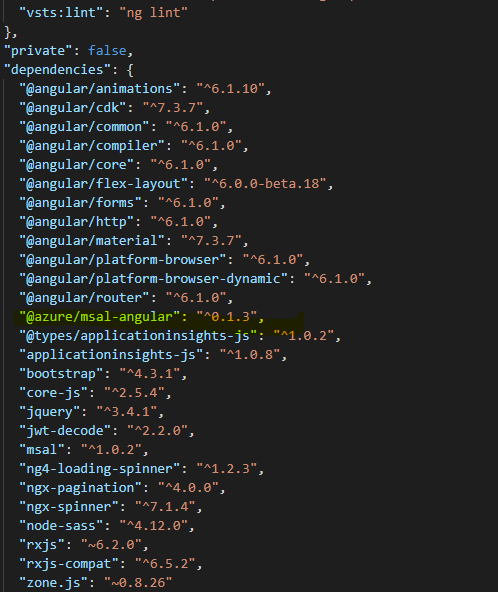
I just upgraded to 0.1.3 but still getting the same error.
Attaching snapshots of package.config and error.
Am i missing something?

 mahi9984
on 28 Jun 2019
mahi9984
on 28 Jun 2019
@mahi9984 Did you get it working with the AOT flag ?
sbanerjee302
on 28 Jun 2019
I didnt use it. Can you tell me how to use it?
mahi9984
on 28 Jun 2019
@mahi9984 try ng serve --aot
sbanerjee302
on 28 Jun 2019
@mahi9984 Do you have a src/polyfills.ts file? If so, can check if the line with import 'core-js/es6/array'; is incommented? If it is commented out, try uncommenting it.
jasonnutter
on 28 Jun 2019
And we're looking into the issue with aot, see #798
jasonnutter
on 28 Jun 2019
@jasonnutter - are we going to reopen this issue (#414) since, the changes were rolled back as per issue #798?
 amigup
on 1 Jul 2019
amigup
on 1 Jul 2019
Yeah, I'll reopen this, and will update when we have a fix.
jasonnutter
on 1 Jul 2019
@jasonnutter Do you have a tentative date for the fix?
arunprasathv
on 1 Jul 2019
@arunprasathv Unfortunately, not at this time, but it is very high priority for us. Will update when we know more.
jasonnutter
on 2 Jul 2019
@vbucchar Can you try building from
devagain? I merged a fix that should address this issue.
@jasonnutter Sorry for the late reply, I was on vacation. I tried the latest DEV commit and no change, I still get the blank white screen and the error on vendor.js
vbucchar
on 12 Jul 2019
updating on it? it seem the IE11 still does not work
 acewang
on 17 Jul 2019
acewang
on 17 Jul 2019
@sgentile sorry for the delay. Here's my code:
`@Injectable()
export class ApiInterceptor implements HttpInterceptor {
constructor(
private authService: MsalService
) {
}
intercept(request: HttpRequest
const scopes = this.authService.getScopesForEndpoint(request.url);
if (scopes === null) {
  return next.handle(request);
}

const headers = {
  'Ocp-Apim-Subscription-Key': environment.apiKey
};

if (this.authService.getUser()) {
  const tokenStored = this.authService.getCachedTokenInternal(scopes);

  if (tokenStored && tokenStored.token) {
    headers['Authorization'] = `Bearer ${tokenStored.token}`;
  } else {
    this.authService.acquireTokenRedirect(scopes);
    return Observable.of();
  }
}

request = request.clone({
  setHeaders: headers
});

return next.handle(request)
  .catch((error: any) => {
    this.handlerError(request, error);
    return Observable.of(error);
  });
}
handlerError(req: HttpRequest
if (err instanceof HttpErrorResponse && err.status === 401) {
const scopes = this.authService.getScopesForEndpoint(req.url);
const tokenStored = this.authService.getCachedTokenInternal(scopes);
if (tokenStored && tokenStored.token) {
this.authService.clearCacheForScope(tokenStored.token);
}
}
}
}`
mattwiz
on 17 Jul 2019
This is still in our perview for July release. Working through solutions!
 DarylThayil
on 17 Jul 2019
DarylThayil
on 17 Jul 2019
While you are fixing this, I just implemented msal-angular for my app and stuck in the same issue, my unit testing runs in Jest and my test is failing with the following error message:
Jest encountered an unexpected token
This usually means that you are trying to import a file which Jest cannot parse, e.g. it's not plain JavaScript.
By default, if Jest sees a Babel config, it will use that to transform your files, ignoring "node_modules".

Here's what you can do:
 • To have some of your "node_modules" files transformed, you can specify a custom "transformIgnorePatterns" in your config.
 • If you need a custom transformation specify a "transform" option in your config.
 • If you simply want to mock your non-JS modules (e.g. binary assets) you can stub them out with the "moduleNameMapper" config option.

You'll find more details and examples of these config options in the docs:
https://jestjs.io/docs/en/configuration.html

Details:

C:\myProject\node_modules\@azure\msal-angular\dist\broadcast.service.js:1
({"Object.<anonymous>":function(module,exports,require,__dirname,__filename,global,jest){import { Injectable } from '@angular/core';
                                                                                                ^

SyntaxError: Unexpected token {
My jest information:
"@nrwl/jest": "8.1.0",
"jest": "24.1.0",
"jest-preset-angular": "^7.1.1",
"jest-zone-patch": "0.0.10",
"ts-jest": "24.0.0",
Should I open a new issue? or is this part of the same compilation issue?
 chr1soscl
on 19 Jul 2019
chr1soscl
on 19 Jul 2019
@chr1soscl You can file a new issue for that, thanks!
jasonnutter
on 23 Jul 2019
Is there a work around before we got the workable version?
 JerryWang20
on 30 Jul 2019
JerryWang20
on 30 Jul 2019
We have published a new version of msal-angular with compatibility for IE11:
npm install @azure/[email protected]
Please test this version and let us know if there are any issues. We will promote to a stable release once we're confident this version doesn't introduce any regressions. Thanks!
jasonnutter
on 6 Aug 2019
To be safe, I manually deleted my \node_modules\@azuremsal-angular, then ran npm install @azure/[email protected] and restarted my app. I still receive the same error in IE 11.
SCRIPT1002: Syntax error
File: vendor.js, Line: 147093, Column: 1
vbucchar
on 6 Aug 2019
We have published a new version of msal-angular with compatibility for IE11:
npm install @azure/[email protected]Please test this version and let us know if there are any issues. We will promote to a stable release once we're confident this version doesn't introduce any regressions. Thanks!
I took the changes, my application is opening in IE11 version 11.1268.16299.0
but in the console there is an error in a loop:
Invalid Host/Origin header
[WDS] Disconnected!
SCRIPT5022: SecurityError
zone.js (199,1)
chr1soscl
on 6 Aug 2019
@vbucchar Can you please provide more information about that error? e.g. the code where the syntax error is occurring? Thanks!
@chr1soscl I also saw that SecurityError, and adding the registry entries described in this issue removed the errors.
jasonnutter
on 6 Aug 2019
@vbucchar Can you please provide more information about that error? e.g. the code where the syntax error is occurring? Thanks!
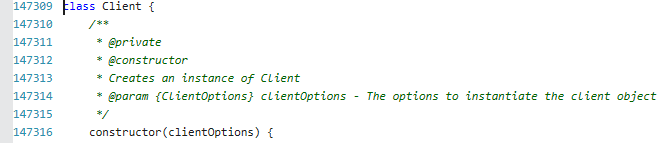
The app isn't even getting to my code from what I can tell. I get the vendor.js error and execution stops with the blank white screen. When I click on the error in IE this is the code.
class Client {
/*
* @private
* @constructor
* Creates an instance of Client
* @param {ClientOptions} clientOptions - The options to instantiate the client object
*/
constructor(clientOptions) {
/*
* @private
* A member which stores the Client instance options
*/
this.config = {
baseUrl: _Constants__WEBPACK_IMPORTED_MODULE_0__["GRAPH_BASE_URL"],
debugLogging: false,
defaultVersion: _Constants__WEBPACK_IMPORTED_MODULE_0__["GRAPH_API_VERSION"],
};
try {
Object(_ValidatePolyFilling__WEBPACK_IMPORTED_MODULE_5__["validatePolyFilling"])();
}
catch (error) {
throw error;
}
for (const key in clientOptions) {
if (clientOptions.hasOwnProperty(key)) {
this.config[key] = clientOptions[key];
}
}
let httpClient;
if (clientOptions.authProvider !== undefined && clientOptions.middleware !== undefined) {
const error = new Error();
error.name = "AmbiguityInInitialization";
error.message = "Unable to Create Client, Please provide either authentication provider for default middleware chain or custom middleware chain not both";
throw error;
}
else if (clientOptions.authProvider !== undefined) {
httpClient = _HTTPClientFactory__WEBPACK_IMPORTED_MODULE_4__["HTTPClientFactory"].createWithAuthenticationProvider(clientOptions.authProvider);
}
else if (clientOptions.middleware !== undefined) {
httpClient = new _HTTPClient__WEBPACK_IMPORTED_MODULE_3__"HTTPClient";
}
else {
const error = new Error();
error.name = "InvalidMiddlewareChain";
error.message = "Unable to Create Client, Please provide either authentication provider for default middleware chain or custom middleware chain";
throw error;
}
this.httpClient = httpClient;
}
vbucchar
on 6 Aug 2019
@vbucchar That looks like code from msgraph-sdk-javascript, are you using that? If so, take a look at this Github issue: https://github.com/microsoftgraph/msgraph-sdk-javascript/issues/190
jasonnutter
on 6 Aug 2019
Also, I forgot to mention that you should set the following config option to properly support IE11:
const isIE = window.navigator.userAgent.indexOf("MSIE ") > -1 || window.navigator.userAgent.indexOf("Trident/") > -1;

MsalModule.forRoot({
  // ...
  storeAuthStateInCookie: isIE
})
I am not using msgraph-sdk-javascript specifically, though I am using microsoft-graph-client to make my API calls. I uninstalled the sdk package and still receive the same error. I reviewed microsoftgraph/msgraph-sdk-javascript#190 and I'm not sure how to transpile vendor.js to ES5. I'm already targeting ES5 in my build. It seems the user in that issue resolved this by calling the graph APIs directly instead of using the client, which is not preferred.
vbucchar
on 7 Aug 2019
@vbucchar I fixed this issue by making rest call from angular by myself and got rid of graph library.
arunprasathv
on 7 Aug 2019
@jasonnutter what version of msal needs to be installed to use this with @azure/[email protected] ?
sgentile
on 7 Aug 2019
The beta is only compatible with version 0.2.2 of msal (which is included as a dependency). It is on our roadmap to update it to use msal 1.0.
jasonnutter
on 7 Aug 2019
@vbucchar I fixed this issue by making rest call from angular by myself and got rid of graph library.
I'd really prefer not to do this, but I guess if that's the only work-around I'll have to.
vbucchar
on 7 Aug 2019
@jasonnutter So above you show calling 'isIE' - the compiler throws errors when attempting to call a function as you have shown.
ERROR in Error during template compile of 'AppModule'
  Function calls are not supported in decorators but 'isIE' was called.
export function isIE() {
  const ua = window.navigator.userAgent;
  const msie = ua.indexOf("MSIE ") > -1;
  const msie11 = ua.indexOf("Trident/") > -1;

  // If you as a developer are testing using Edge InPrivate mode, please add "isEdge" to the if check
  // const isEdge = ua.indexOf("Edge/") > -1;

  console.log('isIE', msie, msie11);
  return msie || msie11;
}

...

MsalModule.forRoot({
      storeAuthStateInCookie: isIE()
    })
@sgentile Yeah, that was my mistake, I'll update shortly.
(We may also decide to put that check into the library itself, so that you don't have to.)
jasonnutter
on 7 Aug 2019
I was going to suggest that...
sgentile
on 7 Aug 2019
My biggest issue right now is trying to debug in IE11. I get in an infinite loop with this error .
Token Renewal Failed | Token renewal operation failed due to timeout
Only happens in IE11 and localhost. But I can't even test my app with IE11 at this point...
Error is . '"AADSTS50058: A silent sign-in request was sent but none of the currently signed in user(s) match the requested login hint.'
sgentile
on 7 Aug 2019
Solved my own issue for those interested... had to add https://login.microsoftonline.com to trusted sites in IE... what a PITA
sgentile
on 7 Aug 2019
@jasonnutter
Hi Jason,
I am using the popup to authenticate my user, like this:
MsalModule.forRoot({
clientID: 'myclientID',
authority: 'myAuthority',
popUp: true,
consentScopes: ["user.read"]
})
with the library version:
"@azure/msal-angular": "^0.1.2"
the popup is working fine, but with the beta version, the popup is not coming up.
chr1soscl
on 7 Aug 2019
@chr1soscl Are there errors in the console? Which browser?
jasonnutter
on 7 Aug 2019
@sgentile Yeah, that's a known issue, unfortunately.
jasonnutter
on 7 Aug 2019
@jasonnutter no errors in the console, it simply redirects me to the landing page without login popup and I am getting a token and user information, seems like it is authenticating. Browser is Chrome.
chr1soscl
on 7 Aug 2019
@jasonnutter ok.. can i upgrade this library now or is there any more issues to be fixed yet.
arunprasathv
on 8 Aug 2019
@chr1soscl I think I was able to reproduce the issue you were seeing (the guard not prompting for login), will have a fix soon.
jasonnutter
on 9 Aug 2019
If you were having issues with the guard not prompting for login, please try version 0.1.4-beta.2, which should fix that bug, and let us know if that fixes what you were seeing.
We'll release 0.1.4 later this week if there are no other issues, thanks!
jasonnutter
on 20 Aug 2019
@chr1soscl I think I was able to reproduce the issue you were seeing (the guard not prompting for login), will have a fix soon.
Hi @jasonnutter now I am getting the popups properly in Chrome, I am able to login normal, in IE when I try to login, it opens the app page in the popup and then it opens a new popup to login again and if I login it continues opening new popups in a loop.
chr1soscl
on 21 Aug 2019
@chr1soscl It is a known issue that popups do not work properly with our library for IE11, so our guidance is to use the redirect flow when users are on IE (set popUp to false programmatically). You should also set storeAuthStateInCookie (introduced in beta) to true. Example: https://github.com/AzureAD/microsoft-authentication-library-for-js/blob/angular-es5-ie11/lib/msal-angular/samples/MSALAngularDemoApp/src/app/app.module.ts#L45-L48
jasonnutter
on 21 Aug 2019
Hi @jasonnutter , I have just upgraded my MSAL-angular app to "0.1.4-beta.2". I have also set the storeAuthStateInCookie correctly and am already using the redirect flow (not popups). I have also set the build target to es5. I have also added the following to TrustedSites (my app URL, login.microsoftonline.com and even the url of my web api). Whilst I now have the site displaying in IE11 (and Edge) - I still get the looping authentication issue. I only see the login once so I think it is related to the Iframe. Interestingly if you kill the browser (IE or Edge) once logged in and after the looping redirects to login BUT before the looping error shows then restart the browser – your credentials are still cached so don’t get redirected to the login and the looping does not begin. From there you can use the site as intended. That’s how I was able to test the other functionality in IE.
Have you any suggestions? This is so close now. I am developing an app for organisations whose policies still mandate IE or Edge and ban Chrome, FF etc. Not being able to use MSAL in a modern Angular app is really causing issues.
Thanks for the good work so far.
 stownend
on 24 Aug 2019
stownend
on 24 Aug 2019
@stownend Thanks for that info, I'll take a look.
jasonnutter
on 26 Aug 2019
@stownend I'm having trouble reproducing the behavior you describe. Do you have a sample project you can share? If you don't want to post it publicly you can email me at [email protected], thanks!
jasonnutter
on 30 Aug 2019
I installed the [email protected] and that seems to work from localhost4200: but when I deploy the build version to our staging app service in azure it wont login it just keeps redirecting back to the ms login page. Not sure why it works locally but redirects in azure.
 stevehougom
on 5 Sep 2019
stevehougom
on 5 Sep 2019
@stevehougom Do you have storeAuthStateInCookie set to true for IE? e.g. https://github.com/AzureAD/microsoft-authentication-library-for-js/issues/414#issuecomment-518800369
jasonnutter
on 5 Sep 2019
I just added the following and its working now!
const isIE = window.navigator.userAgent.indexOf("MSIE ") > -1 || window.
navigator.userAgent.indexOf("Trident/") > -1;
cacheLocation : "localStorage",
storeAuthStateInCookie: isIE
Thanks Jason!
On Thu, Sep 5, 2019 at 3:16 PM Jason Nutter notifications@github.com
wrote:
@stevehougom https://github.com/stevehougom Do you have
storeAuthStateInCookie set to true for IE? e.g. #414 (comment)
https://github.com/AzureAD/microsoft-authentication-library-for-js/issues/414#issuecomment-518800369—
You are receiving this because you were mentioned.
Reply to this email directly, view it on GitHub
https://github.com/AzureAD/microsoft-authentication-library-for-js/issues/414?email_source=notifications&email_token=AMGVI5U6OJZA4TWX2U5XSRTQIFSJPA5CNFSM4FSNLT32YY3PNVWWK3TUL52HS4DFVREXG43VMVBW63LNMVXHJKTDN5WW2ZLOORPWSZGOD6ATYZY#issuecomment-528563303,
or mute the thread
https://github.com/notifications/unsubscribe-auth/AMGVI5VPUAQZXPTAPJCXASLQIFSJPANCNFSM4FSNLT3Q
.
stevehougom
on 5 Sep 2019
Version 0.1.4 has been published as a stable release on npm. If you see any further issues, please open a new issue. Thanks!
jasonnutter
on 10 Sep 2019
Related issues
 spottedmahn
·
4Comments
spottedmahn
·
4Comments
 Anees-Raja
·
3Comments
Anees-Raja
·
3Comments
 jviney
·
3Comments
jviney
·
3Comments
 yakimko
·
3Comments
yakimko
·
3Comments
 ssuvorov
·
3Comments
ssuvorov
·
3Comments
Most helpful comment
@navyasric, we have not heard anything back from you for over 2 weeks. When will your team will fix the BUILD issue and re-distribute the package so that all of us can use this package within IE 11 browser? Please provide all of us with an answer.