Microsoft-authentication-library-for-js: Access SharePoint Online "_api/web/..." api using the MSAL library
I'm submitting a...
[ ] Regression (a behavior that used to work and stopped working in a new release)
[ ] Bug report
[ ] Performance issue
[ ] Feature request
[x] Documentation issue or request
[ ] Other... Please describe:
Browser:
- [x] Chrome version XX
- [x] Firefox version XX
- [x] IE version XX
- [x] Edge version XX
- [x] Safari version XX
Library version
Library version: 0.2.1
Current behavior
I cannot access any resource in the _api/web/lists/... api. SharePoint is a bit odd having multiple APIs to get data (Graph endpoint and _api endpoint), but before I dive into an MSAL conversion I wanted to know whether it actually supports access tokens to this SharePoint _api. I have tried without success. I cannot find anything in the Microsoft documentation about the supported APIs so I was hoping for some guidance. Note our application is currently working with ADAL. Thanks!
Expected behavior
Able to access SharePoint _api/web/lists using the MSAL library.
 dsm0880
All 30 comments
@dsm0880 Can you provide some more details about which Sharepoint API you are trying to call?
What is the exact error message you got? MSAL should be able to get tokens for any of the Microsoft APIs.
 navyasric
on 29 Aug 2018
navyasric
on 29 Aug 2018
Well it's more of the setup that I ran into a dead end. According to the documentation you must register your app with the new registration portal to use V2.0 endpoint. When you go through that portal setup you can only add Microsoft Graph permissions. Granted you can access a ton of resources with this api you cannot do everything, especially in SharePoint. When calling SharePoint APIs outside of the Microsoft Graph you call
dsm0880
on 29 Aug 2018
I am also interested in accessing the SharePoint API's using MSAL.js. Is there an example of showing how you can use a JWT bearer token obtained from the V2 endpoint to access the Sharepoint Online REST API. Currently I am struggling with what permissions to add to the Microsoft APP registration portal.
 andystroz
on 6 Sep 2018
andystroz
on 6 Sep 2018
i need it as well
 moblizeitllc
on 30 Oct 2018
moblizeitllc
on 30 Oct 2018
I am having similar issues.
I tried to use graph api to access SharePoint Online in my Xamarin app then I found out that you cannot use Azure AD guest accounts (Only Work and School accounts). I decided to switch to SharePoint Api but I cannot get the correct scopes for SharePoint permissions. I tried AllSites.Write and https://<domain>.sharepoint.com/AllSites.Write with no success. I get scope parameter not valid error everytime (AADSTS28000).
 KishanRathod
on 1 Feb 2019
KishanRathod
on 1 Feb 2019
someone got this working?
 jampy
on 27 Mar 2019
jampy
on 27 Mar 2019
someone got this working?
I got around this issue by switching all my calls from Graph to SharePoint Rest Api.
KishanRathod
on 27 Mar 2019
Try the scope as : https://yoursite.sharepoint.com/Sites.ReadWrite.All
 sushrutparanjape
on 4 Apr 2019
sushrutparanjape
on 4 Apr 2019
My azure tenant gives the sharepoint search scope as https://microsoft.sharepoint-df.com/Sites.Search.All
 zedthehead
on 17 Apr 2019
zedthehead
on 17 Apr 2019
I have done some research on this. Based on this article you can use the AAD auth to access the SharePoint REST API, but you must use a certificate rather than a secret. According to Microsoft's documentation here you can use MSAL for certificate based authentication, though I haven't quite figured it out yet.
 Mentate
on 9 May 2019
Mentate
on 9 May 2019
I had to dig through the MSAL source but I got it to work! Below is the code I used (it's Python but should be pretty much the same for js)
cert = {"private_key": "key.pem contents", "thumbprint": "cert thumbprint"}# the thumbprint can be found on the app registration where you uploaded the cert
        app = msal.ConfidentialClientApplication(client_id = client_ID, client_credential = cert, authority = ("https://login.microsoftonline.com/" + tenant_id))
        scope = ["https://yourSite.sharepoint.com/.default"]
        auth_token = app.acquire_token_for_client(scopes=scope)
        session = requests.Session()
        session.headers.update({'Authorization': f'Bearer {auth_token["access_token"]}'})#adding headers using token
        session.headers.update({'Content-type': 'application/json'})
        session.headers.update({'Accept': 'aplication/json'})
        self.session = session
        self.digest = GetDigest(session, host, context)
        self.host = host
        self.context = context
Once I used the cert to get the token it worked with the SharePoint REST API
Mentate
on 9 May 2019
@Mentate Awesome, hopefully someone from Microsoft can shed some light as I would think digging through the source code shouldn't be needed, but I'll try something similar on our app and report back.
dsm0880
on 9 May 2019
I had to dig through the MSAL source but I got it to work! Below is the code I used (it's Python but should be pretty much the same for js)
@Mentate
I might try to get this working in JS but I have yet to work with certs in AAD so I am not sure I can get a sample going.
 mcqueene
on 24 May 2019
mcqueene
on 24 May 2019
@negoe Can you please help pointing (or creating if need be) a document that helps people understand how to access SharePoint resources using MSAL JS?
 sameerag
on 24 Jun 2019
sameerag
on 24 Jun 2019
@zedthehead I was confused by the same, but that is probably why it is a permission that requires admin consent.
The permission shows as https://microsoft.sharepoint-df.com/Sites.Search.All, but in the actual app you should request your token with the scope https://yourtenant.sharepoint.com/Sites.Search.All. If you don't SharePoint Online will reject the token because of invalid audience (meaning the token wasn't issued for the correct tenant).
It's weird, and I wish the documentation mentioned this, because it cost me a lot of time to figure this out. I never thought it's possible to request a token with a different scope than defined in the app registration.
 Aculeo
on 25 Jun 2019
Aculeo
on 25 Jun 2019
There is an easier way, if you need one access token with all permissions configured in your AAD application, you can request them using one scope https://yourtenant.sharepoint.com/.default
 sergey-tihon
on 28 Jun 2019
sergey-tihon
on 28 Jun 2019
@sergey-tihon Sorry for the necroposting but can I with an access token for https://yourtenant.sharepoint.com/.default make requests to https://yourtenant.sharepoint.com/subsite1/subsite2/subsite3?
 ZaMaZaN4iK
on 2 Oct 2019
ZaMaZaN4iK
on 2 Oct 2019
@ZaMaZaN4iK yes, I believe so
sergey-tihon
on 2 Oct 2019
i am trying to access the https://mytenant.sharepoint.com/sites/test/_api/web/lists API with help of MSAL library . I am getting unauthorized access error.
I tried to use the https://mytenant.sharepoint.com/.default as well but still there is same error.Can anyone please help me.Thanks
 ashutoshbajpai007
on 5 Nov 2019
ashutoshbajpai007
on 5 Nov 2019
Apologies for the delay in the response. I reached out to the SPO team to clarify app permissions to access SPO resources as we know that they do use adal js for their SPA validation. Will update once I hear back from them.
sameerag
on 8 Nov 2019
@ashutoshbajpai007 could you please provide a SPRequestGuid (should be a header on the response from SharePoint) and tenant name? You can email it to me at [email protected]
 ghost
on 11 Nov 2019
ghost
on 11 Nov 2019
Info from SharePoint team on documentation:
_Permission names for SharePoint sites and OneDrive files through Microsoft Graph are documented here:_
- _https://docs.microsoft.com/en-us/graph/permissions-reference#files-permissions_
- _https://docs.microsoft.com/en-us/graph/permissions-reference#sites-permissions_
_The names of API permissions for the SharePoint resource application (including accessing SharePoint legacy REST API’s) are generally the same as they are in Graph, with similar restrictions._
sameerag
on 16 Nov 2019
Also hitting this problem.
I need to use ClientId/Secret authentication and consume a list (get schema/fields and insert records).
I can't get the scopes to work. Even configuring SharePoint scopes I can't seem to make them work.
 DuncanFisher
on 18 Nov 2019
DuncanFisher
on 18 Nov 2019
@aiwangmicrosoft Can you please start working on this documentation and work with @negoe to close this documentation issue?
 jmckennon
on 5 Dec 2019
jmckennon
on 5 Dec 2019
Indeed, I have granted permissions for the appV1

How should I use them properly? To be honest I've got lost between different APIs approaches and articles on the MSFT sites.
 osysltd
on 12 Dec 2019
osysltd
on 12 Dec 2019
Can you please expand on the usage @osysltd?
- How are you sending the scopes (request type and sample code?) and what is the response?
- Which version of
msal js?
sameerag
on 14 Dec 2019
@sameerag Thanks for picking up. I tried to obtain different endpoint tokens, was trying to use different APIs, different implementations of MSFT authentication and haven't even found a valuable MSFT article with the description on how to leverage the SharePoint App Registration permission. Sorry for possible offtopic but how should leverage the mentioned permissions?
osysltd
on 16 Dec 2019
@lahuey Can anyone from your team help here? Please tag the PM that can follow up and we can display a link in our documentation for SPO users. cc @aiwangmicrosoft Can you please follow up? Please feel free to start an email and I can help to reach out to the right people.
sameerag
on 19 Dec 2019
@sameerag Thanks for picking up. I tried to obtain different endpoint tokens, was trying to use different APIs, different implementations of MSFT authentication and haven't even found a valuable MSFT article with the description on how to leverage the SharePoint App Registration permission. Sorry for possible offtopic but how should leverage the mentioned permissions?
Hi @osysltd !
The AAD Permissions you want to set up depends on your context (maybe you already have the answer though):
- If you want to interact with SharePoint throught a (C#) console application (daemon app), you will set up Application Permissions (Client Credential Flow)
- If you want to interact with SharePoint in user context (client side), you will set up Delegated Permissions (Implicit Flow, Interactive or Authorization Code)
I have tested both contexts and its working 🙂
If you want the process for Daemon App using the Client Credential Flow (although it's off topic), I proposed a solution here
If you want the process for SPA using the Implicit Flow, you can try to reproduce steps below (assuming that you already have registered your AAD Application).
Set up AAD Application
Authentication
You must configure your Application to set redirect URL and manage tokens (for the Implicit Flow), by adding a "Web" Platform:

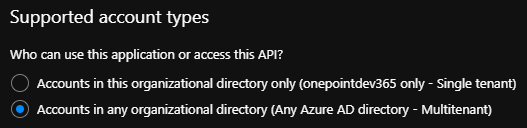
You also must set your Application to support multi-tenant accounts:
Set up Delegated API Permissions
You have to authorize the SharePoint APIs:

Try the access through SPA (MSAL.js)
You can reuse this sample explained here with the following modifications:
Update (or not) MSAL.js version
Update line 6 to replace this:
<script src="https://secure.aadcdn.microsoftonline-p.com/lib/1.0.0/js/msal.js"></script>
By this:
<script src="https://alcdn.msauth.net/lib/1.2.0/js/msal.min.js"></script>
Set up configuration
Update from line 21 to 26:
const msalConfig = {
    auth: {
      clientId: 'Enter_the_Application_Id_here', //This is your client ID
      authority: "https://login.microsoftonline.com/Enter_the_Tenant_Info_Here", //This is your tenant info
      redirectUri: "Enter_the_Redirect_Uri_Here" //This is your redirect URI
}
Set up endpoint
You can replace the following declaration line 33 (or keep the Graph call and add other endpoints) by this:
const account = "loginAccountToGetInfo"
const domain= "yourtenant.onmicrosoft.com"
const spUrl = "https://contoso.sharepoint.com"
const appConfig = {
    graphMeEndpoint: "https://graph.microsoft.com/v1.0/me",
    spListsEndpoint: spUrl + "/_api/lists",
    spUsersEndpoint: spUrl + `/_api/SP.UserProfiles.PeopleManager/GetPropertiesFor(accountName=@v)?@v='i%3A0%23.f%7Cmembership%7C${account}%40${domain}'`
};
(make sure to replace graphConfig with appConfig everywhere you call it in the code)
In this example, I've set up two endpoints:
- one for reaching a Site's Lists (requires "AllSites.Read" AAD delegated permission)
- one for reaching User Profile Properties (requires "User.Read.All" AAD delegated permission)
Set up the scope
Next, go to line 33 (or 43 after code update) and set the desired scope:
const requestObj = {
    scopes: [spUrl + "/.default"]
};
(As the SharePoint REST API is a v1 endpoint, you don't specify the scope but the "default" resource, instead of Graph API)
Call the right endpoint
Then, you can refer to those SP endpoints in your callMSGraph method like this (lines 85 and 113 for example or lines 79 and 105 before code update):
callMSGraph(
     appConfig.spUsersEndpoint,
     tokenResponse.accessToken,
     graphAPICallback
);
// OR
callMSGraph(
     appConfig.spListsEndpoint,
     tokenResponse.accessToken,
     graphAPICallback
);
Update API Call Headers
Finally, update the callMSGraph method to add JSON header as the returned format (below line 181 or 186):
xmlHttp.open("GET", theUrl, true); // true for asynchronous
xmlHttp.setRequestHeader("Authorization", `Bearer ${accessToken}`);
xmlHttp.setRequestHeader("Accept", "application/json; odata=verbose");
xmlHttp.send();
Then you can try ! 🙂
Please let me know if it's working or not, or I missed something.
Hope that it helps.
 michaelmaillot
on 7 Feb 2020
michaelmaillot
on 7 Feb 2020
We have all the instructions from multiple people on this thread. Closing this now and if there are new questions, please raise a new PR.
sameerag
on 6 Mar 2020
Related issues
 DarkLite1
·
3Comments
DarkLite1
·
3Comments
 lecaillon
·
3Comments
lecaillon
·
3Comments
 LarsKemmann
·
4Comments
LarsKemmann
·
4Comments
 Calamari
·
3Comments
Calamari
·
3Comments
 yakimko
·
3Comments
yakimko
·
3Comments
Most helpful comment
I am also interested in accessing the SharePoint API's using MSAL.js. Is there an example of showing how you can use a JWT bearer token obtained from the V2 endpoint to access the Sharepoint Online REST API. Currently I am struggling with what permissions to add to the Microsoft APP registration portal.