Microsoft-authentication-library-for-js: How to use with electron?
Hi,
I try the msal.js for onenote with the sample code here and it works, but after I implemented it in my electron app or a boilerplate electron app, I can't authenticate. After I write my email, I got the message that the account had technical problems and I should try it later again.
I think the problem is the redirection URL in the "app registration portal", I set ther "https://localhost" because it is an electron app without any port or further route.
Did someone try msal.js with electron?
 damien122
All 11 comments
Hello there,
Thanks for your question...I don't think on our team we have created a sample for electron yet. If possible so I wouldn't have to create one from scratch can you provide me your app that you created or a small sample we can test with.
 asnow003
on 11 Jun 2018
asnow003
on 11 Jun 2018
thanks @asnow003 for your quick answer. You can find my app here ... https://github.com/damien122/cloudnoter
damien122
on 12 Jun 2018
@damien122 The MSAL.js library is designed to work with browser based JS and SPA apps. It does not support the Electron platform which requires native platform integration capabilities. Is the application you are building with Electron for a mobile platform?
 navyasric
on 12 Jun 2018
navyasric
on 12 Jun 2018
@navyasric thanks for your answere. I build an alternative OneNote Client for Desktop users, mostly for linux because I don't like ne web client.
But your answere was exactly the information I am looking for. In this case I will use forter my self implemented authentication with the onenote API directly.
damien122
on 14 Jun 2018
I am also working on trying to get ADAL login working in an Electron app. Has anyone found a good way to do this? I am considering using: https://github.com/AzureAD/azure-activedirectory-library-for-nodejs. However, I believe this will potentially expose the client secret.
 jfbloom22
on 4 Oct 2018
jfbloom22
on 4 Oct 2018
@jfbloom22 you can use this called "implicit grant" -> https://docs.microsoft.com/en-us/azure/active-directory/develop/v2-oauth2-implicit-grant-flow
damien122
on 6 Oct 2018
@jfbloom22 I've been looking into getting adal working with electron and angular 6 in the renderer process.
We use the redirect login method (not the popup).
During development we use the angular development server (http://localhost:4200) so when the redirect uri is configured to that it all works. But when compiled the app loads the index.html file from path.
 if (serve) {
    win.loadURL('http://localhost:4200');
  } else {
    win.loadURL(url.format({
      pathname: path.join(__dirname, 'dist/index.html'),
      protocol: 'file:',
      slashes: true
    }));
  }
This didn't work because Azure AD doesn't allow the file://-protocol as a redirect uri.
I had to allow implicit grant flow in my AD-app configuration and i added a custom Public client protocol as the redirect uri, for example: company://auth.
Then in my main process i defined the protocol to get picked up and reload the index.html page adding the hash provided by Azure AD:
  protocol.registerHttpProtocol('company', (req, cb) => {
    if(win.webContents) {
      const receivedHash = `${req.url.split('#')[1]}`;
      win.loadURL(url.format({
        pathname: path.join(__dirname, 'dist/index.html'),
        protocol: 'file:',
        hash: receivedHash,
        slashes: true
      }));
    }
  })
The adalConfig for local development as:
  adalConfig: {
    tenant: 'XXXXXXXXXXX',
    clientId: 'XXXXXXXXX-XXXX-XXXX-XXXX-XXXXXXXXXXXX',
    redirectUri: 'http://localhost:4200'
  }
For production release (compiled) it is:
  adalConfig: {
    tenant: 'XXXXXXXXXXX',
    clientId: 'XXXXXXXXX-XXXX-XXXX-XXXX-XXXXXXXXXXXX',
    redirectUri: 'company://auth'
  }
 wvandeneede
on 8 Nov 2018
wvandeneede
on 8 Nov 2018
@wvandeneede Hey i have created a electron application using react that uses Microsoft graph API, I was facing similar issue for login, So i tried your approach but did not worked. can you provide more elaborate solution for this? Thanks in advance
 snehanandi15
on 10 May 2019
snehanandi15
on 10 May 2019
@snehanandi15 the idea is to use a custom protocol to be able to catch the redirect request, and register that custom protocol in the electron main process. Can you provide us with an example of what you did?
wvandeneede
on 10 May 2019
@wvandeneede
if (isDev) {
    mainWindow.loadURL('http://localhost:3000');
  }
  else {
    mainWindow.loadURL(`file://${__dirname}/index.html`);

    protocol.registerHttpProtocol('graphapi', (req, cb) => {
      if (mainWindow.webContents) {
        const receivedHash = `${req.url.split('#')[1]}`;
        mainWindow.loadURL(url.format({
          pathname: path.join(__dirname, 'index.html'),
          protocol: 'file:',
          hash: receivedHash,
          slashes: true
        }));
      }
    });
  }
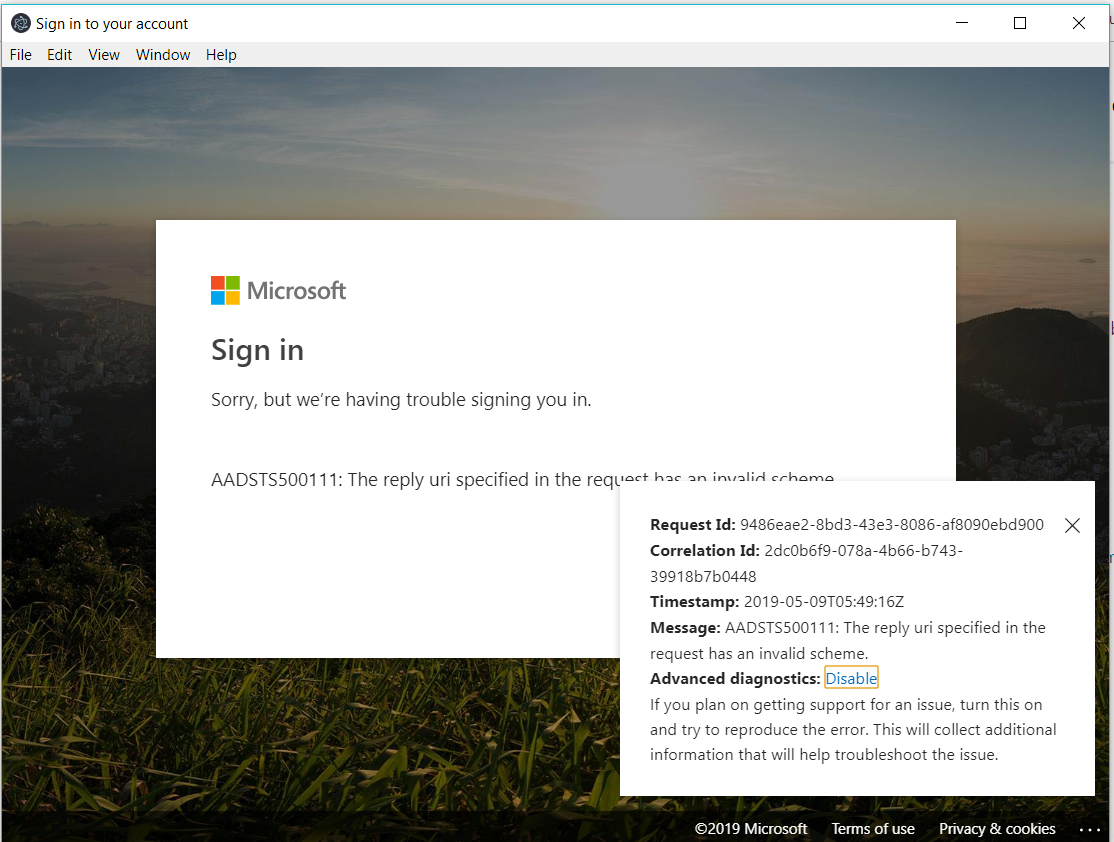
This is in my main process and in the AAD i have set the custom redirect uri for public client

But i am still getting the authentication error .
snehanandi15
on 10 May 2019
@wvandeneede
Hey, can you please help me out with the issue i mentioned above. Actually i am new to these things. Please let me know whether the information provided by me are enough to figure out the issue or you need anything else. Thanks in advance
snehanandi15
on 13 May 2019
Related issues
 lecaillon
·
3Comments
lecaillon
·
3Comments
 exequeryphil
·
3Comments
exequeryphil
·
3Comments
 ssuvorov
·
3Comments
ssuvorov
·
3Comments
 yakimko
·
3Comments
yakimko
·
3Comments
 sameerag
·
3Comments
sameerag
·
3Comments
Most helpful comment
@jfbloom22 I've been looking into getting adal working with electron and angular 6 in the renderer process.
We use the redirect login method (not the popup).
During development we use the angular development server (http://localhost:4200) so when the redirect uri is configured to that it all works. But when compiled the app loads the index.html file from path.
This didn't work because Azure AD doesn't allow the file://-protocol as a redirect uri.
I had to allow implicit grant flow in my AD-app configuration and i added a custom Public client protocol as the redirect uri, for example: company://auth.
Then in my main process i defined the protocol to get picked up and reload the index.html page adding the hash provided by Azure AD:
The adalConfig for local development as:
For production release (compiled) it is: