Microsoft-authentication-library-for-js: Cannot read property 'B2C' of undefined
Hello everyone, would you please help me with this issue that I have when accessing my production Angular 6 app? Thanks a lot. Here's the details of the issue
ERROR TypeError: Cannot read property 'B2C' of undefined
at Function.e.DetectAuthorityFromUrl (main.58ad9cf0316c1e1e28d1.js:1)
at Function.e.CreateInstance (main.58ad9cf0316c1e1e28d1.js:1)
at e.set [as authority] (main.58ad9cf0316c1e1e28d1.js:1)
at new e (main.58ad9cf0316c1e1e28d1.js:1)
at new e (main.58ad9cf0316c1e1e28d1.js:1)
at main.58ad9cf0316c1e1e28d1.js:1
at Oo (main.58ad9cf0316c1e1e28d1.js:1)
at Lo (main.58ad9cf0316c1e1e28d1.js:1)
at e.get (main.58ad9cf0316c1e1e28d1.js:1)
at ya (main.58ad9cf0316c1e1e28d1.js:1)
 ht89
ht89
All 20 comments
@ht89 Can you please attach code snippet for your app to show how you are calling msal.
 rohitnarula7176
on 16 May 2018
rohitnarula7176
on 16 May 2018
Did you wire up msal logging?
 spottedmahn
on 16 May 2018
spottedmahn
on 16 May 2018
Hi @rohitnarula7176 , thanks for your reply. Before using msal, I used msalx which causes the same mentioned issue. Here's my login configuration (keep in mind that the values inside applicationConfig are not real):
```
private applicationConfig = {
tenant: 'tenantId',
clientID: 'abcdf',
signUpSignInPolicy: 'B2C_mySUSIPolicy',
b2cScopes: ['https://mytenantid.onmicrosoft.com/devapi/demo.read', 'offline_access']
};
// Configure the authority for Azure AD B2C
private authority = 'https://login.microsoftonline.com/tfp/' + this.applicationConfig.tenant + '/'
+ this.applicationConfig.signUpSignInPolicy;
private userAgentApplication = new Msal.UserAgentApplication(
this.applicationConfig.clientID,
this.authority,
this.authCallback,
{
cacheLocation: 'localStorage',
redirectUri: environment.authService.redirectUri,
postLogoutRedirectUri: environment.baseURL
}
);
private authCallback(errorDesc, token, error, tokenType) {
if (token) {
console.debug('token received', token);
} else {
console.log(error: ${errorDesc});
}
}
login(): void {
this.userAgentApplication.loginRedirect(this.applicationConfig.b2cScopes);
}
logout(): void {
this.userAgentApplication.logout();
};
isAuthenticated(): boolean {
let user = this.userAgentApplication.getUser();
return user != null;
}
getToken(): string {
return localStorage.getItem('msal.idtoken');
}
get user() {
return this.userAgentApplication.getUser();
}
private aquireToken() {
this.userAgentApplication.acquireTokenSilent(this.applicationConfig.b2cScopes).then(accessToken => {
//AcquireToken Success
console.log('Got silent access token: ', accessToken);
}, error => {
//AcquireToken Failure, send an interactive request.
   this.userAgentApplication.acquireTokenPopup(this.applicationConfig.b2cScopes).then(accessToken => {
            console.log('Got popup access token: ', accessToken);
        }, error => {
            console.log('Could not retrieve token from popup. Trying with acquireTokenRedirect...', error);
            this.userAgentApplication.acquireTokenRedirect(this.applicationConfig.b2cScopes);
        });
    });
}
ht89
on 16 May 2018
Hi @spottedmahn , thanks for your reply. Would you please elaborate your question? Thank you.
ht89
on 16 May 2018
Hi @ht89 - you can wire up logging of the MSAL library to see what it is doing:
var logger = new Msal.Logger(loggerCallback, { level: Msal.LogLevel.Verbose, correlationId:'12345' }); // level and correlationId are optional parameters.
//Logger has other optional parameters like piiLoggingEnabled which can be assigned as shown aabove. Please refer to the docs to see the full list and their default values.

function loggerCallback(logLevel, message, piiLoggingEnabled) {
    console.log(message);
}

var userAgentApplication = new Msal.UserAgentApplication(applicationConfig.clientID, null, authCallback, { logger: logger, cacheLocation: 'localStorage'}); //logger and cacheLocation are optional parameters.
FYI, you'll want to the offline_access scope.
That is for refresh tokens which are n/a w/ implicit flow.
spottedmahn
on 16 May 2018
private static DetectAuthorityFromUrl(authorityUrl: string): AuthorityType {
    authorityUrl = Utils.CanonicalizeUri(authorityUrl);
    let components = Utils.GetUrlComponents(authorityUrl);
    let pathSegments = components.PathSegments;
    switch (pathSegments[0]) {
        case "tfp":
            return AuthorityType.B2C;
        case "adfs":
            return AuthorityType.Adfs;
        default:
            return AuthorityType.Aad;
    }
}
Looks like it is failing on return AuthorityType.B2C;
spottedmahn
on 16 May 2018
What verion of msal are you using?
spottedmahn
on 16 May 2018
Hi @spottedmahn , thanks a lot for your replies. I used the latest version of msal which is 0.1.5. It's weird that when running my Angular 6 app locally, it works fine. However, that's not the case when building the app for production and access it locally.
ht89
on 16 May 2018
Interesting... can you share you build command that doesn't work?
spottedmahn
on 16 May 2018
Hi @spottedmahn , thanks for your reply. I just use ng build --prod to build the app for production. This causes the issue. When using ng serve, the issue does not happen.
ht89
on 16 May 2018
Also, the issue only happens when accessing the production app locally. Thanks
ht89
on 16 May 2018
the issue only happens when accessing the production app locally
How are accessing it? ng build --prod only builds and doesn't serve it.
spottedmahn
on 16 May 2018
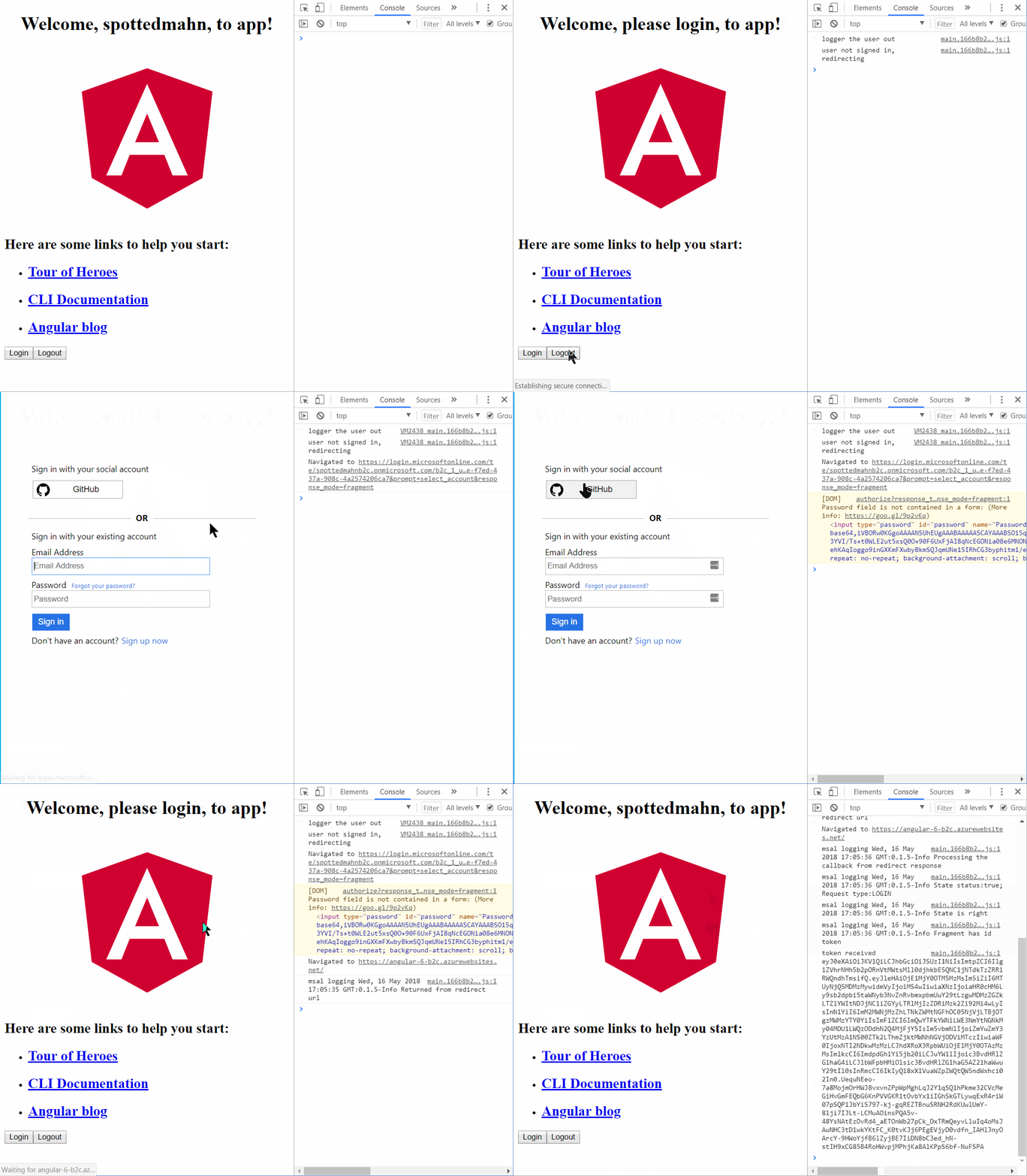
- I created a sample using Angular 5 with B2C using GitHub and local accounts. That worked.
- I upgraded that sample to Angular 6. That worked too.
- I build it using
npm run buildwhich equates tong build --prod - I deployed it to Azure here: https://angular-6-b2c.azurewebsites.net/
spottedmahn
on 16 May 2018
Hi @spottedmahn , thanks so much for your help. Sorry I could not reply earlier. I use http-server -p 4200 inside the dist folder to serve the production app. http-server can be installed via npm install http-server -g. It's interesting that your Angular 6 app works with msal. I will need to check other stuff to see what's wrong.
ht89
on 17 May 2018
Hi @spottedmahn , in your Angular 6 sample, i can see you use the angular version 6.0.2. Therefore, I upgraded angular to that version and now the issue no longer happens. Thanks a lot for your help.
ht89
on 17 May 2018
I use http-server -p 4200 inside the dist folder to serve the production app
Thanks 🙏, didn't know about that!!
I upgraded angular to that version and now the issue no longer happens
Sweet! 💲
Close issue?
spottedmahn
on 17 May 2018
Hi @spottedmahn , no worries :) yes the issue can be closed. Thank you.
ht89
on 17 May 2018
@ht89 Seems like angular 6.0.3 having the issue when building --prod
also tried angular 6.0.2 menitioned above in comments, no difference.
Using angular cli 6.0.5 and msal 0.1.6
SOLVED:
the problem was with @angular-devkit/build-angular": "~0.6.x" now I updated to "@angular-devkit/build-angular": "~0.6.5" and issue has gone
 kuncevic
on 30 May 2018
kuncevic
on 30 May 2018
Thanks for sharing your info @kuncevic
ht89
on 30 May 2018
Related issues
 yakimko
·
3Comments
yakimko
·
3Comments
 lecaillon
·
3Comments
lecaillon
·
3Comments
 atvoid
·
3Comments
atvoid
·
3Comments
 Anees-Raja
·
3Comments
Anees-Raja
·
3Comments
 ArneMancofi
·
3Comments
ArneMancofi
·
3Comments
Most helpful comment
@ht89 Seems like
angular 6.0.3having the issue when building--prodalso tried
angular 6.0.2menitioned above in comments, no difference.Using
angular cli 6.0.5andmsal 0.1.6SOLVED:
the problem was with
@angular-devkit/build-angular": "~0.6.x"now I updated to"@angular-devkit/build-angular": "~0.6.5"and issue has gone