Microsoft-authentication-library-for-dotnet: Login page unresponsive after cancelling iOS sign in
Hello,
I have found an issue where the buttons on our B2C login page can become unresponsive. Using the following steps:
- Open login page
- Tap on sign in with Apple (using iOS device with iOS > 13
- Cancel the login
- App returns to login screen, but all other buttons are not clickable now
- Only option for the user is to cancel at the top of the screen to go back to start page of app.
(Video displaying this - RPReplay_Final1607677676.zip)
The in-app browser is using the embedded WebView.
Which Version of MSAL are you using ?
Microsoft.Identity.Client 4.23.0
Platform
Xamarin.Forms Xamarin.iOS 13.10.0.17
What authentication flow has the issue?
- Desktop / Mobile
- [X] Interactive
- [ ] Integrated Windows Auth
- [ ] Username Password
- [ ] Device code flow (browserless)
Is this a new or existing app?
The app is in production, I haven't upgraded MSAL, but started seeing this issue
Expected behavior
- Open login page
- Tap on sign in with Apple (using iOS device with iOS > 13
- Cancel the login
- App returns to login screen
- User is able to interact with the login screen
Actual behavior
- Open login page
- Tap on sign in with Apple (using iOS device with iOS > 13
- Cancel the login
- App returns to login screen, but all other buttons are not clickable now
- Only option for the user is to cancel at the top of the screen to go back to start page of app.
 c-mckeown
All 13 comments
@c-mckeown does this happen w/any other log in providers or just w/Apple?
 jennyf19
on 11 Dec 2020
jennyf19
on 11 Dec 2020
@c-mckeown are you using system browser or embedded webview? Can you please share how are you creating your app?
 neha-bhargava
on 12 Dec 2020
neha-bhargava
on 12 Dec 2020
@jennyf19 @neha-bhargava @c-mckeown
This only seems to happen with Apple provider - other login providers launch their own web page, can cancelling the webpage seems to be ok.. It only happens when the apple login popup is cancelled on iOS - if we are using a version of iOS < 13 then the apple webpage comes up, and cancelling that is ok.
It happens in system and embedded webview.
@jennyf19 I have your email from the last time I had issues with iOS login. I will send a sample app showing the issue. @neha-bhargava if you provide your email I can send you the sample too. If you run the sample on an iOS device > 13, then tap on the login button our login page will appear. Then you can tap on "Sign in with Apple". This will show the Apple system popup for login. When you press cancel on that one it will go back to the login page, but all buttons don't work after that.
I seen someone posted this issue on stack overflow as well - but im not sure how I would go about setting the agent for the webview you are launching? Maybe you can help here?
https://stackoverflow.com/questions/64194788/wkwebview-buttons-dont-work-after-apple-login-session
Apple have started rejecting our apps because of this issue - so really need a work around or solution for this one.
 WilliamWatterson86
on 12 Dec 2020
WilliamWatterson86
on 12 Dec 2020
Thanks @WilliamWatterson86 . We reached out to our Apple ID sign in team on Friday, so hopefully we'll get some help w/this. will take a look at the link you sent as well.
jennyf19
on 12 Dec 2020
@WilliamWatterson86 what's the status on this, was it resolved w/B2C?
jennyf19
on 22 Jan 2021
@jennyf19 the issue is still being worked on. The latest I have from Namrata is
“We are actively working on fixing this issue. We will have an ETA for this fix by next week.”
WilliamWatterson86
on 22 Jan 2021
ok...thanks for the update @WilliamWatterson86
jennyf19
on 22 Jan 2021
This is Fixed will be available next week with UnifieSSP v2.1.3.
 stevenxzhou
on 25 Feb 2021
stevenxzhou
on 25 Feb 2021
@stevenxzhou will this just be a matter or updating the version number in the custom policy for unified and selfasserted?
WilliamWatterson86
on 25 Feb 2021
Yes. That is correct.
stevenxzhou
on 25 Feb 2021
Great! Thanks for your help on this
WilliamWatterson86
on 25 Feb 2021
@jennyf19 @jmprieur - I can confirm the issue is fixed and updating the version of the template in my custom policy works well.
The only extra thing I needed to add was the highlighted line in the image attached. Without this line when Apple login was cancelled the "create account" link threw an error.
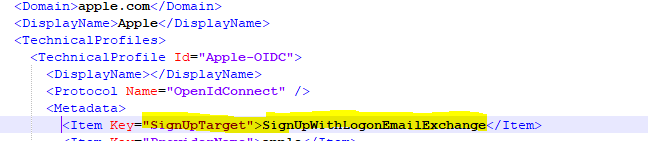
Happy enough to close this one if you are.
Thanks again for your help :)
 williamwatterson
on 4 Mar 2021
williamwatterson
on 4 Mar 2021
Thanks for the update, @williamwatterson and for sharing the fix
Closing as you proposed
 jmprieur
on 5 Mar 2021
jmprieur
on 5 Mar 2021
Related issues
 hausec
·
3Comments
hausec
·
3Comments
 johanalex566
·
3Comments
johanalex566
·
3Comments
 geoffreygeslin
·
4Comments
jmprieur
·
5Comments
geoffreygeslin
·
4Comments
jmprieur
·
5Comments
 chrisevans9629
·
5Comments
chrisevans9629
·
5Comments