Microsoft-authentication-library-for-dotnet: [Documentation] AcquireTokenByUsernamePassword throws AADSTS50020 error
Documentation Related To Component:
MSAL AcquireTokenByUsernamePassword
Please check those that apply
- [ ] typo
- [ ] documentation doesn't exist
- [x] documentation needs clarification
- [ ] error(s) in example
- [ ] needs example
Description Of The Issue
I am trying out AcquireTokenByUsernamePassword to get an access token but I get the following error:
Microsoft.Identity.Client.MsalUiRequiredException
  HResult=0x80131500
  Message=AADSTS50020: User account '{EmailHidden}' from identity provider 'https://sts.windows.net/4e2c9ebc-13a3-4967-a599-8269be6d22f6/' does not exist in tenant 'Carlintveld' and cannot access the application '4f381a56-a3b1-419a-a2ca-89a6f52f0e7b'(Azure DevOps Sample) in that tenant. The account needs to be added as an external user in the tenant first. Sign out and sign in again with a different Azure Active Directory user account.
Trace ID: 39765221-a26a-4792-a51b-19416a219d01
Correlation ID: f6985690-724a-453d-a4f8-4ebfe4cc4d00
Timestamp: 2020-11-30 16:01:14Z
I am using the following program.cs:
using Microsoft.Identity.Client;
using System;
using System.Net;
using System.Security;
using System.Threading.Tasks;

namespace NonInteractivePatGenerationSampleMsal
{
    class Program
    {
        async static Task Main(string[] args)
        {
            var username = "[email protected]";
            var password = new NetworkCredential("", "password").SecurePassword;
            var aadApplicationID = "<guid; redacted>"
            var client = PublicClientApplicationBuilder.Create(aadApplicationID).WithAuthority("https://login.microsoftonline.com/carlintveld.onmicrosoft.com").Build();
            var scopes = new string[] { "user.read" };
            var result = await client.AcquireTokenByUsernamePassword(scopes, username, password).ExecuteAsync();
        }
    }
}
Where is the guid 4e2c9ebc-13a3-4967-a599-8269be6d22f6 coming from?
How do I resolve this AADSTS50020 error?
 cveld
cveld
All 11 comments
Tenants (aka Directories) have a name (carlintveld.onmicrosoft.com) and a GUID (probably 4e2c9ebc-13a3-4967-a599-8269be6d22f6). Most error messages tend to reference the GUID. In app registration, you can also see the GUID:
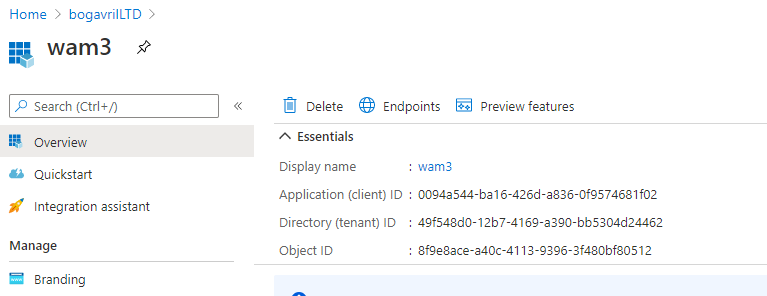
A few things to try:
- are you sure you have created that test user in your directory?
- can you replace
WithAuthority("https://login.microsoftonline.com/carlintveld.onmicrosoft.com")withWithAuthority("https://login.microsoftonline.com/<tenant_id>")and see if this repros?
 bgavrilMS
on 30 Nov 2020
bgavrilMS
on 30 Nov 2020
@bgavrilMS carlintveld.onmicrosoft.com has tenantid 1fea1d7a-95b0-4ebc-b422-bcc75a77c9a0. I tried the alternate way to specify the authority with a guid to no avail. The same error is thrown.
WithAuthority("https://login.microsoftonline.com/1fea1d7a-95b0-4ebc-b422-bcc75a77c9a0")
Your confirmation that I was exploring in the right direction made me spot a mistake I made. Apparently I was using credentials from what is actually an account that was added as a guest to the tenant. This guest account is apparently member of tenant 4e2c9ebc-13a3-4967-a599-8269be6d22f6. I wasn't aware that guest accounts do not work this way easily!
I switched to credentials of an account that was created inside this Azure Active Directory. And that works!
Is it possible to authenticate with a guest account with this method using a single tenant application registration?
Can you point me to documentation where this is explained?
Unfortunately per 9 November 2020 multi-tenant applications are only allowed for validated publishers. I would guess this is quite some restriction you are putting on Visual Studio Subscribers who just would like to explore before advising their customers.
cveld
on 30 Nov 2020
@cveld
The new logic (put in place for security reasons) does not require Publisher Verification to be complete before a multi-tenant app can be created (which seems to be implied in your last sentence). What this limitation does is restrict end-users from consenting to newly registered multi-tenant apps that are asking for user consent to permissions greater than the standard openId scopes + user.read.
You as a developers can till explore before releasing your apps to customers, including across multiple tenants. If you apps are doing basic sign-in and read profile only, you'll will see no change. If your apps are asking for permissions to other data, they will need to have an admin in those other tenants consent to the app
 jmprieur
on 1 Dec 2020
jmprieur
on 1 Dec 2020
To go back to your point around external users, I just tried this out. It looks like AcquireTokenByUsernamePassword is unable to login a guest user, however AcquireTokenIntreactive does allow this login.
My setup was:
authority: https://login.microsoftonline.com/TenantA with a user who a guest in TenantA
This seems to be a service limitation or a bug. AcquireTokenByUsernamePassoword is strongly discouraged, so I would not be surprised if some of these advanced scenarios do not work. Still, please feel free to open a issue via the Azure Portal to the AAD service, as this is not an SDK bug.
If you have problems getting AcquireTokenIntreactive to work, let's discuss further.
bgavrilMS
on 1 Dec 2020
@jmprieur You are completely right I was missing the nuances here because I did not get the reason you were still able to create multi-tenant principals but not use them. So fantastic news that the OpenId scopes + user.read is still allowed. That is the majority of our use cases.
@bgavrilMS Yes I got that AcquireTokenByUsernamePassword is strongly discouraged. I am exploring if this would be a valid alternative to circumvent the limitation with Azure DevOps, i.e. currently one cannot use AAD service principals to connect to the Azure DevOps REST APIs. Using this example as the basis: https://github.com/microsoft/azure-devops-auth-samples/tree/master/NonInteractivePatGenerationSample
Can you elaborate a bit why this feature is strongly discouraged? What is the difference between authenticating with a service principal or authenticating with a service account?
I have tried to raise an issue with the AAD service through Azure Portal, thanks for suggesting that! But it seems that is not a valid service to request support for. Do you have any other suggestions?
cveld
on 2 Dec 2020
Some notes on why Username / Password is discouraged here: https://github.com/AzureAD/microsoft-authentication-library-for-dotnet/wiki/Username-Password-Authentication#this-flow-is-not-recommended .May not affect your scenario...
Not sure I understand what you mean by "not a valid service to request support for". AAD / ESTS is the service.
bgavrilMS
on 2 Dec 2020
AAD / ESTS is not in the list. I have access to two tenants and neither are providing this. Maybe I don't have the authorization? Many other Azure services are there. One is providing "Active Directory Domain Services".
I reread this page and there are some interesting parts to note:
- Never let users enter their username and password into your app.
- Microsoft accounts are apparently not supported. Only work or school accounts.
- The
commonauthority is not supported because it is combining Microsoft accounts with work or school accounts. Therefore one should chooseorganizationsfor multi-tenancy. - ROPC is being used as a term, but explained outside the page: it stands for Resource Owner Password Credentials, i.e. the
AcquireTokenByUsernamePasswordflow.
Ad 1. Indeed, we never ask users to enter their username and password into our apps. We are using the AcquireTokenByUsernamePassword flow solely with service accounts.
Ad 3. I will try the organizations authority.
cveld
on 2 Dec 2020
@cveld it can also happen that the guest account's home tenant admin has setup rules to prevent username/password or has setup conditional access policies which prevent this flow.
jmprieur
on 3 Dec 2020
This is a fair usage of Username / Password. App scopes are too powerful or not granular enough, and automating certain tasks can only be done with Username / Password.
bgavrilMS
on 3 Dec 2020
@cveld : can we close this issue?
jmprieur
on 1 Feb 2021
The solution to fixing this via this flow is to designate a (system) user, for which the tenant admin disables MFA. Then store this user's credentials securely, for example in KeyVault.
Access to KV is done via a cert, which can safely deployed in some scenarios (e.g. CI systems allow for this).
Apps connect to KV, get the creds, and run the auth flow.
bgavrilMS
on 1 Feb 2021
Related issues
jmprieur
·
5Comments
 chrisevans9629
·
4Comments
chrisevans9629
·
4Comments
 johanalex566
·
3Comments
johanalex566
·
3Comments
 hausec
·
3Comments
hausec
·
3Comments
 steffos
·
4Comments
steffos
·
4Comments