Microsoft-authentication-library-for-dotnet: [Internal] Device Auth tests are not running.
 bgavrilMS
All 9 comments
@bgavrilMS the device auth tests seem to be passing now...maybe it was the build fix from earlier? idk.

https://identitydivision.visualstudio.com/IDDP/_build/results?buildId=666395&view=results
 jennyf19
on 18 Nov 2020
jennyf19
on 18 Nov 2020
They are passing because no tests are found.Test run takes 1s
Get Outlook for Androidhttps://aka.ms/ghei36
From: jennyf19 notifications@github.com
Sent: Wednesday, November 18, 2020 9:11:52 PM
To: AzureAD/microsoft-authentication-library-for-dotnet microsoft-authentication-library-for-dotnet@noreply.github.com
Cc: Bogdan Gavril Bogdan.Gavril@microsoft.com; Mention mention@noreply.github.com
Subject: Re: [AzureAD/microsoft-authentication-library-for-dotnet] [Internal] Device Auth tests are not running. (#2207)
@bgavrilMShttps://nam06.safelinks.protection.outlook.com/?url=https%3A%2F%2Fgithub.com%2FbgavrilMS&data=04%7C01%7CBogdan.Gavril%40microsoft.com%7C50065a208c2f408ed51e08d88c06926e%7C72f988bf86f141af91ab2d7cd011db47%7C1%7C0%7C637413307138625507%7CUnknown%7CTWFpbGZsb3d8eyJWIjoiMC4wLjAwMDAiLCJQIjoiV2luMzIiLCJBTiI6Ik1haWwiLCJXVCI6Mn0%3D%7C1000&sdata=VjjhQoDzLYewauM8EORvuPVfgXGauemxkTC%2FRT1WSvw%3D&reserved=0 the device auth tests seem to be passing now...maybe it was the build fix from earlier? idk.
[image]https://nam06.safelinks.protection.outlook.com/?url=https%3A%2F%2Fuser-images.githubusercontent.com%2F19942418%2F99588519-8dc57900-299f-11eb-844b-f30fc7c52810.png&data=04%7C01%7CBogdan.Gavril%40microsoft.com%7C50065a208c2f408ed51e08d88c06926e%7C72f988bf86f141af91ab2d7cd011db47%7C1%7C0%7C637413307138625507%7CUnknown%7CTWFpbGZsb3d8eyJWIjoiMC4wLjAwMDAiLCJQIjoiV2luMzIiLCJBTiI6Ik1haWwiLCJXVCI6Mn0%3D%7C1000&sdata=xsaMYJQbZFZXpeS3kYBSBW4aiNSi%2Bsk0icYnzpQYVGA%3D&reserved=0
https://identitydivision.visualstudio.com/IDDP/_build/results?buildId=666395&view=resultshttps://nam06.safelinks.protection.outlook.com/?url=https%3A%2F%2Fidentitydivision.visualstudio.com%2FIDDP%2F_build%2Fresults%3FbuildId%3D666395%26view%3Dresults&data=04%7C01%7CBogdan.Gavril%40microsoft.com%7C50065a208c2f408ed51e08d88c06926e%7C72f988bf86f141af91ab2d7cd011db47%7C1%7C0%7C637413307138635499%7CUnknown%7CTWFpbGZsb3d8eyJWIjoiMC4wLjAwMDAiLCJQIjoiV2luMzIiLCJBTiI6Ik1haWwiLCJXVCI6Mn0%3D%7C1000&sdata=9rypVyZUey%2FJrxngbk%2FHGgvhLWHPe8a6PWHWpB6faEU%3D&reserved=0
—
You are receiving this because you were mentioned.
Reply to this email directly, view it on GitHubhttps://nam06.safelinks.protection.outlook.com/?url=https%3A%2F%2Fgithub.com%2FAzureAD%2Fmicrosoft-authentication-library-for-dotnet%2Fissues%2F2207%23issuecomment-729956200&data=04%7C01%7CBogdan.Gavril%40microsoft.com%7C50065a208c2f408ed51e08d88c06926e%7C72f988bf86f141af91ab2d7cd011db47%7C1%7C0%7C637413307138635499%7CUnknown%7CTWFpbGZsb3d8eyJWIjoiMC4wLjAwMDAiLCJQIjoiV2luMzIiLCJBTiI6Ik1haWwiLCJXVCI6Mn0%3D%7C1000&sdata=e6EEHllYxsznJrOWx8lovrOe6O%2BLLAKDhGR0oypLMMg%3D&reserved=0, or unsubscribehttps://nam06.safelinks.protection.outlook.com/?url=https%3A%2F%2Fgithub.com%2Fnotifications%2Funsubscribe-auth%2FAC5UN2CBBPXOF3WQA7Q772TSQQ2BRANCNFSM4T2DUU4Q&data=04%7C01%7CBogdan.Gavril%40microsoft.com%7C50065a208c2f408ed51e08d88c06926e%7C72f988bf86f141af91ab2d7cd011db47%7C1%7C0%7C637413307138645496%7CUnknown%7CTWFpbGZsb3d8eyJWIjoiMC4wLjAwMDAiLCJQIjoiV2luMzIiLCJBTiI6Ik1haWwiLCJXVCI6Mn0%3D%7C1000&sdata=bmrEVu6bWRQBlHhqcSTWCdhhbA15SFYiGm%2B0DkHneCA%3D&reserved=0.
bgavrilMS
on 18 Nov 2020

bgavrilMS
on 18 Nov 2020
oh i see.
jennyf19
on 18 Nov 2020
ill take a look
 trwalke
on 19 Nov 2020
trwalke
on 19 Nov 2020
@trwalke i think i've got them working .i'll probably push up a PR tomorrow. have one more small issue to sort out w/publishing.
jennyf19
on 23 Nov 2020
@trwalke I'll leave these Todo's for you to follow up on, as you set up the VM w/the lab and are more familiar w/the feature. Thanks.
TODO:
- [ ] Check which version of VS is on the windows 8 VM
- [ ] Try running the test on the VM, as it's not running correctly currently, as noted in the build logs, but it runs locally. Maybe the VM is missing something.
It's failing before even starting the test:
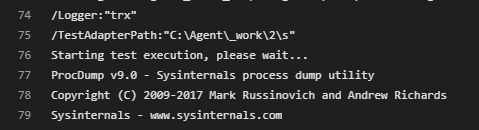
- [ ] Ensure the test runs on the VM and in AzureDevOps
Thank you!
jennyf19
on 24 Nov 2020
Made some progress on this. I am now able to get the test running on the agent by reconfiguring some of the parameters on the test task in YAML. There is an error to fix which I am investigating now but at least the test is actually being executed by ADO.
trwalke
on 14 Jan 2021
Tests are now passing. a little bit of clean up and ill submit pr very soon
trwalke
on 21 Jan 2021
Related issues
 dansiegel
·
5Comments
dansiegel
·
5Comments
 alexzaitzev
·
5Comments
alexzaitzev
·
5Comments
 saketkataruka
·
5Comments
trwalke
·
4Comments
saketkataruka
·
5Comments
trwalke
·
4Comments
 chrisevans9629
·
5Comments
chrisevans9629
·
5Comments
Most helpful comment
Made some progress on this. I am now able to get the test running on the agent by reconfiguring some of the parameters on the test task in YAML. There is an error to fix which I am investigating now but at least the test is actually being executed by ADO.
https://identitydivision.visualstudio.com/IDDP/_build/results?buildId=707385&view=ms.vss-test-web.build-test-results-tab&runId=1422704&resultId=100001&paneView=debug