Microsoft-authentication-library-for-dotnet: [Investigate] B2C Xamarin Sample getAccounts does not return an account after first sign-in
My Code
        public async Task<UserContext> SingInWithoutInteractively()
        {
            UserContext newContext;
            try
            {
                // acquire token silent
                newContext = await AcquireToken();

            } catch
            {
                newContext = null;
            }

            return newContext;
        }

        public async Task<UserContext> SignInAsync()
        {
            UserContext newContext;
            try
            {
                // acquire token silent
                newContext = await AcquireToken();
            }
            catch (MsalUiRequiredException)
            {
                // acquire token interactive
                newContext = await SignInInteractively();
            }
            return newContext;
        }

        private async Task<UserContext> AcquireToken()
        {
            IEnumerable<IAccount> accounts = await _pca.GetAccountsAsync();
            AuthenticationResult authResult = await _pca.AcquireTokenSilent(B2CConstants.Scopes, GetAccountByPolicy(accounts, B2CConstants.PolicySignUpSignIn))
               .WithB2CAuthority(B2CConstants.AuthoritySignInSignUp)
               .ExecuteAsync();

            var newContext = UpdateUserInfo(authResult);
            return newContext;
        }
        private async Task<UserContext> SignInInteractively()
        {
            IEnumerable<IAccount> accounts = await _pca.GetAccountsAsync();

            AuthenticationResult authResult = await _pca.AcquireTokenInteractive(B2CConstants.Scopes)
                .WithPrompt(Prompt.SelectAccount)
                .WithAccount(GetAccountByPolicy(accounts, B2CConstants.PolicySignUpSignIn))
                .ExecuteAsync();

            var newContext = UpdateUserInfo(authResult);
            return newContext;
        }
        private IAccount GetAccountByPolicy(IEnumerable<IAccount> accounts, string policy)
        {
            foreach (var account in accounts)
            {
                string userIdentifier = account.HomeAccountId.ObjectId.Split('.')[0];
                if (userIdentifier.EndsWith(policy.ToLower())) return account;
            }

            return null;
        }
Expected behavior
After first login, I think _pca.GetAccountsAsync() should return accounts list and be able to refresh token
Actual behavior
always _pca.GetAccountsAsync() returns empty array so, can't refresh token
So it ask to login every time app launches.
 tal-athena
All 16 comments
@tal-athena
Did you add a token cache serialization.?
See https://docs.microsoft.com/en-us/azure/active-directory/develop/msal-net-token-cache-serialization#token-cache-for-a-public-client
and also https://github.com/AzureAD/microsoft-authentication-extensions-for-dotnet/wiki/Cross-platform-Token-Cache
 jmprieur
on 15 Oct 2020
jmprieur
on 15 Oct 2020
@tal-athena can you provide a repro or a link? Are you using the Xamarin B2C sample? If so, which platform are you using?
 jennyf19
on 15 Oct 2020
jennyf19
on 15 Oct 2020
@jennyf19 , I used https://github.com/Azure-Samples/active-directory-b2c-xamarin-native
Xamarin Forms.
I tested it on Android
tal-athena
on 15 Oct 2020
@jmprieur , Is the account saved by default when login success? should I add cache serialization to save account data?
tal-athena
on 15 Oct 2020
thanks @tal-athena we will take a look. Did you change anything in the sample or run it as-is?
jennyf19
on 15 Oct 2020
@jennyf19 , almost didn't changed, but the authentication code is the code provided
tal-athena
on 15 Oct 2020
@tal-athena I'm not able to repro this. I do have an account in the cache:
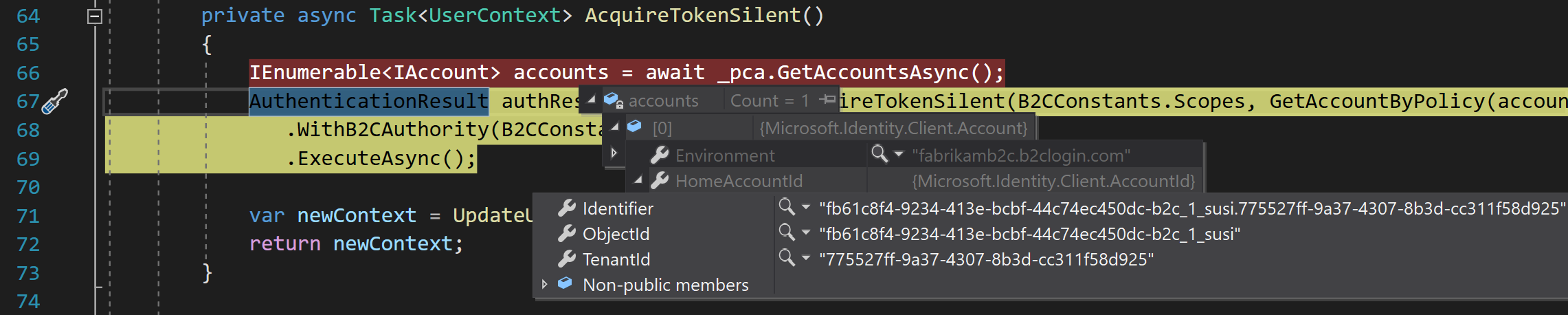
My repro steps are:
- on a Pixel 2 device
- sign-in interactively on first app start
- close the app
- run app again, and on AT silent, i have an account in the cache.
jennyf19
on 15 Oct 2020
@jennyf19 , can you provide me full project?
the sample repo also not working for me.
Do I need to do additional configuration in Azure or do sth in code?
tal-athena
on 16 Oct 2020
@tal-athena i just did a git clone of master. the sample works as-is without any configuration changes. Are you using a device or simulator?
jennyf19
on 16 Oct 2020
@jennyf19 , I am using simulator- google pixel-2 Pie 9.0
tal-athena
on 16 Oct 2020
@tal-athena okay. thanks for the additional info. any chance you can try on a device? there are some slight performance differences between the simulator and device, as noted in our native android team's wiki. I'll try it out w/the simulator.
jennyf19
on 16 Oct 2020
@jennyf19 , I also tested it on device (Samsung galaxy) but also not cached. I tested with sample repo,
does it need any additional configuration in azure?
tal-athena
on 16 Oct 2020
@tal-athena no, you don't need to do anything, as the end-user. the sample should work as-is, with a git clone.
@trwalke @neha-bhargava could you try out the above sample as well? I'm not able to repro this issue atm. thank you.
jennyf19
on 16 Oct 2020
@tal-athena - please work with Microsoft support to get your further, we cannot repro the issue
 bgavrilMS
on 23 Oct 2020
bgavrilMS
on 23 Oct 2020
thanks for your attention
I resolved this error after adding openid scope to my app.
Thanks
tal-athena
on 23 Oct 2020
Thanks for getting back to us @tal-athena !
bgavrilMS
on 23 Oct 2020
Related issues
 jsquire
·
4Comments
jsquire
·
4Comments
 23W
·
5Comments
jennyf19
·
5Comments
23W
·
5Comments
jennyf19
·
5Comments
 steffos
·
4Comments
steffos
·
4Comments
 dansiegel
·
5Comments
dansiegel
·
5Comments