Microsoft-authentication-library-for-dotnet: [Bug] Edit Profile is asking user to log in
Which Version of MSAL are you using ?
Microsoft.Identity.Client 4.18.0
Platform
.NET Standard 2.0, .NET Framework 4.6.1, WPF
What authentication flow has the issue?
- Desktop / Mobile
- [x] Interactive B2C
Is this a new or existing app?
The app is in production but updated MSAL version and changed areas of code and are now re-testing.
Repro
var ar = await pca.AcquireTokenInteractive(this.scopes)
    .WithAccount(account)
    .WithB2CAuthority(AuthB2C.AuthorityEditProfile)
    .WithParentActivityOrWindow(parentActivity)
    .WithPrompt(Prompt.NoPrompt)
    .ExecuteAsync();
Expected behavior
If the existing token has been acquired silently then the Window should go directly to the Edit Profile section.
Actual behavior
If the existing token has been acquired silently then the UI asks for user to authenticate before proceeding to the Edit Profile section.
Note: it works correctly if the current token has been retrieved via AcquireTokenInteractive (i.e. does not ask the user to authenticate).
Additional context/ Logs / Screenshots
Previous similar issue: https://github.com/AzureAD/microsoft-authentication-library-for-dotnet/issues/505

 RhomGit
All 21 comments
@RhomGit, how did you get the account. Did you use app.GetAccountsAsync(AuthB2C.AuthorityEditProfile).FirstOrDefault() ?
 jmprieur
on 4 Sep 2020
jmprieur
on 4 Sep 2020
Sorry for not including that piece of info.
I was using the (older?) method using GetAccountByPolicy() but have now changed it to the following with same result.
var accounts = await pca.GetAccountsAsync(AuthB2C.PolicyEditProfile);
var account = accounts.FirstOrDefault();
Interestingly the accounts enumerable does have something in it but FirstOrDefault() returns null.
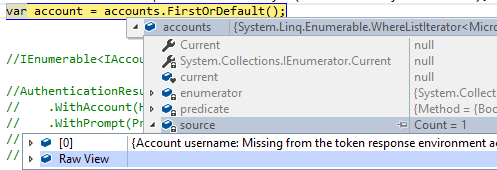
I tried to put it all on one line but I get a compile error...

RhomGit
on 5 Sep 2020
@RhomGit Can you share the original code and include the silent calls + AT interactive calls?
 jennyf19
on 5 Sep 2020
jennyf19
on 5 Sep 2020
Hi Jenny,
the original code used a Helpers class for "GetAccountByPolicy". Please find it all below:
    public static class Helpers
    {
        public static IAccount GetAccountByPolicy(IEnumerable<IAccount> accounts, string policy)
        {
            foreach (var account in accounts)
            {
                string userIdentifier = account.HomeAccountId.ObjectId.Split('.')[0];
                if (userIdentifier.EndsWith(policy.ToLower())) return account;
            }

            return null;
        }
        public static JObject ParseIdToken(string idToken)
        {
            // Get the piece with actual user info
            idToken = idToken.Split('.')[1];
            idToken = Base64UrlDecode(idToken);
            return JObject.Parse(idToken);
        }
        public static string Base64UrlDecode(string s)
        {
            s = s.Replace('-', '+').Replace('_', '/');
            s = s.PadRight(s.Length + (4 - s.Length % 4) % 4, '=');
            var byteArray = Convert.FromBase64String(s);
            var decoded = Encoding.UTF8.GetString(byteArray, 0, byteArray.Count());
            return decoded;
        }
    }
        public async Task EditProfile()
        {
            try
            {
                // var accounts = await pca.GetAccountsAsync(AuthB2C.PolicyEditProfile);
                // var account = accounts.FirstOrDefault();

                var accounts = await pca.GetAccountsAsync();
                var account = Helpers.GetAccountByPolicy(accounts, AuthB2C.PolicyEditProfile);

                var ar = await pca.AcquireTokenInteractive(this.scopes)
                    .WithAccount(account)
                    .WithB2CAuthority(AuthB2C.AuthorityEditProfile)
                    .WithParentActivityOrWindow(parentActivity)
                    .WithPrompt(Prompt.NoPrompt)
                    .ExecuteAsync();
            }
            catch (Exception ex)
            {
                // Alert if any exception excluding user cancelling sign-in dialog
                if (((ex as MsalException)?.ErrorCode != "authentication_canceled"))
                    throw ex;
            }
        }
            var accounts = await pca.GetAccountsAsync();
            var firstAccount = accounts.FirstOrDefault();

            try
            {
                if (isSilent)
                {
                    authResult = await pca.AcquireTokenSilent(this.scopes, firstAccount).ExecuteAsync();
                }
                else
                {
                    await SignOut();

                    authResult = await pca.AcquireTokenInteractive(this.scopes)
                        .WithUseEmbeddedWebView(true)
                        .WithLoginHint(previousSignInName)
                        .WithParentActivityOrWindow(parentActivity)
                        .WithPrompt(Prompt.SelectAccount)
                        .ExecuteAsync();
                }
            }
            catch (MsalUiRequiredException exMsal)
            {
                throw exMsal;
            }
            catch (Microsoft.Identity.Client.MsalServiceException exMsal2)
            {
                if (exMsal2.Message.Contains("AADB2C90118") == true) //The user has forgotten their password.
                    await ResetPassword();
                else if (exMsal2.Message.Contains("AADB2C90091") == true) //The user has cancelled entering self-asserted information.
                    return false;
                else
                    throw exMsal2;
            }
            catch (Microsoft.Identity.Client.MsalClientException exMsal3)
            {
                // just cancelled, ignore?
                return false;
            }
            catch (Exception ex)
            {
                throw ex;
            }
@RhomGit cool, thanks! i assume this is the same code reported in the other issue. if you have a repro, that would help. I can use our B2C tenant and see what's going on better.
jennyf19
on 5 Sep 2020
Hi Jenny,
I have quickly thrown together a repro here: https://github.com/RhomGit/MSALDesktopRepro
Its really rough, sorry.
The buttons on the right, click in this order:
Create Auth, Silent and then Edit Profile.

RhomGit
on 5 Sep 2020
thank you! @RhomGit
jennyf19
on 5 Sep 2020
There was no sign out function and silent failure wasn't handled nicely so I have pushed an update.
So the steps for repro would be:
- Create Auth object
- Interactive sign in (using your own B2C values)
- Edit Profile (should work)
- Close and reopen the App
- Create Auth object
- Silently sign in
- Edit Profile (should require additional authentication)
RhomGit
on 5 Sep 2020
metoo :) In fact for me, it doesn't even work when user is authenticated through AcquireTokenInteractive. Xamarin Forms (IOS + Android) is what I am using. I have retrieved my first token using an embedded web view.
@jennyf19
 Coder-RKV
on 7 Sep 2020
Coder-RKV
on 7 Sep 2020
@RhomGit the repro you sent was SUPER helpful, love the app, very awesome. Thank you so much. I started w/this issue. I'll see if i have time to tackle the second issue today as well.
Here is my suggestion:
- I followed your repro steps, also, SUPER helpful, thank you so much. definitely saved us both a lot of time and back & forth.
- [x] Create Auth object
- [x] Interactive sign in (using your own B2C values)
- [x] Edit Profile (should work) - yes, it worked great.
- [x] Close and reopen the App
- [x] Create Auth object
- [ ] Silently sign in
Here, I have two accounts in the cache, as expected, one for susi and one for edit profile:

but then, we I do AT Silent, because the authority is not specified, MSAL is using the default authority, which is su_si authority, and i get a failure, which says the edit_profile endpoint is not valid w/su_si (these are different authorization servers).
The fix here, is to specify the authority, which in this case is the edit_profile authority, I added this hard coded to test it:
@csharp
authResult = await pca.AcquireTokenSilent(this.scopes, firstAccount)
                    .WithB2CAuthority(AuthB2C.AuthorityEditProfile)
                    .ExecuteAsync();
and I didn't get get a UI shown because I'm already signed in. The downside to this, is that if you wanted the user to be able to edit their profile, they won't be shown that UI, because the silent API does not show UI, so you'd have to make an interactive call for that.
I get this auth result back:
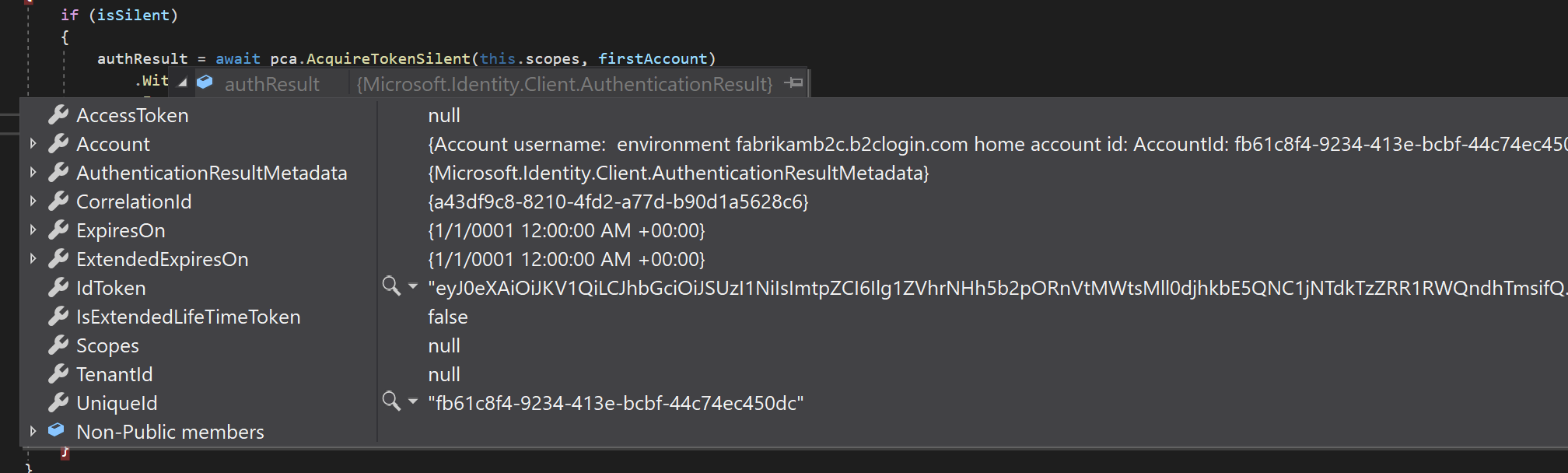
no token because the API only accepts the su_si policy, but i've signed in.
In fact, all of the policies, except su_si should be done w/an interactive authentication because it is expected to have some kind of user interaction, such as resetting the password, editing the profile or something else.
Also, the first 3 steps in your repro are how we suggest doing this. Interactive call (or silent w/su_si) and then edit profile. And you're setting the prompt correctly, so as you saw B2C will use the active session cookie to determine if the user has already signed in. In B2C, it is excepted that the su_si policy goes first, as in the user has to sign-up or sign-in to the application before they can edit the profile or do anything else. So it's the overarching policy in a way, which is why we use it for silent auth because if there is a valid account and token, the user will not be shown a UI.
Let us know if this helps and/or unblocks you, or if something is not clear, or anything else.
Again, thanks for the repro.
jennyf19
on 9 Sep 2020
metoo :) In fact for me, it doesn't even work when user is authenticated through AcquireTokenInteractive. Xamarin Forms (IOS + Android) is what I am using. I have retrieved my first token using an embedded web view.
@jennyf19
@Coder-RKV I'd need to see your code, do you have a link or repro you can share? thx.
jennyf19
on 9 Sep 2020
I am not sure I understand sorry.
Here, I have two accounts in the cache, as expected, one for susi and one for edit profile:
Why do you have one for edit profile? In the repro 3rd step I only have 1 account when calling "pca.GetAccountsAsync()" and that is susi.
Furthermore calling this returns null:
GetAccountByPolicy(accounts, AuthB2C.PolicyEditProfile);
Yet when calling the following code in Step 3 the Edit Profile dialog opens perfectly (no additional auth required).
var ar = await pca.AcquireTokenInteractive(this.scopes)
    .WithAccount(account)
    .WithB2CAuthority(AuthB2C.AuthorityEditProfile)
    .WithPrompt(Prompt.NoPrompt)
    .ExecuteAsync();
MSAL is using the default authority, which is su_si authority, and i get a failure, which says the edit_profile endpoint is not valid w/su_si (these are different authorization servers).
If I understand what you are saying then perhaps the above AT interactive call should not actually work as I am passing null in as the account? I am accessing the edit_profile endpoint only ever having authorised against susi? How does it work when I am susi interactive and not susi silent?
RhomGit
on 9 Sep 2020
Why do you have one for edit profile? In the repro 3rd step I only have 1 account when calling "pca.GetAccountsAsync()" and that is susi.
I have two because I signed in initially (step 2) and got a token and then did edit profile (step 3), so now i have two accounts in the cache. When I closed the app, I did not sign out, so the accounts were still in the cache when I reloaded the app.
Furthermore calling this returns null:
right, because you don't have an account for that policy in the cache.
If I understand what you are saying then perhaps the above AT interactive call should not actually work as I am passing null in as the account?
.WithAccount() acts like the login hint, so it can "pre-fill" the sign-in dialog w/the username. You actually don't need this with an interactive call, and with B2C, we don't know the preferred username anyway, so best to not use it. Even if there were a "null" account, it just means the UI will not get prepopulated.
I am accessing the edit_profile endpoint only ever having authorised against susi?
Right. This is what I mentioned in the other reply. So you have signed in w/susi, AND you have an active session cookie w/B2C. So when you sign in w/edit_profile, B2C knows, via the session cookie, that you are the same user and therefore, they do not send you to the sign-in screen again, but directly to the edit_profile page, this is why we recommend sending "no_prompt" because it allows B2C to determine which sign-in screen to show based on the active session cookie.
How does it work when I am susi interactive and not susi silent?
Not sure what you mean here, can you explain?
jennyf19
on 9 Sep 2020
Hmm, that is a different result to me.
- Sign out
- Create Auth object
- Interactive sign in (using your own B2C values)
Edit Profile (should work)
a) I only have a susi account
b) B2C uses the 'active session cookie' to use the susi account to validate the edit_profile B2C authority
c) it worksClose and reopen the App
- Create Auth object
- Silently sign in
- Put a breakpoint on Auth.EditProfile and click the button.
a) I still only have a susi account
b) B2C does not have an 'active session cookie' so can't use the susi account to validate the edit_profile B2C authority
c) requires password reentry
I think the magic of the active session cookie is what had me confused.
Thanks for taking the time to explain this as I didn't realise there was a difference. Sorry for wasting your time.
RhomGit
on 10 Sep 2020
@RhomGit not a waste of time at all. we recently did work in a related area, so it was good to triple check we didn't have any issues there. I really appreciate the repro and quick responses from you. very helpful. if anything else comes up, let us know.
Also, @jmprieur and I realized this is not very well documented, not from us, nor B2C, so something we can improve for sure.
jennyf19
on 10 Sep 2020
metoo :) In fact for me, it doesn't even work when user is authenticated through AcquireTokenInteractive. Xamarin Forms (IOS + Android) is what I am using. I have retrieved my first token using an embedded web view.
@jennyf19
@Coder-RKV I'd need to see your code, do you have a link or repro you can share? thx.
@jennyf19 For repro, we can use exactly the same as https://github.com/Azure-Samples/active-directory-b2c-xamarin-native/blob/master/UserDetailsClient/ and just add an WithUseEmbeddedView(true) in the SignInInteractively.
Please note that the above implementation works for Android.
Coder-RKV
on 11 Sep 2020
@Coder-RKV if that's the case, then I can't repro the issue, as the sample referenced works as expected. Probably easier to share a repro or link to the code. thx.
jennyf19
on 11 Sep 2020
@Coder-RKV if that's the case, then I can't repro the issue, as the sample referenced works as expected. Probably easier to share a repro or link to the code. thx.
@jennyf19 Thank you for taking time to reply. However, wondering the repro would just be the same. The sample referenced works as expected without the Embedded Web View, the moment we introduce it, it just works in Android.
Snippets of the changes
private async Task<UserContext> SignInInteractively()
        {

            IEnumerable<IAccount> accounts = await _pca.GetAccountsAsync();

            AuthenticationResult authResult = await _pca.AcquireTokenInteractive(B2CConstants.Scopes)
                .WithAccount(GetAccountByPolicy(accounts, B2CConstants.PolicyLogin))
                .WithB2CAuthority(B2CConstants.AuthorityLogIn)
                .WithUseEmbeddedWebView(true)
                .ExecuteAsync();

            // Store the access token securely for later use.
            ///
            var newContext = UpdateUserInfo(authResult);

            return newContext;
        }
Custom edit profile policy to verify email using MFA. Tried with the out of the box Edit policy as well.
public async Task<bool> EmailVerification()
        {
            bool isVerified;
            try
            {
                IEnumerable<IAccount> accounts = await _pca.GetAccountsAsync();

                AuthenticationResult authResult = await _pca.AcquireTokenInteractive(B2CConstants.Scopes)
                    .WithAccount(accounts.FirstOrDefault())
                    .WithAuthority(B2CConstants.AuthorityEmailVerification)
                    .WithUseEmbeddedWebView(true)
                    .WithPrompt(Prompt.NoPrompt)
                    .ExecuteAsync();

                var newContext = UpdateUserInfo(authResult);

                isVerified = newContext.EmailVerified;
            }
            catch (MsalUiRequiredException)
            {
                isVerified = false;
            }

            return isVerified;
        }
No other change. I thought it might be due to the ParentActivity window, hence also added the below code for getting the current view controller.
var window = UIApplication.SharedApplication.KeyWindow;
            var vc = window.RootViewController;
            while (vc.PresentedViewController != null)
            {
                vc = vc.PresentedViewController;
            }
            return vc;
It doesn't work as expected with or without the above piece of code for IOS.
Coder-RKV
on 11 Sep 2020
@Coder-RKV you need to have .WithB2CAuthority(B2CConstants.AuthorityEmailVerification) not .WithAuthority(B2CConstants.AuthorityEmailVerification)
jennyf19
on 11 Sep 2020
@Coder-RKV you need to have
.WithB2CAuthority(B2CConstants.AuthorityEmailVerification)not.WithAuthority(B2CConstants.AuthorityEmailVerification)
Tried it, no luck,
Coder-RKV
on 11 Sep 2020
@Coder-RKV you can open a new issue w/exactly what the issue is & provide a repro. thanks.
jennyf19
on 11 Sep 2020
Related issues
 johanalex566
·
3Comments
johanalex566
·
3Comments
 jsquire
·
4Comments
jsquire
·
4Comments
 crmann1
·
5Comments
jmprieur
·
5Comments
crmann1
·
5Comments
jmprieur
·
5Comments
 saketkataruka
·
5Comments
saketkataruka
·
5Comments