Microsoft-authentication-library-for-dotnet: [Bug] Unable to view Keypad on IOS on Input focus - Xamarin Forms - EmbeddedWebView
Which Version of MSAL are you using ?
4.17.1
Platform
Xamarin Forms
What authentication flow has the issue?
Other?
On the IOS Simulators (haven't yet tested on the phone), unable to see the keypad opening for any input fields. Tried IOS 11 (13.6.1) and IOS 8 (13.6.1). I am using EmbeddedWebView to display.
Is this a new or existing app?
App is in development
Expected behavior
Keypad should open on the focus of the input field. It works as expected in Android.
Actual behavior
Keypad doesn't open up on focus of input field in IOS. In the bottom able to see a bar with Done link and up / down arrows to toggle between the input fields but the keypad itself is not showing up.
Possible Solution
Not sure
 Coder-RKV
All 22 comments
thanks @Coder-RKV can you provide screenshots or a recording of what you're seeing. thanks.
 jennyf19
on 28 Aug 2020
jennyf19
on 28 Aug 2020
@jennyf19 Please find attached.
The input is in focus, but unable to see the keypad.
Just seeing a Done button to come out of the focus for the input.

Coder-RKV
on 28 Aug 2020
@Coder-RKV I checked w/our iOS team, and this is an issue w/Apple. They reported the issue a few days ago and are waiting to hear back. Will mark as external for now. thanks for reporting.
jennyf19
on 28 Aug 2020
@jennyf19 Thank you for confirmation. Just wanted to double check on one thing though. Will it work on publishing to the device?
Perhaps its a simulator only issue?
Coder-RKV
on 28 Aug 2020
@Coder-RKV our iOS team first noticed on a device, and sent that feedback to Apple, so to answer your question, I doubt this will work on a device. If i get more info from them, i'll update this issue.
jennyf19
on 28 Aug 2020
@jennyf19 Thanks. So in essence the library version is unstable / unusable for IOS as of now.
Coder-RKV
on 28 Aug 2020
@Coder-RKV more like an issue w/Apple, not us. You can use system browser until things w/Apple get resolved.
@kaisong1990 is working w/Apple on this, & can chime in and answer more questions if needed.
jennyf19
on 28 Aug 2020
@jennyf19 Thank you. BTW, observed the same for without EmbeddedWebView(true) i.e. the system browser (at least on the simulator).
Coder-RKV
on 28 Aug 2020
@kaisong1990 - @Coder-RKV is reporting the same on simulator.
@trwalke can you try this out (embedded & system browser) w/the same os version - IOS 11 (13.6.1) and IOS 8 (13.6.1).? thx.
jennyf19
on 28 Aug 2020
@Coder-RKV We are facing the very similar issue on iOS side (real device) when user tries to type in username/password in the webView, the keyboard shows as transparent. Discussed with the web team, and they confirmed there is no special handling before showing the keyboard. We have filled a feedback to Apple regarding this issue and pending their response at the moment.
 kaisong1990
on 28 Aug 2020
kaisong1990
on 28 Aug 2020
@kaisong1990 Thank you for confirmation. Will keep an eye on this.
Coder-RKV
on 28 Aug 2020
@kaisong1990 @jennyf19 Any updates? This is actually a critical blocker to use MSAL library for our project.
Coder-RKV
on 28 Aug 2020
@Coder-RKV We are waiting to hear back from Apple. The issue is external to MSAL. @kaisong1990 will update when he has info.
jennyf19
on 28 Aug 2020
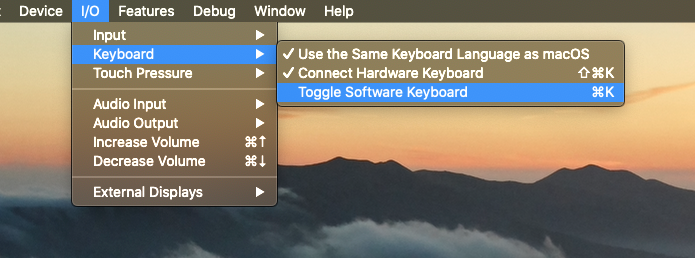
@Coder-RKV One more clarification from you. Based on the description, it said the keyboard is not showing, and the screenshot shows the arrow and done button at the very bottom. Can you try to type cmd+k from your physical keyboard when on simulator to see if you can see the iOS keyboard?
Or manually turn on the software keyboard in below settings for simulator
kaisong1990
on 28 Aug 2020
@kaisong1990 oh my god... that's like a crazy moment... do you think it'll work on the device as well then?
I'll try to publish it and check it anyway
Coder-RKV
on 28 Aug 2020
@Coder-RKV This is a feature on iOS simulator to let developers see more content during development. It should not happen on real device
kaisong1990
on 28 Aug 2020
@kaisong1990 @jennyf19 On an iPhone X OS 13.5.1, I am able to view the number keypad and the email (alphanumeric) keypad. With the cmd x, I'm able to see in simulator too.
Coder-RKV
on 28 Aug 2020
@Coder-RKV can we close this issue? @trwalke is going to investigate the other iOS/Apple issue and open a new issue if needed. sound good?
jennyf19
on 29 Aug 2020
@jennyf19 Closing the issue as am able to view the input keypad.
Also, could you please provide a one liner for the open iOS/Apple Issue so that we can be aligned on the same and if it has any impact.
Coder-RKV
on 29 Aug 2020
@kaisong1990 can provide a one-liner and @trwalke will update if MSAL .NET is impacted
jennyf19
on 29 Aug 2020
@kaisong1990 @trwalke @jennyf19 One-liner and impact please
Coder-RKV
on 2 Sep 2020
The issue we saw earlier is that when user taps textfield from sign in flow on web view, for example, email address or password field, the keyboard window will present from bottom. However, the keyboard itself is transparent. We found this issue during one of our bug bash from real device. And there is no constant way to reproduce this issue. The issue can be fixed by reopen the app or navigate web page back and force. It happens very rare.
We have reported the issue to Apple, and didn't see any major impact so far.
kaisong1990
on 2 Sep 2020
Related issues
 chrisevans9629
·
5Comments
chrisevans9629
·
5Comments
 steffos
·
4Comments
steffos
·
4Comments
 hausec
·
3Comments
hausec
·
3Comments
 jsquire
·
4Comments
jsquire
·
4Comments
 alexzaitzev
·
5Comments
alexzaitzev
·
5Comments
Most helpful comment
@kaisong1990 @jennyf19 On an iPhone X OS 13.5.1, I am able to view the number keypad and the email (alphanumeric) keypad. With the cmd x, I'm able to see in simulator too.