Microsoft-authentication-library-for-dotnet: Facebook IDP throwing state mismatch error (External Identities)
Which Version of MSAL are you using ?
Downloaded MSAL Desktop app from QuickStarts inside Portal AAD Applications blade.
(Quickstart: Acquire a token and call Microsoft Graph API from a Windows desktop app)
Platform
net45
What authentication flow has the issue?
- Desktop
- [Yes ] Interactive
Is this a new or existing app?
New App. Created for testing
Repro
- Follow below doc to enable self-service signup and add Facebook IDP
- https://docs.microsoft.com/en-in/azure/active-directory/b2b/self-service-sign-up-user-flow
- Download the MSAL desktop app from quick start (Inside AAD -> Application) and start running the application.
- Choose Facebook IDP and complete the Signup/ Signin process
Fiddler Trances
StateMismatch FB Trace.zip
Expected behavior
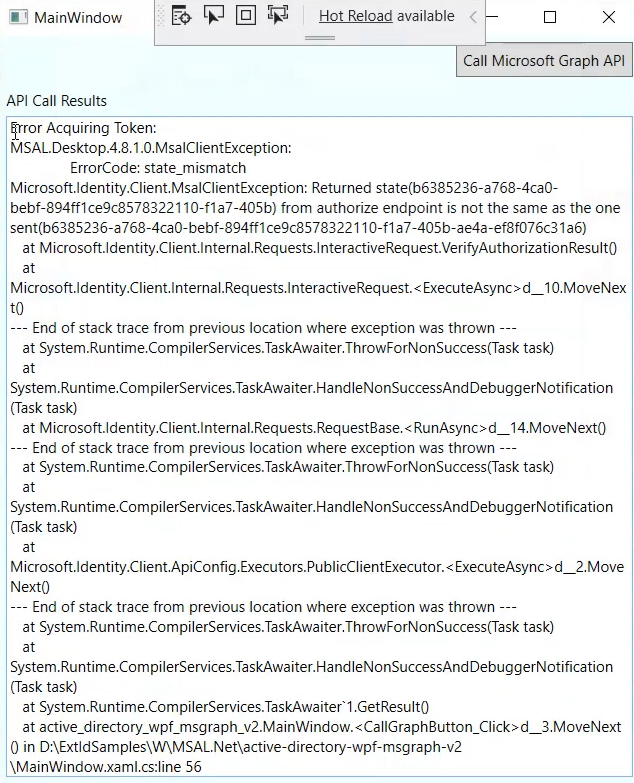
MSAL.Net app should allow Facebook users to login. We tried with less number of characters in email address and it is working fine, if we have more characters in email address (ex: [email protected]), MSAL.Net start throwing state mismatch exception.
Actual behavior
If email have more characters, MSAL throwing state mismatch exception. we tried with less number of characters it is working fine.
Possible Solution
Additional context/ Logs / Screenshots
 pottabathini
All 21 comments
I was able to repro the scenario. For some reason when the username is long there is a mismatch in the original state and state returned in the auth result. Which is validated here. I debugged and found that the state returned in the auth result is truncated when the username is long. Also, there is no change in length of state for a long username.
 neha-bhargava
on 28 Sep 2020
neha-bhargava
on 28 Sep 2020
This is a bug in MSAL. The fiddler trace contains the correct state in the auth result while the result is truncated here: https://github.com/AzureAD/microsoft-authentication-library-for-dotnet/blob/271cfbb35667525cd18287e0bf887206dea0ab44/src/client/Microsoft.Identity.Client/Platforms/netdesktop/EmbeddedWebUi/WindowsFormsWebAuthenticationDialogBase.cs#L198.
Looks like the Uri.OriginalString has a cap for 2083 characters.
neha-bhargava
on 30 Sep 2020
So, you're saying that MSAL intercepts the full url and that .net's url.OriginalString caps it to 2083? I'm not sure the problem is with url.OriginalString. The size limitation is typically imposed by the browsers, see https://stackoverflow.com/questions/29458445/what-is-a-safe-maximum-length-a-segment-in-a-url-path-should-be/33733386#:~:text=According%20to%20the%20HTTP%20spec,remain%20under%20approximately%202000%20characters.
Url size is a well known limitation which has caused a ton of problems in the past. Only reliable way against it is to ensure url is smaller.
 bgavrilMS
on 30 Sep 2020
bgavrilMS
on 30 Sep 2020
If on .net classic, it may be that the embedded webview has this limitation, although I'm not sure you can use the system webview with facebook because it may not allow setting http://localhost:1234 as redirect uri....
bgavrilMS
on 30 Sep 2020
Would we think that moving to Edgium would solve the issue @bgavrilMS ?
 jmprieur
on 30 Sep 2020
jmprieur
on 30 Sep 2020
No idea, but possible :). @neha-bhargava might want to investigate furher in the code first to see if we truncate the url somewhere.
bgavrilMS
on 30 Sep 2020
@neha-bhargava have identified this to be a bug in MSAL or incoming request as fiddler shows we get the right data back.
 henrik-me
on 1 Oct 2020
henrik-me
on 1 Oct 2020
There are 3 ways I can see fixing or mitigating this problem:
- Use WebView2 instead of the old InternetExplorer control - blocked until WebView2 API is GA'ed (end of year) - tracking issue https://github.com/AzureAD/microsoft-authentication-library-for-dotnet/issues/1398. It would also require an investigation if WebView2 does not have the same limitation.
- Use the system web view instead. However, this would require using a redirect uri of "http://localhost" which I believe Facebook does not allow (needs confirmation)
- Ignore the
stateparam (at least for B2C). We are in any case doing PKCE, so is there any benefit from using the state param? (@henrik-me who proposed the feature originally).
bgavrilMS
on 5 Oct 2020
@neha-bhargava @bgavrilMS state validation is protocol specific. The added complexity of the state param is suggested in the spec.
Where in this case is the truncating happening, reading the above that seems like it's happening in the uri class? Can you pls. help clarify exactly what is causing the truncation?
henrik-me
on 5 Oct 2020
@henrik-me the URI class does not have any cap on the string values. This is something that seems to be happening at the browser end.
neha-bhargava
on 5 Oct 2020
@neha-bhargava can you pls. confirm where the issue is?
The state param is in place for CSRF protection. Not sure if it's a great idea to lax this requirement. Will require a protocol discussion.
What is the current limitation in the upn size?
henrik-me
on 5 Oct 2020
@henrik-me While debugging I found that the URL always have 2083 characters and same is mentioned here: https://support.microsoft.com/en-us/help/208427/maximum-url-length-is-2-083-characters-in-internet-explorer
neha-bhargava
on 5 Oct 2020
Thanks. What does this mean in terms of max length for the upn (email address).
Let's please ensure this limitation is documented in the wiki page and is added as a remark with an aka.ms link to the relevant api's. Also we should at least add this information to the exception. Let's also discuss this with the protocol people to explore if we can mitigate this issue some other way.
henrik-me
on 5 Oct 2020
The upn I used was 35 (including @gmail.com) characters long. The mentioned upn is also more than 35 characters. The url contains parameters: code, state and session_state. Looks like the longer username adds more characters to token. It might only be happening for fb because the username has '@gmail.com' added. Which makes it even bigger. For IDP like gmail, it has a cap on the length of username which is 30 characters.
neha-bhargava
on 5 Oct 2020
@neha-bhargava : can we pls. document max upn lenght and add a aka.ms link to the exception pointing to a wiki page where we describe this issue? Also did you investigate using system browser? E.g. it may be that we can recommend using Edge, Chrome or another browser as a work around?
@bgavrilMS @neha-bhargava : makes sense to start a conversation with the ests team on mitigations (e.g. shortening the state param) and potential ways of addressing this. Also it may be possible that we can work with Facebook on the part of the upn after the @ sign. Also curious if you can identify other workarounds.
henrik-me
on 6 Oct 2020
@henrik-me This is a desktop app, we don't have an option to use the system browser.
neha-bhargava
on 6 Oct 2020
@neha-bhargava - yes, you do, just use .WithEmbeddedBrowser(false) and be mindful of the redirect uri (http://localhost or http://localhost:1234). The problem is that you'll need to configure this redirect uri on the IDP - facebook, and I don't think they allow http://localhost nor http://localhost:1234
bgavrilMS
on 6 Oct 2020
@bgavrilMS Yes, I was able to use .WithUseEmbeddedWebView(false) and add the redirect uri http://localhost and it worked. Thanks
neha-bhargava
on 7 Oct 2020
@pottabathini this is a limitation of embedded web view as it uses Internet Explorer and it truncates the url to 2083 characters causing the state returned in the url by the server to be truncated and hence mismatch with the original state. Please try to use .WithUseEmbeddedWebView(false) and add a redirect uri as mentioned above. You might have to add the redirect uri to your app too in the portal. Please see https://github.com/AzureAD/microsoft-authentication-library-for-dotnet/wiki/System-Browser-on-.Net-Core#embedded-vs-system-web-ui
neha-bhargava
on 7 Oct 2020
Very cool, we have a path forward I think. Would be good to record this on the "known issues" page - https://github.com/AzureAD/microsoft-authentication-library-for-dotnet/wiki/known%20issues
bgavrilMS
on 7 Oct 2020
@neha-bhargava : would be great to get the max length of the urn documented. Aside: Seems like the aka.ms link should point to the page Bogdan outlines with a href to the section on state parameter mismatch instead of it's own wiki page?
henrik-me
on 7 Oct 2020
Related issues
 jennyf19
·
5Comments
jennyf19
·
5Comments
 msminski
·
6Comments
msminski
·
6Comments
 bemartin
·
3Comments
bemartin
·
3Comments
 yhvicey
·
3Comments
yhvicey
·
3Comments
 jsquire
·
4Comments
jsquire
·
4Comments
Most helpful comment
Very cool, we have a path forward I think. Would be good to record this on the "known issues" page - https://github.com/AzureAD/microsoft-authentication-library-for-dotnet/wiki/known%20issues