Microsoft-authentication-library-for-dotnet: [Bug] Windows integrated authentication Azure AD and WinForms, Integrated Windows Auth is not supported for managed users
Which Version of MSAL are you using ?
MSAL 4.10
Platform
.net 4.6.1
What authentication flow has the issue?
- Desktop / Mobile
- [ ] Interactive
- [x] Integrated Windows Auth
- [ ] Username Password
- [ ] Device code flow (browserless)
- Web App
- [ ] Authorization code
- [ ] OBO
- Web API
- [ ] OBO
Other? - please describe;
Is this a new or existing app?
c. This is a new app or experiment
Repro
using:
authResult = await app.AcquireTokenSilent(scopes, accounts.FirstOrDefault())
and
authResult = await app.AcquireTokenByIntegratedWindowsAuth(scopes)
_Get error: Integrated Windows Auth is not supported for managed users_
using the method:
app.AcquireTokenInteractive
The application shows a prompt for the user to select what account wants to use (the prompt shows connected to windows) and I don't need to enter the password, right after I click the user it sings in and gets the token.
After I get the token and it is saved using PublicClientApp.UserTokenCache the next logins even if the token is expired I don't need to select the account, the user sing in automatically. using the method app.AcquireTokenSilent
Expected behavior
it should get the token without user interaction
Actual behavior
methods returns:
```
Microsoft.Identity.Client.MsalClientException: Integrated Windows Auth is not supported for managed users. See https://aka.ms/msal-net-iwa for details.
at Microsoft.Identity.Client.Internal.Requests.IntegratedWindowsAuthRequest
```
Possible Solution
Additional context/ Logs / Screenshots
I have tried 2 options (none worked):
- A user created in Windows AD and then synced to AAD
- A user created in AAD and then created in Windows AD
other info:
- Treat application as a public client is marked yes in the app registration.
- I used the same app registration with a web application (SPA) and using Microsoft Edge I can login without the user interaction, it signs in automatically
- in azure AD -> Seamless single sign-on | Enabled | 1 domain
 mike7ang1rdz
All 14 comments
@trwalke - I think you investigated this some time back - is there anything else users need to do to get this flow working for managed users?
 bgavrilMS
on 2 Apr 2020
bgavrilMS
on 2 Apr 2020
I have this same issue, but we are using the staged rollout functionality.
 jabbera
on 3 Apr 2020
jabbera
on 3 Apr 2020
This is a configuration issue. AAD must report that the user is "federated". If it reports that the user is "managed", then IWA doesn't work.
You must configure AD to be federated.
bgavrilMS
on 14 May 2020
@bgavrilMS
You must configure AD to be federated.
Why doesn’t MSAL support Seamless SSO? I can be unfederated and login to SSMS with a password or any web page that supports Seamless SSO. This seems natural to support as part of the integrated workflow no?
https://docs.microsoft.com/en-us/azure/sql-database/sql-database-aad-authentication-configure?tabs=azure-powershell#active-directory-integrated-authentication
jabbera
on 14 May 2020
@jabbera it does.
@trwalke which is the MSAL.NET minimum version to get seamless SSO.
 jmprieur
on 15 May 2020
jmprieur
on 15 May 2020
I'm pretty sure MSAL 4.x supports it, but it won't hurt to upgrade to latest MSAL to verify.
We make a WS-Trust query and the endpoint must report the user as being federated. This is how seamless SSO works. If user appears to be "managed", there is a configuration issue. That's my understanding of it. @trwalke can confirm.
bgavrilMS
on 15 May 2020
Thanks! I tested this and ran into another issue I submitted but it looks like it does!
jabbera
on 15 May 2020
I'm still a little confused, we don't want to configure AD as federated. is this a MSAL bug or not?, as @jabbera mentioned a seamless SSO should be permitted transparently.
I'm using MSAL 4.10
mike7ang1rdz
on 20 May 2020
@mike7ang1rdz this is not a MSAL issue. MSAL can only perform SSO if the user realm reports back the correct response. The environment needs to be configured properly for this to work with MSAL.
i believe this can help explain a little more
https://docs.microsoft.com/en-us/azure/active-directory/hybrid/how-to-connect-sso-quick-start
 trwalke
on 20 May 2020
trwalke
on 20 May 2020
Also, I can confirm the desktop SSO is compatible with version of MSAL starting at 4
trwalke
on 20 May 2020
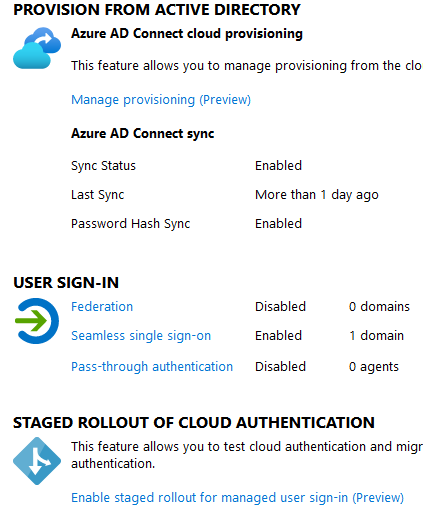
I think there is a bug as @bgavrilMS said that AAD must report a federated user, even if the seamless sso does not need a federated configuration forcibly... anyway we don't want to enable this feature.. the image above shows that seamless SSO is enabled.
Do you have a work around?
mike7ang1rdz
on 21 May 2020
If I remember correctly, enabling seamless SSO would make the user discovery call report back a "federated" user without federation. MSAL makes the following call (please replace with your own user):
https://login.microsoftonline.com/common/userrealm/[email protected]?api-version=1.0
If seamless SSO was not configured correctly, please open a case with support to get some help. I am not sure anybody on the SDK can help further.
bgavrilMS
on 27 May 2020
Closing as this is external, not related to the library, but configuration
jmprieur
on 2 Jun 2020
Can anyone confirm this was a bug ?
If so, can anyone point to an external issue on Azure AD side ?
 geoffreygeslin
on 1 Apr 2021
geoffreygeslin
on 1 Apr 2021
Related issues
 jsquire
·
4Comments
jsquire
·
4Comments
 chrisevans9629
·
5Comments
chrisevans9629
·
5Comments
 johanalex566
·
3Comments
johanalex566
·
3Comments
 crmann1
·
5Comments
crmann1
·
5Comments
 23W
·
5Comments
23W
·
5Comments