Microsoft-authentication-library-for-dotnet: [Feature Request] If Authority is Azure B2C then use "name" as "perferred_username"
Is your feature request related to a problem? Please describe.
Currently when requesting a token from using app.AcquireTokenByUsernamePassword the username is not getting set when app.GetAccountsAsync() is called. This is causing the lookup in the token cache to be difficult to use. I would like to be able to look in cache for username property to filter the account.
According to documentation here https://docs.microsoft.com/en-us/azure/active-directory/develop/msal-net-aad-b2c-considerations it says the following as a workaround.
Mitigation for "Missing from the token response"
One option is to use the "name" claim as the preferred username. The process is mentioned in this B2C doc -> "In the Return claim column, choose the claims you want returned in the authorization tokens sent back to your application after a successful profile editing experience. For example, select Display Name, Postal Code.”
This seems to imply that if you return a "name" claim then "preferred_username" should use "name" if "preferred_username" is not provided. I am using local user accounts in azure b2c and I do see that the name property is returned properly in the IdToken so in theory everything should work properly unless I have a misunderstanding.
Looking at the code https://github.com/AzureAD/microsoft-authentication-library-for-dotnet/blob/master/src/client/Microsoft.Identity.Client/TokenCache.ITokenCacheInternal.cs#L192 I don't see currently how its possible it uses "name" instead of "preferred_username" when the Authority is B2C. The code only seems to be conditional based on if the Authority is Adfs.
Describe the solution you'd like
I would like if the Authority is B2C then it would use the "name" property instead of "preferred_username" if "preferred_username" is null or empty like below
  private static string GetPreferredUsernameFromIdToken(AuthorityType authority, IdToken idToken)
        {
            // The preferred_username value cannot be null or empty in order to comply with the ADAL/MSAL Unified cache schema.
            // It will be set to "preferred_username not in idtoken"
            if (idToken == null)
            {
                return NullPreferredUsernameDisplayLabel;
            }

            var preferredUsername = idToken.PreferredUsername;

            if (!string.IsNullOrWhiteSpace(preferredUsername))
            {
                return preferredUsername;
            }

            preferredUsername = NullPreferredUsernameDisplayLabel;

            switch (authority)
            {
                case AuthorityType.Adfs:
                    //The direct to adfs scenario does not return preferred_username in the id token so it needs to be set to the upn
                    preferredUsername = !string.IsNullOrEmpty(idToken.Upn)
                        ? idToken.Upn
                        : NullPreferredUsernameDisplayLabel;
                    break;
                case AuthorityType.B2C:
                    preferredUsername = !string.IsNullOrEmpty(idToken.Name)
                        ? idToken.Name
                        : NullPreferredUsernameDisplayLabel;
                    break;
            }

            return preferredUsername;
        }
Describe alternatives you've considered
Alternate I thought about is to pass around the oid or sub in the token claims and then when calling AcquireTokenSilent filter the Account collection from the GetAccountsAsync call with the users object id. It would be easier to have the username to filter on and according to docs it should be a viable solution unless I'm missing something.
Additional context
I might be missing something and this is already possible in some manner. I have tried to do research before posting this and can't really find anything helpful. I did see a similar question https://github.com/Azure-Samples/active-directory-b2c-dotnetcore-webapp/issues/64 in this repo and replied here before I started digging in MSAL source and found that it doesn't look like the scenario is supported in code yet.
 chris-skuvault
All 6 comments
Thanks for the detailed feature request @chris-skuvault. @jmprieur , @jennyf19 - what do you think?
 bgavrilMS
on 27 Mar 2020
bgavrilMS
on 27 Mar 2020
Thanks @chris-skuvault ...I answered in the other issue as well. Enabling the "name" claim in the id_token means you can filter the name out and display it to the user, if you want. You cannot get the user name from the MSAL Account, like you could with an AAD only application. Our MSAL cache just looks for the preferred_username value in the response from eSTS or AAD B2C, and due to the flexibility and customization of B2C, we do not know if customers will or will not enable these properties in the portal, so the work around is to use the id_token instead and enable the claims you want there.
Also, name is not guaranteed to be unique (preferred_username is unique) so it cannot be used as a cache key.
Closing, as won't fix (for now), but as B2C and AAD begin to move toward feature parity, we will be looking at all of these issues and how to address them.
 jennyf19
on 27 Mar 2020
jennyf19
on 27 Mar 2020
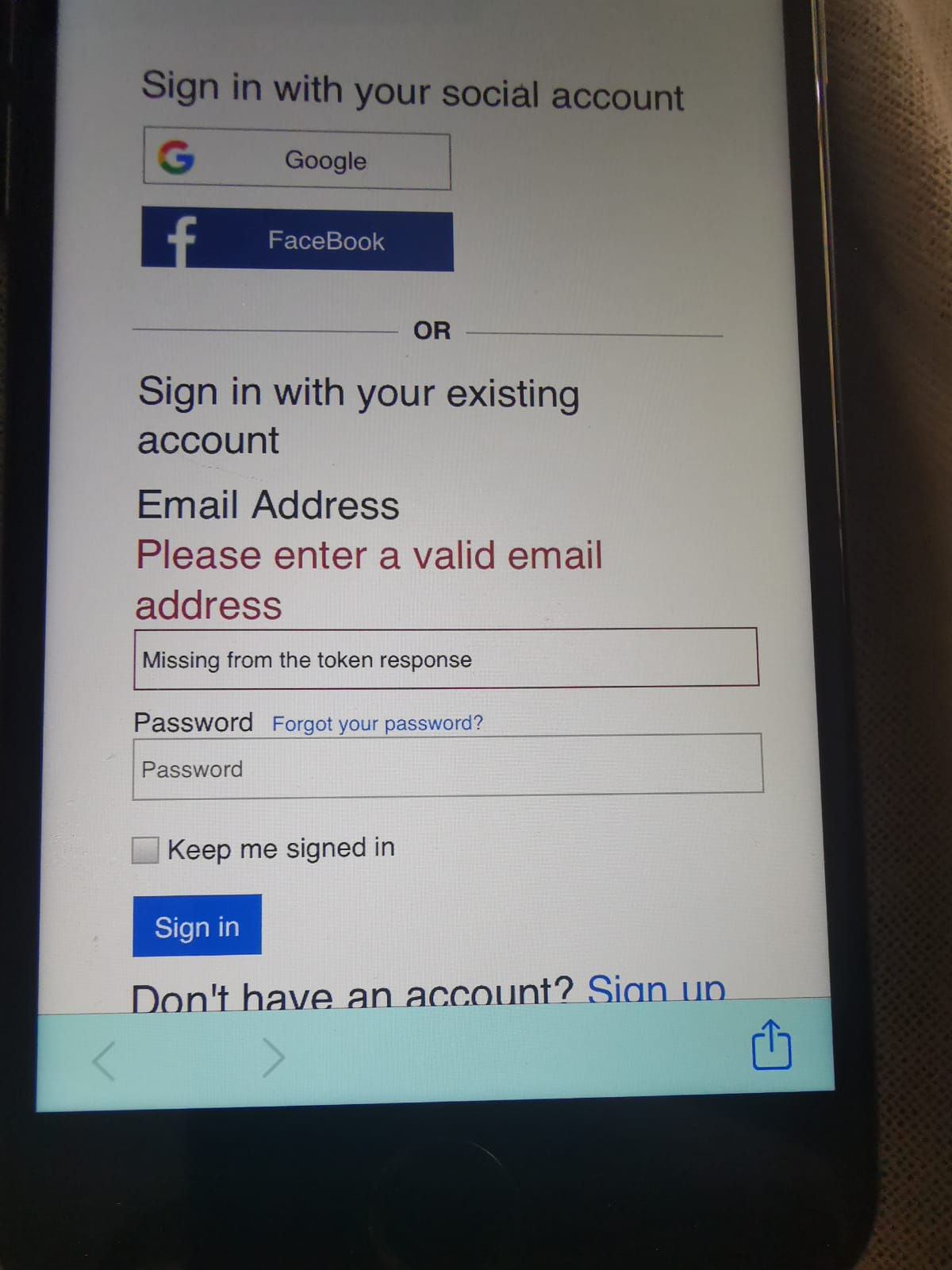
Hi all, I have parked this issue for some time while moving on with other requirements. I'm now coming back to customizing the B2C screens, however "Missing token from response". I have everything working fine and I am receiving a name claim from B2C, however when the token expires and needs to re-authenticate, the message is displayed in the email Text box of the login dialog. I may still be missing something but how do I either send an empty string to this field or pass the email address. The property username is read only. jennyf19 has offered advice in the past, but I am still unsure how to pass "name" to the page.
 ryanglenn79
on 14 Jul 2020
ryanglenn79
on 14 Jul 2020
@ryanglenn79
so this is coming from MSAL and the cache. B2C does not return a preferred_username, so we have no value to display there for B2C. And the webview is outside of the control of MSAL, it's presented by AAD B2C.
The way around this is to not send the account w/the request, as that's prepopulating the user name that you don't want, because that's the replacement username MSAL is using.
But, you can send in .WithLoginHint() and pass in any value that you parsed from the id_token (this only works if there is a token in the cache).
Your code could be something like this:
string email;
authResult = await pca.AcquireTokenInteractive(AuthB2C.scopes)
.WithLoginHint(email)
.WithParentActivityOrWindow(parentActivity)
.ExecuteAsync();
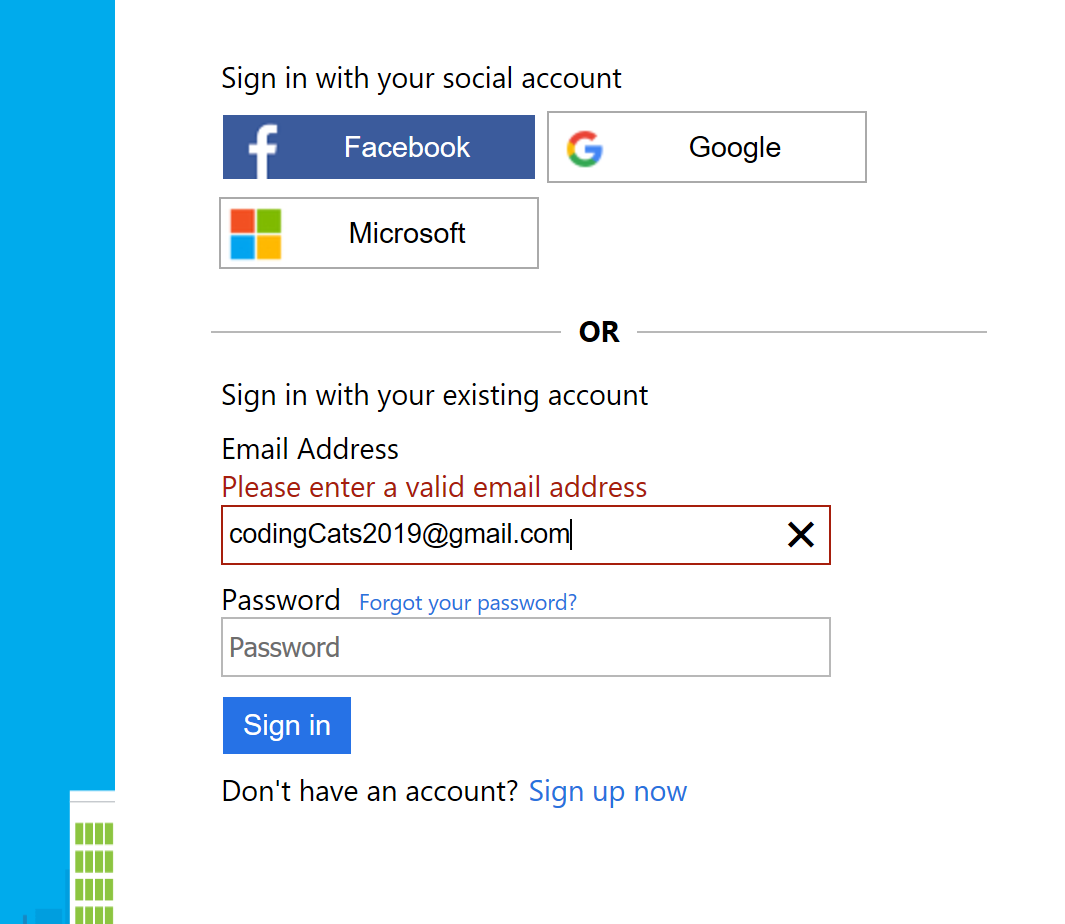
I got the email value when i parsed the id_token from the initial sign-in, and now it displays in the box, as you can see above.
Does that unblock you?
I'm not sure if LoginHint will work with non-AAD B2C accounts (ex. facebook, google), but if you are using system browser, it works really nice with the other IdPs as the user will sign in automatically if they have already signed in on their browser.
Hope this helps.
jennyf19
on 14 Jul 2020
@jennyf19, you are a genius, thank you so much. I was passing the account with the request. I was certain that it was required. Its working great now.
ryanglenn79
on 15 Jul 2020
@jennyf19 - great workaround! I wonder if MSAL could do more ...
- offer the IdToken as a dictionary of claim name / claim value so that developers don't have to parse it themselves
- Use the value of IdToken email if available as Account.Username if not other value is found?
bgavrilMS
on 15 Jul 2020
Related issues
 chrisevans9629
·
5Comments
chrisevans9629
·
5Comments
 saketkataruka
·
5Comments
saketkataruka
·
5Comments
 trwalke
·
4Comments
trwalke
·
4Comments
 johanalex566
·
3Comments
johanalex566
·
3Comments
 alexzaitzev
·
5Comments
alexzaitzev
·
5Comments
Most helpful comment
@jennyf19, you are a genius, thank you so much. I was passing the account with the request. I was certain that it was required. Its working great now.