Microsoft-authentication-library-for-dotnet: True or False : Is it normal that the "MsalAppBuilder.BuildConfidentialClientApplication()" and "AcquireTokenSilent" execution time is always around 300 to 400 miliseconds even after caching it?
According to the documentation, once the AcquireTokenSilent complete successfully, it should start using the cache to increase the performance. But, even if i'm using the cache, I don't see this performance improvement.
The documentation also specifiy the AcquireTokenSilent is now less network chatty. But, i don't see any improvement after the token is cache also. Any ideas why?
Which Version of MSAL are you using ?
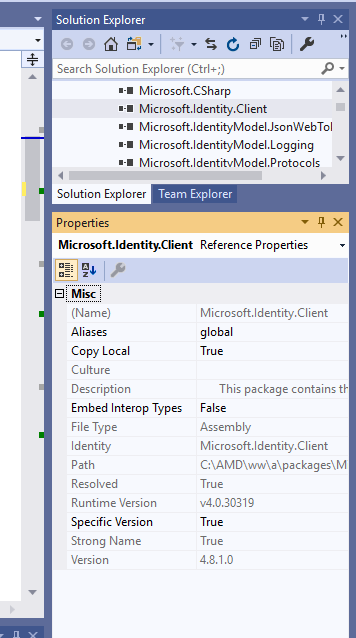
I'm not totally sure how to retrieve this information. But my project is using Microsoft.Identity.Client version 4.8.1.0. Is there an other way to retrieve this information?
Platform
.net 4.5.1 ... I will try to update this framework and see if it address the issue.
What authentication flow has the issue?
- Web App
- [ ] Authorization code
Repro
1 - Download the sample file at this address : https://github.com/Azure-Samples/active-directory-b2c-dotnet-webapp-and-webapi
2 - Configure the sample according to the documentation (https://github.com/Azure-Samples/active-directory-b2c-dotnet-webapp-and-webapi). But, you don't need to configure the webapi, because we won't use it.
3 - Replace the "Index" method in the "TaskController" with the following code.
    public async Task<ActionResult> Index()
    {
        try
        {
            JArray array = new JArray();
            for (int cmpt = 0; cmpt < 20; cmpt++)
            {
                Stopwatch watch = new Stopwatch();
                watch.Start();
                var scope = new string[] { Globals.ReadTasksScope };

                IConfidentialClientApplication cca = MsalAppBuilder.BuildConfidentialClientApplication();
                var accounts = await cca.GetAccountsAsync();
                AuthenticationResult result = await cca.AcquireTokenSilent(scope, accounts.FirstOrDefault()).ExecuteAsync();
                var bla = result.AccessToken;
                array.Add("cmpt : " + cmpt.ToString() + " : " + watch.ElapsedMilliseconds);

            }
            ViewBag.Tasks = array;
            return View();
        }
        catch (MsalUiRequiredException ex)
        {
            return new RedirectResult("/Account/SignUpSignIn?redirectUrl=/Tasks");
        }
        catch (Exception ex)
        {
            return ErrorAction("Error reading to do list: " + ex.Message);
        }
    }
4 - Launch the application
5 - Click the sign-in button. If you don't have an account, pleas create one.
6 - Once authenticate, push the "to-do list".
7 - Validate the execution time.
Expected behavior
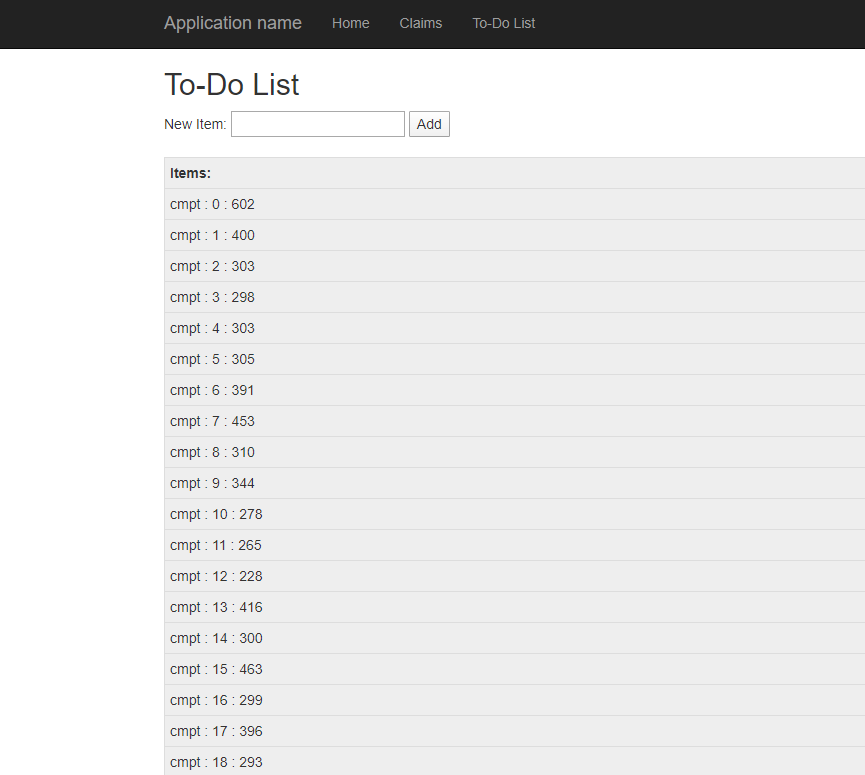
My understanding is that, once the token is cache, it should be faster. But, for some reason, I don't see any improvement in performance. The question is why?
Actual behavior
If I execute the previous code multiple time, the AcquireTokenSilent is always taking the same time to complete. Cache or no cache, it always taking the same amount of time.
Additional context/ Logs / Screenshots
 plemm98
All 7 comments
@jennyf19 : we really need to push the B2C part of the incremental web app tutorial.
 jmprieur
on 12 Feb 2020
jmprieur
on 12 Feb 2020
@plemm98: in a B2C app, there are accounts by policies. you need to select the right account.
Given you don't use the Web API, we recommend you look at this other sample: https://github.com/Azure-Samples/active-directory-aspnetcore-webapp-openidconnect-v2/tree/master/1-WebApp-OIDC/1-5-B2C which should be more performant.
jmprieur
on 12 Feb 2020
@jmprieur : Thank you for the answer. I'm just curious, is there an example in .net framework available as well?
Best regards,
plemm98
on 13 Feb 2020
@plemm98; no, I don't think so. I did not find any.
jmprieur
on 15 Feb 2020
@plemm98: in a B2C app, there are accounts by policies. you need to select the right account.
Given you don't use the Web API, we recommend you look at this other sample: https://github.com/Azure-Samples/active-directory-aspnetcore-webapp-openidconnect-v2/tree/master/1-WebApp-OIDC/1-5-B2C which should be more performant.
@jmprieur: Given that the referenced sample uses the built-in ASP.NET Core middleware for authentication and does not use MSAL, is the answer to this question then "True", it is expected that AcquireTokenSilent can take up to a half a second every time, regardless of any internal MSAL caching? And for those of us using a web API who therefore cannot use the built-in ASP.NET Core middleware, are we stuck with this performance hit, or should we be doing something other than calling AcquireTokenSilent to get an MSAL cached token (with automatic refresh when nearing access token expiration)?
 HarlowBurgess
on 15 Feb 2020
HarlowBurgess
on 15 Feb 2020
I found the answer, at least for my case. I was explicitly including openid and offline_access in Scopes. I removed those and AcquireTokenSilent went from 300ms-400ms to <5ms. Yay! Figured it out when I came across this:
[Bug] "offline_access" scope causes token cache misses
https://github.com/AzureAD/microsoft-authentication-library-for-dotnet/issues/1548
HarlowBurgess
on 17 Feb 2020
@HarlowBurgess - thank you for investigating this fully. I fixed that bug by making sure those scopes are not used when searching in the token cache. MSAL 4.8+ should have the fixes.
There are other OIDC reserved scopes that cause similar problems, mainly "email", that require more complex work - see https://github.com/AzureAD/microsoft-authentication-library-for-dotnet/issues/1547
 bgavrilMS
on 17 Feb 2020
bgavrilMS
on 17 Feb 2020
Related issues
 chrisevans9629
·
5Comments
chrisevans9629
·
5Comments
 trwalke
·
4Comments
trwalke
·
4Comments
 geoffreygeslin
·
4Comments
geoffreygeslin
·
4Comments
 23W
·
5Comments
23W
·
5Comments
 johanalex566
·
3Comments
johanalex566
·
3Comments