Microsoft-authentication-library-for-dotnet: [Bug] In WPF client the social login stack in the redirecting state
Which Version of MSAL are you using ?
4.3.1
Platform
.NET 4.6.2
What authentication flow has the issue?
- Desktop / Mobile
- [ X ] Interactive
- [ ] Integrated Windows Auth
- [ ] Username Password
- [ ] Device code flow (browserless)
Is this a new or existing app?
The app is in production
Repro
_Currently does not work the library at all if you call it from WPF. Even the sample application does not work, even my application does not work._
Repo:
Use any type of WPF application, like the sample app.
- Download and Build the Microsoft Azure Sample App: https://github.com/Azure-Samples/active-directory-b2c-dotnet-desktop
- Start it.
- Click on the Sign In button.
- Click any type of social provider. (Facebook, Google, Microsoft)
- The Window Title change to "Redirecting..." and stack in this state.
_Same with every WPF applications._
Check the sample code, but here is the method that called.
 authResult = await (app as PublicClientApplication).AcquireTokenInteractive(App.ApiScopes)
                    .WithParentActivityOrWindow(new WindowInteropHelper(this).Handle)
                    .WithAccount(GetAccountByPolicy(accounts, App.PolicySignUpSignIn))
                    .ExecuteAsync();
Expected behavior
A clear and concise description of what you expected to happen (or code).
Actual behavior
A clear and concise description of what happens, e.g. exception is thrown, UI freezes
Possible Solution
Maybe there is a problem on Microsoft B2C side, but the library does not handling this scenario.
Additional context/ Logs / Screenshots


 TuroczyX
All 36 comments
I am having this exact same problem, just started in the last day. We can still login using the local b2c accounts, but using OpenId Connect to link to Active Directory just hangs on the redirecting page.
I was also able to reproduce it in just a DotNet Framework Console application so it is not just WPF related.
 jondmcelroy
on 12 Sep 2019
jondmcelroy
on 12 Sep 2019
I think I found the issue and a workaround on it. But I still say this bug is on the B2C server side which the library can't handle properly.
So originally the Azure B2C used the login.microsoftonline.com URL, but several month ago the team introduce the b2clogin.com which is fine. Both URL are supported, and has to work, but from yesterday morning on the login.microsoftonline.com the redirect does not work. I have migrated my application to use b2clogin and with that everything is working. The migration document is not clear (especially the replay url part). It was painful, but with this updated URL at least works.
TuroczyX
on 12 Sep 2019
@TuroczyX Thanks for the update. Let me check w/B2C on this. Do you happen to have a correlationID from a failed request w/login.microsoftonline.com? And what exact AADB2C error code + message are you getting?
 jennyf19
on 12 Sep 2019
jennyf19
on 12 Sep 2019
@TuroczyX nothing has changed on the b2c side and I am able to target login.microsoftonline.com w/a policy. We will investigate further.
@jondmcelroy are you using login.microsoftonline.com or b2clogin.com?
i assume you both are having the redirect issue?
Which IdP's is this happening with (FB, Google, Microsoft, etc...or B2C local)?
jennyf19
on 12 Sep 2019
@jennyf19 Maybe on the code side not. I spent 2.5 hours with the Microsoft support and they confirmed there were no deployment since 22th of August. But something changed yesterday morning. I have created a video tutorial and fiddler trace about this issue, if you want I can send you in DM.
To answer your question. There were no AADB2C error code, due as we saw in the fiddler log, the response is 200 OK, but without any content. Normally a AADB2C code has to shown. That why I said the library should somehow manage this "special" situation.
_Which IdP's is this happening with (FB, Google, Microsoft, etc...or B2C local)?_
FB, Google, Microsoft, Azure AD has the same issue, if you use login.microsoftoneline.com inside a Windows application. In my case WPF. (Azure B2C local works properly) But you can download the sample and you can see it.
TuroczyX
on 12 Sep 2019
@jennyf19 I am using login.microsoftonline.com.
It just fails for me when trying to use the b2clogin.com.
I haven't done any of the work to move over: https://docs.microsoft.com/en-us/azure/active-directory-b2c/b2clogin. Looks painful.
I am currently in between microsoft support calls right now. We were trying to use fiddler while running the app, but it kept breaking the app when we turned on the decryption of https.
jondmcelroy
on 12 Sep 2019
@TuroczyX and @jondmcelroy you're welcome to send me logs/fiddler traces/videos/repro code/etc... -> [email protected]
If you don't want to send this info, can you send your b2c tenant and a correlation_id for one of the requests? Thanks so much.
jennyf19
on 12 Sep 2019
@jennyf19
Its easy to reproduce. Just create a dotnet framework console program.
Nuget in Microsoft.Identity.Client 4.3.1.
Fill out the variables (tenantid, clientid, policy and scopes) and run the following code:
var AzureB2CTenant = "<tenantId>";
var AzureAdBaseAuthority = "https://login.microsoftonline.com/tfp/{tenant}/{policy}/oauth2/v2.0/authorize";
var AzureB2CClientId = "<clientid>";
var AzureB2CPolicySignUpSignIn = "<policy>";
var AzureAdAuthoritySignUpSignIn = AzureAdBaseAuthority.Replace("{tenant}", AzureB2CTenant)
    .Replace("{policy}", AzureB2CPolicySignUpSignIn);
var AzureAdScopes = new List<string> { "<scopes>" };
var azureClientApplication = PublicClientApplicationBuilder.Create(AzureB2CClientId).WithAuthority(AzureAdAuthoritySignUpSignIn).Build();
var authenticationResult = await azureClientApplication
    .AcquireTokenInteractive(AzureAdScopes)
    .WithAuthority(AzureAdAuthoritySignUpSignIn)
    .WithPrompt(Prompt.SelectAccount)
    .ExecuteAsync();

Console.WriteLine(authenticationResult.Account.Username);
IF you try to use an OpenID/Social link it will hang.
jondmcelroy
on 12 Sep 2019
@jondmcelroy could you have the support engineer you're working w/contact me? my email is above. Thanks.
jennyf19
on 12 Sep 2019
@jondmcelroy jennyf19 created a sample code how to use b2clogin.com from here you can download it
https://github.com/Azure-Samples/active-directory-b2c-dotnet-desktop/tree/markzuber/msal420
Be aware which branch you choose! :) Msal420 contains the modification. Do not forget to change the replay URL!
TuroczyX
on 12 Sep 2019
@TuroczyX @jondmcelroy Actual, the msalv3 branch has the update to b2clogin.com.
jennyf19
on 12 Sep 2019
Yes, just the master is not. That used the old "login.microsoftonline.com" which does not work now.
TuroczyX
on 12 Sep 2019
@TuroczyX Right, so using login.microsoftonline.com will no longer work with that sample. We moved to b2clogin.com. But @jondmcelroy says this issue is happening with b2clogin.com.
jennyf19
on 12 Sep 2019
@TuroczyX @jondmcelroy I think we have two separate issues, but please correct me if i'm wrong.
1) the sample (linked above) no longer works w/login.microsoftonline.com, but you can git clone and change the values there and using the old domain should work, except for the api call. When making the api call, you will get "unauthorized". This is because, yesterday, we updated the node.js api to handle b2clogin.com and not login.microsoftonline.com.
2) for some reason the log-in is hanging and not redirecting back to the app. @jondmcelroy sent code for a repro. i'll try that next
....I did just try w/our wpf sample and the log-in worked for me there w/b2c.login using Google, FB, and Local account (but doesn't count until it works for you too. :) )
jennyf19
on 12 Sep 2019
@TuroczyX Ok I got further by using the b2clogin.com url.
I am getting this error because I have not set the reply url.
AADSTS50011: The reply url specified in the request does not match the reply urls configured for the application:
How do i properly set the redirect/reply URI?
Also I have this setup as not a web app because its just a WPF app.
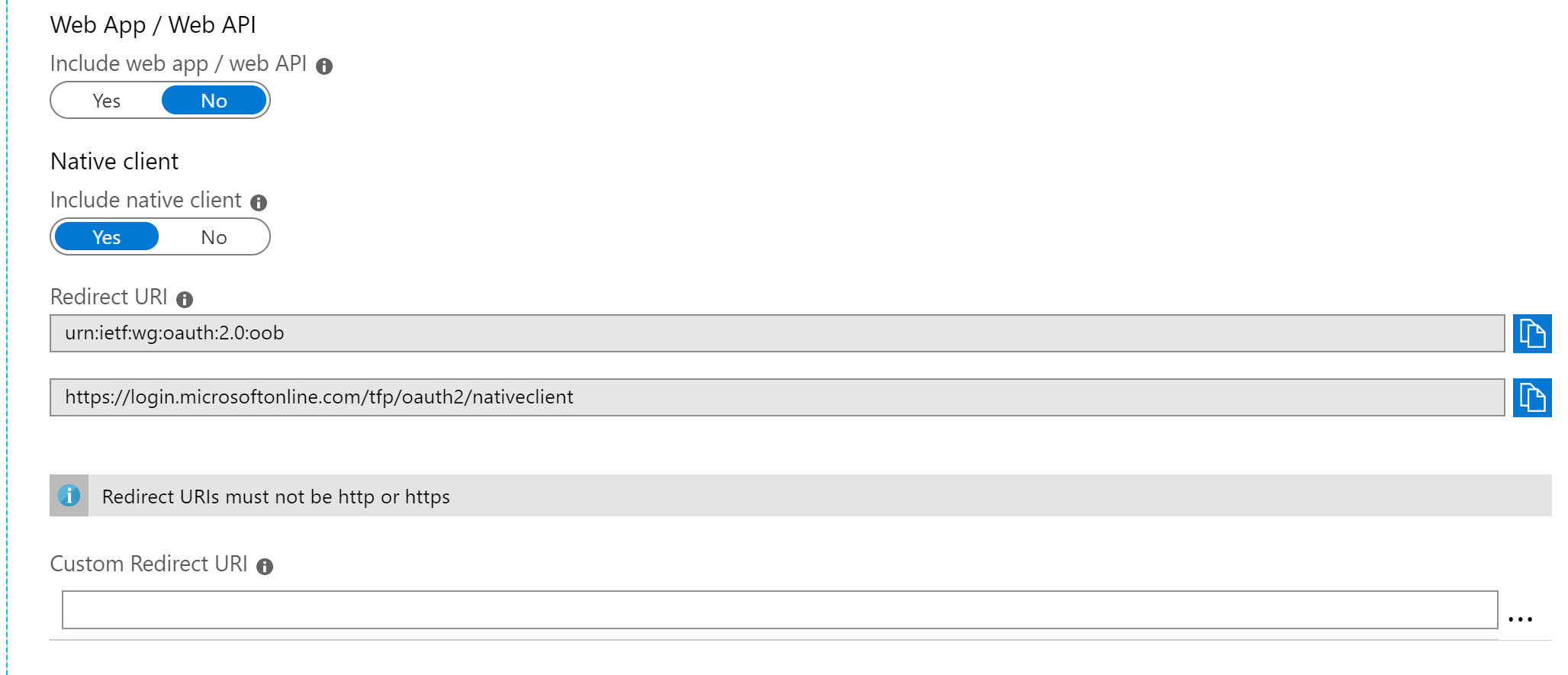
I cannot set the customer redirect URI to either https://b2clogin.com or b2clogin.com for difference reasons...

jondmcelroy
on 12 Sep 2019
@jondmcelroy Right, you don't need a redirect uri. You are getting an error back from eSTS (so AAD) and not B2C, which means you're not hitting the right endpoint.
When you make the call into MSAL, you'll need to use .WithB2CAuthority()
and the authority should have this format:
string AzureAdB2CHostname = "fabrikamb2c.b2clogin.com";
string Tenant = "fabrikamb2c.onmicrosoft.com";
$"https://{AzureAdB2CHostname}/tfp/{Tenant}/{policy}/";
Can you verify you have something similar?
You can also try hitting the .well-known/oidc endpoint and see if your info is there:
https://{AzureAdB2CHostname}/{Tenant}/{policy}/v2.0/.well-known/openid-configuration
jennyf19
on 13 Sep 2019
@jennyf19 I am able to hit that endpoint and view the configuration.
Here is the screenshot of the error i am when clicking the social link to our active directory:

jondmcelroy
on 13 Sep 2019
@jondmcelroy are you doing .WithB2CAuthority() in the builder?
jennyf19
on 13 Sep 2019
@jennyf19
Yes I have tried with both: .WithB2CAuthority() and .WithAuthority().
jondmcelroy
on 13 Sep 2019
@jondmcelroy
with b2c, you only want to use .WithB2CAuthority().
can you confirm that you're using this format for the b2c authority:
string AzureAdB2CHostname = "fabrikamb2c.b2clogin.com";
string Tenant = "fabrikamb2c.onmicrosoft.com";
$"https://{AzureAdB2CHostname}/tfp/{Tenant}/{policy}/";
Unrelated to the current conversation, but @mmacy, please see @TuroczyX 's comment above about docs -
The migration document is not clear (especially the replay url part). It was painful, but with this updated URL at least works.
@TuroczyX can you share the link to the doc you were using so we can make it better? Thank you
jennyf19
on 13 Sep 2019
@jennyf19 I sent your an email with reproducible code.
I believe the documentation he is referring to is here: https://docs.microsoft.com/en-us/azure/active-directory-b2c/b2clogin.
The application page is confusing because there are both reply urls (for webapp) and redirect URIs. The redirect URIs dont let you post URIs with https and they also dont accept non https urls.

jondmcelroy
on 13 Sep 2019
@TuroczyX @jondmcelroy With the repro @jondmcelroy sent me today, was able to repro the issue. Looks like the js code in window.location.replace is not executing

Hopefully will have more info for you tomorrow.
jennyf19
on 13 Sep 2019
@jondmcelroy Yes that is the document that I refereed. That is not describe well what you have to do. But as I see, you wrote the replay URL to a wrong place.
Screenshots attached.
- Go to the Azure B2C page
- From navigation pane (left side) choose the Azure Active Directory (Yes, the terminology is confusing)
- App Registration
- Click on the View all applications button.
- Choose you App. (Look on the Application ID)
- Settings
- Replay URLs
- Add you URL which should looks like this:
https://{your-tenant-name}.b2clogin.com/{your-tenant-name}.onmicrosoft.com/oauth2/authresp
- Save it. And it will work.
In the previous version was /te in the URL. REMOVE IT! :)


TuroczyX
on 13 Sep 2019
We have been struggling with this since yesterday. We have a C++ desktop app that started suffering from this yesterday for many of our users. I have found if I create a new user on my machine and log in as that - it works ok so it lead me to look for user caches in the registry and I found this key with a reference to login.microsoftonline.com. Renaming the key immediately solves the problem for us and I am waiting to hear back from microsoft whether this is safe as a workaround whilst they address the issue HKEY_CURRENT_USER\Software\Microsoft\Windows\CurrentVersion\AAD
 foxyjess1
on 13 Sep 2019
foxyjess1
on 13 Sep 2019
thanks for the additional information @foxyjess1 and @xammob will update here as we learn more.
jennyf19
on 13 Sep 2019
Thanks @jennyf19 .... MS support have told us not to use the reg hack saying it’s unsafe - so we still have no solution for our users and re-deploying our desktop application using b2clogin.com is at least 2 weeks work.... we’re desperate for a resolution.......
foxyjess1
on 13 Sep 2019
@foxyjess1 We are now all aligned on the MS side of things. hopefully we'll have an update here sometime today. Thanks for your patience.
jennyf19
on 13 Sep 2019
@foxyjess1 @xammob @TuroczyX @jondmcelroy
B2C should have a fix out by end of day today, will update here if that timelines changes.
also, passing in my own HttpClient helped me get around the "redirecting" page.
class HttpClientFactory : IMsalHttpClientFactory
    {
        private HttpClient _httpClient;

        public HttpClientFactory()
        {
            _httpClient = new HttpClient(new HttpClientHandler() { UseDefaultCredentials = true })
            {
                MaxResponseContentBufferSize = 1 * 1024 * 1024 // 1 MB
            };

            _httpClient.DefaultRequestHeaders.Accept.Clear();
            _httpClient.DefaultRequestHeaders.Accept.Add(new MediaTypeWithQualityHeaderValue("application/json"));
        }

        public HttpClient GetHttpClient()
        {
            return _httpClient;
        }
    }
IMsalHttpClientFactory httpClientFactory = new HttpClientFactory();
var app = PublicClientApplicationBuilder
                .Create(AzureB2CClientId)
                .WithB2CAuthority(AzureAdAuthoritySignUpSignIn)
                .WithHttpClientFactory(httpClientFactory)
                .WithLogging(MyLoggingMethod, LogLevel.Info,
                       enablePiiLogging: false,
                       enableDefaultPlatformLogging: true)
                .Build();
Thanks for the info! I hope this is the case and MS can address the issue. We can move to b2clogin - but we’d rather do it in a co trolled fashion than a massive rush to paper over MS’s cracks!!!
Appreciate the updates.
foxyjess1
on 13 Sep 2019
@TuroczyX Thanks for the direction, I finally figured out like you showed that I needed to update the app registration for the AD application NOT the B2C Application. The documentation needs to be updated with pictures and better explanation.
@jennyf19 Thanks for being on top of this and all of the communication!
For anyone else thinking about making the switch to b2clogin, you will need to update all of your applications to use the b2clogin at the same due to needing to validate the issuer at the server.
So even if you properly authentication with the b2clogin at the client level, your server also needs to be updated to get metadata from the b2clogin.
I am hoping that the rollback happens soon so that I do not have to hotfix on a friday afternoon!
jondmcelroy
on 13 Sep 2019
@jondmcelroy Thanks for the call-out on exactly what you'd like to see in the docs, that's super helpful. I've added a work item to add an expanded explanation to the Use b2clogin.com doc. Will tag this issue in the PR once I get there.
Edit: And thanks to @TuroczyX for the steps and screenshots, love it!
 mmacy
on 13 Sep 2019
mmacy
on 13 Sep 2019
@foxyjess1 @xammob @TuroczyX @jondmcelroy
The fix is out.
I have confirmed that I am no longer hit the "redirecting..." page...can you please do so as well and let us know? Thank you.
jennyf19
on 13 Sep 2019
Now it is working ;)
TuroczyX
on 13 Sep 2019
Confirmed! This is working for me now in our production app! Means we don’t have to rush out the change to b2clogin - although we’ll make sure we move to it soon!
Thanks for the comms here! It’s been a very stressful 48 hours!!!
foxyjess1
on 13 Sep 2019
Thanks @jennyf19 for driving this to resolution!
 jmprieur
on 14 Sep 2019
jmprieur
on 14 Sep 2019
Related issues
 jsquire
·
4Comments
jsquire
·
4Comments
 chrisevans9629
·
5Comments
chrisevans9629
·
5Comments
 hausec
·
3Comments
jmprieur
·
5Comments
hausec
·
3Comments
jmprieur
·
5Comments
 stweedie
·
3Comments
stweedie
·
3Comments
Most helpful comment
Now it is working ;)