Microsoft-authentication-library-for-dotnet: Microsoft.Identity.Client.MsalClientException: The application does not have keychain access groups enabled...failure to save to the iOS keychain.
Which Version of MSAL are you using ?
MSAL 2.5.0-Preview
Which platform has the issue?
xamarin iOS
What authentication flow has the issue?
- Desktop / Mobile
- [ ] Interactive
Repro
We currently have an interoperability issue with MSAL and Microsoft App Center. We have set up MSAL correctly with the required keychain sharing capabilities in Entitlements.plist. We build in Azure Devops using an ad-hoc provisioning profile which includes the UUIDS of all our development devices. Our builds work fine and we can successfully authenticate against our Azure B2C and access Azure resources.
Our issue manifests when we try to push the app to new iOS testers whose devices are provisioned via App Center’s automatic provisioning. When checking the output from the OSX codesign tool, we see:
In the original working build from ADO, this is the output (with our AppID redacted)
??qq1<?xml version="1.0" encoding="UTF-8"?>
<!DOCTYPE plist PUBLIC "-//Apple//DTD PLIST 1.0//EN" "http://www.apple.com/DTDs/PropertyList-1.0.dtd">
<plist version="1.0">
<dict>
       <key>get-task-allow</key>
       <false/>
       <key>application-identifier</key>
       <string>XXXXXXXXXX.XXX.XXXXXXXX.XXXXXX.app</string>
       <key>com.apple.developer.team-identifier</key>
       <string>XXXXXXXXXX</string>
       <key>keychain-access-groups</key>
       <array>
              <string>XXXXXXXXXX.com.microsoft.adalcache</string>
       </array>
       <key>com.apple.developer.healthkit</key>
       <true/>
</dict>
</plist>
In the newly re-signed build from App Center, this is what we see.
??qq?<?xml version="1.0" encoding="UTF-8"?>
<!DOCTYPE plist PUBLIC "-//Apple//DTD PLIST 1.0//EN" "http://www.apple.com/DTDs/PropertyList-1.0.dtd">
<plist version="1.0">
<dict>
       <key>application-identifier</key>
       <string>XXXXXXXXXX.XXX.XXXXXXXXXXX.XXXXXXX.app</string>
       <key>com.apple.developer.associated-domains</key>
       <string>*</string>
       <key>com.apple.developer.healthkit</key>
       <true/>
       <key>com.apple.developer.healthkit.access</key>
       <array>
              <string>health-records</string>
       </array>
       <key>com.apple.developer.team-identifier</key>
       <string>XXXXXXXXXX</string>
       <key>get-task-allow</key>
       <false/>
       <key>keychain-access-groups</key>
       <array>
              <string>XXXXXXXXXX.*</string>
       </array>
</dict>
</plist>
We suspect that the problem is the expansion using wildcards of the keychain access groups because if we purposely setup our entitlements.plist to contain this form, then our ADO build (which normally works) throws the same MSAL exception.
We’ve raised this with the App Center team who have been able to reproduce the same issue.
Expected behavior
MSAL to save access token.
Actual behavior
MSAL authenticates ok, but then throws an exception:
Microsoft.Identity.Client.MsalClientException: The application does not have keychain access groups enabled in the Entitlements.plist. As a result, there was a failure to save to the iOS keychain.
Possible Solution
MSAL to save access token in local keychain if fails to write to shared keychain.
Additional context/ Logs / Screenshots
https://stackoverflow.com/questions/53829119/xamarin-with-msal-cannot-save-access-token-as-keychain-access-groups-changed-dur?noredirect=1#comment94998265_53829119
 MagicBulletDave
All 22 comments
@MagicBulletDave We have a change coming out with how MSAL handles the TeamId, which we are currently testing. You can pick up the release package now from myget...Msal v2.7.0. Can you try it and see if you get different behavior? If you can email logs as well, that would be helpful - [email protected]
 jennyf19
on 14 Jan 2019
jennyf19
on 14 Jan 2019
@MagicBulletDave related -> https://github.com/AzureAD/microsoft-authentication-library-for-dotnet/issues/777
jennyf19
on 14 Jan 2019
@MagicBulletDave closing, as this seems to be an AppCenter bug at the moment. Our fix for TeamId is one part of this. We are communicating via email, so if needed, i'll reopen.
jennyf19
on 16 Jan 2019
@MagicBulletDave AppCenter has identified a bug on their end, where they were changing the entitlements to use a wildcard during signing of the app. Their fix should be out Jan. 21.
jennyf19
on 18 Jan 2019
We are having this issue as well. Here is our entitlements.plist. How do we change this to make MSAL work?
<?xml version="1.0" encoding="UTF-8" ?>
<!DOCTYPE plist PUBLIC "-//Apple//DTD PLIST 1.0//EN" "http://www.apple.com/DTDs/PropertyList-1.0.dtd">
<plist version="1.0">
    <dict>
        <key>keychain-access-groups</key>
        <array>
            <string>$(AppIdentifierPrefix)com.microsoft.adalcache</string>
        </array>
    </dict>
</plist>
 JohnLivermore
on 13 Dec 2019
JohnLivermore
on 13 Dec 2019
@JohnLivermore Are you setting the iosKeychainSecurityGroup property in the public client builder?
@csharp
var builder = PublicClientApplicationBuilder
     .Create(ClientId)
     .WithIosKeychainSecurityGroup("com.microsoft.adalcache")
     .Build();
More info can be found here
jennyf19
on 13 Dec 2019
Yes. Here is the exception...
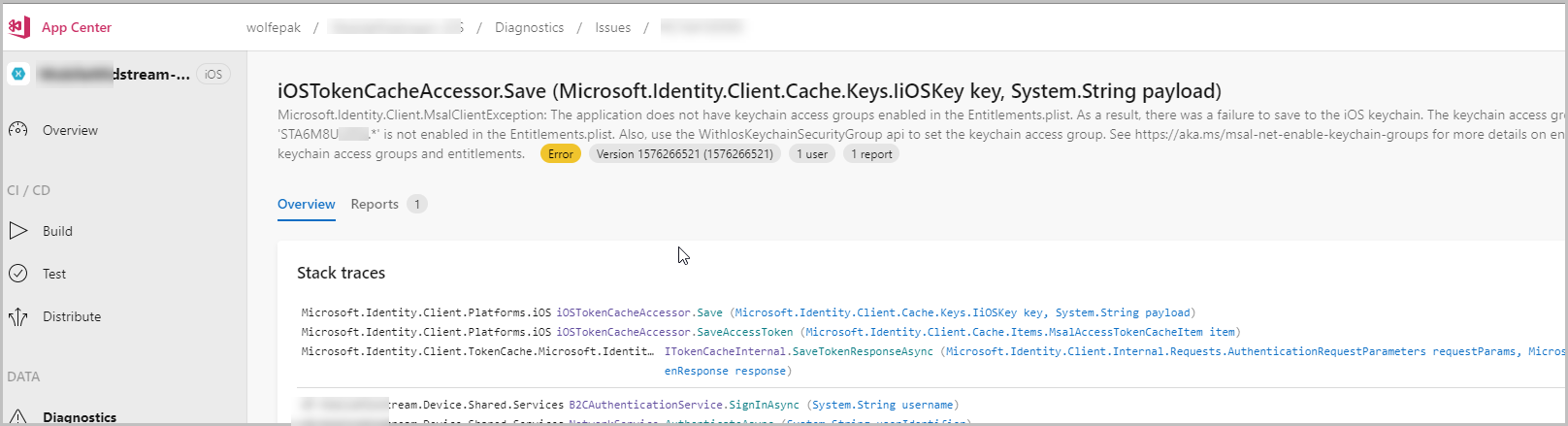
Microsoft.Identity.Client.MsalClientException: The application does not have keychain access groups enabled in the Entitlements.plist. As a result, there was a failure to save to the iOS keychain. The keychain access group 'STA6M8UUDS.com.microsoft.adalcache' is not enabled in the Entitlements.plist. Also, use the WithIosKeychainSecurityGroup api to set the keychain access group. See https://aka.ms/msal-net-enable-keychain-groups for more details on enabling keychain access groups and entitlements.
Here is my current entitlements...
<plist version="1.0">
    <dict>
        <key>keychain-access-groups</key>
        <array>
            <string>$(AppIdentifierPrefix)com.microsoft.adalcache</string>
            <string>STA6M8UUDQ.com.microsoft.adalcache</string>
        </array>
    </dict>
</plist>
And I am creating the IPublicClientApplication with...
            PCA = PublicClientApplicationBuilder.Create(Constants.B2CConstants.ClientID)
                .WithB2CAuthority(Constants.B2CConstants.AuthoritySignInSignUp)
                .WithIosKeychainSecurityGroup(Constants.B2CConstants.IOSKeyChainGroup)
                .WithRedirectUri($"msal{Constants.B2CConstants.ClientID}://auth")
                .Build();
And for IOSKeyChainGroup, I have tried the following values...
STA6M8UUDS.com.microsoft.adalcache
com.microsoft.adalcache
Finally, all works fine when debugging locally. Our app is pushed through AppCenter, and when downloaded to the phone, the authentication fails with the above exception. And I am entering my userid/pwd correctly. The auth actually works, a keychain popup appears, then the browser closes, and no token is received. The keychain popup happens so fast you can barely see it.
JohnLivermore
on 13 Dec 2019
Thanks for the details @JohnLivermore
You should only need this one:
<string>$(AppIdentifierPrefix)com.microsoft.adalcache</string>
as MSAL will resolve the TeamID at runtime, so you don't need to include it.
If going through AppCenter, you might have to use a wildcard...we have to do something similar for our AppCenter builds to work
builder.WithIosKeychainSecurityGroup("*");
jennyf19
on 13 Dec 2019
I am having the same issue today with a local debug build.
I am Using .WithIosKeychainSecurityGroup and the keychain-access-groups in Entitlements.plist. as below
            PCA = PublicClientApplicationBuilder.Create(AppManager.ClientId)
                .WithIosKeychainSecurityGroup("com.microsoft.adalcache")
                .WithRedirectUri($"msal{AppManager.ClientId}://auth")
                .WithB2CAuthority(AppManager.Authority)
                .Build();
<?xml version="1.0" encoding="UTF-8"?>
<!DOCTYPE plist PUBLIC "-//Apple//DTD PLIST 1.0//EN" "http://www.apple.com/DTDs/PropertyList-1.0.dtd">
<plist version="1.0">
<dict>
    <key>keychain-access-groups</key>
    <array>
        <string>$(AppIdentifierPrefix)com.microsoft.adalcache</string>
    </array>
</dict>
</plist>
I have also tried the WithIosKeychainSecurityGroup and the entitlements.plist with the hardcoded TeamId. but it still fails.
I am using Visual Studio 16.4.1
Microsoft.Identity.Client 4.7.1
XCode 11.2.1
iOS 13.2.3
 Corneliuskruger
on 13 Dec 2019
Corneliuskruger
on 13 Dec 2019
I changed to use...
            var builder = PublicClientApplicationBuilder.Create(Constants.B2CConstants.ClientID)
                .WithB2CAuthority(Constants.B2CConstants.AuthoritySignInSignUp)
                .WithIosKeychainSecurityGroup("*")
                .WithRedirectUri($"msal{Constants.B2CConstants.ClientID}://auth");
Still getting the exception. It's slightly different this time to indicate the asterisk introduced.
Microsoft.Identity.Client.MsalClientException: The application does not have keychain access groups enabled in the Entitlements.plist. As a result, there was a failure to save to the iOS keychain. The keychain access group 'STA6M8UUDS.*' is not enabled in the Entitlements.plist. Also, use the WithIosKeychainSecurityGroup api to set the keychain access group. See https://aka.ms/msal-net-enable-keychain-groups for more details on enabling keychain access groups and entitlements.
I really appreciate the help.
JohnLivermore
on 13 Dec 2019
@JohnLivermore You should only use the wildcard for appCenter, which is why we have it under a flag, so I would do something similar, and see if that works.
@Corneliuskruger Please make sure your project is configured to use the entitlements, sometimes you have to manually add them in VS.

jennyf19
on 13 Dec 2019
Oops, I didn't show that code, but my wildcard code is only active when built in AppCenter. So I am already doing what you suggest.
JohnLivermore
on 13 Dec 2019
@JohnLivermore and that error is coming from AppCenter? do you have a basic repro you can share w/us? You can also run pii logs and pull out a more specific error message in the logs. that might give us some more information.
jennyf19
on 13 Dec 2019
Yes, here is the error from AppCenter.
JohnLivermore
on 13 Dec 2019
@JohnLivermore interesting...has this ever worked for you?
can you share your info.plist file?
jennyf19
on 13 Dec 2019
It works fine with Android debugging locally and through AppCenter. Through AppCenter, iOS has not worked for us thus far. However, it works fine when debugging iOS locally.
Here is the info.plist. I changed all the identifying information to just "Company", "myCompany", etc.
<?xml version="1.0" encoding="UTF-8"?>
<!DOCTYPE plist PUBLIC "-//Apple//DTD PLIST 1.0//EN" "http://www.apple.com/DTDs/PropertyList-1.0.dtd">
<plist version="1.0">
    <dict>
        <key>UIDeviceFamily</key>
        <array>
            <integer>1</integer>
            <integer>2</integer>
        </array>
        <key>UISupportedInterfaceOrientations</key>
        <array>
            <string>UIInterfaceOrientationPortrait</string>
            <string>UIInterfaceOrientationPortraitUpsideDown</string>
        </array>
        <key>UISupportedInterfaceOrientations~ipad</key>
        <array>
            <string>UIInterfaceOrientationPortrait</string>
            <string>UIInterfaceOrientationPortraitUpsideDown</string>
            <string>UIInterfaceOrientationLandscapeLeft</string>
            <string>UIInterfaceOrientationLandscapeRight</string>
        </array>
        <key>CFBundleDisplayName</key>
        <string>WP.CompanyName.Device</string>
        <key>CFBundleIdentifier</key>
        <string>com.mycompany.CompanyName</string>
        <key>CFBundleVersion</key>
        <string>1.0</string>
        <key>UILaunchStoryboardName</key>
        <string>LaunchScreen</string>
        <key>CFBundleName</key>
        <string>WP.CompanyName.Device</string>
        <key>XSAppIconAssets</key>
        <string>Assets.xcassets/AppIcon.appiconset</string>
        <key>UIAppFonts</key>
        <array>
            <string>icomoon.ttf</string>
            <string>LibreFranklin-Bold.ttf</string>
            <string>LibreFranklin-Regular.ttf</string>
        </array>
        <key>XSLaunchImageAssets</key>
        <string>Assets.xcassets/LaunchImages.launchimage</string>
        <key>UIViewControllerBasedStatusBarAppearance</key>
        <false/>
        <key>MinimumOSVersion</key>
        <string>9.0</string>
        <key>CFBundleURLTypes</key>
        <array>
            <dict>
                <key>CFBundleTypeRole</key>
                <string>Editor</string>
                <key>CFBundleURLName</key>
                <string>com.myCompany.CompanyName.UserDetailsClient</string>
                <key>CFBundleURLSchemes</key>
                <array>
                    <string>msal2a36fa05-3ae3-4d7a-ab79-b35bfc5de73a</string>
                </array>
            </dict>
        </array>
        <key>LSApplicationQueriesSchemes</key>
        <array>
            <string>msauthv2</string>
            <string>msauthv3</string>
        </array>
    </dict>
</plist>
@JohnLivermore
in the info.plist can you remove UserDetailsClient from being defined in the CFBundleURLName and try adding another CFBundleURLSchemes of:
<string>msauth.com.myCompany.CompanyName</string>
can you get pii logs from the appCenter build? in the iOS section, there should be a more specific error code, or you can just send me that section of the logs -> [email protected]
fyi: @aiwangmicrosoft
jennyf19
on 13 Dec 2019
Hi @jennyf19,
Thank you so much, that was exactly it. Somehow I lost that in my Debug configuration. (all other still had it.).
@JohnLivermore, sounds like you are using a different build configuration for building in AppCenter. So maybe just double check that you have the Entitlements.plist set in that build config.
Corneliuskruger
on 14 Dec 2019
@Corneliuskruger yep, that was it. I didn't have the Entitlements for the build config used in appcenter. I fixed that and it worked.
JohnLivermore
on 17 Dec 2019
Hi @JohnLivermore
I am facing the same issue as mentioned in this thread.. I am using a custom build config QA & made sure it is using Entitlement.plist. Have you used WithIosKeychainSecurityGroup("*") to make it work ?
Thanks
Tarun Sharma
 Tarunshrma
on 21 Jul 2020
Tarunshrma
on 21 Jul 2020
@Tarunshrma ours looks like this...
.WithIosKeychainSecurityGroup("com.microsoft.adalcache")
JohnLivermore
on 22 Jul 2020
I am getting the same error when upload and test the IPA on AppCenter
I have tried all was commented in this issue
like https://github.com/AzureAD/microsoft-authentication-library-for-dotnet/issues/783#issuecomment-565633848
and nothing works on appcenter, local works fine.

This is my debug config

 stanleywailers
on 21 Jan 2021
stanleywailers
on 21 Jan 2021
Related issues
 geoffreygeslin
·
4Comments
geoffreygeslin
·
4Comments
 chrisevans9629
·
5Comments
chrisevans9629
·
5Comments
 jsquire
·
4Comments
jsquire
·
4Comments
 hausec
·
3Comments
hausec
·
3Comments
 steffos
·
4Comments
steffos
·
4Comments
Most helpful comment
@Corneliuskruger yep, that was it. I didn't have the Entitlements for the build config used in appcenter. I fixed that and it worked.