Microsoft-authentication-library-for-dotnet: Script error on login page "Unable to get property 'reject'".
Which Version of ADAL are you using ?
Note that to get help, you need to run the latest preview or non-preview version
For MSAL, please log issues to https://github.com/AzureAD/microsoft-authentication-library-for-dotnet
v2.4.0-preview
v2.5.0-preview
Which platform has the issue?
net45
What authentication flow has the issue?
- Desktop / Mobile
- [x] Interactive
- [ ] Integrated Windows Auth
- [ ] Username Password
- [ ] Device code flow (browserless)
- Web App
- [ ] Authorization code
- [ ] OBO
- Web API
- [ ] OBO
Other? - please describe;
What is the identity provider ?
- [x] Azure AD
- [ ] Azure AD B2C
Repro
string AppKey = "...My App Key...";

string[] AppScopes =
{
    // Users' scopes
    "User.ReadBasic.All",
    "User.Read",

    // Files' scopes
    "Files.ReadWrite",
    "Files.ReadWrite.All",
};

byte[] tokensStream = null;

var tokenCache = new TokenCache();
tokenCache.SetAfterAccess((TokenCacheNotificationArgs args) =>
{
    if (args.TokenCache.HasStateChanged)
    {
        lock (locker)
        {
            tokensStream = args.TokenCache.Serialize();
        }
    }
});

tokenCache.SetBeforeAccess((TokenCacheNotificationArgs args) =>
{
    lock (locker)
    {
        args.TokenCache.Deserialize(tokensStream);
    }
});

const string DefaultAuthority = "https://login.microsoftonline.com/common/";
var App = new PublicClientApplication(AppKey, DefaultAuthority, tokenCache);

var authResult = await App.AcquireTokenAsync(AppScopes, string.Empty, UIBehavior.ForceLogin, string.Empty);
var accessToken = authResult.AccessToken;
Expected behavior
Login Form should work without JScript error.
Actual behavior
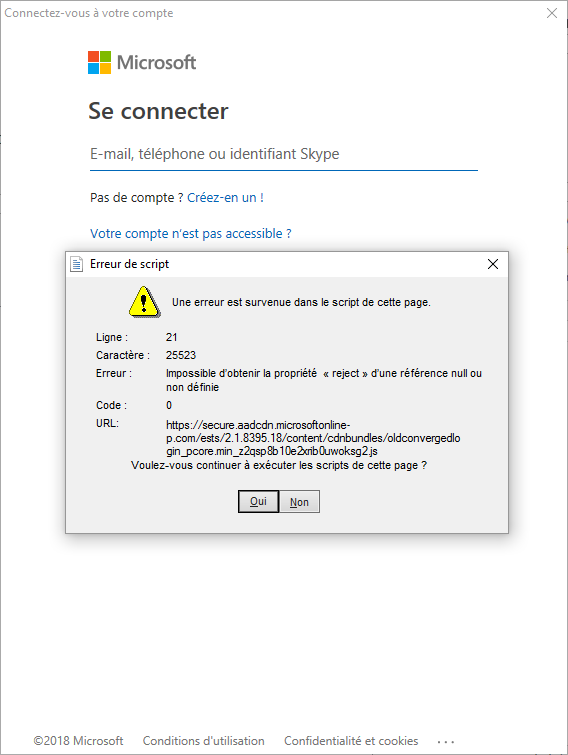
Call PublicClientApplication.AcquireTokenAsync shows login form with JScript error: "Unable to get property 'reject' of undefined or null reference." Script URL: https://secure.aadcdn.microsoftonline-p.com/ests/2.1.8395.17/content/cdnbundles/oldconvergedlogin_pcore.min_z2qsp8b10e2xrib0uwoksg2.js
See screenshot bellow.
If user continues execution by pressing "Yes", login finished with valid access token.
Possible Solution
Additional context/ Logs / Screenshots

 23W
23W
All 13 comments
@23W
this issue is not actionable:
1) we don't know which app topology you are using.
2) we don't know if you are using B2C or not.
Please re-word your issue using the template we provide. We need to have repro steps in order to repro.
 jmprieur
on 11 Dec 2018
jmprieur
on 11 Dec 2018
@jmprieur
Thanks, I've updated issue.
This issue appeared on this Monday on all my app versions that uses MSAL 1.1.0-preview and MSAL 2.4.0-preview.
23W
on 11 Dec 2018
Thanks @23W
I'm just slightly puzzled by the constructor of PublicClientApplication with app-keys :)
jmprieur
on 12 Dec 2018
Thanks @23W
there is an issue on the service side (AAD Login Page). It's fixed, but still need to be rolled out.
Leaving the issue open until it's deployed.
jmprieur
on 12 Dec 2018
The fix is being rolled-out. this should be completed by tomorrow.
jmprieur
on 13 Dec 2018
Thanks
23W
on 16 Dec 2018
Hello,
I still encounter the same issue. Does the fix need more time to be rolled-out?
Thanks
 LucasLibis
on 17 Dec 2018
LucasLibis
on 17 Dec 2018
you are right. I asked the service team and it has not been fully rolled out yet.
It should be completed by end of the (Redmond) day.
jmprieur
on 17 Dec 2018
Has not fixed yet. I still see this script error :(
23W
on 22 Dec 2018
@jmprieur , sorry do you have some information when it will be fixed?
23W
on 25 Dec 2018
Hi @jmprieur ,
Even I am facing the same issue. Sorry but is the issue fixed now?
Thanks
 vartika29
on 1 Jan 2019
vartika29
on 1 Jan 2019
Hello,
The issue seems to be solved since this morning
LucasLibis
on 3 Jan 2019
Thanks for the update @LucasLibis
jmprieur
on 5 Jan 2019
Related issues
 johanalex566
·
3Comments
johanalex566
·
3Comments
 dansiegel
·
5Comments
dansiegel
·
5Comments
 jsquire
·
4Comments
jsquire
·
4Comments
 chrisevans9629
·
5Comments
chrisevans9629
·
5Comments
 crmann1
·
5Comments
crmann1
·
5Comments
Most helpful comment
The fix is being rolled-out. this should be completed by tomorrow.