Microsoft-authentication-library-for-dotnet: GetAccountsAsync() does Instance Discovery call...will not work off-line
name: Bug report
about: Pca.GetAccountsAsync() does not work offline
Which Version of MSAL are you using ?
MSAL 2.2.0-preview (Latest)
Which platform has the issue?
UWP, Xamarin android, . Cannot test iOS due to this issue with PCA and iOS simulator.
What authentication flow has the issue?
- Desktop
- [x] Interactive
- [ ] WIA
- [ ] U/P
- [ ] Device code flow (browserless)
- [x] Mobile
- Web App
- [ ] Authorization code
- [ ] OBO
- Web API
- [ ] OBO
Other? - please describe;
Repro
v1.x works offline. This line in v2.x:
IEnumerable<IAccount> accounts = await Pca.GetAccountsAsync();
throws
$exception | {System.Net.Http.HttpRequestException: An error occurred while sending the request. --->
Expected behavior
Needs to return the tokens already in the cache
Actual behavior
Exception thrown, show is over.
Additional context/ Logs / Screenshots
Here is my code:
public async Task<AuthenticationResult> AcquireTokenForSignInSilentlyAsync()
        {
            AuthenticationResult authenticationResult = null;

            try
            {
                IEnumerable<IAccount> accounts = await Pca.GetAccountsAsync();
                authenticationResult =
                    await Pca.AcquireTokenSilentAsync(_scopes, GetAccountByPolicy(accounts, _policySignUpSignIn));
            }
            catch (Exception e)
            {
                //Do nothing as will force a login.
            }

            return authenticationResult;
        }

private IAccount GetAccountByPolicy(IEnumerable<IAccount> accounts, string policy)
        {
            IAccount foundAccount = null;

            foreach (IAccount account in accounts)
            {
                string userIdentifier = account.HomeAccountId.Identifier.Split('.')[0];
                if (userIdentifier.EndsWith(policy.ToLower()))
                {
                    foundAccount = account;
                    break;
                }
            }

            return foundAccount;
        }
What am I missing?
 Surfrat
All 37 comments
Can someone please confirm that this does/doesn't work offline?
If my code is wrong then please point me in the right direction.
Thank you.
Surfrat
on 11 Oct 2018
@Surfrat : we are investigating
Just checking, when you write offline, do we agree that you mean no network connection?
so far what we have found is that getting the accounts (when there is an identity in the cache) works (returns a result) when the device is not connected to the phone, but acquiring a token does not work.
Can you please tell us more about your scenario? are you trying to have something where you can do changes in a disconnected mode, and then want to reconnect when the network is available?
 jmprieur
on 11 Oct 2018
jmprieur
on 11 Oct 2018
Yes, offline means no internet/network connection. In the previous major version it would find the token in the cache (sorry if I have some of the terminology incorrect).
I want the functionality to work as in the previous version. Previously if you ran the app with no internet connection it would grab the token and you could then work offline. I will not do changes to the cached info but will use it to do stuff that you can only do if previously authenticated.
In your demo app v1.x, if run offline, the users info would be retrieved i.e. user name, irrespective on whether the device was connected or not.
Thanks for the help.
Surfrat
on 11 Oct 2018
@Surfrat I was able to confirm that GetAccountsAsync() works offline. I was able to pull a token from the cache. I used a B2C app.
Looking at your code again, try looking up by the ObjectId, not the Identifier:
string userIdentifier = account.HomeAccountId.ObjectId.Split('.')[0];
 jennyf19
on 19 Oct 2018
jennyf19
on 19 Oct 2018
Hi Jenny,
Thanks for the update. I think we are missing each other here. In my code, when offline, this line
IEnumerable
throws an exception and I never get to GetAccountByPolicy(). Even if I did accounts is null.
This is a Xamarin Forms app and I am testing under UWP. In previous testing I tested all platforms with the same result.
A solution is to get Pca.GetAccountsAsync() to return the tokens while offline or have another way to get hold of them.
I also tried your suggested edit but GetAccountByPolicy() is never hit due to the exception.
Can I please have a look at your sample app that works?
Thanks for your help.
Surfrat
on 19 Oct 2018
@Surfrat
Thank you for outlining the issue. I confirm that pca.GetAccountsAsync will perform a web request, so it cannot be done offline. This is the call: https://github.com/AzureAD/azure-activedirectory-library-for-dotnet/blob/dev/core/src/Instance/AadInstanceDiscovery.cs#L53
The reason behind the web request is that we are trying to collect the identity provider aliases (e.g. "login.microsoftonline.com", "login.windows.net" are the same provider) so that we can return the correct accounts.
If I understand correct, you restrict internet access of your app and rely on intranet / specific ports to access the protected resources?
 bgavrilMS
on 19 Oct 2018
bgavrilMS
on 19 Oct 2018
You have identified the problem correctly.
Re: "If I understand correct, you restrict internet access of your app and rely on intranet / specific ports to access the protected resources?"
I am not doing this at this stage. All I want to know is that the user is authenticated and then can do protected stuff.
Being a mobile app I want the user to be able to work offline with his protected files. For instance I could check that the files on the device are really his by comparing the owner of the files with the name in the token.
Thanks for your help.
Surfrat
on 19 Oct 2018
@Surfrat : when you write the name in the token, you mean the name in the IAccount? or the name in a token. (in that case ID token? or access token?)
jmprieur
on 19 Oct 2018
oh, @Surfrat the B2C sample that @jennyf19 has tested withis the following: https://github.com/Azure-Samples/active-directory-b2c-xamarin-native
jmprieur
on 19 Oct 2018
This is the info in the token:
if (authenticationResult?.IdToken != null)
            {
                JObject user = _userService.ParseIdToken(authenticationResult.IdToken);
                GivenName = user["given_name"]?.ToString();
                Surname = user["family_name"]?.ToString();
                Name = user["name"]?.ToString();
                Id = user["oid"]?.ToString();
I will take a look at your sample again. This sample is what I used for the MSAL v1 code.
I will test it offline and get back to you.
Surfrat
on 19 Oct 2018
Thanks for confirming
In MSAL v2, you have the notion of IAccount which has a displayable name
Please see https://aka.ms/msal-net-2-released for the detail of changes in MSAL.NET between 1.x and 2.x
jmprieur
on 19 Oct 2018
Just ran your sample.
The sample does not retrieve a token even though you are online. You have to login every time. I don't know how it is possible for this to work offline. It also shows the same error as in my app:
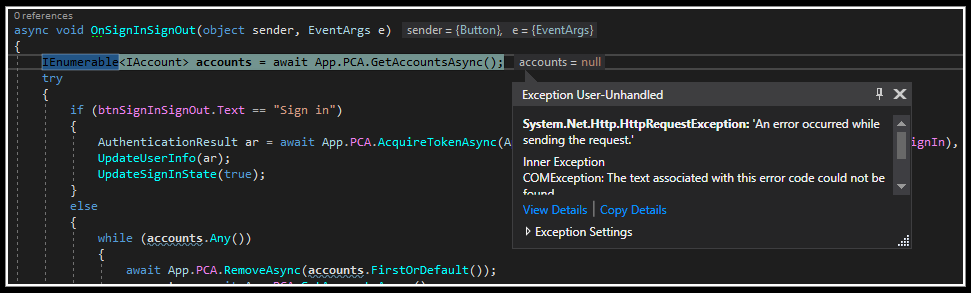
So the real question is:
Can this library be used offline in the same fashion as the v1 MSAL did?
Put simply, v1 when offline would show the same result as if you had just done a login. In this sample app in the v1 version you could be offline and get this screen populated with data eventhough you were not connected to the internet.
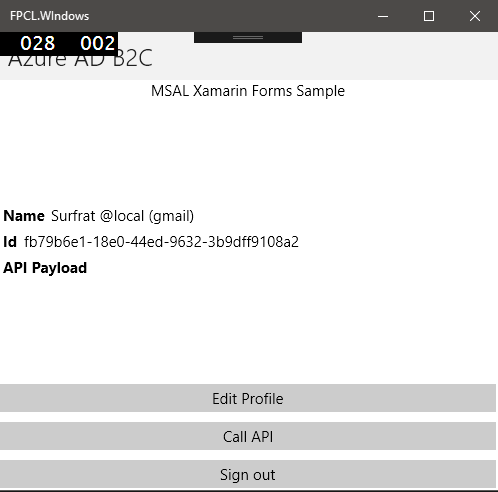
Thanks for your help.
Mark.
Surfrat
on 19 Oct 2018
Thanks for the clarification @Surfrat
Let's make sure we agree on the repro steps. Here is my current understanding. Can you please confirm?
Repro steps:
- build and deploy https://github.com/Azure-Samples/active-directory-b2c-xamarin-native
- on which platform? Android? iOS? UWP?
- login with a social identity which in this case is a gmail account?
- close the application
- set the device in plane mode.
- Reopen the application
Expected:
The user is already logged-in and the information about its identity appears in the window
Actual:
The user needs to re-sign-in which is not possible offline
jmprieur
on 19 Oct 2018
- UWP.
I used the built in account (local to B2C). [email protected]
Expected and actual is 100%. I expect the page to popup with your details even though you have airplane mode on.
Thanks.
Surfrat
on 19 Oct 2018
thanks @Surfrat. This will help us repro and we'll get back to you.
cc: @jennyf19 @bgavrilMS
Repro steps:
- build and deploy https://github.com/Azure-Samples/active-directory-b2c-xamarin-native
to UWP - login with a social identity which in this case is a b2C local account
- close the application
- set the device in plane mode.
- Reopen the application
Expected:
The user is already logged-in and the information about its identity (id and displayable name) appears in the window. The call to the WebApi / graph, of course cannot be made
Actual:
The user needs to re-sign-in which is not possible offline
jmprieur
on 19 Oct 2018
Thanks.
Surfrat
on 19 Oct 2018
@Surfrat - IThe issue is what @bgavrilMS mentioned above. Will see if it's possible to decouple this or if it's part of the cache design. Will update here when I have more information.
jennyf19
on 7 Nov 2018
I confirm that this issue is reproducible on Xamarin UWP application using version v2.3.0 Preview.
Is it a bug or expected behavior?
It should work if we have some user in cache already.
 zeeshandad
on 7 Nov 2018
zeeshandad
on 7 Nov 2018
@zeeshandad - thanks for confirming. We are currently exploring options right now.
cc: @somkape
jennyf19
on 7 Nov 2018
Is it a bug or expected behavior?
zeeshandad
on 7 Nov 2018
This is expected behavior, and it does not have to do with users in the cache per se. We have to make a discovery call to get all the aliases of AAD (e.g. "login.windows.net", "login.microsoftonline.com etc. ). This information is used, among others, to identify the users in the cache.
Technically, we could live without this discovery call if you configure your app in this way, but this would be an enhacement to the current MSAL.
What is the scenario that you are trying to enable with offline access?
bgavrilMS
on 7 Nov 2018
I disagree. MSAL version 1 worked offline. v2 does not. Please add the same offline functionality as v1.
Surfrat
on 8 Nov 2018
@Surfrat : we are looking at what we can do here.
jmprieur
on 8 Nov 2018
My scenario wants user to remain login (on subsequent Application launches as well), until he manually Sign Out.
zeeshandad
on 8 Nov 2018
Same here:
Currently the call to 'GetAccountsAsync()' throws an exception when the device is offline / in plane mode, when it should instead return the cached user account from the last login.
 erdmenchen
on 15 Nov 2018
erdmenchen
on 15 Nov 2018
@Surfrat @zeeshandad @erdmenchen
Fixed in MSALv2.5.0-preview
jennyf19
on 21 Nov 2018
Thank you for all the effort so far.
I think we are half way there. GetAccountsAsync() now returns the account while offline but the next line causes an exception. Continuing shows nothing in the UI. This is what I expect when off and online.
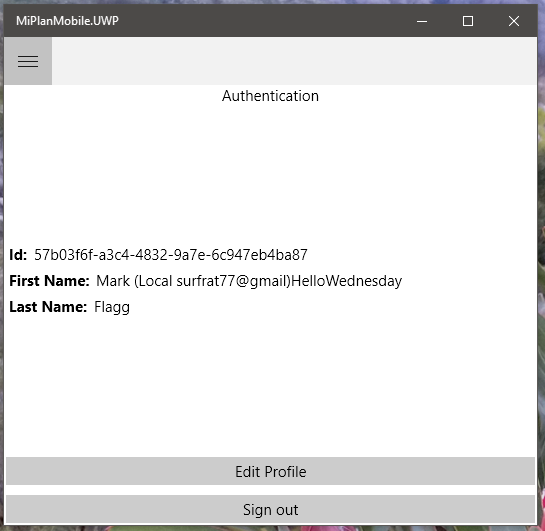
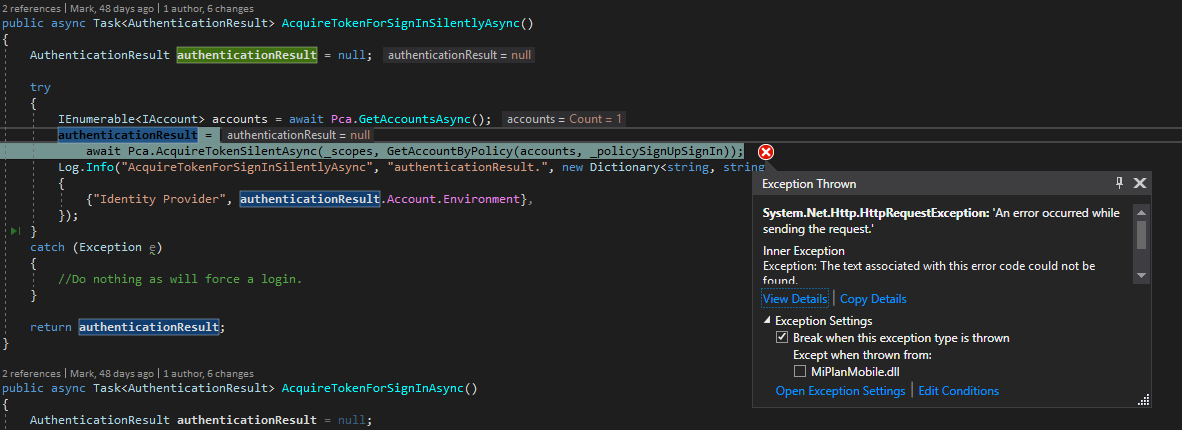
Here is my GetAccountByPolicy code which finds an account while offline.
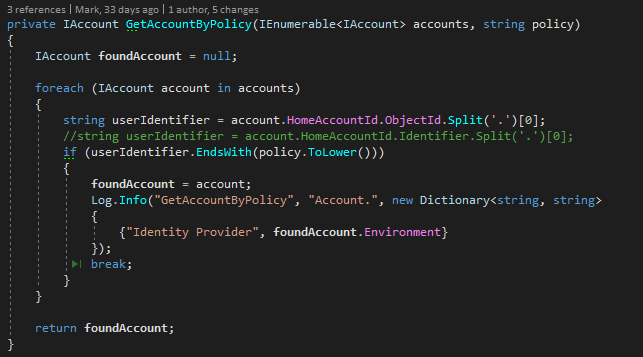
If you have a working sample can I please take a look.
Surfrat
on 22 Nov 2018
I don't think we ever planned to make AcquireTokenSilentAsync work offline. Once you get an access token, what would you do with it?
bgavrilMS
on 22 Nov 2018
I can then get user info in the token and use it. This worked in v1.
Surfrat
on 22 Nov 2018
The IAccount has a Username property - could you use this instead? Otherwise, what information do you require that can only be found in UserInfo ?
bgavrilMS
on 22 Nov 2018
@Surfrat: which claims did you retrieve in which token (IDToken? or AccessToken?)
jmprieur
on 22 Nov 2018
@jmprieur here is the info from the token. I am not sure as to which it is. I got this while offline.


Please let me know if I can give you more info.
Surfrat
on 23 Nov 2018
We use the IdToken to transfer user details for UI customization with multiple custom claims from the IdToken.
E.g. the surename and given name and the organisation/company of the user.
The IAccount does not provide this information, as @Surfrat already stated.
(we are in a AD B2C context as well)
erdmenchen
on 23 Nov 2018
@erdmenchen @Surfrat can you please share with us the kind of code you had when using accounts offline?
jmprieur
on 23 Nov 2018
@jmprieur I dug out my old test project using MSAL v1.1.4.preview. It is attached.
Offline is aeroplane mode with no internet connection. The results are as follows:
UWP:
Token details displayed while on and offline. The following screenshot is the same for both.

Android (Nokia 8):
Token details displayed while on and offline. The following screenshot is the same for both.Note the aeroplane mode icon.

iOS Simulator.
There is a known problem in that the simulator does not remember the token. I did test it on a device and it worked offline when I last ran this project.
Attached is my test project. I have removed my ID's (I tested with mine) but yours are still there.
Surfrat
on 26 Nov 2018
Any feedback?
Surfrat
on 3 Dec 2018
Welcome to 2019. I see there are now more similar issues logged. Can you please give me some feedback on this? Can you run the sample I supplied to confirm my findings?
Thanks.
Surfrat
on 9 Jan 2019
Related issues
 johanalex566
·
3Comments
johanalex566
·
3Comments
 msminski
·
6Comments
msminski
·
6Comments
 jsquire
·
4Comments
jsquire
·
4Comments
 steffos
·
4Comments
steffos
·
4Comments
 yhvicey
·
3Comments
yhvicey
·
3Comments
Most helpful comment
@Surfrat : we are looking at what we can do here.