Microsoft-authentication-library-for-dotnet: Wrong version of access token (got Azure AD V1 instead of V2)
Hello,
Using the MSAL.NET library, I successfully retrieved an access token (from an ASP.NET Core 2.1 website). When I copy/paste it in the https://jwt.ms/ website, it indicates that "This is an Azure AD V1 token.".
Here are the URLs I used:
"Authority": "https://login.microsoftonline.com/[TENANT-ID]/v2.0/",
"Instance": "https://login.microsoftonline.com/[TENANT-ID]/oauth2/v2.0/authorize",
I'm using the Microsoft.Identity.Client 1.1.4-preview0002.
Here is the code that gets the access token:
public async Task<string> GetAccessTokenAsync(IEnumerable<string> scopes)
        {
            var userCache = new FileTokenCache(
                this._protector, this._httpContextAccessor.HttpContext.User);

            HttpRequest request = this._httpContextAccessor.HttpContext.Request;
            string currentUri = UriHelper.BuildAbsolute(request.Scheme, request.Host, request.PathBase, request.Path);

            ConfidentialClientApplication daemonClient = new ConfidentialClientApplication(
                this._azureAdSettings.Value.ClientId,
                this._azureAdSettings.Value.Authority,
                currentUri,
                new ClientCredential(this._azureAdSettings.Value.ClientSecret),
                userCache.ToTokenCache(),
                new TokenCache());

            AuthenticationResult authResult = await daemonClient.AcquireTokenSilentAsync(
                scopes,
                daemonClient.Users.First());

            if (authResult != null)
            {
                return authResult.AccessToken;
            }

            return null;
        }
Why do I get a V1 token instead of the V2 version?
Thanks,
Adrien.
 pellea
All 34 comments
@pellea :
- Could you please share with us the issuer of your token (
issclaim, that you'll find by using https://jwt.ms) - Can you please tell us more about your resource? is it a V1 or a V2 resource?
 jmprieur
on 15 Jun 2018
jmprieur
on 15 Jun 2018
@jmprieur :
- "iss": "https://sts.windows.net/[MY_TENANT_ID]/"
- The resource is the API. How do I get the version information?
I use this following scope: "https://xxx.onmicrosoft.com/MyApi/MyEntity.Read"
pellea
on 15 Jun 2018
Thanks @pellea
For the API, I just wanted to make sure that this was a V2 Web API? (not a V1 one)
jmprieur
on 15 Jun 2018
It's an aspnetcore 2.1 project then yes it's not the V1.
pellea
on 15 Jun 2018
@pellea can you share you app ID for your client?
 danieldobalian
on 15 Jun 2018
danieldobalian
on 15 Jun 2018
@danieldobalian => 5df493a9-03f4-4010-9616-b4965022f513
Why do you need the clientId? (it's only a guid)
pellea
on 15 Jun 2018
I believe it's being classified as a v1 token due to the resource being an Azure AD v1.0 app. This won't impact your client app all that much. Confirming with your client id.
danieldobalian
on 18 Jun 2018
How to create an Azure AD v2 app? I used the add button in "enterprise apps" from "Azure Active Directory".
pellea
on 20 Jun 2018
Then that's a V1 app.
V2 apps are registered using the V2 application registration portal for the moment: please see https://github.com/AzureAD/microsoft-authentication-library-for-dotnet/wiki/Register-your-application-with-Azure-Active-Directory
jmprieur
on 20 Jun 2018
So do I need to create a "Converged applications" or "Azure AD only applications" in https://apps.dev.microsoft.com?
pellea
on 20 Jun 2018
you need to create a converged application, @pellea
jmprieur
on 20 Jun 2018
hi @jmprieur sorry for commeting an closed issue, but I registerd my app at apps.dev.microsoft.com, but why I still get the v1 access token? using the oauth/v2.0 endpoint?
my app id: 2a5f0cd9-7b82-46d9-b4dd-c2478575c347
@pellea sorry bothering, did you end up getting a v2 access token?
 ibigbug
on 4 Jan 2019
ibigbug
on 4 Jan 2019
@ibigbug : the kind of token you'll get does not depend on the endpoint, but depends on what the Web API you call is capable of supporting. See the accessTokenAcceptedVersion property of the App manifest (the Web API app manifest)
jmprieur
on 5 Jan 2019
@jmprieur thanks for reply.
what I'm doing is I want to use OBO for AzureDevops(VSTS), when requesting the OBO accessToken, if I used V2 endpoint, I'll get a message:
"{"error":"invalid_grant","error_description":"AADSTS70002: Error validating credentials. AADSTS50013: The token issuer doesn't match the api version: A version 1 token cannot be used with the v2 endpoint\r\nTrace ID: 14aedd69-6314-4c36-b8c9-c2c6fa362500\r\nCorrelation ID: 1122fbae-627e-4cbf-8fd2-567739953d99\r\nTimestamp: 2019-01-04 06:20:44Z","error_codes":[70002,50013],"timestamp":"2019-01-04 06:20:44Z","trace_id":"14aedd69-6314-4c36-b8c9-c2c6fa362500","correlation_id":"1122fbae-627e-4cbf-8fd2-567739953d99"}"
if I use V1 endpoint, I'll get:
"{"error":"invalid_grant","error_description":"AADSTS50013: Assertion contains an invalid signature. [Reason - The provided signature value did not match the expected signature value., Thumbprint of key used by client: '9DB0B05B5D70DD7901FB151A5F029148B8CC1C64', Found key 'Start=11/11/2018 00:00:00, End=11/11/2020 00:00:00']\r\nTrace ID: f675679d-62c5-44bc-ae76-7006a7314d00\r\nCorrelation ID: 36148198-7816-43c5-b3ad-df492091ced2\r\nTimestamp: 2019-01-04 12:31:31Z","error_codes":[50013],"timestamp":"2019-01-04 12:31:31Z","trace_id":"f675679d-62c5-44bc-ae76-7006a7314d00","correlation_id":"36148198-7816-43c5-b3ad-df492091ced2"}"
seems neither v1/v2 works in my case, any idea for this?
ibigbug
on 6 Jan 2019
@ibigbug
If I understand correctly you are writing a Web API, which needs to call an Azure DevOps API, and you are trying to use MSAL.NET / the v2.0 endpoint in your API.
The reason why you get the first message (using the V2 endpoint), is because your Web API is not declared as accepting V2 tokens, and therefore the client that calls gets a v1 token from Azure AD.
what you need to do is to accept v2.0 tokens itself. See Step 2: Register the sample with your Azure Active Directory tenant of the 2nd part of the https://github.com/Azure-Samples/active-directory-dotnet-native-aspnetcore-v2/ sample.
jmprieur
on 7 Jan 2019
@jmprieur
Thanks for explanation.
Maybe I didn't get your point, I'm trying to acquire a token from AAD and use that token to call VSTS, why I need to set my Web API to accept v2.0 tokens, it should be VSTS accepting v2 tokens right?
ibigbug
on 7 Jan 2019
sorry if I was not clear, @ibigbug
- Today VSTS only accepts v1.0 tokens so MSAL will have to get from Azure AD a v1.0 token for VSTS (that works). MSAL is called into your app.
- as you mentioned you were using OBO, I thought your app calling MSAL was a Web API. Is it right? if yes, is if called by a Web App or a Desktop / Mobile app?
jmprieur
on 7 Jan 2019
Thanks @jmprieur. It's clear now.
it's an Web API. As VSTS only accepts v1.0, does that mean I can only use the v1 (instead of the v2.0).
If that's the case, I'm getting the invalid signature error message using the v1 endpoint, does that mean the token I got is somehow broken, can I fix that on my Web API side?
ibigbug
on 7 Jan 2019
actually @ibigbug, you can also use the v2.0 endpoint (and MSAL.NET) provided your web API accepts v2.0 tokens. Did you look at the link I provided above: https://github.com/Azure-Samples/active-directory-dotnet-native-aspnetcore-v2
jmprieur
on 7 Jan 2019
thanks @jmprieur I'm looking into the sample project.
But I'm still confused, since you were saying VSTS only accepts v1.0 tokens, given my WebAPI accepts v2.0, could I use the token to acquire token for VSTS using OBO?
ibigbug
on 7 Jan 2019
yes @ibigbug, your v2.0 Web API can use MSAL.NET AcquireTokenOnBehalfOfAsync to Acquire, from the v2.0 token it received, a (v1.0) token for VSTS. This is because Azure AD knows that VSTS accepts only v1.0 tokens, and therefore will provide to MSAL.NET a v1.0 token so that your API can call VSTS.
jmprieur
on 7 Jan 2019
@jmprieur changed my Web API App Registration manifest to accessTokenAcceptedVersion = 2, still getting v1 accessToken ..
ibigbug
on 7 Jan 2019
@ibigbug : I'm assuming your're getting a v1.0 token in your Web API. Did you clear the cache of the client application calling your API (otherwise until the token has expired, it would be taken from the cache, and would still be a v1.0 token)
Alternatively I believe that you could call AcquireTokenSilentAsync (in the client calling you Web API) with the override having a force Boolean (to force the refresh)
jmprieur
on 7 Jan 2019
thanks @jmprieur I've been researching this and sent an follow up email to you
ibigbug
on 9 Jan 2019
I know this is a closed topic but I am having the same issue when using MSAL and B2C. I can get a token using the following authority - https://login.microsoftonline.com/tfp/{tenant}/{policy}/.
However, I get an unauthorized message when calling the API with that token. I believe my set up is correct because I verified the scopes and client permissions. I also verified that in the web app manifest the "accessTokenAcceptedVersion" item is set to 2. When I decode this token I notice that the version is 1.0 (see screenshot) as opposed to a 2.0 token that can I generate elsewhere that works. How can I get a 2.0 token?
      PCA = PublicClientApplicationBuilder.Create(B2CConstants.ClientID)
          .WithB2CAuthority(B2CConstants.Authority)
          .WithIosKeychainSecurityGroup(B2CConstants.IOSKeyChainGroup)
          .WithRedirectUri($"msal{B2CConstants.ClientID}://auth")
          .Build();
Same result when using
authority = https://login.microsoftonline.com/tfp/{tenant}/{policy}/oauth2/v2.0/authorize
This returns to me a 1.0 token.
      AuthenticationResult ar = await PCA.AcquireTokenInteractive(B2CConstants.Scopes)
          .WithAccount(GetAccountByPolicy(accounts, B2CConstants.PolicySignUpSignIn))
          .WithParentActivityOrWindow(ParentActivityOrWindow)
          .ExecuteAsync();
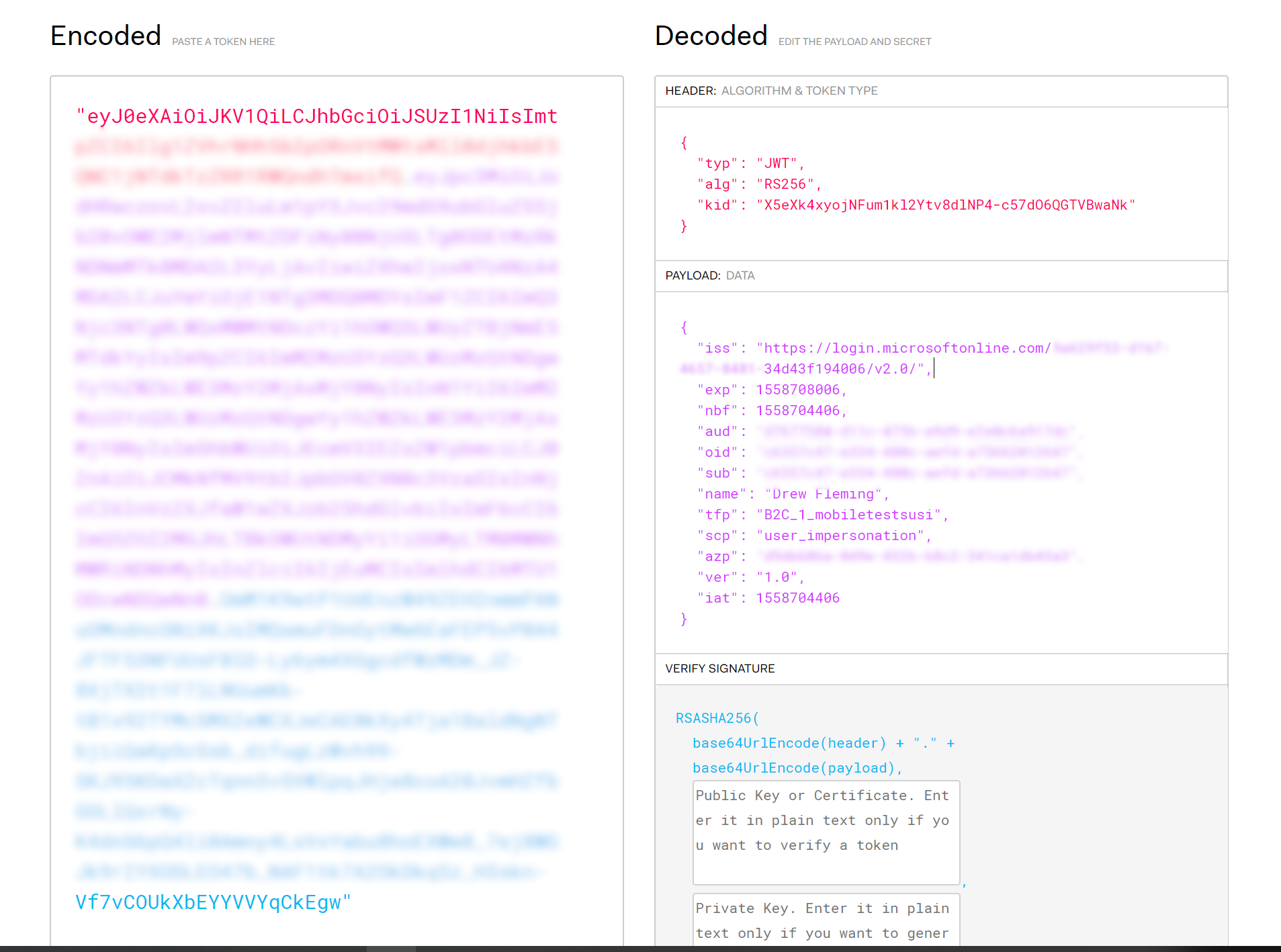
 ajfleming1
on 24 May 2019
ajfleming1
on 24 May 2019
@ajfleming1 :
In the Azure AD case, the client app uses MSAL.NET to request a token for a Web API to Azure AD. Azure AD provides a token with a version which is the version that the Web API decides.
See the note in https://docs.microsoft.com/en-us/azure/active-directory/develop/scenario-protected-web-api-app-registration#accepted-token-version
I don't know how this works for B2C. Adding @parakhj and @valnav for their lights here.
jmprieur
on 24 May 2019
@jmprieur Azure AD B2C does not look at the AcceptedTokenVersion property in the app, so is it MSAL doing a separate check?
 parakhj
on 24 May 2019
parakhj
on 24 May 2019
@parakhj : no MSAL does not care about it. Only Azure AD (and the Web API)
jmprieur
on 24 May 2019
That means the API is thinking it is secured against Azure AD, not Azure AD B2C. @ajfleming1 what is your configuration set up for the API?
parakhj
on 24 May 2019
@parakhj Thanks for the reply.
Are you saying the API I am trying to call is getting a token for Azure AD and it needs one for B2C?
Also, I am not sure what configuration you are asking me about. Do I need to check values in the manifest within App Registrations? Where exactly can I find the configuration set up? My client (a mobile app) has been given API permission using the user_impersonation scope.
Thanks again!
ajfleming1
on 24 May 2019
Given that you are making a request to B2C, you're going to get a B2C token (which you are, as I can tell by the tfp claim above).
The API now needs to validate the B2C token against the B2C openid metadata endpoint, and ensuring the keys and signature and other things match. So in the API, you must have configured the openid metadata endpoint somewhere. That's the configuration i was referring to
parakhj
on 28 May 2019
@jmprieur Could you correct me if I'm wrong? The only option to force AzureAD to issue V2 access token to some custom WebApi is to explicitly set in its manifest accessTokenAcceptedVersion to 2?
How then I can do that with CLI or PowerShell, is my only option graph api?
 krlm
on 9 Apr 2020
krlm
on 9 Apr 2020
I know this is a closed topic but I am having the same issue when using MSAL and B2C. I can get a token using the following authority - https://login.microsoftonline.com/tfp/{tenant}/{policy}/.
However, I get an unauthorized message when calling the API with that token. I believe my set up is correct because I verified the scopes and client permissions. I also verified that in the web app manifest the "accessTokenAcceptedVersion" item is set to 2. When I decode this token I notice that the version is 1.0 (see screenshot) as opposed to a 2.0 token that can I generate elsewhere that works. How can I get a 2.0 token?
      PCA = PublicClientApplicationBuilder.Create(B2CConstants.ClientID)
          .WithB2CAuthority(B2CConstants.Authority)
          .WithIosKeychainSecurityGroup(B2CConstants.IOSKeyChainGroup)
          .WithRedirectUri($"msal{B2CConstants.ClientID}://auth")
          .Build();
Same result when using
authority = https://login.microsoftonline.com/tfp/{tenant}/{policy}/oauth2/v2.0/authorizeThis returns to me a 1.0 token.
      AuthenticationResult ar = await PCA.AcquireTokenInteractive(B2CConstants.Scopes)
          .WithAccount(GetAccountByPolicy(accounts, B2CConstants.PolicySignUpSignIn))
          .WithParentActivityOrWindow(ParentActivityOrWindow)
          .ExecuteAsync();
@ajfleming1 did you got this figured out eventually? We encounter the same problem :( getting v1 access tokens and our api requires v2 tokens. So hitting a 401.
 Depechie
on 26 May 2020
Depechie
on 26 May 2020
@jmprieur Could you correct me if I'm wrong? The only option to force AzureAD to issue V2 access token to some custom WebApi is to explicitly set in its manifest
accessTokenAcceptedVersionto 2?
How then I can do that with CLI or PowerShell, is my only option graph api?
Yes, indeed, @krlm, the Web API decides the accepted token version, independently of the protocol version
jmprieur
on 26 May 2020
Related issues
 crmann1
·
5Comments
crmann1
·
5Comments
 geoffreygeslin
·
4Comments
geoffreygeslin
·
4Comments
 chrisevans9629
·
5Comments
jmprieur
·
5Comments
chrisevans9629
·
5Comments
jmprieur
·
5Comments
 bemartin
·
3Comments
bemartin
·
3Comments
Most helpful comment
yes @ibigbug, your v2.0 Web API can use MSAL.NET AcquireTokenOnBehalfOfAsync to Acquire, from the v2.0 token it received, a (v1.0) token for VSTS. This is because Azure AD knows that VSTS accepts only v1.0 tokens, and therefore will provide to MSAL.NET a v1.0 token so that your API can call VSTS.