Microsoft-authentication-library-for-dotnet: 1.1.1-preview0040 creating nuget conflicts with Xamarin.Forms
NU1107: Version conflict detected for Xamarin.Android.Support.Compat. Reference the package directly from the project to resolve this issue.
App4.Android -> App4 -> Xamarin.Forms 2.5.0.121934 -> Xamarin.Android.Support.v7.MediaRouter 25.4.0.2 -> Xamarin.Android.Support.v7.Palette 25.4.0.2 -> Xamarin.Android.Support.Compat (= 25.4.0.2)
App4.Android -> Microsoft.Identity.Client 1.1.1-preview0040 -> Xamarin.Android.Support.CustomTabs 25.3.1 -> Xamarin.Android.Support.Compat (= 25.3.1).
NuGet package restore failed.
Time Elapsed: 00:00:07.1907186
I created a blank Xamarin.Forms application from a template in Visual studio 2017. I had to remove all nuget packages for Xamarin.Forms and Android support libraries in order to get the 1.1.1-preview0040 to install but now I am unable to get Xamarin.Forms to install with the 1.1.1-preview0040 installed!
 markti
All 37 comments
@markti Thanks for the detailed steps on your issue, I was able to repro this. Unfortunately, this is a typical problem with Xamarin dependencies.
I was able to resolve it by referencing <PackageReference Include="Xamarin.Forms" Version="2.5.0.91635" /> in the csproj file of the app before installing 1.1.1-preview0040.
See the reference in MSAL's XForms app for the necessary Xamarin.Forms version: https://github.com/AzureAD/microsoft-authentication-library-for-dotnet/blob/dev/tests/dev%20apps/XForms/XForms/XForms.csproj#L17
 jennyf19
on 7 Jan 2018
jennyf19
on 7 Jan 2018
Hi @jennyf19 thanks for the quick response. However, were you able to get the Android application working? I removed all nuget packages from the Android app but when I try to add 'Xamarin.Forms' v2.5.0.91635 i get the following error:
Severity Code Description Project File Line Suppression State
Error NU1107 Version conflict detected for Xamarin.Android.Support.Compat. Reference the package directly from the project to resolve this issue.
App5.Android -> Xamarin.Android.Support.v7.MediaRouter 25.4.0.2 -> Xamarin.Android.Support.v7.Palette 25.4.0.2 -> Xamarin.Android.Support.Compat (= 25.4.0.2)
App5.Android -> App5 -> Microsoft.Identity.Client 1.1.1-preview0040 -> Xamarin.Android.Support.CustomTabs 25.3.1 -> Xamarin.Android.Support.Compat (= 25.3.1).
markti
on 7 Jan 2018
I suppose I should mention I am using .NET Standard code sharing strategy...
markti
on 7 Jan 2018
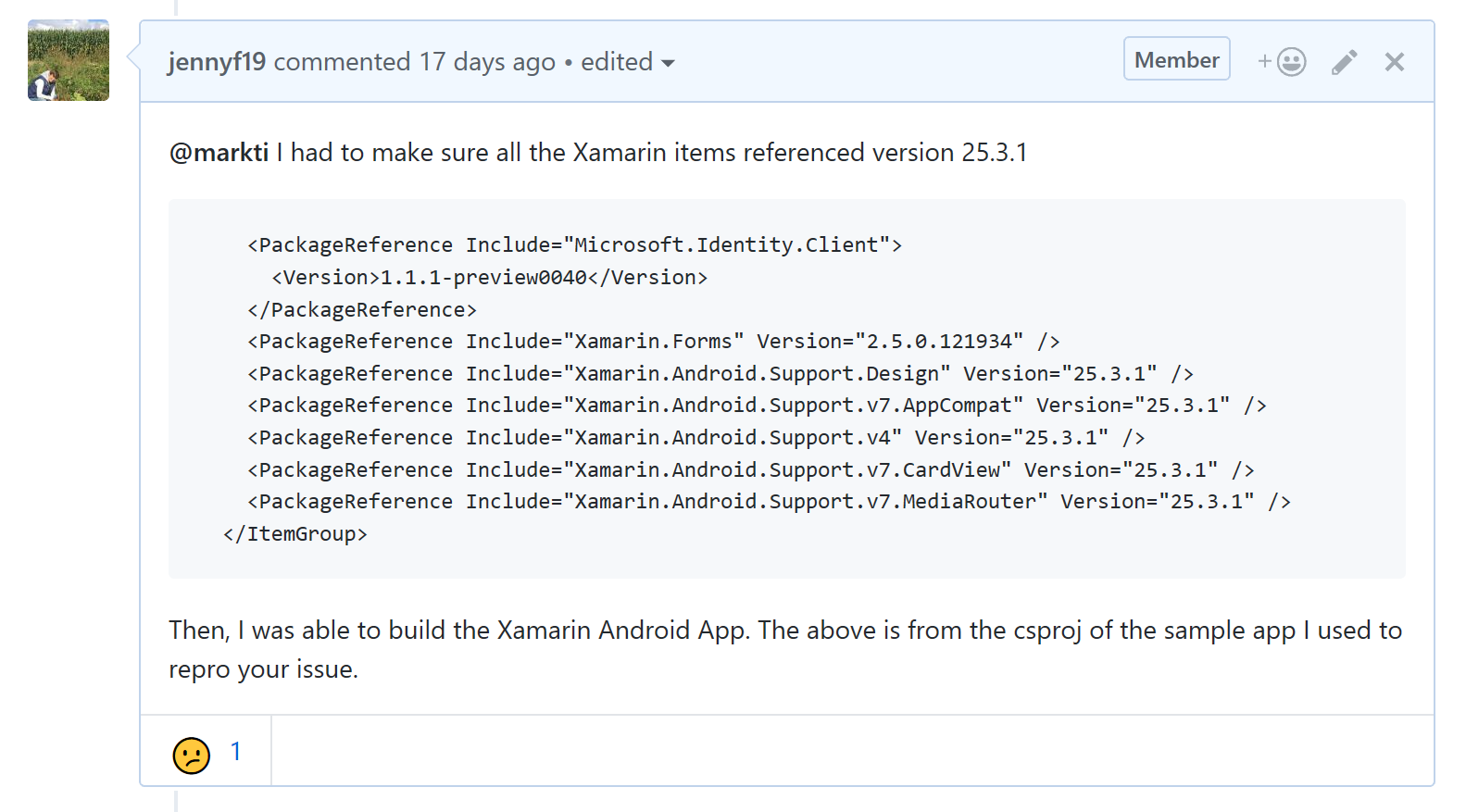
@markti I had to make sure all the Xamarin items referenced version 25.3.1
<ItemGroup>
    <PackageReference Include="Microsoft.Identity.Client">
      <Version>1.1.1-preview0040</Version>
    </PackageReference>
    <PackageReference Include="Xamarin.Forms" Version="2.5.0.121934" />
    <PackageReference Include="Xamarin.Android.Support.Design" Version="25.3.1" />
    <PackageReference Include="Xamarin.Android.Support.v7.AppCompat" Version="25.3.1" />
    <PackageReference Include="Xamarin.Android.Support.v4" Version="25.3.1" />
    <PackageReference Include="Xamarin.Android.Support.v7.CardView" Version="25.3.1" />
    <PackageReference Include="Xamarin.Android.Support.v7.MediaRouter" Version="25.3.1" />
  </ItemGroup>
Then, I was able to build the Xamarin Android App. The above is from the csproj of the sample app I used to repro your issue.
jennyf19
on 7 Jan 2018
it looks like it also magically works with
Install-Package Xamarin.Android.Support.Design -Version 25.4.0.2
Install-Package Xamarin.Android.Support.v4 -Version 25.4.0.2
Install-Package Xamarin.Android.Support.v7.AppCompat -Version 25.4.0.2
Install-Package Xamarin.Android.Support.v7.CardView -Version 25.4.0.2
Install-Package Xamarin.Android.Support.v7.MediaRouter -Version 25.4.0.2
Update: spoke to soon...this does not work
markti
on 7 Jan 2018
wish this would be included in the release notes
markti
on 7 Jan 2018
Hopefully you are unblocked. Thanks for the follow-up.
jennyf19
on 7 Jan 2018
It appears I am unblocked, just a bit jarring trying to get an azure ad b2c demo working and there is a tangle of undocumented incompatible dependencies...
markti
on 7 Jan 2018
Maybe the sample needs to be updated? Can you provide the link to the sample you are using? Thanks
jennyf19
on 7 Jan 2018
ugh, actually still blocked...
markti
on 7 Jan 2018
probably need to go to android support 25.3.1 as you suggested...
markti
on 7 Jan 2018
i found version 25.4.2 in the android test so thought it would be good...
markti
on 7 Jan 2018
So I got Xamarin.Forms v2.5.0.91635 installed on the shared project...but can't get it added to android....
Install-Package Xamarin.Forms -Version 2.5.0.91635 on 'App5.Android' produces this:
Restoring packages for c:\users\mark\sourcereposApp5App5.AndroidApp5.Android.csproj...
Install-Package : Version conflict detected for Xamarin.Android.Support.Compat. Reference the package directly from the project to resolve this issue.
App5.Android -> Xamarin.Forms 2.5.0.91635 -> Xamarin.Android.Support.v7.MediaRouter 25.4.0.2 -> Xamarin.Android.Support.v7.Palette 25.4.0.2 -> Xamarin.Android.Support.Compat (= 25.4.0.2)
App5.Android -> App5 -> Microsoft.Identity.Client 1.1.1-preview0040 -> Xamarin.Android.Support.CustomTabs 25.3.1 -> Xamarin.Android.Support.Compat (= 25.3.1).
At line:1 char:1
- Install-Package Xamarin.Forms -Version 2.5.0.91635
~~~~~~~~~~
- CategoryInfo : NotSpecified: (:) [Install-Package], Exception
- FullyQualifiedErrorId : NuGetCmdletUnhandledException,NuGet.PackageManagement.PowerShellCmdlets.InstallPackageCommand
Install-Package : Package restore failed. Rolling back package changes for 'App5.Android'.
At line:1 char:1
- Install-Package Xamarin.Forms -Version 2.5.0.91635
~~~~~~~~~~
- CategoryInfo : NotSpecified: (:) [Install-Package], Exception
- FullyQualifiedErrorId : NuGetCmdletUnhandledException,NuGet.PackageManagement.PowerShellCmdlets.InstallPackageCommand
Time Elapsed: 00:00:00.4015910
PM>
markti
on 7 Jan 2018
with no xamarin.forms installed in the android solution...if i try to add android support library 25.3.1
Install-Package Xamarin.Android.Support.Design -Version 25.3.1
i get this:
Restoring packages for c:\users\mark\sourcereposApp5App5.AndroidApp5.Android.csproj...
Install-Package : Version conflict detected for Xamarin.Android.Support.v7.AppCompat. Reference the package directly from the project to resolve this issue.
App5.Android -> App5 -> Xamarin.Forms 2.5.0.91635 -> Xamarin.Android.Support.v7.AppCompat (>= 25.4.0.2)
App5.Android -> Xamarin.Android.Support.Design 25.3.1 -> Xamarin.Android.Support.v7.AppCompat (= 25.3.1).
At line:1 char:1
- Install-Package Xamarin.Android.Support.Design -Version 25.3.1
~~~~~~~~~~~~~~
- CategoryInfo : NotSpecified: (:) [Install-Package], Exception
- FullyQualifiedErrorId : NuGetCmdletUnhandledException,NuGet.PackageManagement.PowerShellCmdlets.InstallPackageCommand
Install-Package : Package restore failed. Rolling back package changes for 'App5.Android'.
At line:1 char:1
- Install-Package Xamarin.Android.Support.Design -Version 25.3.1
~~~~~~~~~~~~~~
- CategoryInfo : NotSpecified: (:) [Install-Package], Exception
- FullyQualifiedErrorId : NuGetCmdletUnhandledException,NuGet.PackageManagement.PowerShellCmdlets.InstallPackageCommand
Time Elapsed: 00:00:00.8053188
markti
on 7 Jan 2018
as jarjar would say, "dis is bom-baaaaad"
markti
on 7 Jan 2018
this is the sample i'm trying to use....
https://azure.microsoft.com/en-us/resources/samples/active-directory-b2c-xamarin-native/
I'm trying to re-create the sample in a clean project...this is where i'm getting these problems... because i can't even get the M.Identity.Client referenced successfully...
markti
on 7 Jan 2018
i don't think this issue should be closed
markti
on 7 Jan 2018
I had to manually change the version to 25.3.1 in the csproj file, then I cleaned and rebuilt the solution file.
jennyf19
on 7 Jan 2018
@jennyf19 How do you use Xamarin.Forms 2.5.0.121934 in the Android project but you're using 2.5.0.91635 in the shared code project?
markti
on 7 Jan 2018
@markti - The issue is not with the library itself, but with oddness of Xamarin forms and its dependencies. As @jennyf19 suggested, you should manually change the versions in csproj files. We closed this because this is not really an actionable item for us, but we are glad to help and answer questions as we are currently doing.
 kpanwar
on 7 Jan 2018
kpanwar
on 7 Jan 2018
@kpanwar OK, so just wanna make sure I understand this, I need Xamarin.Forms v2.5.0.91635 in my shared code project and Xamarin.Forms v2.5.0.121934 in my Android project? And android support libraries v25.3.1 in my android project but I have to jam them in by manually editing the csproj?
markti
on 7 Jan 2018
ok. seriously. wow. that worked. it feels very cringy but it worked! lol
markti
on 7 Jan 2018
@markti - Yes, thats the idea. Our sample project in msal repo uses 25.4.0.2 version for android dependencies, but Xamarin forms core project uses 2.5.0.91635. Also, shared code project is a legacy way of creating xamarin projects, but sadly it is still supported as a template. :( Suggested way is using PCL or NetStandard templates.
kpanwar
on 7 Jan 2018
imma blog about this...this is seriously not for the faint of heart yo! 😆
markti
on 7 Jan 2018
@markti 
kpanwar
on 7 Jan 2018
@jmprieur - This should be included in the blog post for this release 1.1.1-preview0040
jennyf19
on 7 Jan 2018
This is ridiculous. This should not be closed and is an MSAL problem. For the MSAL dev team to suggest it is not their issue and close this is highly unprofessional. MSAL should not reference a specific version of Xamarin.Android.Support.CustomTabs it should reference >=. If it has to reference a specific version for some bizare reason, it should be updated to reference the version used by the latest version of Xamarin,Forms. The ONLY reason for MSAL for Android to exist is Xamarin,.Android, so it is incumbent on the MSAL dev team, to keep in sync. The solution is clear: the MSAL team need to change the NuGet dependency and also test with Xamarin,.Android.Support.Compat 25.4.0.2
 davidallen-bluemetal
on 24 Jan 2018
davidallen-bluemetal
on 24 Jan 2018
I think I may have figured out an easier and cleaner way around this issue, It would appear that the main problem is that the MSAL NuGet package defines a dependency on an exact version (=) of Xamarin.Android.Support.CustomTabs, instead of it being equal or greater than (=>).
I created a Xamarin Forms project with XF and .Net Standard 2.0. When I tried to add the MSAL Nuget Package (either the latest stable or the lasts development build) I got the Version conflict error described above.
Here’s how I fixed it:
Try to add the MSAL NuGet package. Note the conflicting versions.
Unload the solution from VS.
Open the xxx.Android.csproj file. Find the ItemGroup with
<PackageReference Include="Xamarin.Forms" Version=" " />
  <PackageReference Include="Xamarin.Android.Support.Design" Version=" " />
  <PackageReference Include="Xamarin.Android.Support.v7.AppCompat" Version=" " />
and manually add in the following dependencies (replacing the version with the one NuGet reports as required by MSAL):
<PackageReference Include="Xamarin.Android.Support.CustomTabs" Version="X.y.z" />
  <PackageReference Include="Xamarin.Android.Support.Compat" Version=" X.y.z" />
  <PackageReference Include="Xamarin.Android.Support.Annotations" Version=" X.y.z" />
Load solution into VS and build. Now you should be able to successfully add the MSAL NuGet package and successfully build the solution.
However, when MainActivity attempts to load the XF App instance, it crashes with a null pointer exception – there seems to be a mismatch.
Unload the solution again from VS and again manually edit the xxx.Android.csproj file, this time change the three references to the versions referenced by XF. Reload and rebuild.
Now it should build and run.
In my case I was using the latest XF 2.5.0.122203, the latest dev version of MSAL (1.2-alpha0004). XF references version 25.4.0.2 of the Android support packages, where as MSAL referenced version 25.3.1 of Xamarin.Android.Support.CustomTabs. I edited the xxx.Android.csproj file and added:
<PackageReference Include="Xamarin.Android.Support.CustomTabs" Version="25.3.1" />
  <PackageReference Include="Xamarin.Android.Support.Compat" Version="25.3.1" />
  <PackageReference Include="Xamarin.Android.Support.Annotations" Version="25.3.1" />
I then loaded the MSAL NuGet package and then edited the xxx.Android.csproj file and changed the version of those references to 25.4.0.2.
Now it built, launched XF and authenticated with my B2C tenant correctly.
FYI, the dev builds of MSAL can be accessed by adding https://www.myget.org/F/aad-clients-nightly/api/v3/index.json as a source to the NuGet Package Manager.
davidallen-bluemetal
on 25 Jan 2018
Thank you for the workaround, @davidallen-bluemetal - Looks similar to what we provided the customer earlier in this thread.
We appreciate your earlier feedback and are looking further into this issue, as having to manually update the csproj files is not ideal. Thank you for bringing this back to our attention and I'll update the thread when I have more information.
jennyf19
on 25 Jan 2018
Np @jennyf19.
The nice thing about this approach, is that you don’t have to mess around with different versions of XF. An important thing I found was that the versions of those three references have to be changed back to the version referenced by XF (I haven’t tested just removing the manual references after MSAL is loaded, but that may also work). XF.Android is very picky about the versions of the Android support libraries it uses, which often catches out devs when they try to use the latest versions of Google Play Services such as Maps.
Assuming that MSAL isn’t actually tied to a specific version of Xamarin.Android.Support.CustomTabs, and just requires a min version, then this whole issue could be solved by changing the NuGet reference from = to =>. Interestingly the MSAL wiki states the dependency as =>. II have used this work around on 4 different version of MSAL and XF now, utilizing both .Net Standard 1.6.1 and 2.0, so I think the = in the NuGet definition might be an oversight. It must be worth a try changing it, as if works then it would not only make MSAL usage more robust, but cease all the enquiries you guts get about it!!
From: jennyf19 [mailto:[email protected]]
Sent: Thursday, January 25, 2018 03:44
To: AzureAD/microsoft-authentication-library-for-dotnet microsoft-authentication-library-for-dotnet@noreply.github.com
Cc: Allen, David david.allen@bluemetal.com; Mention mention@noreply.github.com
Subject: Re: [AzureAD/microsoft-authentication-library-for-dotnet] 1.1.1-preview0040 creating nuget conflicts with Xamarin.Forms (#520)
Thank you for the workaround, @davidallen-bluemetalhttps://github.com/davidallen-bluemetal - Looks similar to what we provided the customer earlier in this thread.
[image]https://user-images.githubusercontent.com/19942418/35381321-b397949c-0170-11e8-91db-3ef0936e5df6.png
We appreciate your earlier feedback and are looking further into this issue, as having to manually update the csproj files is not ideal. Thank you for bringing this back to our attention and I'll update the thread when I have more information.
—
You are receiving this because you were mentioned.
Reply to this email directly, view it on GitHubhttps://github.com/AzureAD/microsoft-authentication-library-for-dotnet/issues/520#issuecomment-360414344, or mute the threadhttps://github.com/notifications/unsubscribe-auth/AYp8u7ZeyIDcKkZ1TzOgUSFVybbkQAXBks5tOEzjgaJpZM4RVwOs.
davidallen-bluemetal
on 25 Jan 2018
Better fix provided in MSAL.Net 1.1.2-preview.
See also this wiki page: Troubleshooting-Xamarin.Android-issues-with-MSAL
 jmprieur
on 2 Feb 2018
jmprieur
on 2 Feb 2018
Hi,
i have the same problem with version 1.1.2-preview0008. All the Android (Support) packages are at 27.0.2 and cannot be downgraded. When following the referenced description of @jmprieur which includes the downgrade i get:
Package Xamarin.Android.Support.v4 25.4.0.2 is not compatible with netstandard2.0 (.NETStandard,Version=v2.0). Package Xamarin.Android.Support.v4 25.4.0.2 supports: monoandroid70 (MonoAndroid,Version=v7.0).
Does anyone has a solution for that?
It's very demotivating when the first major challenge is to include the necessary packages before a single line of code has been written and weird that it does not work with up-to-date releases. . .
Best regards
Yahku
 Yahku
on 22 May 2018
Yahku
on 22 May 2018
@Yahku - Do you think your issue is related to this?
We are looking into the issue w/27.0.2. Thanks for your patience.
jennyf19
on 22 May 2018
@Yahku , it sounds like you have a rogue .NetStandard reference in your Android project. The platform specific projects should not reference NuGet packages with cross reference dependencies (such as .NetStandard). Check the project references for any NuGet packages with a .NetStandard dependency that you've installed in your Android project by mistake.
davidallen-bluemetal
on 22 May 2018
At first, thanks for the fast reply! Looks like the same, yes, waiting for a fix there!
I have not found a rogue reference, anyways i will try it with a new project after the fix. Visual Studio plus the packet manager seem to produce a little mess from time to time . . .
Yahku
on 22 May 2018
I am getting the same issue also -- please let us know when this is fixed.
 dhirujadhav
on 23 May 2018
dhirujadhav
on 23 May 2018
@dhirujadhav and @Yahku we will have a release out shortly with a fix.
jennyf19
on 23 May 2018
Related issues
 chrisevans9629
·
4Comments
chrisevans9629
·
4Comments
 yhvicey
·
3Comments
jennyf19
·
5Comments
yhvicey
·
3Comments
jennyf19
·
5Comments
 stweedie
·
3Comments
stweedie
·
3Comments
 crmann1
·
5Comments
crmann1
·
5Comments
Most helpful comment
ok. seriously. wow. that worked. it feels very cringy but it worked! lol