Microsoft-authentication-library-for-dotnet: Cannot get access token for scope https://graph.microsoft.com/User.ReadWrite.All
I am trying to acquire an access token using the client_credentials grant type for scope https://graph.microsoft.com/User.ReadWrite.All and the STS returns:
error_description=AADSTS70011: The provided value for the input parameter 'scope' is not valid. The scope https://graph.microsoft.com/User.ReadWrite.All is not valid.
Trace ID: 89831612-cb0d-4b38-bfbb-355a365d3200
Correlation ID: c64d9a44-0911-4a93-9c25-76b9f4f0a435
Timestamp: 2017-08-01 12:52:44Z
However, I know it for a fact that the scope is right, since I can acquire a token with the right claims using:
- using postman (with authorization_code flow)
- using the Microsoft.IdentityModel.Clients.ActiveDirectory (with the client_credientials flow but not in a multi-tenant scenario)
Here is a snippet of my use of the package:
var app = new ConfidentialClientApplication(this._clientCredential.ClientId, "https://www.getpostman.com/oauth2/callback", new Microsoft.Identity.Client.ClientCredential(this._secret), new Microsoft.Identity.Client.TokenCache(), new Microsoft.Identity.Client.TokenCache() );
var authenticationResult = app.AcquireTokenForClientAsync(new List
I would like to know the correct way to use the package.
 delepster
All 19 comments
Hi Guy, did you have a look at this guided setup: https://docs.microsoft.com/en-us/azure/active-directory/develop/guidedsetups/active-directory-windesktop ?
 jmprieur
on 1 Aug 2017
jmprieur
on 1 Aug 2017
Thanks for your answer. I looked at it and here's what I see:
- I already did install the Microsoft Authentication Library (MSAL) to my project
- However, I want to use the client_credentials flow, without a UI portion, since the calls are done in the backend of my app, so I use the ConfidentialClientApplication.AcquireTokenForClientAsync method
- I see the scope listed in the sample at the end is only "user.read" without the https://graph.microsoft.com/ prefix. I tried to modify the scope, with no luck.
Here's what set up for permissions to be granted for my app:
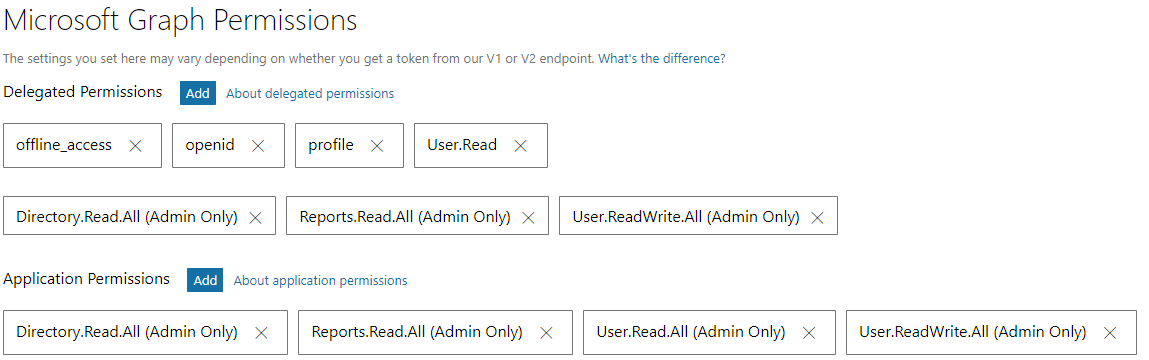
delepster
on 1 Aug 2017
Oh sorry, I mis-understood that you wanted to use the client credential flow.
The thing is that if you use a client credential flow, you don't have a user (the application identifies itself to the graph with an app secret). So I think you can only use user independent scopes (such as All) but not user read. @kpanwar ?
jmprieur
on 1 Aug 2017
@jmprieur The scopes I am trying to get a token for are along User.ReadWrite.All, Directory.Read.All and Reports.Read.All
delepster
on 1 Aug 2017
I guess I sort of resolved my problem, by having using the adminconsent endpoint (https://docs.microsoft.com/en-us/azure/active-directory/develop/active-directory-v2-scopes#using-the-admin-consent-endpoint) because these are _admin-restricted scopes_. From what I understand, this endpoint allows granting admin-only permissions to applications.
delepster
on 1 Aug 2017
Hi @delepster I am having a very similar problem. I am also using the client credential flow. What scope did you end up using in the /token endpoint? What does your final request look like?
 FabbyD
on 17 Sep 2017
FabbyD
on 17 Sep 2017
Hi @delepster,
I know it's late but I ran into this today, and found this post. I thought I'll share for the next one stumbling here.
With grant_type=client_credentials you use https://graph.microsoft.com/.default for scope. It will give you the permission defined in your app.
I had to use my tenant endpoint for the /token request, not common. You get the tenant id after the admin consent.
My final request looked like this:
POST https://login.microsoftonline.com/{tenant-id}/oauth2/v2.0/token
client_id:{client_id}
client_secret:{client_secret}
grant_type:client_credentials
scope:https://graph.microsoft.com/.default
 jdevost
on 15 Aug 2018
jdevost
on 15 Aug 2018
https://graph.microsoft.com/.default worked for me as the scope when trying to request a new access token. Thank you!
I also url encoded (e.g. encodeURIComponent) for some parameters if having problems.
 kfitzsimons
on 17 Sep 2018
kfitzsimons
on 17 Sep 2018
Seems like this is documented here, but MSAL could do a better job at validating these with the client credential flows:
https://docs.microsoft.com/en-us/graph/auth-v2-service#4-get-an-access-token
@bgavrilMS ?
 clairernovotny
on 9 Jan 2019
clairernovotny
on 9 Jan 2019
It should be trivial to validate that the scopes are suffixed by ".default". @jmprieur - are there any cases where the scopes would be specified differently?
 bgavrilMS
on 10 Jan 2019
bgavrilMS
on 10 Jan 2019
No @bgavrilMS : the scope should be "resource/.default". I wrote scope as we cannot request tokens for several resources. So the rule is
scopes.Length == 1
and scopes.First().EndsWith(".default")
jmprieur
on 11 Jan 2019
Closing this issue (this is documented in https://aka.ms/msal-client-credentials). The scope to request is "https//graph.microsoft.com/.default"
jmprieur
on 8 Feb 2019
With
grant_type=client_credentialsyou usehttps://graph.microsoft.com/.defaultfor scope. It will give you the permission defined in your app.
This doesn't seem to be the case anymore. That does indeed allow me to authenticate, but the generated token doesn't grant access to anything, even though I've given my app permission to everything. All API calls with the token return the error message:
Error Message: The token contains no permissions, or permissions can not be understood.
 chrisspen
on 22 Sep 2020
chrisspen
on 22 Sep 2020
@chrisspen : could you send me a screenshot of the API permissions page for your app in the app-registration portal (jean-marc dot prieur at microsoft dot come) ?
jmprieur
on 22 Sep 2020
@jmprieur we want to add custom attribute in JWT token generated through client credential grant type to enable authorization at our API gateway. Is it possible to add it via calling a custom policy.? or any suggestion how to achieve this.
 ani2011
on 10 Nov 2020
ani2011
on 10 Nov 2020
MSAL allows developers to create their own signed assertions for this grant instead of creating the assertion on their own. We have documented this scenario here: https://github.com/AzureAD/microsoft-authentication-library-for-dotnet/wiki/Client-Assertions
bgavrilMS
on 10 Nov 2020
@bgavrilMS can we add custom attribute in JWT while doing client credential grant type. can't find any reference
ani2011
on 10 Nov 2020
In token that you receive from ESTS or in token that you generate based on your cert to send to ESTS?
I don't know about custom attribute (claim) in token that you receive from ESTS.
bgavrilMS
on 10 Nov 2020
@chrisspen : this does not seem to be related to this issue. In the future, please open another issue with repro steps.
Do you need a claim? or an app role?
Did you see https://docs.microsoft.com/en-us/azure/active-directory/develop/active-directory-optional-claims ?
jmprieur
on 10 Nov 2020
Related issues
 stweedie
·
3Comments
jmprieur
·
5Comments
stweedie
·
3Comments
jmprieur
·
5Comments
 saketkataruka
·
5Comments
saketkataruka
·
5Comments
 alexzaitzev
·
5Comments
alexzaitzev
·
5Comments
 chrisevans9629
·
4Comments
chrisevans9629
·
4Comments
Most helpful comment
Hi @delepster,
I know it's late but I ran into this today, and found this post. I thought I'll share for the next one stumbling here.
With
grant_type=client_credentialsyou usehttps://graph.microsoft.com/.defaultfor scope. It will give you the permission defined in your app.I had to use my tenant endpoint for the
/tokenrequest, not common. You get the tenant id after the admin consent.My final request looked like this: