Microk8s: command not found after install
sudo snap install microk8s --classic --channel=1.18/stable
microk8s (1.18/stable) v1.18.0 from Canonical✓ installed
sudo microk8s status --wait-ready
Traceback (most recent call last):
File "/snap/microk8s/1319/scripts/wrappers/status.py", line 149, in
available_addons = get_available_addons(get_current_arch())
File "/snap/microk8s/1319/scripts/wrappers/common/utils.py", line 113, in get_available_addons
addons = yaml.load(file, Loader=yaml.FullLoader)
AttributeError: module 'yaml' has no attribute 'FullLoader'
lsb_release -a
No LSB modules are available.
Distributor ID: Ubuntu
Description: Ubuntu 18.04.4 LTS
Release: 18.04
Codename: bionic
uname -r
4.15.0-91-generic
zsh: command not found: microk8s
snap services show services are running, snap logs for each of them, I not do see errors except flannelId, pasted below
snap services
Service Startup Current Notes
microk8s.daemon-apiserver enabled active -
microk8s.daemon-apiserver-kicker enabled active -
microk8s.daemon-cluster-agent enabled active -
microk8s.daemon-containerd enabled active -
microk8s.daemon-controller-manager enabled active -
microk8s.daemon-etcd enabled active -
microk8s.daemon-flanneld enabled active -
microk8s.daemon-kubelet enabled active -
microk8s.daemon-proxy enabled active -
microk8s.daemon-scheduler enabled active -
sudo snap logs microk8s.daemon-flanneld
2020-04-04T12:05:01Z microk8s.daemon-flanneld[16703]: I0404 20:05:01.342266   16703 main.go:386] Found network config - Backend type: vxlan
2020-04-04T12:05:01Z microk8s.daemon-flanneld[16703]: I0404 20:05:01.342416   16703 vxlan.go:120] VXLAN config: VNI=1 Port=0 GBP=false DirectRouting=false
2020-04-04T12:05:01Z microk8s.daemon-flanneld[16703]: I0404 20:05:01.389635   16703 local_manager.go:234] Picking subnet in range 10.1.1.0 ... 10.1.255.0
2020-04-04T12:05:01Z microk8s.daemon-flanneld[16703]: I0404 20:05:01.393006   16703 local_manager.go:220] Allocated lease (10.1.43.0/24) to current node (192.168.1.124)
2020-04-04T12:05:01Z microk8s.daemon-flanneld[16703]: I0404 20:05:01.405622   16703 main.go:317] Wrote subnet file to /var/snap/microk8s/common/run/flannel/subnet.env
2020-04-04T12:05:01Z microk8s.daemon-flanneld[16703]: I0404 20:05:01.406204   16703 main.go:321] Running backend.
2020-04-04T12:05:01Z microk8s.daemon-flanneld[16703]: I0404 20:05:01.406456   16703 vxlan_network.go:60] watching for new subnet leases
2020-04-04T12:05:01Z microk8s.daemon-flanneld[16703]: I0404 20:05:01.409745   16703 main.go:429] Waiting for 22h59m59.981316306s to renew lease
2020-04-04T12:05:10Z microk8s.daemon-flanneld[16703]: E0404 20:05:10.901030   16703 **watch.go:43] Watch subnets: client: etcd cluster is unavailable or misconfigured; error #0: unexpected EOF
2020-04-04T12:05:10Z microk8s.daemon-flanneld[16703]: E0404 20:05:10.901030   16703 watch.go:171] Subnet watch failed: client: etcd cluster is unavailable or misconfigured; error #0: unexpected EOF**
journalctl logs grep flannel and etcd
Apr 04 20:05:22    microk8s.daemon-apiserver[18786]: + exec /snap/microk8s/1319/kube-apiserver --cert-dir=/var/snap/microk8s/1319/certs --service-cluster-ip-range=10.152.183.0/24 --authorization-mode=AlwaysAllow --basic-auth-file=/var/snap/microk8s/1319/credentials/basic_auth.csv --service-account-key-file=/var/snap/microk8s/1319/certs/serviceaccount.key --client-ca-file=/var/snap/microk8s/1319/certs/ca.crt --tls-cert-file=/var/snap/microk8s/1319/certs/server.crt --tls-private-key-file=/var/snap/microk8s/1319/certs/server.key --kubelet-client-certificate=/var/snap/microk8s/1319/certs/server.crt --kubelet-client-key=/var/snap/microk8s/1319/certs/server.key --secure-port=16443 --token-auth-file=/var/snap/microk8s/1319/credentials/known_tokens.csv --token-auth-file=/var/snap/microk8s/1319/credentials/known_tokens.csv --etcd-servers=https://127.0.0.1:12379 --etcd-cafile=/var/snap/microk8s/1319/certs/ca.crt --etcd-certfile=/var/snap/microk8s/1319/certs/server.crt --etcd-keyfile=/var/snap/microk8s/1319/certs/server.key --insecure-port=0 --requestheader-client-ca-file=/var/snap/microk8s/1319/certs/front-proxy-ca.crt --requestheader-allowed-names=front-proxy-client --requestheader-extra-headers-prefix=X-Remote-Extra- --requestheader-group-headers=X-Remote-Group --requestheader-username-headers=X-Remote-User --proxy-client-cert-file=/var/snap/microk8s/1319/certs/front-proxy-client.crt --proxy-client-key-file=/var/snap/microk8s/1319/certs/front-proxy-client.key
Apr 04 20:15:25    etcd[18380]: store.index: compact 768
Apr 04 20:15:25    etcd[18380]: finished scheduled compaction at 768 (took 2.587079ms)
Apr 04 20:17:35    microk8s.daemon-apiserver[18786]: W0404 20:17:35.938620   18786 watcher.go:199] watch chan error: etcdserver: mvcc: required revision has been compacted
Apr 04 20:20:25    etcd[18380]: store.index: compact 1424
Apr 04 20:20:25    etcd[18380]: finished scheduled compaction at 1424 (took 2.938123ms)


Apr 04 20:05:22    microk8s.daemon-kubelet[18841]: ++ jq .Network /var/snap/microk8s/1319/args/flannel-network-mgr-config
 sweetpotatoz
All 23 comments
Could you please attach the tarball create with sudo microk8s.inspect?
For zfs not able to find microk8s could you make sure /snap/bin/ is in your path?
 ktsakalozos
on 4 Apr 2020
ktsakalozos
on 4 Apr 2020
Anything special about the machine you have? I am tryng to reproduce the FullLoader error with no success.
ktsakalozos
on 4 Apr 2020
Anything special about the machine you have? I am tryng to reproduce the FullLoader error with no success.
nothing special, it is just a Kubuntu laptop. /snap/bin was not in my PATH, added to it. but still shows command not found. i shall upload the tarball in a moment. thank you
sweetpotatoz
on 4 Apr 2020
Could you please attach the tarball create with
sudo microk8s.inspect?For zfs not able to find
microk8scould you make sure/snap/bin/is in your path?
sweetpotatoz
on 4 Apr 2020
Try the kubectl coming with MicroK8s, sudo microk8s.kubect version.
ktsakalozos
on 4 Apr 2020
Try the kubectl coming with MicroK8s,
sudo microk8s.kubect version.
sudo microk8s.kubectl version
Client Version: version.Info{Major:"1", Minor:"18", GitVersion:"v1.18.0", GitCommit:"9e991415386e4cf155a24b1da15becaa390438d8", GitTreeState:"clean", BuildDate:"2020-03-25T14:58:59Z", GoVersion:"go1.13.8", Compiler:"gc", Platform:"linux/amd64"}
Server Version: version.Info{Major:"1", Minor:"18", GitVersion:"v1.18.0", GitCommit:"9e991415386e4cf155a24b1da15becaa390438d8", GitTreeState:"clean", BuildDate:"2020-03-25T14:50:46Z", GoVersion:"go1.13.8", Compiler:"gc", Platform:"linux/amd64"}
But I still need sudo, even after I added my user to microk8s group?
sudo usermod -a -G microk8s <myuserid>
sweetpotatoz
on 5 Apr 2020
sudo microk8s.kubectl get node
NAME                    STATUS   ROLES    AGE   VERSION
<mypcname>   Ready    <none>   10h   v1.18.0
sudo microk8s.kubectl get all
NAME                 TYPE        CLUSTER-IP     EXTERNAL-IP   PORT(S)   AGE
service/kubernetes   ClusterIP   10.152.183.1   <none>        443/TCP   10h
Questions:
1/ Does the yaml error in my first post mean anything?
Seems that I can create pod, services, and deployment
(base) ~|⇒ sudo microk8s.kubectl run nginx --image=nginx
pod/nginx created
(base) ~|⇒ sudo microk8s.kubectl get pod --all-namespaces
NAMESPACE   NAME    READY   STATUS              RESTARTS   AGE
default     nginx   0/1     ContainerCreating   0          7s
But I still need sudo, even after I added my user to microk8s group?
If you added your user in the microk8s group you should not need sudo after your next reboot.
1/ Does the yaml error in my first post mean anything?
I am not able to reproduce this error. Is it still happening?
ktsakalozos
on 5 Apr 2020
the yaml error is still happening.
while for the sudo issue, now only kubectl get all need to use sudo, others command are fine.
i think that is due to zsh and snap issue. i'm ok to live with it now, as only get all require sudo.
sweetpotatoz
on 5 Apr 2020
Hey @sweetpotatoz
I have the same problem (probably), Parrot OS (Debian based) here. Maybe little bit different. I haven't added /snap/bin to the PATH. But when I added my output not it's showing this. So when I do export in new session:
export PATH=$PATH:/snap/bin
I can work with microk8s.
$ microk8s (...)
My question is:
Do you have in new sessions /snap/bin in your PATH? If not this is the problem.
 axyan
on 5 Apr 2020
axyan
on 5 Apr 2020
Hey @sweetpotatoz
I have the same problem (probably), Parrot OS (Debian based) here. Maybe little bit different. I haven't added
/snap/binto the PATH. But when I added my output not it's showing this. So when I do export in new session:
export PATH=$PATH:/snap/binI can work with microk8s.
$ microk8s (...)My question is:
Do you have in new sessions/snap/binin your PATH? If not this is the problem.
yeah it has been added to .zshrc (also added some fix in zprofile, apparently there is some issue with zsh and snap)
and shown up in the $PATH
now, i no longer have command not found issue except the yaml error.
sweetpotatoz
on 6 Apr 2020
the yaml error
could you share the result of pip3 list? We ship with the MicroK8s snap the right PyYAML package but perhaps it is getting shadowed by some other package.
ktsakalozos
on 6 Apr 2020
the yaml error
could you share the result of
pip3 list? We ship with the MicroK8s snap the right PyYAML package but perhaps it is getting shadowed by some other package.
apt-xapian-index (0.47)
asn1crypto (0.24.0)
astroid (2.2.5)
awscli (1.16.139)
botocore (1.12.129)
certifi (2018.1.18)
chardet (3.0.4)
Click (7.0)
colorama (0.3.9)
command-not-found (0.3)
cryptography (2.1.4)
cupshelpers (1.0)
distro-info (0.18ubuntu0.18.04.1)
docutils (0.14)
httplib2 (0.9.2)
idna (2.6)
isort (4.3.21)
Jinja2 (2.10)
jmespath (0.9.4)
kazam (1.5.3)
keyring (10.6.0)
keyrings.alt (3.0)
language-selector (0.1)
lazy-object-proxy (1.4.1)
livereload (2.6.0)
Markdown (3.0.1)
MarkupSafe (1.1.1)
mccabe (0.6.1)
mkdocs (1.0.4)
netifaces (0.10.4)
olefile (0.45.1)
pexpect (4.2.1)
Pillow (5.1.0)
pip (9.0.1)
pyasn1 (0.4.5)
pycairo (1.16.2)
pycrypto (2.6.1)
pycups (1.9.73)
pygobject (3.26.1)
pylint (2.3.1)
python-apt (1.6.5+ubuntu0.2)
python-dateutil (2.8.0)
python-debian (0.1.32)
pyxdg (0.25)
PyYAML (3.13)
reportlab (3.4.0)
requests (2.18.4)
requests-unixsocket (0.1.5)
rsa (3.4.2)
s3transfer (0.2.0)
SecretStorage (2.3.1)
setuptools (39.0.1)
six (1.12.0)
systemd-python (234)
tornado (5.1.1)
typed-ast (1.4.0)
ubuntu-drivers-common (0.0.0)
ufw (0.36)
unattended-upgrades (0.1)
urllib3 (1.24.1)
virtualenv (15.1.0)
wheel (0.30.0)
wrapt (1.11.2)
xkit (0.0.0)
I have miniconda installed, doing pip3 list from the base
sweetpotatoz
on 6 Apr 2020
@sweetpotatoz I still cannot reproduce the yaml error. Any hints on how python was setup in your system?
ktsakalozos
on 6 Apr 2020
@sweetpotatoz I still cannot reproduce the yaml error. Any hints on how python was setup in your system?
nothing special. Kubuntu 18.04 and miniconda 4.7.12
my shell always started with miniconda base env which is
/home/
python is alias to python3
Python 3.7.3
if i run conda deactivate (i always leave it with env base even when im not using python)
which python3 is default to
/usr/bin/python3
python is alias to python3
Python 3.6.9
I tried without miniconda base env
sudo microk8s status --wait-ready
Traceback (most recent call last):
  File "/snap/microk8s/1319/scripts/wrappers/status.py", line 149, in <module>
    available_addons = get_available_addons(get_current_arch())
  File "/snap/microk8s/1319/scripts/wrappers/common/utils.py", line 113, in get_available_addons
    addons = yaml.load(file, Loader=yaml.FullLoader)
AttributeError: module 'yaml' has no attribute 'FullLoader'
still see the same message.
but after using for a few days, it seems not to affect much except i need to use sudo when get pod all
so it is not critical, so i'm fine with it if we cannot really find the root cause. appreciate your time and effort.
sweetpotatoz
on 7 Apr 2020
the yaml error
could you share the result of
pip3 list? We ship with the MicroK8s snap the right PyYAML package but perhaps it is getting shadowed by some other package.apt-xapian-index (0.47)
asn1crypto (0.24.0)
astroid (2.2.5)
awscli (1.16.139)
botocore (1.12.129)
certifi (2018.1.18)
chardet (3.0.4)
Click (7.0)
colorama (0.3.9)
command-not-found (0.3)
cryptography (2.1.4)
cupshelpers (1.0)
distro-info (0.18ubuntu0.18.04.1)
docutils (0.14)
httplib2 (0.9.2)
idna (2.6)
isort (4.3.21)
Jinja2 (2.10)
jmespath (0.9.4)
kazam (1.5.3)
keyring (10.6.0)
keyrings.alt (3.0)
language-selector (0.1)
lazy-object-proxy (1.4.1)
livereload (2.6.0)
Markdown (3.0.1)
MarkupSafe (1.1.1)
mccabe (0.6.1)
mkdocs (1.0.4)
netifaces (0.10.4)
olefile (0.45.1)
pexpect (4.2.1)
Pillow (5.1.0)
pip (9.0.1)
pyasn1 (0.4.5)
pycairo (1.16.2)
pycrypto (2.6.1)
pycups (1.9.73)
pygobject (3.26.1)
pylint (2.3.1)
python-apt (1.6.5+ubuntu0.2)
python-dateutil (2.8.0)
python-debian (0.1.32)
pyxdg (0.25)
PyYAML (3.13)
reportlab (3.4.0)
requests (2.18.4)
requests-unixsocket (0.1.5)
rsa (3.4.2)
s3transfer (0.2.0)
SecretStorage (2.3.1)
setuptools (39.0.1)
six (1.12.0)
systemd-python (234)
tornado (5.1.1)
typed-ast (1.4.0)
ubuntu-drivers-common (0.0.0)
ufw (0.36)
unattended-upgrades (0.1)
urllib3 (1.24.1)
virtualenv (15.1.0)
wheel (0.30.0)
wrapt (1.11.2)
xkit (0.0.0)I have miniconda installed, doing pip3 list from the base
Hi,
Your pip3 list reports PyYaml (3.13). Keep in mind the FullLoader class is available in PyYAML 5.1 and later.
Maybe trying to upgrade it and see if something changes?
pip install -U PyYAML
History with changes: https://pyyaml.org/wiki/PyYAML#history
 iskitsas
on 7 Apr 2020
iskitsas
on 7 Apr 2020
Thank you. I run pip install -U PyYAML
It is upgraded to PyYAML (5.3.1) now
However I still get the error below, but it is only happen when I run status --wait-ready
sudo microk8s status --wait-ready
Traceback (most recent call last):
File "/snap/microk8s/1319/scripts/wrappers/status.py", line 149, in
available_addons = get_available_addons(get_current_arch())
File "/snap/microk8s/1319/scripts/wrappers/common/utils.py", line 113, in get_available_addons
addons = yaml.load(file, Loader=yaml.FullLoader)
AttributeError: module 'yaml' has no attribute 'FullLoader'
sweetpotatoz
on 7 Apr 2020
Can you ckeck the yaml package version installed in the snap?
cat /snap/microk8s/current/lib/python3.5/site-packages/yaml/__init__.py
It is at the begging of the file:
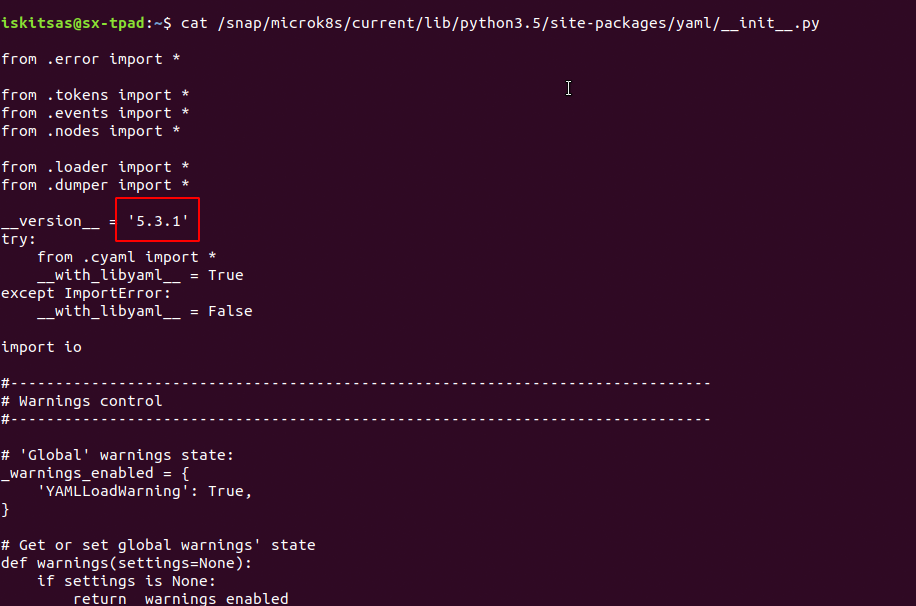
iskitsas
on 7 Apr 2020
/snap/microk8s/current/lib/python3.5/site-packages/yaml/__init__.py
It shows 5.3.1 here as well
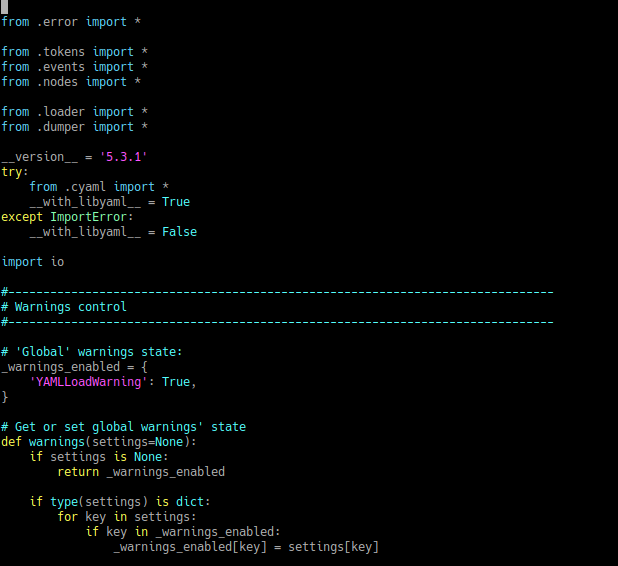
sweetpotatoz
on 7 Apr 2020
putting this issue to close now, as it is not stopping me from using microk8s
sweetpotatoz
on 9 Apr 2020
I've faced the same error and figured out that python uses user defined site-packages:
$ /snap/microk8s/current/usr/bin/python3 -m site
sys.path = [
    '/home/user',
    '/snap/microk8s/current/usr/lib/python35.zip',
    '/snap/microk8s/current/usr/lib/python3.5',
    '/snap/microk8s/current/usr/lib/python3.5/plat-x86_64-linux-gnu',
    '/snap/microk8s/current/usr/lib/python3.5/lib-dynload',
    '/home/user/.local/lib/python3.5/site-packages',
    '/snap/microk8s/current/usr/lib/python3/dist-packages',
]
USER_BASE: '/home/user/.local' (exists)
USER_SITE: '/home/user/.local/lib/python3.5/site-packages' (exists)
ENABLE_USER_SITE: True
In my case PyYAML package in /home/user/.local/lib/python3.5/site-packages has version 3.11 and an output of python says the same:
$ /snap/microk8s/current/usr/bin/python3
Python 3.5.2 (default, Oct  8 2019, 13:06:37)
[GCC 5.4.0 20160609] on linux
Type "help", "copyright", "credits" or "license" for more information.
>>> import yaml
>>> yaml.__version__
'3.11'
After deleting a directory /home/user/.local/lib/python3.5/site-packages (I have no python 3.5 anymore) I have next site-packages:
$ /snap/microk8s/current/usr/bin/python3 -m site
sys.path = [
    '/home/user',
    '/snap/microk8s/current/usr/lib/python35.zip',
    '/snap/microk8s/current/usr/lib/python3.5',
    '/snap/microk8s/current/usr/lib/python3.5/plat-x86_64-linux-gnu',
    '/snap/microk8s/current/usr/lib/python3.5/lib-dynload',
    '/snap/microk8s/current/usr/lib/python3/dist-packages',
]
USER_BASE: '/home/user/.local' (exists)
USER_SITE: '/home/user/.local/lib/python3.5/site-packages' (doesn't exist)
ENABLE_USER_SITE: True
After that microk8s starts to work:
$ microk8s status
microk8s is running
addons:
cilium: disabled
dashboard: disabled
dns: disabled
fluentd: disabled
gpu: disabled
helm: disabled
helm3: disabled
ingress: disabled
istio: disabled
jaeger: disabled
knative: disabled
kubeflow: disabled
linkerd: disabled
metallb: disabled
metrics-server: disabled
prometheus: disabled
rbac: disabled
registry: disabled
storage: disabled
Is it possible to disable ENABLE_USER_SITE for snap microk8s (environment variable PYTHONNOUSERSITE=false)?
 realmfoo
on 16 Apr 2020
realmfoo
on 16 Apr 2020
@sweetpotatoz to fix the sudo issue you may want to clean up your $HOME/.kube/cache it is probably owned by root. That is why you are forced to use sudo when invoking microk8s.kubectl commands.
 balchua
on 16 Apr 2020
balchua
on 16 Apr 2020
I've faced the same error and figured out that python uses user defined site-packages:
$ /snap/microk8s/current/usr/bin/python3 -m site
sys.path = [
    '/home/user',
    '/snap/microk8s/current/usr/lib/python35.zip',
    '/snap/microk8s/current/usr/lib/python3.5',
    '/snap/microk8s/current/usr/lib/python3.5/plat-x86_64-linux-gnu',
    '/snap/microk8s/current/usr/lib/python3.5/lib-dynload',
    '/home/user/.local/lib/python3.5/site-packages',
    '/snap/microk8s/current/usr/lib/python3/dist-packages',
]
USER_BASE: '/home/user/.local' (exists)
USER_SITE: '/home/user/.local/lib/python3.5/site-packages' (exists)
ENABLE_USER_SITE: True
In my case PyYAML package in
/home/user/.local/lib/python3.5/site-packageshas version 3.11 and an output of python says the same:$ /snap/microk8s/current/usr/bin/python3 Python 3.5.2 (default, Oct 8 2019, 13:06:37) [GCC 5.4.0 20160609] on linux Type "help", "copyright", "credits" or "license" for more information. >>> import yaml >>> yaml.__version__ '3.11'After deleting a directory
/home/user/.local/lib/python3.5/site-packages(I have no python 3.5 anymore) I have next site-packages:$ /snap/microk8s/current/usr/bin/python3 -m site sys.path = [ '/home/user', '/snap/microk8s/current/usr/lib/python35.zip', '/snap/microk8s/current/usr/lib/python3.5', '/snap/microk8s/current/usr/lib/python3.5/plat-x86_64-linux-gnu', '/snap/microk8s/current/usr/lib/python3.5/lib-dynload', '/snap/microk8s/current/usr/lib/python3/dist-packages', ] USER_BASE: '/home/user/.local' (exists) USER_SITE: '/home/user/.local/lib/python3.5/site-packages' (doesn't exist) ENABLE_USER_SITE: TrueAfter that microk8s starts to work:
$ microk8s status
microk8s is running
addons:
cilium: disabled
dashboard: disabled
dns: disabled
fluentd: disabled
gpu: disabled
helm: disabled
helm3: disabled
ingress: disabled
istio: disabled
jaeger: disabled
knative: disabled
kubeflow: disabled
linkerd: disabled
metallb: disabled
metrics-server: disabled
prometheus: disabled
rbac: disabled
registry: disabled
storage: disabled
Is it possible to disable ENABLE_USER_SITE for snap
microk8s(environment variablePYTHONNOUSERSITE=false)?
thanks @realmfoo
snap has its own python :/
i went in here /home/user/.local/lib/python3.5/site-packages and delete rm -rf yaml
and the yaml error has gone.
sweetpotatoz
on 20 Apr 2020
Related issues
 khteh
·
5Comments
khteh
·
5Comments
 cnadeau
·
4Comments
cnadeau
·
4Comments
 NumesSanguis
·
3Comments
NumesSanguis
·
3Comments
 devbharat
·
3Comments
devbharat
·
3Comments
 xrpn
·
4Comments
xrpn
·
4Comments
Most helpful comment
Hey @sweetpotatoz
I have the same problem (probably), Parrot OS (Debian based) here. Maybe little bit different. I haven't added
/snap/binto the PATH. But when I added my output not it's showing this. So when I do export in new session:export PATH=$PATH:/snap/binI can work with microk8s.
$ microk8s (...)
My question is:
Do you have in new sessions
/snap/binin your PATH? If not this is the problem.