Micro: True Colors don't show on Windows, no matter what
Description of the problem or steps to reproduce
Specifications
Commit hash: f594686
OS: Windows 10
Terminal: Many
Hello. So i've tried almost every relevant terminal for Windows 10: regular Console, Microsoft Terminal, MinTTY, ConEmu, Cmder, and the PowerShell terminal which is pretty much the same as CMD.
I've set the environment var MICRO_TRUECOLOR to true every time, but no matter what , i keep getting basic colors.
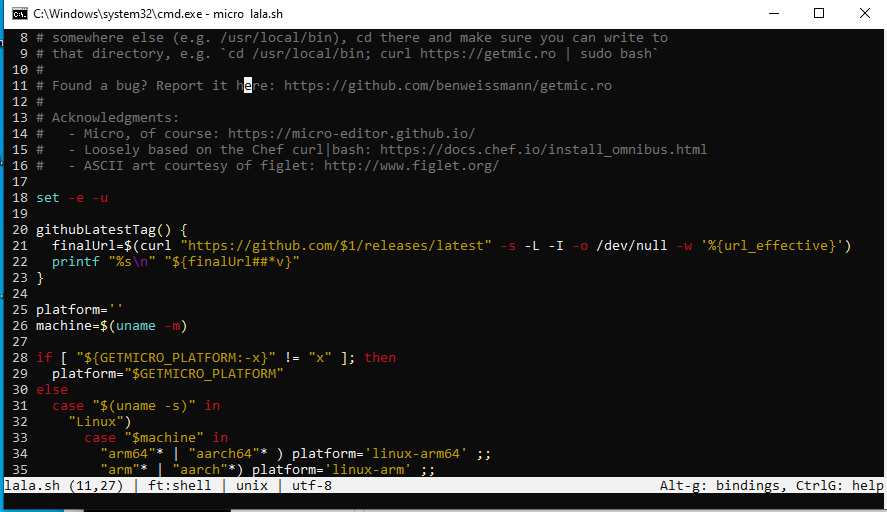
Mouse interactions, however, work pretty well on most terminals, interestingly enough.
 tr4g
tr4g
All 9 comments
Try set MICRO_TRUECOLOR=1 instead of set MICRO_TRUECOLOR=true.
 Calinou
on 19 May 2020
Calinou
on 19 May 2020
Try
set MICRO_TRUECOLOR=1instead ofset MICRO_TRUECOLOR=true.
Thanks for your answer. Just tried that and got the same result.
Just FYI, in the same console window I get the colors perfectly fine if I enter into WSL (typing bash) and run micro from inside Ubuntu
tr4g
on 19 May 2020
Here I have recorded micro working on both WIndows and Linux (WSL) in the same terminal:
COMPARISON: Windows vs Linux in the same terminal
tr4g
on 19 May 2020
Came here to say that I'm having the same problem. I looked into it and it seems the backend library tcell supports only 16 colors on Windows. https://github.com/gdamore/tcell/issues/187
I don't really understand why there is even an issue with Windows, as the console supports the same ANSI escape codes.
 Yevano
on 20 May 2020
Yevano
on 20 May 2020
The author of tcell just posted that a PR is coming that will implement the missing functionality!
 mardukbp
on 25 Aug 2020
mardukbp
on 25 Aug 2020
Yesterday the author of tcell commited the necessary changes and zyedidia/tcell was also updated. I just compiled the HEAD of master and it works! Just do the following before running micro: set MICRO_TRUECOLOR=1
Thank you @zyedidia!
mardukbp
on 26 Aug 2020
Appears to be fixed in 2.0.8 - cfcb2e4, if env variable set to MICRO_TRUECOLOR=1
 vazub
on 25 Oct 2020
vazub
on 25 Oct 2020
@tr4g Could you verify if this works for you now?
Yevano
on 29 Nov 2020
It works fine now, thank you very much :)
Mouse interaction still doesn't work in Windows Terminal, but I think it's a different issue
tr4g
on 9 Dec 2020
Related issues
 Rbagman
·
4Comments
Rbagman
·
4Comments
 GeigerCounter
·
3Comments
GeigerCounter
·
3Comments
 Mohamed3on
·
3Comments
Mohamed3on
·
3Comments
 luis-lavaire
·
3Comments
luis-lavaire
·
3Comments
 xintrea
·
3Comments
xintrea
·
3Comments
Most helpful comment
Yesterday the author of tcell commited the necessary changes and zyedidia/tcell was also updated. I just compiled the HEAD of master and it works! Just do the following before running micro:
set MICRO_TRUECOLOR=1Thank you @zyedidia!