Micro: No syntax highlighting for .bat (batch) files
No syntax highlighting for Windows batch files, seems like this is overlooked

 StewAlexander-com
All 29 comments
Even bat displays the batch commands in nice colors

StewAlexander-com
on 23 Sep 2019
seems like this is overlooked
It's probably that no one contributed a Batch syntax highlighting file yet (micro relies on its own definitions). Be the change you want to see? :slightly_smiling_face:
 Calinou
on 23 Sep 2019
Calinou
on 23 Sep 2019
@Calinou if I knew how / had the time I sure would, I wonder if any other community members would take up the gauntlet and build the highlighting file?
StewAlexander-com
on 23 Sep 2019
@StewAlexanderACC I can make you a basic .bat syntax file for you to try.
In the next few days if you are interested.
 tommyshem
on 30 Sep 2019
tommyshem
on 30 Sep 2019
@tommyshem yes please
StewAlexander-com
on 30 Sep 2019
@StewAlexanderACC Make directory ~/.config/micro/syntax on linux, not sure the location on windows for the micro config files.
Make new file bat.yaml in the new directory syntax
Copy the code below into the file bat.yaml
Now re-open micro and it should work with .bat file extensions.
If you need any changes, let me know and I will try and sort it out.
filetype: batch

detect:
    filename: "(\\.bat$)"
    # header: ""

rules:
    # Numbers
    - constant.number: "\\b[0-9]+\\b"

      # Conditionals and control flow
    - type: "\\b(case|do|done|elif|else|esac|exit|fi|for|function|if|in|local|read|return|select|then|until|while)\\b"
    - special: "(\\{|\\}|\\(|\\)|\\;|\\]|\\[|`|\\\\|\\$|<|>|!|=|&|\\|)"
    - type: "\\b(equ|neq|lss|leq|gtr|geq|on|off)\\b"
    - type: "\\b(goto|for|in|do|call|exit|not|exist|errorlevel|defined)\\b"
    - type: "\\b(prn|nul|lpt3|lpt2|lpt1|con|com4|com3|com2|com1|aux)\\b"

    # keywords
    - statement: "\\b(adprep|append|arp|assoc|at|atmadm|attrib|auditpol|autochk|autoconv|autofmt|bcdboot|bcdedit|bdehdcfg|bitsadmin|bootcfg|break|brea)\\b"
    - statement: "\\b(cacls|cd|certreq|certutil|chcp|change|choice|cipher|chdir|chkdsk|chkntfs|chglogon|chgport|chgusr|clip|cls|clscluadmin|cluster|cmd|cmdkey|cmstp|color)\\b"
    - statement: "\\b(comp|compact|convert|copy|cprofile|cscript|csvde|date|dcdiag|dcgpofix|dcpromo|defra|del|dfscmd|dfsdiag|dfsrmig|diantz|dir|dirquota|diskcomp|diskcopy|diskpart|diskperf|diskraid|diskshadow|dispdiag|doin|dnscmd|doskey|driverquery|dsacls|dsadd|dsamain|dsdbutil|dsget|dsmgmt|dsmod|dsmove|dsquery|dsrm)\\b"
    - statement: "\\b(echo|edit|endlocal|erase|esentutl|eventcreate|eventquery|eventtriggers|evntcmd|expand|extract)\\b"
    - statement: "\\b(fc|filescrn|find|findstr|finger|flattemp|fonde|forfiles|format|freedisk|fs|fsutil|ftp|ftype|fveupdate|getmac|gettype|gpfixup|gpresult|gpupdate|graftabl)\\b"
    - statement: "\\b(hashgen|hep|help|helpctr|hostname|icacls|iisreset|inuse|ipconfig|ipxroute|irftp|ismserv|jetpack|keyb|klist|ksetup|ktmutil|ktpass|label|ldifd|ldp|lodctr|logman|logoff|lpq|lpr|macfile)\\b"
    - statement: "\\b(makecab|manage-bde|mapadmin|md|mkdir|mklink|mmc|mode|more|mount|mountvol|move|mqbup|mqsvc|mqtgsvc|msdt|msg|msiexec|msinfo32|mstsc|nbtstat|net computer|net group)\\b"
    - statement: "\\b(net localgroup|net print|net session|net share|net start|net stop|net use|net user|net view|net|netcfg|netdiag|netdom|netsh|netstat|nfsadmin|nfsshare|nfsstat|nlb)\\b"
    - statement: "\\b(nlbmgr|nltest|nslookup|ntackup|ntcmdprompt|ntdsutil|ntfrsutl|openfiles|pagefileconfig|path|pathping|pause|pbadmin|pentnt|perfmon|ping|pnpunatten|pnputil|popd)\\b"
    - statement: "\\b(powercfg|powershell|powershell_ise|print|prncnfg|prndrvr|prnjobs|prnmngr|prnport|prnqctl|prompt|pubprn|pushd|pushprinterconnections|pwlauncher|qappsrv|qprocess)\\b"
    - statement: "\\b(query|quser|qwinsta|rasdial|rcp|rd|rdpsign|regentc|recover|redircmp|redirusr|reg|regini|regsvr32|relog|rem|ren|rename|rendom|repadmin|repair-bde|replace|reset|restore)\\b"
    - statement: "\\b(rxec|risetup|rmdir|robocopy|route|rpcinfo|rpcping|rsh|runas|rundll32|rwinsta|scp|sc|setlocal|session|schtasks|scwcmd|secedit|serverceipoptin|servrmanagercmd|serverweroptin|set|setspn)\\b"
    - statement: "\\b(setx|sfc|shadow|shift|showmount|shutdown|sort|ssh|start|storrept|subst|sxstrace|ysocmgr|systeminfo|takeown|tapicfg|taskkill|tasklist|tcmsetup|telnet|tftp|time)\\b"
    - statement: "\\b(timeout|title|tlntadmn|tpmvscmgr|tpmvscmgr|tacerpt|tracert|tree|tscon|tsdiscon|tsecimp|tskill|tsprof|type|typeperf|tzutil|uddiconfig|umount|unlodctr|ver|verify)\\b"
    - statement: "\\b(verifier|verif|vol|vssadmin|w32tm|waitfor|wbadmin|wdsutil|wecutil|wevtutil|where|whoami|winnt|winnt32|winpop|winrm|winrs|winsat|wlbs|mic|wscript|xcopy)\\b"

      # Conditional flags
    - type: "--[a-z-]+"
    - type: "\\ -[a-z]+"

    - identifier: "\\$\\{?[0-9A-Z_!@#$*?-]+\\}?"
    - identifier: "\\$\\{?[0-9A-Z_!@#$*?-]+\\}?"

    # String
    - constant.string:
        start: \"
        end: \"
        skip: \\.
        rules:
            - constant.specialChar: (\\0|\\\\|\\t|\\n|\\r|\\"|\\')
            - constant.unicode: \\u\{[[:xdigit:]]+}

    - constant.string:
        start: "'"
        end: "'"
        rules: []

    - comment:
        start: "(^|\\s)#"
        end: "$"
        rules:
            - todo: "(TODO|XXX|FIXME):?"
@tommyshem Thanks a million
Would anyone here know where the config files for Micro are stored on a Windows system?
I'll poke around a little in the next day or two, and let you all know if I find it
StewAlexander-com
on 1 Oct 2019
Would anyone here know where the config files for Micro are stored on a Windows system?
It seems like they're in %USERPROFILE%\.config\micro :slightly_smiling_face:
Create the syntax folder there if it doesn't exist already.
Calinou
on 1 Oct 2019
I looked under %USERPROFILE%\AppData\Local, didn't see it, so thanks @Calinou for the info
StewAlexander-com
on 1 Oct 2019
hmm well it did something, the \ are colored, but not the commands
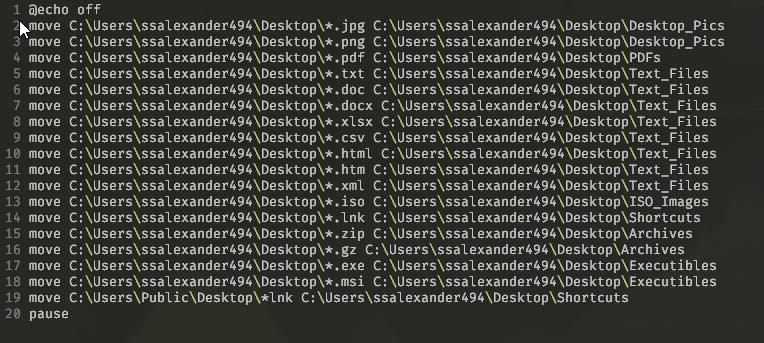
Interesting, it would be nice if the batch command list was highlighted in a color
Here's the list of batch commands
https://ss64.com/nt/
Thank you though for the work
StewAlexander-com
on 1 Oct 2019
I tested on linux and the commands highlight. I will have to dig out my windows computer and test it. I will get back to you in a day, as working.
tommyshem
on 2 Oct 2019
@StewAlexanderACC What version of micro editor are you using so I can test with the same version.
tommyshem
on 2 Oct 2019
@StewAlexanderACC
Testing
I have tested on windows 10 using cmd promt and it is working.
But if you are using a colorscheme then it does not work on atom-dark-tc. I have tested on latest micro from the github bin download page using 64bit.
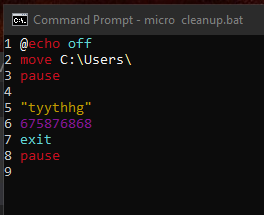
Possible Solution
Please try set colorscheme default if you are using a colorscheme.
Check that all the contents in your bat.yaml file is the same as the pasted code on this page above.
More Info
If you are not using a colorscheme please give me more info, if the above is of no use.
Which version of windows are you using
The command prompt you are using
The version of micro editor you are using
Any other info you think might be helpful.
tommyshem
on 2 Oct 2019
@tommyshem
C:\Users\ssalexander494
λ micro --version
Version: 1.4.1
Commit hash: 1856891
Compiled on August 10, 2018
Set the colorscheme to default, view is from terminal app Cmder (https://cmder.net)
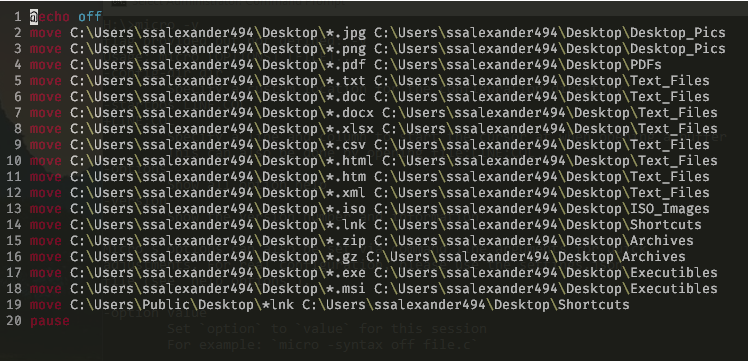
StewAlexander-com
on 2 Oct 2019
@tommyshem wow, thanks
Any chance your fix can get incorporated into the Micro proper? Maybe with it working with themes?
Anyway, wow, very nice!
StewAlexander-com
on 2 Oct 2019
@StewAlexanderACC I will do a pull request to the micro project, when I take a look at why some themes are not working. In the mean time if you see anything missing let me know and I will try and add it.
tommyshem
on 2 Oct 2019
@tommyshem
I'm using Micro quite a lot so I will let you know if I find anything, and again thank you
StewAlexander-com
on 2 Oct 2019
@tommyshem or anyone else seeing this ...
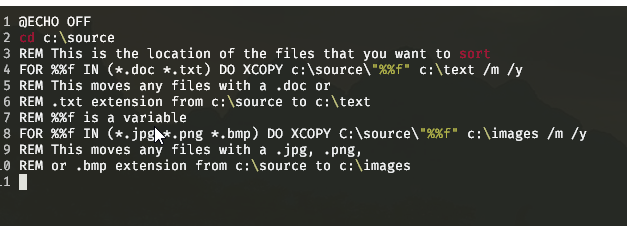
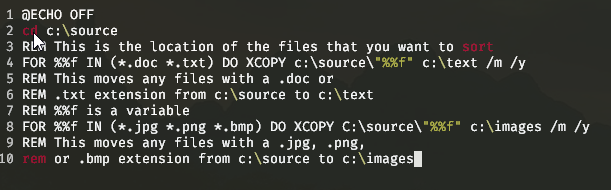
REMcomments are the same color, would be nice if these were slightly darker, or a different colorFORI think should be colored- Any variable starting with a
%%would be nice to have a different color, if possible
Just ideas...
Addendum:
Looks like stuff in capitals (caps) doesn't show the syntax highlighting
See here:
StewAlexander-com
on 2 Oct 2019
A decent primer on batch commands, lists the basic ones and what they do..
StewAlexander-com
on 2 Oct 2019
@StewAlexanderACC
Code below should solve most of the requested features.
keywords case insensitive
variables in a different colour
comments (rem) in a different colour)
Could you test the code below and let me know if anything is still missing.
filename .config/micro/syntax/bat.yaml needs over writing we below code.
filetype: batch

detect:
    filename: "(\\.bat$)"
    # header: ""

rules:
    # Numbers
    - constant.number: "\\b[0-9]+\\b"
    # Brackets and symbols
    - special: "(\\{|\\}|\\(|\\)|\\;|\\]|\\[|`|\\\\|\\$|<|>|!|=|&|\\|)"
    # Conditionals and control flow
    # note (?i) means case insensitive match
    - type: "\\b(?i)(case|do|done|elif|else|esac|exit|fi|for|function|if|in|local|read|return|select|then|until|while)\\b"
    - type: "\\b(?i)(equ|neq|lss|leq|gtr|geq|on|off)\\b"
    - type: "\\b(?i)(goto|for|in|do|call|exit|not|exist|errorlevel|defined)\\b"
    - type: "\\b(?i)(prn|nul|lpt3|lpt2|lpt1|con|com4|com3|com2|com1|aux)\\b"
    # keywords
    - statement: "\\b(?i)(adprep|append|arp|assoc|at|atmadm|attrib|auditpol|autochk|autoconv|autofmt|bcdboot|bcdedit|bdehdcfg|bitsadmin|bootcfg|break|brea)\\b"
    - statement: "\\b(?i)(cacls|cd|certreq|certutil|chcp|change|choice|cipher|chdir|chkdsk|chkntfs|chglogon|chgport|chgusr|clip|cls|clscluadmin|cluster|cmd|cmdkey|cmstp|color)\\b"
    - statement: "\\b(?i)(comp|compact|convert|copy|cprofile|cscript|csvde|date|dcdiag|dcgpofix|dcpromo|defra|del|dfscmd|dfsdiag|dfsrmig|diantz|dir|dirquota|diskcomp|diskcopy|diskpart|diskperf|diskraid|diskshadow|dispdiag|doin|dnscmd|doskey|driverquery|dsacls|dsadd|dsamain|dsdbutil|dsget|dsmgmt|dsmod|dsmove|dsquery|dsrm)\\b"
    - statement: "\\b(?i)(echo|edit|endlocal|erase|esentutl|eventcreate|eventquery|eventtriggers|evntcmd|expand|extract)\\b"
    - statement: "\\b(?i)(fc|filescrn|find|findstr|finger|flattemp|fonde|forfiles|format|freedisk|fs|fsutil|ftp|ftype|fveupdate|getmac|gettype|gpfixup|gpresult|gpupdate|graftabl)\\b"
    - statement: "\\b(?i)(hashgen|hep|help|helpctr|hostname|icacls|iisreset|inuse|ipconfig|ipxroute|irftp|ismserv|jetpack|keyb|klist|ksetup|ktmutil|ktpass|label|ldifd|ldp|lodctr|logman|logoff|lpq|lpr|macfile)\\b"
    - statement: "\\b(?i)(makecab|manage-bde|mapadmin|md|mkdir|mklink|mmc|mode|more|mount|mountvol|move|mqbup|mqsvc|mqtgsvc|msdt|msg|msiexec|msinfo32|mstsc|nbtstat|net computer|net group)\\b"
    - statement: "\\b(?i)(net localgroup|net print|net session|net share|net start|net stop|net use|net user|net view|net|netcfg|netdiag|netdom|netsh|netstat|nfsadmin|nfsshare|nfsstat|nlb)\\b"
    - statement: "\\b(?i)(nlbmgr|nltest|nslookup|ntackup|ntcmdprompt|ntdsutil|ntfrsutl|openfiles|pagefileconfig|path|pathping|pause|pbadmin|pentnt|perfmon|ping|pnpunatten|pnputil|popd)\\b"
    - statement: "\\b(?i)(powercfg|powershell|powershell_ise|print|prncnfg|prndrvr|prnjobs|prnmngr|prnport|prnqctl|prompt|pubprn|pushd|pushprinterconnections|pwlauncher|qappsrv|qprocess)\\b"
    - statement: "\\b(?i)(query|quser|qwinsta|rasdial|rcp|rd|rdpsign|regentc|recover|redircmp|redirusr|reg|regini|regsvr32|relog|ren|rename|rendom|repadmin|repair-bde|replace|reset|restore)\\b"
    - statement: "\\b(?i)(rxec|risetup|rmdir|robocopy|route|rpcinfo|rpcping|rsh|runas|rundll32|rwinsta|scp|sc|setlocal|session|schtasks|scwcmd|secedit|serverceipoptin|servrmanagercmd|serverweroptin|set|setspn)\\b"
    - statement: "\\b(?i)(setx|sfc|shadow|shift|showmount|shutdown|sort|ssh|start|storrept|subst|sxstrace|ysocmgr|systeminfo|takeown|tapicfg|taskkill|tasklist|tcmsetup|telnet|tftp|time)\\b"
    - statement: "\\b(?i)(timeout|title|tlntadmn|tpmvscmgr|tpmvscmgr|tacerpt|tracert|tree|tscon|tsdiscon|tsecimp|tskill|tsprof|type|typeperf|tzutil|uddiconfig|umount|unlodctr|ver|verify)\\b"
    - statement: "\\b(?i)(verifier|verif|vol|vssadmin|w32tm|waitfor|wbadmin|wdsutil|wecutil|wevtutil|where|whoami|winnt|winnt32|winpop|winrm|winrs|winsat|wlbs|mic|wscript|xcopy)\\b"
    # / Flags
    - constant: "(/\\w+)"
    # Variables
    - special: "(%%\\w+)"
    # Conditional flags
    - type: "--[a-z-]+"
    - type: "\\ -[a-z]+"

    - identifier: "\\$\\{?[0-9A-Z_!@#$*?-]+\\}?"
    - identifier: "\\$\\{?[0-9A-Z_!@#$*?-]+\\}?"
    # "" String
    - constant.string:
        start: \"
        end: \"
        skip: \.
        rules:
            - constant.specialChar: (\\0|\\\\|\\t|\\n|\\r|\\"|\\')
            - constant.unicode: \\u\{[[:xdigit:]]+}
    # '' string
    - constant.string: "(\\'.+\\')"
    # rem as comment
    - comment.rem: "(?i)(rem\\s.*)"
    # :: as comment
    - comment.rem: "(?i)(\\:\\:\\s.*)"
@tommyshem
Yep you bet, thanks!
StewAlexander-com
on 3 Oct 2019
@tommyshem
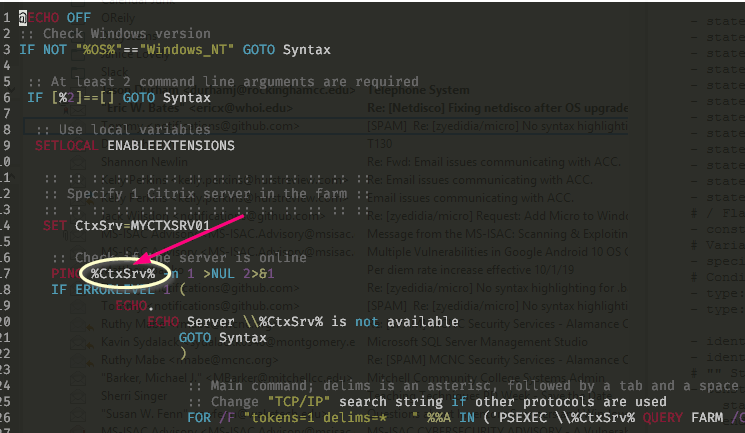
Looking good so far. see the picture (what a beauty, thanks 👍 )
Just one more request, is it possible to make a different color for variables surrounded by %? as in:
%<varriable>% see the screen capture (circled)?
StewAlexander-com
on 3 Oct 2019
@tommyshem
Here's a good list of Windows Batch examples if you (or someone reading this thread) wants to do some testing on their own
StewAlexander-com
on 3 Oct 2019
@StewAlexanderACC
Find below, the code in your .config/micro/syntax/bat.yaml file should be line 37.
   # Variables
    - special: "(%%\\w+)"
And add this line under the above code.
- special: "(%\\w+%)"
This should add colour highlighting to %<variable>%
I do not use Windows or bat files so if you need anything adding, just post here and I will try and add it.
When you are happy with it, let me know and I will create a pull request to micro editor project.
tommyshem
on 3 Oct 2019
Just stumbled upon this issue while looking into a different issue I'm experiencing, and couldn't help but drop in to leave a comment: You guys who whipped up a .bat syntax file are awesome! I essentially NEVER use .bat files, or Windows for that matter, but found it really cool that the community was able to provide a user with a slick new syntax file for their use. Anyways, just wanted to say good job, and thanks for being helpful and contributing to Micro.
 anirath
on 10 Nov 2019
anirath
on 10 Nov 2019
@anirath - yeah, great team
StewAlexander-com
on 11 Nov 2019
@tommyshem I've been using it for a bit, don't see any major issues at this point.
Thank you for the help, feel free to put in the pull request.
StewAlexander-com
on 11 Nov 2019
@StewAlexanderACC Glad to here it is working for you.
I will do a pull request this week.
tommyshem
on 13 Nov 2019
@tommyshem - thanks so much!
StewAlexander-com
on 13 Nov 2019
Related issues
Calinou
·
3Comments
 bitcoinmeetups
·
3Comments
bitcoinmeetups
·
3Comments
 rishabh96b
·
3Comments
rishabh96b
·
3Comments
 aerth
·
4Comments
aerth
·
4Comments
 KhodeN
·
3Comments
KhodeN
·
3Comments
Most helpful comment
Just stumbled upon this issue while looking into a different issue I'm experiencing, and couldn't help but drop in to leave a comment: You guys who whipped up a .bat syntax file are awesome! I essentially NEVER use .bat files, or Windows for that matter, but found it really cool that the community was able to provide a user with a slick new syntax file for their use. Anyways, just wanted to say good job, and thanks for being helpful and contributing to Micro.