Micro: shift is not recognized in screen/tmux session
Description of the problem or steps to reproduce
- start tmux or screen (terminal multiplexers)
- try to select text using shift+arrow
- cursor does not move as long as I hold shift
Workaround:
1) add options to tmux.conf
set -g default-terminal xterm
set-window-option -g xterm-keys on
with those settings, text selection in micro works, but they don't work so great for other applications - htop's display doesn't get updated properly, whether I use urxvt or xterm.
1.5) use a gnome-terminal-based terminal emulator (i tried mate-terminal)
With this, htop still looks a little funky, but at least there are no artifacts when using the search function.
Specifications
Commit hash: 5fc8f84
OS: Ubuntu 16.04
Terminal: urxvt, xterm, mate-terminal
 rynnon
All 14 comments
Same problem here.
 evanescente-ondine
on 6 Jan 2018
evanescente-ondine
on 6 Jan 2018
probably related but closed for some reason
yeah that is probably the simplest way to go, however if it does not work in tmux it's not so usable for alacritty users as alacritty kind of needs tmux


micro gets the shift+up sequence but does nothing when running in tmux (this was the case with or without set-window-option -g xterm-keys on)
 ghost
on 6 Jan 2018
ghost
on 6 Jan 2018
Yes that's pretty weird. Micro seems to be receiving the correct escape sequences when looking in raw mode. This probably has to do with tcell initialization going wrong at some point.
 zyedidia
on 6 Jan 2018
zyedidia
on 6 Jan 2018
Ok here's a simple fix for the shift problem. You can run the mkinfo program and that fixes it. The special arrow keys still don't work though. I'll keep investigating.
zyedidia
on 6 Jan 2018
Another possible fix is to run export TERM=xterm-256color. This seems to fix everything. Clearly tcell is somehow getting confused by the screen terminal.
zyedidia
on 6 Jan 2018
Another possible fix is to run export TERM=xterm-256color. This seems to fix everything. Clearly tcell is somehow getting confused by the screen terminal.
just tried (putting into .bash_profile) and indeed seems to be the case as far as I can tell, thanks!
not sure why though cause my alacritty.yml also has TERM: xterm-256color so seems redundant
ghost
on 6 Jan 2018
Another possible fix is to run export TERM=xterm-256color. This seems to fix everything.
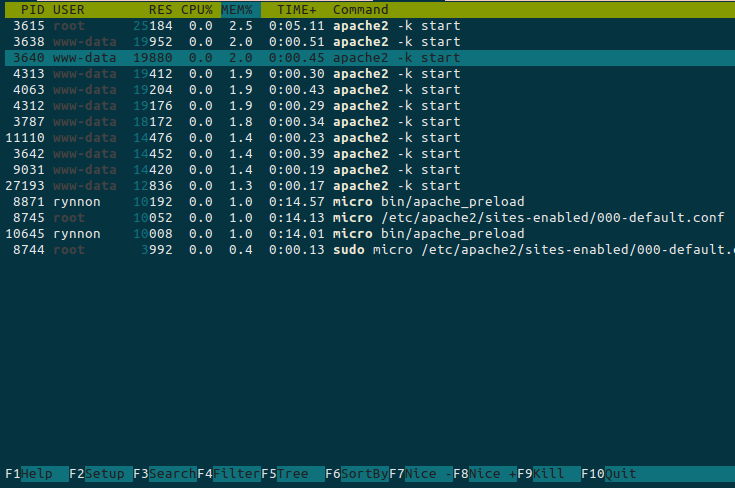
The issue with htop remains. To show what I mean, I made some screenshots:
Expected: (urxvt + htop)
Actual: (urxvt + tmux + htop)
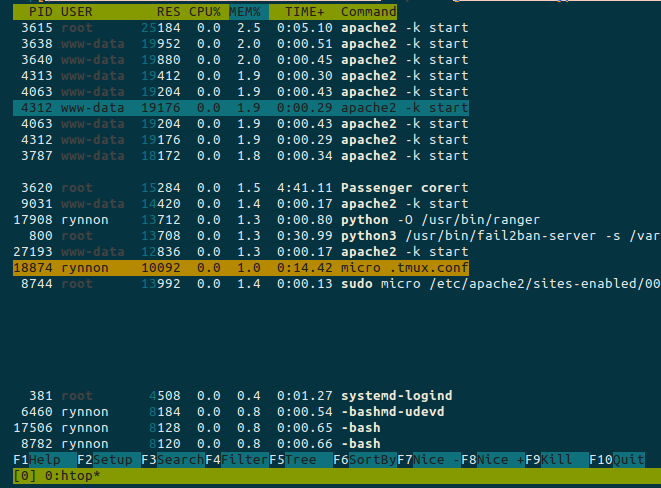
Note the additional processes displayed under the gap, and the way the color rows don't fill the entire width. This behavior is consisted for TERM=xterm.
rynnon
on 6 Jan 2018
Using mkinfo should fix the issue with shift characters and I would expect it to not change the behavior of htop.
I'm still interested in looking into why the arrow keys don't work with special modifiers in tmux. I think it has to do with the terminfo database for screen not containing those key codes even though they are being sent.
zyedidia
on 6 Jan 2018
honestly this mkinfo feels more like a hack to me... shoudn't this be included into micro to make it more resilient? at least at some point in the future ...
ghost
on 6 Jan 2018
Alright so I think I misunderstood the issue earlier. It turns out the terminfo entry for screen just doesn't have any information for what escape sequences it will send for Shift-Arrows, so micro has no idea what to look for. But it turns out that screen does send the same escape sequences as xterm it just doesn't tell micro what it's going to do.
You can fix this with some raw bindings though by putting the following in your bindings.json:
{
    "\u001b[1;2A": "SelectUp",
    "\u001b[1;2B": "SelectDown",
    "\u001b[1;2C": "SelectRight",
    "\u001b[1;2D": "SelectLeft",
    "\u001b[1;3D": "WordLeft",
    "\u001b[1;3C": "WordRight",
    "\u001b[1;3A": "MoveLinesUp",
    "\u001b[1;3B": "MoveLinesDown",
    "\u001b[1;4C": "SelectWordRight",
    "\u001b[1;4D": "SelectWordLeft",
    "\u001b[1;5D": "StartOfLine",
    "\u001b[1;5C": "EndOfLine",
    "\u001b[1;6D": "SelectToStartOfLine",
    "\u001b[1;6C": "SelectToEndOfLine",
    "\u001b[1;5A": "CursorStart",
    "\u001b[1;5B": "CursorEnd",
    "\u001b[1;6A": "SelectToStart",
    "\u001b[1;6B": "SelectToEnd"
}
This will fix the bindings for Ctrl, Shift, Alt, CtrlShift, and AltShift.
Sorry but there doesn't seem to be a better fix to this.
zyedidia
on 8 Jan 2018
A few additional considerations:
- The suggestion to have
export TERM=xterm-256colorinside a tmux session is not recommended - It doesn't matter what the value of
TERMis outside tmux, it is likely changed to something likescreen-256color(if you want full color support) - Take into account your terminal might not implement escape sequences in a manner that works with tmux, micro, or both (two examples: alacritty and #1335)
Solutions:
- The one posted by @zyedidia right above works great
- Two steps that _might_ work
- Run (or alias) tmux to
tmux -2so it assumes your terminal supports 256 colors (it should, but you should make sure it does) - Start micro like so:
TERM=xterm-256color micro
- Run (or alias) tmux to
 andradei
on 31 Jul 2019
andradei
on 31 Jul 2019
Seems like the workaround indeed is aliasing micro to TERM=xterm-256color micro or bindings.json ;_;
 rcx
on 29 Feb 2020
rcx
on 29 Feb 2020
@ecx86 See https://github.com/zyedidia/micro/issues/1489#issuecomment-587116459. There's also the recently added xterm option as a workaround.
 joshuarli
on 29 Feb 2020
joshuarli
on 29 Feb 2020
@joshuarli Thanks!
rcx
on 1 Mar 2020
Related issues
 GeigerCounter
·
3Comments
GeigerCounter
·
3Comments
 nabeelomer
·
4Comments
nabeelomer
·
4Comments
 luis-lavaire
·
3Comments
luis-lavaire
·
3Comments
 johnmbaughman
·
3Comments
johnmbaughman
·
3Comments
 Bigguy34
·
3Comments
Bigguy34
·
3Comments
Most helpful comment
Alright so I think I misunderstood the issue earlier. It turns out the terminfo entry for
screenjust doesn't have any information for what escape sequences it will send for Shift-Arrows, so micro has no idea what to look for. But it turns out that screen does send the same escape sequences as xterm it just doesn't tell micro what it's going to do.You can fix this with some raw bindings though by putting the following in your
bindings.json:This will fix the bindings for Ctrl, Shift, Alt, CtrlShift, and AltShift.
Sorry but there doesn't seem to be a better fix to this.