Metro: Could not list contents of .... Couldn't follow symbolic link.
Getting this error in android with doing release build.
cd android && ./gradlew assembleDevRelease
FAILURE: Build failed with an exception.
* What went wrong:
Could not list contents of '/.../node_modules/metro/node_modules/.bin/babylon'. Couldn't follow symbolic link.
 Balasnest
All 23 comments
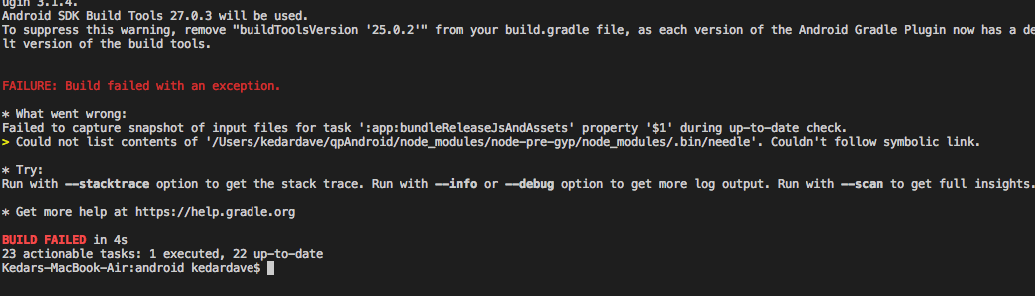
Tried everything mentioned here but still getting this error
 davekedar
on 22 Nov 2018
davekedar
on 22 Nov 2018
 msand
on 11 Feb 2019
msand
on 11 Feb 2019
msand
on 11 Feb 2019
msand
on 11 Feb 2019
rm -rf node_modules && npm install
 crobinson42
on 28 Mar 2019
crobinson42
on 28 Mar 2019
Any solution for this??. I have also the same problem.
 AnchalMulchandani
on 16 Apr 2019
AnchalMulchandani
on 16 Apr 2019
@AnchalMulchandani you can open project in android studio and update buildsdk and target sdk to solve this
davekedar
on 17 Apr 2019
1.We just need to delete the particular files(which is mentioned in the error) present inside ".bin" folder(nodemodule/node-pre-gyp/nodemodule/.bin/)
- Clean and rebuild the app
- Generate Signed apk
if we have run the bundle command before,then we will get the error of image duplicity-
for that
- we need to remove all the photos from android drawable folders
- Clean and rebuild the app
- Generate Signed apk
AnchalMulchandani
on 18 Apr 2019
Same issue here with RN 0.59.5:
> Task :app:bundleReleaseJsAndAssets FAILED

FAILURE: Build failed with an exception.

* What went wrong:
Failed to capture fingerprint of input files for task ':app:bundleReleaseJsAndAssets' property '$1' during up-to-date check.
> Could not list contents of '/Users/jdnichollsc/builds/y9nRxChC/0/myapp/node_modules/.bin/needle'. Couldn't follow symbolic link.
 jdnichollsc
on 3 Jul 2019
jdnichollsc
on 3 Jul 2019
@jdnichollsc You just need to delete the file present inside .bin folder.
just go to the respective path where the error file located and delete that.
and also make sure after deleting the file you have already deleted all the images from drawable folder , RN0.59 not support that and android automatically build the images for device in signed apk.
Thanks!
AnchalMulchandani
on 3 Jul 2019
@AnchalMulchandani did not work the above solution. Please give me some solution to build signed apk.
 reactdevrocks
on 13 Jul 2019
reactdevrocks
on 13 Jul 2019
@AnchalMulchandani did not work the above solution. Please give me some solution to build signed apk.
what issue you are facing?
AnchalMulchandani
on 15 Jul 2019
rm -rf node_modules && npm install
worked!
 sagarv1997
on 27 Jul 2019
sagarv1997
on 27 Jul 2019
Just run:
rm -rf node_modules/metro/node_modules/.bin/babylon
for any other similar issues remove that file only
eg:
rm-rf /Users/kumarutsav111/Documents/OrtholiveProviderAppVijay/node_modules/.bin/uuid
 kumarutsav111
on 24 Sep 2019
kumarutsav111
on 24 Sep 2019
If rm -rf node_modules && npm install does not do the trick, run the following in your project dir: find . -type l -exec test ! -e {} \; -delete
 dvuvne
on 13 Oct 2019
dvuvne
on 13 Oct 2019
@dvuvne Buddy, you make my day. Thanks :)
 NirmalsinhRathod
on 16 Oct 2019
NirmalsinhRathod
on 16 Oct 2019
@dvuvne I've run it just in /node_modules/ folder and it is helped 👍
 eisenheim94
on 18 Oct 2019
eisenheim94
on 18 Oct 2019
@dvuvne work for me, Thanks
 zoe1026
on 12 Nov 2019
zoe1026
on 12 Nov 2019
If
rm -rf node_modules && npm installdoes not do the trick, run the following in your project dir:find . -type l -exec test ! -e {} \; -delete
@dvuvne This worked. Thank you.
 pavan168
on 15 Feb 2020
pavan168
on 15 Feb 2020
If
rm -rf node_modules && npm installdoes not do the trick, run the following in your project dir:find . -type l -exec test ! -e {} \; -delete
It worked for me.. thanks.. can you please tell me what exactly this command does? @dvuvne
 Samiksha19
on 24 Feb 2020
Samiksha19
on 24 Feb 2020
If
rm -rf node_modules && npm installdoes not do the trick, run the following in your project dir:find . -type l -exec test ! -e {} \; -delete
thanks so much....worked for me.... but what is this command any way ? 🤒
 e3bmo3ty
on 2 Mar 2020
e3bmo3ty
on 2 Mar 2020
If
rm -rf node_modules && npm installdoes not do the trick, run the following in your project dir:find . -type l -exec test ! -e {} \; -delete
This worked for me. Thank you so much!
 WALReactNative
on 30 Mar 2020
WALReactNative
on 30 Mar 2020
find . -type l find all files of type link
-exec execute the following command:
test ! -e {} test if file found does not exist
\; termination symbol for -exec
-delete delete the broken link
 JamesXNelson
on 29 Jun 2020
JamesXNelson
on 29 Jun 2020
You can try to get through android studio first
 wutiange
on 27 Jul 2020
wutiange
on 27 Jul 2020
Related issues
 benmurden
·
4Comments
benmurden
·
4Comments
 mrousavy
·
4Comments
mrousavy
·
4Comments
 samuela
·
4Comments
samuela
·
4Comments
 skovhus
·
6Comments
skovhus
·
6Comments
 aleclarson
·
4Comments
aleclarson
·
4Comments
Most helpful comment
If
rm -rf node_modules && npm installdoes not do the trick, run the following in your project dir:find . -type l -exec test ! -e {} \; -delete