Metro: Require cycle warnings should be opt-in when the source is node_modules
Do you want to request a feature or report a bug?
Feature
What is the current behavior?
Lots of warnings about require cycles from libraries in node_modules in the react-native ecosystem, coming from the following code: https://github.com/facebook/metro/blob/dc8d85911ff6bf6487b7e3aef6b004df4bdcf17f/packages/metro/src/lib/polyfills/require.js#L158-L174
What is the expected behavior?
Don't warn users about require cycles in libraries in node_modules unless the user opts-in. Warnings about code that you don't own, especially when the warnings are non-essential, create unnecessary noise.
Please provide your exact Metro configuration and mention your Metro, node, yarn/npm version and operating system.
React Native 0.57 default configuration and Metro version (0.47.1). Other information irrelevant.
 brentvatne
All 93 comments
Any workaround for this issue?
 elkinjosetm
on 24 Oct 2018
elkinjosetm
on 24 Oct 2018
I get the warn as well. I've tried to ignore this but it didn't help me.
YellowBox.ignoreWarnings([
'Warning: isMounted(...) is deprecated', // works
'Module RCTImageLoader', // works
'Require cycle:', // doesn't work
])
 dakiesse
on 25 Oct 2018
dakiesse
on 25 Oct 2018
I can't deal with these warnings right now in my app. I mute them via a npm postintall script including this mess:
const codeToObscure = /console.warn\([\s\S].*"Require cycle: "/;
const problemFilePath = './node_modules/metro-config/node_modules/metro/src/lib/polyfills/require.js';
const problemFileContent = fs.readFileSync(problemFilePath,'utf8');
fs.writeFileSync(problemFilePath,problemFileContent.replace(codeToObscure,'const noConsoleWarn = (""'),'utf8');
 defualt
on 5 Nov 2018
defualt
on 5 Nov 2018
Would love to be able to opt-in to this warning. In the meantime, similar to @defualt, I've used patch-package to apply the below patch to ignore the warning only if its an external dependency:
Patch
```diff
patch-package
--- a/node_modules/metro/src/lib/polyfills/require.js
+++ b/node_modules/metro/src/lib/polyfills/require.js
@@ -111,21 +111,29 @@ function metroRequire(moduleId) {
var initializingIndex = initializingModuleIds.indexOf(
moduleIdReallyIsNumber
);
+
if (initializingIndex !== -1) {
var cycle = initializingModuleIds
.slice(initializingIndex)
.map(function(id) {
return modules[id].verboseName;
});
- // We want to show A -> B -> A:
- cycle.push(cycle[0]);
- console.warn(
- "Require cycle: " +
- cycle.join(" -> ") +
- "\n\n" +
- "Require cycles are allowed, but can result in uninitialized values. " +
- "Consider refactoring to remove the need for a cycle."
- );
+ - var isExternalOnly = cycle.every(function(cycleWarning) {
- return cycleWarning.includes("node_modules")
- })
- if (!isExternalOnly) {
- // We want to show A -> B -> A:
- cycle.push(cycle[0]);
- console.warn(
- "Require cycle: " +
- cycle.join(" -> ") +
- "\n\n" +
- "Require cycles are allowed, but can result in uninitialized values. " +
- "Consider refactoring to remove the need for a cycle."
- );
- }
}
}
```
 CodyBrouwers
on 7 Nov 2018
CodyBrouwers
on 7 Nov 2018
@CodyBrouwers I have tried to use your patch but I received the following error from patch-package
**ERROR** Failed to apply patch for package metro
This error was caused because Git cannot apply the following patch file:
patches/metro+0.45.6.patch
This is usually caused by inconsistent whitespace in the patch file.
 toioski
on 7 Nov 2018
toioski
on 7 Nov 2018
@toioski Ah yes, I've encountered that issue with patch-package as well. Better to just make the same changes and patch it yourself I think.
CodyBrouwers
on 10 Nov 2018
I'd like to add that require cycle may be intentional inside your app code and is fine in many cases if you know what you are doing and don't start calling cycle methods on initialization . I'd like to be able to disable those warnings even for my own code, is there a way?
 slorber
on 13 Nov 2018
slorber
on 13 Nov 2018
@slorber In those cases the warning should be displayed. The problem like the OP said is:
Lots of warnings about require cycles from libraries in node_modules in the react-native ecosystem
 luissmg
on 14 Nov 2018
luissmg
on 14 Nov 2018
Hi! We added this warning since we got many complains from developers at FB that it was hard to debug the errors caused by cyclic dependencies (since a cyclic dependency causes the returned value of a require statement to be undefined without hard throwing).
The YellowBox.ignoreWarnings method should allow to mute these errors, @dakiesse are you adding it at the top of the entry point of your app?
YellowBox.ignoreWarnings([
'Require cycle:',
]);
 rafeca
on 14 Nov 2018
rafeca
on 14 Nov 2018
@rafeca I added that in my entry point and it does not work. Like @dakiesse said, the other two warnings don't show up but this one does.
luissmg
on 14 Nov 2018
@rafeca yes, immediately after imports in entry point
dakiesse
on 15 Nov 2018
Today I updated versions to:
"react": "16.6.3",
"react-native": "0.57.5",
"metro-react-native-babel-preset": "0.49.1",
And I became to get new warning ListView is deprecated and will be removed in a future release. See https://fb.me/nolistview for more information. I've tried to ignore it.
YellowBox.ignoreWarnings([
'Require cycle:',
'ListView is deprecated',
])
It doesn't work as well.
dakiesse
on 15 Nov 2018
This is so annoying, any updates here?
Every time I load the app I get like a million require cycle warnings which I really don't care about and muting them as suggested doesn't work.
Is there any other way of silencing this?
 vrgimael
on 17 Nov 2018
vrgimael
on 17 Nov 2018
@vrgimael the solution was suggested by @defualt
dakiesse
on 18 Nov 2018
YellowBox.ignoreWarnings(["Require cycle:"]); worked for me 👍
Here is my index.js:
/** @format */
import { AppRegistry, YellowBox } from "react-native";
import App from "./App";
import { name as appName } from "./app.json";
// ignore specific yellowbox warnings
YellowBox.ignoreWarnings(["Require cycle:", "Remote debugger"]);
AppRegistry.registerComponent(appName, () => App);
 abegehr
on 22 Nov 2018
abegehr
on 22 Nov 2018
YellowBox.ignoreWarnings unfortunately does not hide them in the console :/
 KylePalko
on 26 Nov 2018
KylePalko
on 26 Nov 2018
IMO this should be opt-in, not opt out. Many people also don't understand what it is and think they need to fix this warning even if nothing is wrong with the code. There are also third-party libs with the warning that you can do nothing about.
Also to find require cycles, you have to go through hundreds of warnings, doesn't seem very efficient to find an issue. Enabling/disabling all of the warnings don't seem ideal either, it'll probably be better to enable this per folder rather than for whole project.
 satya164
on 26 Nov 2018
satya164
on 26 Nov 2018
Okaaaay, so if this warning is annoying the hell out of you, and you can't refactor your app because it's too much work, here's how I "suppressed" those warnings until a proper solution shows up :
- Add a
scriptsfolder in your project - Create a
stfu.jsfile with the following content (edited from @dakiesse) :
const fs = require('fs');

const codeToObscure = /console.warn\([\s\S].*"Require cycle: "/;
const problemFilePath = './node_modules/metro/src/lib/polyfills/require.js';
const problemFileContent = fs.readFileSync(problemFilePath,'utf8');
fs.writeFileSync(problemFilePath,problemFileContent.replace(codeToObscure,'const noConsoleWarn = (""'),'utf8');
- Add the following line to your
package.jsonin yourscripts:"postinstall": "node ./scripts/stfu.js",
When it's done, just rm -rf node_modules && yarn to reinstall everything, and make sure these damn warnings are now gone.
This is really really tricky for us since we have _LOTS_ of require cycles because of how we use redux in our app.
I hope this is helpful.
 Exilz
on 4 Dec 2018
Exilz
on 4 Dec 2018
When i have a warning like that on my console, even if is not in node_modules, my assets loading be very slow.
As a temporary fix to disable the warning and have assets load quicker, you can comment out line 109 in node_modules/metro/src/lib/polyfills/require.js.
Check it out temporary solution here: https://github.com/expo/expo/issues/2578#issuecomment-435713216
 mauriciord
on 11 Dec 2018
mauriciord
on 11 Dec 2018
can someone please explain how to patch this? @Exilz answer is not working
 coryb08
on 31 Dec 2018
coryb08
on 31 Dec 2018
Can always mute it by patching console.warn. This is my index.js file:
if (__DEV__) {
const IGNORED_WARNINGS = [
'Remote debugger is in a background tab which may cause apps to perform slowly',
'Require cycle:',
]
const oldConsoleWarn = console.warn
console.warn = (...args) => {
if (
typeof args[0] === 'string' &&
IGNORED_WARNINGS.some(ignoredWarning =>
args[0].startsWith(ignoredWarning),
)
) {
return
}
return oldConsoleWarn.apply(console, args)
}
}
module.exports = require('./src')
Note, if it isn't obvious, that this is a temporary fix until a more ideal solution is released. At which point you should delete this monkey patch!
IMO, YellowBox.ignoreWarnings should result in a similar output than the above monkey patch.
 tazsingh
on 2 Jan 2019
tazsingh
on 2 Jan 2019
@tazsingh Your solution works great! YellowBox.ignoreWarnings can not mute the console logs. May need to use both ways to mute all.
 sunnylqm
on 3 Jan 2019
sunnylqm
on 3 Jan 2019
Require cycles are perfectly fine. Well-organized code will undoubtedly have cycles. I don't understand the rationale to warn about them... Is the goal to put all the code in a single file?
 alamothe
on 6 Jan 2019
alamothe
on 6 Jan 2019
How to mute this in a Typescript project? None of the suggested workarounds are working.
 i-schuetz
on 10 Feb 2019
i-schuetz
on 10 Feb 2019
@i-schuetz I created the following patch file (in my case named metro+0.45.6.patch) to apply with patch-package and is working fine for me
--- a/node_modules/metro/src/lib/polyfills/require.js
+++ b/node_modules/metro/src/lib/polyfills/require.js
@@ -106,7 +106,7 @@ function metroRequire(moduleId) {
});
// We want to show A -> B -> A:
cycle.push(cycle[0]);
- console.warn('Require cycle: ' + cycle.join(' -> ') + '\n\n' + 'Require cycles are allowed, but can result in uninitialized values. ' + 'Consider refactoring to remove the need for a cycle.');
+ // console.warn('Require cycle: ' + cycle.join(' -> ') + '\n\n' + 'Require cycles are allowed, but can result in uninitialized values. ' + 'Consider refactoring to remove the need for a cycle.');
}
}
Today I encountered the following require cycle node_modules/react-native/Libraries/Network/fetch.js -> node_modules/react-native/Libraries/vendor/core/whatwg-fetch.js -> node_modules/react-native/Libraries/Network/fetch.js. I have a single fetch() invocation in my whole codebase.
React Native Environment Info:
System:
OS: macOS 10.14.3
CPU: (4) x64 Intel(R) Core(TM) i5-5250U CPU @ 1.60GHz
Memory: 54.78 MB / 8.00 GB
Shell: 3.2.57 - /bin/bash
Binaries:
Node: 8.12.0 - /usr/local/bin/node
Watchman: 4.9.0 - /usr/local/bin/watchman
SDKs:
iOS SDK:
Platforms: iOS 12.1, macOS 10.14, tvOS 12.1, watchOS 5.1
Android SDK:
API Levels: 27, 28
Build Tools: 27.0.3, 28.0.2, 28.0.3
System Images: android-28 | Google APIs Intel x86 Atom
IDEs:
Android Studio: 3.2 AI-181.5540.7.32.5056338
Xcode: 10.1/10B61 - /usr/bin/xcodebuild
npmPackages:
react: 16.6.3 => 16.6.3
react-native: 0.57.8 => 0.57.8

 tsvetan-ganev
on 26 Feb 2019
tsvetan-ganev
on 26 Feb 2019
Okaaaay, so if this warning is annoying the hell out of you, and you can't refactor your app because it's too much work, here's how I "suppressed" those warnings until a proper solution shows up :
- Add a
scriptsfolder in your project- Create a
stfu.jsfile with the following content (edited from @dakiesse) :const fs = require('fs'); const codeToObscure = /console.warn\([\s\S].*"Require cycle: "/; const problemFilePath = './node_modules/metro/src/lib/polyfills/require.js'; const problemFileContent = fs.readFileSync(problemFilePath,'utf8'); fs.writeFileSync(problemFilePath,problemFileContent.replace(codeToObscure,'const noConsoleWarn = (""'),'utf8');
- Add the following line to your
package.jsonin yourscripts:"postinstall": "node ./scripts/stfu.js",When it's done, just
rm -rf node_modules && yarnto reinstall everything, and make sure these damn warnings are now gone.This is really really tricky for us since we have _LOTS_ of require cycles because of how we use redux in our app.
I hope this is helpful.
Use
const codeToObscure = /console.warn\([\s]*`Require cycle[^;]*;/;
and
fs.writeFileSync(problemFilePath, problemFileContent.replace(codeToObscure, ''), { encoding: 'utf8' });
if the Regex mentioned above by @Exilz doesn't work, as in my case (Metro 0.49.2)
 alexverbitsky
on 6 Mar 2019
alexverbitsky
on 6 Mar 2019
@leshanative
const codeToObscure = /console.warn\([\s]*`Require cycle[^;]*;/;
should be
const codeToObscure = /console.warn\([\s]*'Require cycle[^;]*;/;
(note the ')
 JulianKingman
on 24 Apr 2019
JulianKingman
on 24 Apr 2019
Honestly, would it be possible to remove all "Require cycle" warnings, put them in the bin, and throw the bin over the side (preferably when anchored over the nearest ocean trench)? I really don't see the need for them at all. Which programming languages can deal with cyclic dependencies? These days, pretty much all of them: from C to Python to JavaScript. Yes, _it would be nice_ not to have cyclic dependencies, but it sounds unavoidable, especially in third-party code. By the sounds of it, "Require cycle" warning are less information and more noise, wasting the time of programmers.
For me, the "Require cycle" warnings occurs with existing Redux code that works on vanilla React (React original? React plain? The non-native React, I mean) and works quite well. There is a little bit of cyclic dependency between actions.js (the Redux actions code), and httpreq.js (Redux thunk code that sends HTTP requests and fires actions on responses), but I never got any warning on that platform. So why is there a warning on React Native?
 peterkmurphy
on 12 Jun 2019
peterkmurphy
on 12 Jun 2019
This warning is making me do ugly acrobatics to suppress it when it's ostensibly for code quality. Really unfortunate decision to bury an optional warning deep inside a tool without a configuration option.
This might be showing my ignorance when it comes to bundlers, but why do we need this warning at that level instead of a linter like https://www.npmjs.com/package/tslint-no-circular-imports?
 coffenbacher
on 16 Jun 2019
coffenbacher
on 16 Jun 2019
I turned it off in node_modules/metro/src/lib/polyfills/require.js:
if (__DEV__) {
var initializingIndex = initializingModuleIds.indexOf(
moduleIdReallyIsNumber
);
if (initializingIndex !== -1) {
var cycle = initializingModuleIds
.slice(initializingIndex)
.map(function(id) {
return modules[id].verboseName;
});
// We want to show A -> B -> A:
cycle.push(cycle[0]);
// console.warn(
// "Require cycle: " +
// cycle.join(" -> ") +
// "\n\n" +
// "Require cycles are allowed, but can result in uninitialized values. " +
// "Consider refactoring to remove the need for a cycle."
// );
}
}
 gghnisan
on 26 Jun 2019
gghnisan
on 26 Jun 2019
This solution is working to me:
package.json
"scripts": {
"postinstall": "node ./scripts/stfu.js",
}
/scripts/stfu.js
const fs = require('fs');
const codeToObscure = /console.warn\('Require cycle: '/gi;
const problemFilePath = './node_modules/metro/src/lib/polyfills/require.js';
const problemFileContent = fs.readFileSync(problemFilePath, 'utf8');
fs.writeFileSync(
problemFilePath,
problemFileContent.replace(codeToObscure, 'const noConsoleWarn = (""'),
'utf8',
);
npm install
or
yarn
solves this problem :-]
mauriciord
on 26 Jun 2019
Solution from @mauriciord worked for me.
 nhblock
on 9 Jul 2019
nhblock
on 9 Jul 2019
@mauriciord's solution worked for me, but I had to make the regex a bit more general as that warning was wrapped over a couple of lines and had double quotes in my file:
const codeToObscure = /console.warn\(\s*["']Require cycle: ["']/gi
 dwxw
on 10 Jul 2019
dwxw
on 10 Jul 2019
Can project maintainers speak up on this issue? The above "official fix" does not actually suppress these warnings, which makes debugging extremely annoying. If a member from the core team gives the okay, I will shoot over a PR so we can put this to bed.
I currently have over 30 lines of cyclic warnings in a project and we are ~2 weeks from beta. Again, debugging has been an extremely annoying process. IMO, this is not a small issue. It may not be as big as hooks but it's driving me crazy. Give me the okay that you'll accept the PR and I'll send the PR your way.
 iamclaytonray
on 10 Jul 2019
iamclaytonray
on 10 Jul 2019
the console warn is still there. only it was changed to string interpolation and linted. here is an updated regex to ignore the console warning.
const fs = require('fs')
const codeToObscure = /console.warn\([\s\S].*`Require cycle:[^;]*;/gi
const problemFilePath = './node_modules/metro/src/lib/polyfills/require.js'
const problemFileContent = fs.readFileSync(problemFilePath, 'utf8')
fs.writeFileSync(
problemFilePath,
problemFileContent.replace(codeToObscure, ''),
'utf8'
)
 nazmifeeroz
on 21 Jul 2019
nazmifeeroz
on 21 Jul 2019
@alexverbitsky solution worked for me and I am using rn 0.60.0 and metro-react-native-babel-preset 0.54.1
 ErnesII
on 31 Jul 2019
ErnesII
on 31 Jul 2019
@alamothe and others, the problem I have with these require cycles warning is not just wanting to turn them off, but I do believe it is affecting my action creators. Most of the action creators inside my loginActions.js file are also giving the warning of returning undefined or not a function.
When I console log them right after their import statements they are indeed a function, but then go on to be undefined. So if the problem is require cycles, why would we want to eliminate the warning? Why not eliminate the dependency cycle?
 ldco2016
on 6 Aug 2019
ldco2016
on 6 Aug 2019
@ldco2016 it depends on how you are using it. if you're not using the imported value in the top level of the file, the cycle is perfectly ok.
satya164
on 6 Aug 2019
@satya164 , I am not sure what you mean. I am not deliberately using any require cycles. I recently upgraded a React Native application from 53.3 to 60.4 and now the application has all these require cycle warnings and most of the action creators in my loginActions.js file are undefined or not a function. Since I have been doing a lot of troubleshooting and getting nowhere I am assuming the problem is this whole process of File A wants something from File B -> File B wants something from File C -> File C wants something from File A. There is a circle being created and its leading to uninitialized values in my loginActions.js
ldco2016
on 6 Aug 2019
index.js
import A from './A';
import B from './B';
export { A, B };
A.js
// This is OK, because it's not a require cycle
import B from './B';
export default const A;
B.js
// Not OK, it makes a require cycle
import { A } from './';
export default B;
SomeOtherFile.js
// This is OK
import { A, B } from './letters'
@gghnisan solution worked for me (+ a lot less hassle than the rest)
 paddy10tellys
on 14 Aug 2019
paddy10tellys
on 14 Aug 2019
@paddy10tellys , yeah but turning off the error does not necessarily resolve it, especially if its affecting the application in some unknown way. I would prefer a true solution where I can eliminate require cycles as a cause of something else.
ldco2016
on 14 Aug 2019
This works for me...
Remove node_modules, package-lock.json and yarn.lock
rm -rf node_modules && rm -r package-lock.json && rm -r yarn.lock
create a npm script on your package.json
"postinstall": "node ./scripts/stfu.js"
create a folder on your root of your project "scripts"
inside script folder create stfu.js file
const fs = require('fs');

const codeToObscure = /console.warn\([\s\S].*"Require cycle: "/;
const problemFilePath = './node_modules/metro/src/lib/polyfills/require.js';
const problemFileContent = fs.readFileSync(problemFilePath,'utf8');
fs.writeFileSync(problemFilePath,problemFileContent.replace(codeToObscure,'const noConsoleWarn = (""'),'utf8');
then run
npm install
 danieltoro
on 20 Aug 2019
danieltoro
on 20 Aug 2019
@danieltoro , thanks for the suggestion. I have been able to confirm that require cycles are not the problem with my application. In fact, it helps the ios side of my app, if I try to remove them, it breaks my application on the ios side.
ldco2016
on 20 Aug 2019
I used patch-package with
diff --git a/node_modules/metro/src/lib/polyfills/require.js b/node_modules/metro/src/lib/polyfills/require.js
index a1901a1..eb6c1c6 100644
--- a/node_modules/metro/src/lib/polyfills/require.js
+++ b/node_modules/metro/src/lib/polyfills/require.js
@@ -111,11 +111,13 @@ function metroRequire(moduleId) {
         }); // We want to show A -> B -> A:

       cycle.push(cycle[0]);
-      console.warn(
-        "Require cycle: ".concat(cycle.join(" -> "), "\n\n") +
-          "Require cycles are allowed, but can result in uninitialized values. " +
-          "Consider refactoring to remove the need for a cycle."
-      );
+      if (!(cycle[0].startsWith('node_modules/'))) {
+        console.warn(
+          "Require cycle: ".concat(cycle.join(" -> "), "\n\n") +
+            "Require cycles are allowed, but can result in uninitialized values. " +
+            "Consider refactoring to remove the need for a cycle."
+        );
+      }
     }
   }
and this gives me my code's cycles, but not node_modules's cycles.
 pvinis
on 21 Aug 2019
pvinis
on 21 Aug 2019
for me after migrating to sdk 34 its happening in:
Require cycle: node_modules/@unimodules/react-native-adapter/build/index.js -> node_modules/@unimodules/react-native-adapter/build/errors/UnavailabilityError.js -> node_modules/@unimodules/react-native-adapter/build/index.js
Require cycles are allowed, but can result in uninitialized values. Consider refactoring to remove the need for a cycle.
 summerkiflain
on 23 Aug 2019
summerkiflain
on 23 Aug 2019
After migrating to sdk 34, I had to update the script
script/stfu.js
to this version, to match the updated warning: thanks to @mauriciord for the solution
const fs = require('fs');

const codeToObscure = /cycle.push\(cycle\[0\]\);(\s.*){5}/gim;
const problemFilePath = './node_modules/metro/src/lib/polyfills/require.js';
const problemFileContent = fs.readFileSync(problemFilePath, 'utf8');
fs.writeFileSync(
    problemFilePath,
    problemFileContent.replace(codeToObscure, '// no cycle warning removed by stfu.js script'),
    'utf8',
);
 EKoetsjarjan
on 2 Sep 2019
EKoetsjarjan
on 2 Sep 2019
There are generally two categories of cycle warning: one from our own codebase, and another from node_modules packages such as jsan and react-navigation-fluid-transitions.
We could hardly do anything about the require cycle in node_modules, unless the package authors fix it. But we could fix our own code.
Is there a way to only disable recycle warning for the node_modules folder? The above solution disabled require cycle warning for the whole project.
 Jonathan0wh
on 6 Sep 2019
Jonathan0wh
on 6 Sep 2019
@Jonathan0wh check this out: https://github.com/facebook/metro/issues/287#issuecomment-523377428
However, this does not solve the problem. I am noticing some strange behavior with react-native-firebase. First time I start the app it works and is fetching data from firebase database. But after a while it does not anymore. When I restart the bundler it works again for a few times. I believe it is connected to the "require cycles may result in uninitialized values" part of this warning.
I hope there will be a solution soon in either the packages or some genius finds a way.
 tb91
on 12 Sep 2019
tb91
on 12 Sep 2019
I really didn't feel like patching metro (because of dependency updates and whatnot) so I fixed it by including the following snippet as the first bit that runs in the app. It only disables warning message generated by node modules
if (__DEV__) {
  const origWarn = console.warn;

  console.warn = message => {
    if (/^Require cycle: node_modules/.test(message)) return;
    origWarn(message);
  };
}
Not the cleanest of solutions as this runs for every warn during development, but it gets the job done. Performance impact is equal to one single if statement on startup in a production bundle.
 Hless
on 24 Oct 2019
Hless
on 24 Oct 2019
@Hless Looks similar to what I have up here 😄 https://github.com/facebook/metro/issues/287#issuecomment-450903701
tazsingh
on 24 Oct 2019
for me personally, i just feel like i don't want to see warnings (or in general distracting fuzz) at all. so you can solve this with a different approach, e.g. by disabling warnings in your chrome console (or other browser console). this is also possible to do in react-native-debugger. screenshot showing chrome:
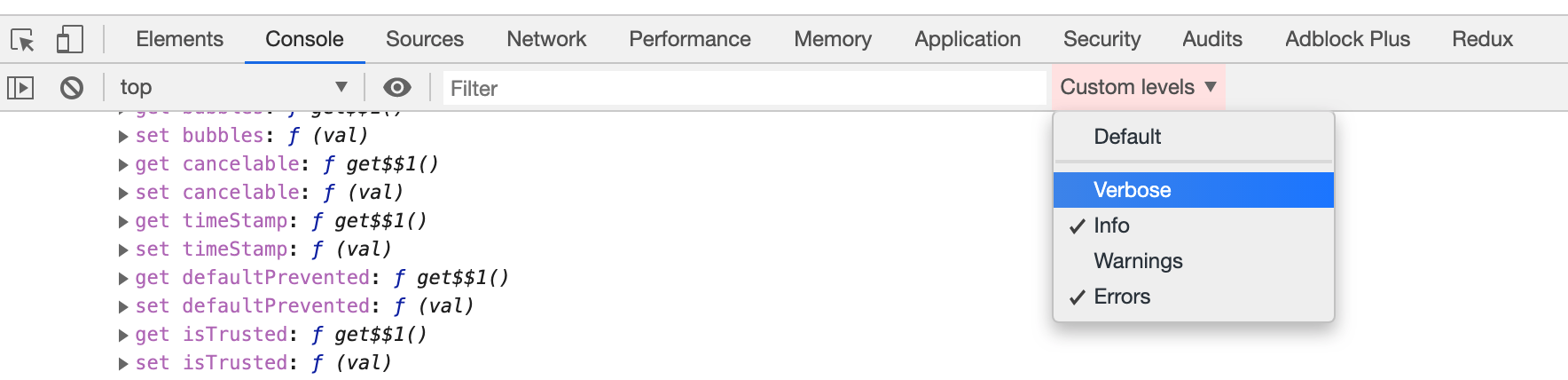
 mxmzb
on 24 Oct 2019
mxmzb
on 24 Oct 2019
@tazsingh Ah, I totally missed that. It was probably hidden due to length of the thread.
Your solution looks more universally usable.
Hless
on 25 Oct 2019
For me only worked this solution:
import { YellowBox } from 'react-native'

YellowBox.ignoreWarnings([
  'Require cycle:'
])
 vedmant
on 22 Nov 2019
vedmant
on 22 Nov 2019
For me only worked this solution:
import { YellowBox } from 'react-native'

YellowBox.ignoreWarnings([
  'Require cycle:'
])
Sorry to ask but where did you use that in your app?
 MorenoMdz
on 1 Apr 2020
MorenoMdz
on 1 Apr 2020
@MorenoMdz Use it ASAP in your code :) in your first called component would be a good place.
 CharlyPoppins
on 23 Apr 2020
CharlyPoppins
on 23 Apr 2020
For those using patch-package here is another approach:
- Open ./node_modules/metro/src/lib/polyfills/require.js
- Search for
Require cycle - Comment the
console.warnblock
116       cycle.push(cycle[0]);
117       //console.warn(
118       //  `Require cycle: ${cycle.join(" -> ")}\n\n` +
119       //    "Require cycles are allowed, but can result in uninitialized values. " +
120       //    "Consider refactoring to remove the need for a cycle."
121       //);
- Then execute
patch-packageto generate the correspondent patch file for your metro version
$ yarn run patch-package metro
yarn run v1.21.1
$ /Users/xxx/Sandbox/DOCV2/source/node_modules/.bin/patch-package metro
patch-package 6.2.2
• Creating temporary folder
• Installing [email protected] with yarn
• Diffing your files with clean files
✔ Created file patches/metro+0.58.0.patch
✨  Done in 24.68s.
- So, if you are already using
patch-packagethen you probably have"postinstall": "patch-package"in your package.jsonscriptssection, if not then add it to apply patches after installing dependencies
Now, everytime you install your dependencies metro will be patched to hide the Require cycle warnings.
Finally, what I personally like from this approach is that if your metro version changes then patch-package will keep patching metro, BUT it will display a warning about applying the patch to a different version of metro, this will give you the chance to adjust the settings if necessary.
 dnlcv
on 28 Apr 2020
dnlcv
on 28 Apr 2020
I'm having the same problem. This really messes up the console log (rightly or wrongly), making it opt-in would be the right solution, surely?
 linnett
on 1 May 2020
linnett
on 1 May 2020
Same issue. Any solution ?
 ghasemikasra39
on 11 May 2020
ghasemikasra39
on 11 May 2020
How is this still an issue after a year and a half... YellowBox.ignoreWarnings is still not working and we shouldn't have to use a hacky postinstall patch like suggested earlier in this thread :/
 lefoy
on 14 May 2020
lefoy
on 14 May 2020
I am also facing the same issue, YellowBox.ignoreWarnings is still not working and it fills up the console with warnings if anyone here found the solution then please help.
 hackrx
on 21 May 2020
hackrx
on 21 May 2020
Hi! We added this warning since we got many complains from developers at FB that it was hard to debug the errors caused by cyclic dependencies (since a cyclic dependency causes the returned value of a
requirestatement to beundefinedwithout hard throwing).
so a few people from FB complained how "hard" debugging some errors, so you "fixed" their problem which resulted in annoying the hell out of hundreds of thousands of other developers. i mean just look at what they are trying to do to silence the warning.
 russeg
on 23 May 2020
russeg
on 23 May 2020
What @russeg said.
@brentvatne: Would the solution be as simple as replacing the code:
     console.warn(
       `Require cycle: ${cycle.join(' -> ')}\n\n` +
         'Require cycles are allowed, but can result in uninitialized values. ' +
         'Consider refactoring to remove the need for a cycle.',
     );
With:
if (__SHOW_REQUIRECYCLE_WARNINGS__) {
     console.warn(
       `Require cycle: ${cycle.join(' -> ')}\n\n` +
         'Require cycles are allowed, but can result in uninitialized values. ' +
         'Consider refactoring to remove the need for a cycle.',
     );
}
Where __SHOW_REQUIRECYCLE_WARNINGS__ is one of those pseudo-global variables that inhabits the React ecosystem. FB devs can set it to true; everybody else can leave it as false or undefined. Everybody's happy.
peterkmurphy
on 25 May 2020
@peterkmurphy - that seems reasonable! I think an important distinction though is that you probably actually do care about require cycles in your own code but you probably do not care about require cycles *in code that you don't control in your node_modules. i think the reason this works fine at FB is that they own all of their dependencies (i believe) and so they can just jump to another directory in their monorepo and fix the require cycle. whereas in open source, tracking down dependencies and resolving these issues could take months, and in some cases where libraries aren't purpose-built for react-native, the maintainers might not even care.
brentvatne
on 10 Jul 2020
"react-native": "^0.63.2"
import { LogBox } from 'react-native';

LogBox.ignoreLogs(['Require cycle:']);
 soblinskas
on 11 Aug 2020
soblinskas
on 11 Aug 2020
Please add an option to disable these warnings when they come from code in the node_modules folder.
 ofirgeller
on 29 Aug 2020
ofirgeller
on 29 Aug 2020
For those using
patch-packagehere is another approach:1. Open ./node_modules/metro/src/lib/polyfills/require.js 2. Search for `Require cycle` 3. Comment the `console.warn` block116 cycle.push(cycle[0]); 117 //console.warn( 118 // `Require cycle: ${cycle.join(" -> ")}\n\n` + 119 // "Require cycles are allowed, but can result in uninitialized values. " + 120 // "Consider refactoring to remove the need for a cycle." 121 //);1. Then execute `patch-package` to generate the correspondent patch file for your metro version$ yarn run patch-package metro yarn run v1.21.1 $ /Users/xxx/Sandbox/DOCV2/source/node_modules/.bin/patch-package metro patch-package 6.2.2 • Creating temporary folder • Installing [email protected] with yarn • Diffing your files with clean files ✔ Created file patches/metro+0.58.0.patch ✨ Done in 24.68s.1. So, if you are already using `patch-package` then you probably have `"postinstall": "patch-package"` in your package.json `scripts` section, if not then add it to apply patches after installing dependenciesNow, everytime you install your dependencies
metrowill be patched to hide theRequire cyclewarnings.Finally, what I personally like from this approach is that if your
metroversion changes thenpatch-packagewill keep patchingmetro, BUT it will display a warning about applying the patch to a different version ofmetro, this will give you the chance to adjust the settings if necessary.
I think a better solution could be (if we want to ignore just third party require cycle warnings):
116       cycle.push(cycle[0]);
117       if (!cycle.every((value) => value.startsWith("node_modules"))) {
118           console.warn(
119               `Require cycle: ${cycle.join(" -> ")}\n\n` +
120               "Require cycles are allowed, but can result in uninitialized values. " +
121                "Consider refactoring to remove the need for a cycle."
122           );
123       }
 tmenyhart
on 11 Sep 2020
tmenyhart
on 11 Sep 2020
omg nothing works..
 DannyChambers
on 21 Sep 2020
DannyChambers
on 21 Sep 2020
@DannyChambers
Did you try the patch method? did you confirm it patches the code after installing packages? there is really no way for it not to work (caching and the patch not being applied aside).
ofirgeller
on 21 Sep 2020
Please add an option to disable these warnings when they come from code in the node_modules folder.
Exactly what we need for now.
MorenoMdz
on 6 Oct 2020
Add console.clear(); close to the App.tsx/jsx level. ☠️
It's dirty as hell, but so is 7 warnings from node_modules that I CANNOT SHUT OFF. LogBox.ignoreLogs(['Require cycle:']); does NOT work, even if you try putting REGEX in there to match the entire string. 🤦🏻♀️
Hope this helps - it's been plaguing our dev team for months now.....
 GamesOfSummer
on 8 Oct 2020
GamesOfSummer
on 8 Oct 2020
The main point here it's why does a simple fetch call generates a Require cycle warning. It does not make any sense. Cycles can be a problem and we need to know when it happens. So adding LogBox.ignoreLogs(['Require cycle:']) it's a big workaround from a team saying "hey, add it and shut up, we won't fix it, because we don't care...".
 fabiocberg
on 9 Oct 2020
fabiocberg
on 9 Oct 2020
Update - console.clear() will crash React Native apps after our CICD process pushed builds out to QA. Don't do this.
Can we please have this error shut off from node_modules. Please. :(
GamesOfSummer
on 15 Oct 2020
@GamesOfSummer rarely, I just want to close the modules. Can anyone solve this?
 ahmetozalp
on 19 Oct 2020
ahmetozalp
on 19 Oct 2020
Why hasn't anything been done about this? Is there an unsurmountable technical reason? Seriously, why can't all the smart people here come up with a solution that satisfies both parties? Or is Facebook just being stubborn and won't admit they made a silly mistake? C'mon guys, this is getting ridiculous.
russeg
on 7 Nov 2020
It does't work in my console, Is there an official response?
 qiliangya
on 13 Nov 2020
qiliangya
on 13 Nov 2020
cannot import { LogBox } on reac-native 0.63.2
 dillonkuester
on 13 Nov 2020
dillonkuester
on 13 Nov 2020
in react-native 0.63+, try bellow to ignore this kind of warnings from node_modules, for those from your own app code, I suggest changing the code to remove the warning, at least it's not a good practice.
import { LogBox } from 'react-native'

LogBox.ignoreLogs([
  'Require cycle: node_modules'
])
 L3au
on 4 Dec 2020
L3au
on 4 Dec 2020
@L3au where do you put these lines ? In my case, warning are still displayed in the terminal
 balzdur
on 15 Dec 2020
balzdur
on 15 Dec 2020
@L3au where do you put these lines ? In my case, warning are still displayed in the terminal
In the entry or setup of App.
Yeah, still show in terminal, but won't in Dev app, it's fine to me. If you want to hide it completely, could try this approach https://github.com/facebook/metro/issues/287#issuecomment-444177106
L3au
on 16 Dec 2020
So we still have to live with these warnings if we don't want to use the hacky patch-package approach and nobody came up with an easy solution? YellowBox and LogBox are both not working for me
 nemanjagajic
on 23 Dec 2020
nemanjagajic
on 23 Dec 2020
Ok here's another hack, but this is rather good.
UNIX comes to the rescue, guys. Use grep!!
Define your ignore patterns in a file. Here's mine:
.metroIgnoreLines:
Require cycle: node_modules/react-native-randombytes/index.js -> node_modules/sjcl/sjcl.js
Require cycles are allowed, but can result in uninitialized values
Run Metro like this: react-native start | grep -vF .metroIgnoreLines
This will work, but will also cause the terminal output to lose its colors. The reason is that since the Metro output is not going directly to the terminal anymore but to the grep command, Metro strips any colors from it. We must force it to keep the colors in the output:
FORCE_COLOR=2 react-native start | grep -vf .metroIgnoreLines
See the relevant section in Chalk docs for info on FORCE_COLOR. Since Metro employs Chalk to manage colors, this will work.
Also if you are a big nerd see the script Linux command for a more generic way of doing this, one that will work in every scenario.
I know this is not the fix you're looking for, but to me this is less fragile than the other hacks mentioned above.
 gwn
on 31 Jan 2021
gwn
on 31 Jan 2021
Okaaaay, so if this warning is annoying the hell out of you, and you can't refactor your app because it's too much work, here's how I "suppressed" those warnings until a proper solution shows up :
- Add a
scriptsfolder in your project- Create a
stfu.jsfile with the following content (edited from @dakiesse) :const fs = require('fs'); const codeToObscure = /console.warn\([\s\S].*"Require cycle: "/; const problemFilePath = './node_modules/metro/src/lib/polyfills/require.js'; const problemFileContent = fs.readFileSync(problemFilePath,'utf8'); fs.writeFileSync(problemFilePath,problemFileContent.replace(codeToObscure,'const noConsoleWarn = (""'),'utf8');
- Add the following line to your
package.jsonin yourscripts:"postinstall": "node ./scripts/stfu.js",When it's done, just
rm -rf node_modules && yarnto reinstall everything, and make sure these damn warnings are now gone.This is really really tricky for us since we have _LOTS_ of require cycles because of how we use redux in our app.
I hope this is helpful.
Seems that in new versions of metro, the require cycle message uses ` instead of " so your regex breaks. I've modified your code to this in my project, should work with both " and ` (only tested with `):
const fs = require('fs');
const codeToObscure = /console.warn\(\s*(?=["`]Require cycle:)/;
const problemFilePath = './node_modules/metro/src/lib/polyfills/require.js';
const problemFileContent = fs.readFileSync(problemFilePath,'utf8');
fs.writeFileSync(problemFilePath,problemFileContent.replace(codeToObscure,'const noConsoleWarn = ('),'utf8');
 irisjae
on 3 Feb 2021
irisjae
on 3 Feb 2021
Okaaaay, so if this warning is annoying the hell out of you, and you can't refactor your app because it's too much work, here's how I "suppressed" those warnings until a proper solution shows up :
- Add a
scriptsfolder in your project- Create a
stfu.jsfile with the following content (edited from @dakiesse) :const fs = require('fs'); const codeToObscure = /console.warn\([\s\S].*"Require cycle: "/; const problemFilePath = './node_modules/metro/src/lib/polyfills/require.js'; const problemFileContent = fs.readFileSync(problemFilePath,'utf8'); fs.writeFileSync(problemFilePath,problemFileContent.replace(codeToObscure,'const noConsoleWarn = (""'),'utf8');
- Add the following line to your
package.jsonin yourscripts:"postinstall": "node ./scripts/stfu.js",When it's done, just
rm -rf node_modules && yarnto reinstall everything, and make sure these damn warnings are now gone.
This is really really tricky for us since we have _LOTS_ of require cycles because of how we use redux in our app.
I hope this is helpful.Seems that in new versions of metro, the require cycle message uses
instead of " so your regex breaks. I've modified your code to this in my project, should work with both " and(only tested with `):const fs = require('fs'); const codeToObscure = /console.warn\(\s*(?=["`]Require cycle:)/; const problemFilePath = './node_modules/metro/src/lib/polyfills/require.js'; const problemFileContent = fs.readFileSync(problemFilePath,'utf8'); fs.writeFileSync(problemFilePath,problemFileContent.replace(codeToObscure,'const noConsoleWarn = ('),'utf8');
Yes, here in my project disappeared this logs in the console.
Thanks!! 👍
 paulo-souza
on 15 Feb 2021
paulo-souza
on 15 Feb 2021
I find it hard to believe that 2 years later we still can't silence the console warnings (not YellowBox) without "patching" Metro.
 alistairholt
on 15 Mar 2021
alistairholt
on 15 Mar 2021
Guys ... how is this still a problem? Can we please just wrap this logic in a bloody env var and be done with it?
 Jonjoe
on 19 Mar 2021
Jonjoe
on 19 Mar 2021
- "postinstall": "node ./scripts/stfu.js",
This worked for me. Absolute madness that we have to do this. But I really appreciate the collective work on a community solution 💪🏽.
Jonjoe
on 19 Mar 2021
beautiful dev peops, heads up when upgrading to react-native 0.64.x
notice, that the file moved:
node_modules/metro/src/lib/polyfills/require.js => node_modules/metro-runtime/src/polyfills/require.js
 ferdicus
on 8 Apr 2021
ferdicus
on 8 Apr 2021
I use:
LogBox.ignoreLogs(['Require cycle:'])
Right after imports, in App.js; notice this is for newest versions of react native.
 Stevemoretz
on 26 Apr 2021
Stevemoretz
on 26 Apr 2021
I use:
LogBox.ignoreLogs(['Require cycle:'])Right after imports, in App.js; notice this is for newest versions of react native.
Afaik, in react-native 0.64.0, LogBox doesn't affect the output of metro cli itself, only what is logged by the loaded bundle at runtime. Metro is resolving imports and logs this message regardless of what is configured in LogBox.
 mattijsf
on 26 Apr 2021
mattijsf
on 26 Apr 2021
I use:
LogBox.ignoreLogs(['Require cycle:'])Right after imports, in App.js; notice this is for newest versions of react native.
Afaik, in react-native 0.64.0, LogBox doesn't affect the output of metro cli itself, only what is logged by the loaded bundle at runtime. Metro is resolving imports and logs this message regardless of what is configured in LogBox.
I'm using expo sdk 41 and this is working.
Stevemoretz
on 26 Apr 2021
Still have the same issue. Tried to use like below but not worked for me on 0.64.1;
LogBox.ignoreLogs(['Require cycle:'])
And I actually don't want to ignore this error but mostly getting this because of absolute path usage. Is there a proper way to use absolute path without getting this kind of warnings?
 enesozturk
on 11 Jul 2021
enesozturk
on 11 Jul 2021
Related issues
 cpojer
·
3Comments
cpojer
·
3Comments
 skovhus
·
6Comments
skovhus
·
6Comments
 samuela
·
4Comments
samuela
·
4Comments
 vtn-dev2016
·
4Comments
vtn-dev2016
·
4Comments
 alexanderoskin
·
5Comments
alexanderoskin
·
5Comments
Most helpful comment
Okaaaay, so if this warning is annoying the hell out of you, and you can't refactor your app because it's too much work, here's how I "suppressed" those warnings until a proper solution shows up :
scriptsfolder in your projectstfu.jsfile with the following content (edited from @dakiesse) :package.jsonin yourscripts:"postinstall": "node ./scripts/stfu.js",When it's done, just
rm -rf node_modules && yarnto reinstall everything, and make sure these damn warnings are now gone.This is really really tricky for us since we have _LOTS_ of require cycles because of how we use redux in our app.
I hope this is helpful.