_21 Upvotes_ When running 'meteor run android-device --verbose' command in Meteor 1.1.0.2 for Windows (on Win 8.1 OS), I receive the following error:
? Can't run on the following platforms on Windows: android-device
Is this expected? I didn't see anything in the release notes about this. If this is not implemented, any ETA on when this will be implemented?
 mojochao
All 108 comments
on https://github.com/meteor/meteor/wiki/Preview-of-Meteor-on-Windows it explicitly says its not supported.
 keithn
on 9 Apr 2015
keithn
on 9 Apr 2015
I want Cordova with Meteor for Windows too. When will be implemented?
 engenheiro
on 9 Apr 2015
engenheiro
on 9 Apr 2015
We definitely need to make it more clear that Android is currently not supported on Windows, sorry about that.
 stubailo
on 10 Apr 2015
stubailo
on 10 Apr 2015
No man, we just ask for a implementation date. For you, allowing Meteor to be used on mobile devices through Windows is a great marketing, because it will allow the community to grow .
engenheiro
on 12 Apr 2015
@stubailo, any plan to make it available on windows ?
 tsamatech
on 28 May 2015
tsamatech
on 28 May 2015
Any indication of when/if it will be possible would be great! I would love to just test my Android app on my main (windows) machine.
 jwktje
on 1 Jun 2015
jwktje
on 1 Jun 2015
Was over the moon when I thought it could do android on windows, you should really update the tutorial to say it wont work on windows. It doesn't mention you need a mac.
 EmbeddedSam
on 13 Jun 2015
EmbeddedSam
on 13 Jun 2015
@EmbeddedSam you're totally right, we should definitely update that part of the tutorial to tell people it won't work on Windows. Sorry to get your hopes up!
stubailo
on 13 Jun 2015
Hey @stubailo, thanks for the great framework. Are you guys planning to add android sdk to windows?
 shukritobi
on 29 Jun 2015
shukritobi
on 29 Jun 2015
I'd love it too!
 robertocr
on 29 Jun 2015
robertocr
on 29 Jun 2015
What is the timeline for this to be implemented?
 votivate
on 4 Jul 2015
votivate
on 4 Jul 2015
1+
 Adiel-Sharabi
on 8 Jul 2015
Adiel-Sharabi
on 8 Jul 2015
+1
 ismaelaarab10
on 9 Jul 2015
ismaelaarab10
on 9 Jul 2015
What's stopping it exactly? If that were posted here, then maybe somebody with enough desire would have a good enough place to start to fix it and give a pull request.
 Type1J
on 13 Jul 2015
Type1J
on 13 Jul 2015
@martijnwalraven any thoughts?
stubailo
on 13 Jul 2015
As I recently posted in the forum, I'm currently working on some improvements to the Cordova integration that I hope to get into the Meteor 1.2 release.
One of the goals is to get Android development working on Windows. The Cordova integration was developed before Meteor added Windows support, and there are some dependencies on OS X/Linux that I'm in the process of removing. More specifically, the current integration uses bash scripts to call out to various tools (cordova, android, adb), and I'm replacing this with using the Cordova lib from NPM and relying on Cordova to control the Android emulator, etc.
 martijnwalraven
on 13 Jul 2015
martijnwalraven
on 13 Jul 2015
That's a great news. When can we expect it to ship?
 abhisheksoni27
on 14 Jul 2015
abhisheksoni27
on 14 Jul 2015
@martijnwalraven: Thanks! I'm glad to know that it's on its way.
Type1J
on 14 Jul 2015
@abhisheksoni27 Meteor 1.2 will ship later this summer, see Matt's recent blog post about it.
martijnwalraven
on 14 Jul 2015
+1
 shrimpster00
on 18 Jul 2015
shrimpster00
on 18 Jul 2015
I am curious to see this version.
 dhavalrajani92
on 20 Jul 2015
dhavalrajani92
on 20 Jul 2015
+1
Any1 have info on adding the next platform - Windows Phone (killed by M$) or now Windows 10 Mobile (Universal Windows app)?
It's smaller market but it's not without any prospect. Right?
 hkalic
on 20 Jul 2015
hkalic
on 20 Jul 2015
@hkalic i think you can just wrap a webapp and it will work fine. I saw a video of them wrapping a canvas game, took just a minute. I'll see if I can find it
 benjick
on 20 Jul 2015
benjick
on 20 Jul 2015
@stubailo Is there anything I can do to help the Windows development. I am not trying to pester you, but I'd rather help it along on Windows than have to resort to using Linux, or even worse... a Mac... ;-)
 kodybrown
on 3 Aug 2015
kodybrown
on 3 Aug 2015
@kodybrown it's up to @martijnwalraven now!
stubailo
on 3 Aug 2015
@stubailo you're right, sorry.. What do you think @martijnwalraven?
kodybrown
on 4 Aug 2015
Just got my first Cordova Android app running on Windows! More work to be done, but I think we're on track for inclusion in Meteor 1.2.
martijnwalraven
on 4 Aug 2015
this is really great news, I am really excited to see it working on windows.
 mntbllr
on 10 Aug 2015
mntbllr
on 10 Aug 2015
That is great! Can I beta-test for you!? :-)
kodybrown
on 10 Aug 2015
It seams that Cordova support for Win isn't working in 1.2rc12.
Any plans?
 leocavalcante
on 9 Sep 2015
leocavalcante
on 9 Sep 2015
It's almost there, but there are a few remaining issues and we didn't feel comfortable releasing it for 1.2. But it should come not too long after.
martijnwalraven
on 9 Sep 2015
@martijnwalraven Do you need beta testers?
 Leekao
on 21 Sep 2015
Leekao
on 21 Sep 2015
That is great we are waiting for it and then android app making will be great fun.
 Sandeep3005
on 22 Sep 2015
Sandeep3005
on 22 Sep 2015
+1
 fabyeah
on 22 Sep 2015
fabyeah
on 22 Sep 2015
:+1:
I can beta test too, if you like!
leocavalcante
on 22 Sep 2015
Do you guys know some workaround to build Cordova apps with Meteor on Windows right now?
leocavalcante
on 30 Sep 2015
+1
 mibcadet
on 4 Oct 2015
mibcadet
on 4 Oct 2015
+1
 douaberigoale
on 6 Oct 2015
douaberigoale
on 6 Oct 2015
@martijnwalraven whats the status on this - will it be ready for the hackathon?
 raix
on 6 Oct 2015
raix
on 6 Oct 2015
No, we've prioritized rewriting the file serving and hot code push plugin, which is what I'm currently working on. Windows support isn't too far off, but will require a few additional days of development and a round of testing. Unfortunately, that won't happen before the hackathon.
martijnwalraven
on 6 Oct 2015
It seems like the only solution for us folks on the Windows platform is to install a copy of Ubuntu onto our machines in the mean time and boot into it.
I have risked it all to start to develop mobile apps with Meteor, so my disappointment was great when I found out (only yesterday) that this is not yet supported on Windows. Luckily the dual boot option with Ubuntu means that we can still carry on developing in Meteor with all of the functionality, Cordova included.
Looking forward to this being supported in Windows and sounds like it's not far off... :-)
 RiaanOos
on 6 Oct 2015
RiaanOos
on 6 Oct 2015
Go VirtualBox from Oracle + Debian 8.2, need nothing else :)
Still +1 for Windows version.
mibcadet
on 6 Oct 2015
Eagerly waiting for this feature to be available on Windows.
@RiaanOos I tried it on Ubuntu on VMWare but on running Android simulator didn't open at all. I waited for more than half an hour. Were you able to pull it off?
 manrajgrover
on 12 Oct 2015
manrajgrover
on 12 Oct 2015
Well, for those who don't want to switch to a Linux-based desktop, I got this working with Vagrant. Creating Meteor app in ubuntu/trusty64 box, editing with Sublime on Windows (thanks to Vagrant's synced folders), building the Cordova project back to Ubuntu and building/running (emulating) on Windows. Those "switches" was just Alt-tabs between a Vagrant SSH terminal connection and a local pointed terminal.

leocavalcante
on 13 Oct 2015
+1
 rootux
on 19 Oct 2015
rootux
on 19 Oct 2015
@leocavalcante please provide some direction as to how you have been able to do this
 nosizejosh
on 26 Oct 2015
nosizejosh
on 26 Oct 2015
@martijnwalraven : Do you have an ETA for this issue/request? If support for windows will release soon, I can avoid installing ubuntu :)
 Tealons
on 26 Oct 2015
Tealons
on 26 Oct 2015
It probably won't release _that_ soon!
stubailo
on 26 Oct 2015
@nosizejosh There is the Vagrantfile with inline shell provision, haven't tested yet, was just the step-by-step I followed after finding some issues. Any trouble running it, let me know.
https://gist.github.com/leocavalcante/46afaafeb10599797cc6
leocavalcante
on 26 Oct 2015
@leocavalcante thanx for responding. I am very new to vagrant,virtual box etc.What I have is meteor working on my machine. I run into this because I want to be able to access camera on android device on a project I am working on ( I was fine with my xampp setup :) ). I currently installed vagrant and virtual box and am guessing I need to add the ubntu/trusty64 box. I am not sure whether to cd into my project directory in windows before doing this ( in-order to be able to have the synced folders as you described) or do it from the installation directory of vagrant. Not sure what to do after that either. Started with adding the box from my project directory but it was taking real long and I was not sure what I was doing so I cancelled it. pls help. Thanx
nosizejosh
on 27 Oct 2015
@stubailo @martijnwalraven If it takes several days/weeks than I can wait for it an focus on other features to develop in my app.
Tealons
on 27 Oct 2015
@Tealons I'm hoping to get a preview release out before the end of next month, but don't count on it.
martijnwalraven
on 27 Oct 2015
I'd like to count on it. I'd love to be able to try Meteor Cordova on Windows.
 gdudding
on 3 Nov 2015
gdudding
on 3 Nov 2015
+1
 adriangordon1231
on 4 Nov 2015
adriangordon1231
on 4 Nov 2015
This would be a great feature any ETA yet??
 Vaccuss
on 9 Nov 2015
Vaccuss
on 9 Nov 2015
Waiting for this feature eagerly.
 prasad-madhale
on 11 Nov 2015
prasad-madhale
on 11 Nov 2015
8 months later since the windows release and still not having this? :(
+10000
 dotnetwise
on 17 Nov 2015
dotnetwise
on 17 Nov 2015
Such a great frameWork/platform, really missing most important support ie Android build on Windows and we are looking forward its early release. Please consider it on priority....
 lgframe
on 17 Nov 2015
lgframe
on 17 Nov 2015
+1
 ppryde
on 17 Nov 2015
ppryde
on 17 Nov 2015
+1
 jannesiera
on 19 Nov 2015
jannesiera
on 19 Nov 2015
@stubailo @martijnwalraven What else needs to be done to implement this functionality? Moreover is there a branch/repo/what not for tracking this? or is this issue the prefered location?
 rozzzly
on 20 Nov 2015
rozzzly
on 20 Nov 2015
does anyone have some new information?
 marko-mlinarevic
on 21 Nov 2015
marko-mlinarevic
on 21 Nov 2015
I don't have much new te offer on this issue. As mentioned before, I've had to prioritize working on rewriting the file serving and hot code push plugin. I'm also working on upgrading the Cordova dependencies (which depending on the state of Cordova iOS 4.0 would give us WKWebView support for the next release). I'm fully aware of the requests for Windows support, but at this point I'm not sure if we'll be able to get it into Meteor 1.3.
martijnwalraven
on 22 Nov 2015
That's really disappointing to hear, I was really looking forward to 1.3 specifically for this reason.
 hyrmedia
on 23 Nov 2015
hyrmedia
on 23 Nov 2015
+1 for this feature
 naysumyat
on 25 Nov 2015
naysumyat
on 25 Nov 2015
What about emulating over SSH, over the internet? I've read that adb can be done over ssh so here is my theoretical setup:
| ̄ ̄ ̄ ̄ ̄|                   | ̄ ̄ ̄ ̄ ̄ ̄ ̄ ̄ ̄ ̄|
|  My PC  |                   |      My VPS      |
|         | ----------------> |                  |
|         |   adb over SSH    |                  |
|         | <---------------- |                  |
| (win10) |                   |    (CentoOS 7)   |
|_____|                   |__________|

PC has phone                    Server runs meteor
   and/or                               /
android emulator               `meteor run android`
Is this possible? I don't know enough about cordova to be able to completely understand
https://github.com/meteor/meteor/tree/devel/tools/cordova
What I've found online about this (specifically for cordova, not meteor) doesnt tell me much about what I would need to do here. How much of the emulation is meteor dependant? What would setting this set up require to be modified in meteor?
rozzzly
on 27 Nov 2015
I'm sure there is no need for tricks, Windows can handle Cordova and Android SDK just fine. The problem must be in the process of compiling a regular Meteor app into a Cordova app, but your idea can fit in to that too, just like meteor deploy we could have a meteor build --cordova (or something like that) were it uploads a Meteor app and downloads a Cordova app :)
leocavalcante
on 27 Nov 2015
+1 for Windows support!
 abeburnett
on 5 Dec 2015
abeburnett
on 5 Dec 2015
Windows support absolutely necessary
 Testato
on 6 Dec 2015
Testato
on 6 Dec 2015
+1 for this feature
 ChowLi
on 14 Dec 2015
ChowLi
on 14 Dec 2015
For a longer-term solution, maybe we could look at relaying the HTML/CSS/JS source to PhoneGap Build via API? That way any user, regardless of platform, would be able to build the application for use on any mobile platform supported by PhoneGap.
Sencha CLI does this and it's relatively smooth for Windows or Linux users to get production-ready IPA and APK files. They also throw an ASCII art QR code into the command line, but maybe we don't need to go that far. :)
 domramirez
on 24 Dec 2015
domramirez
on 24 Dec 2015
+1
 nloui
on 26 Dec 2015
nloui
on 26 Dec 2015
Ionic has android build support for windows. And they're open source. Might wanna borrow some code from them perhaps?
 opensorceror
on 27 Dec 2015
opensorceror
on 27 Dec 2015
+1 Windows support, I went back to Windows from my virtual Linux box after finding out I can't emulate android in a virtual machine. Ionic look nice, checking that out now.
 edencorbin
on 4 Jan 2016
edencorbin
on 4 Jan 2016
+1 Windows support, would be a great feature! Any update @martijnwalraven ?
 Tibo46
on 6 Jan 2016
Tibo46
on 6 Jan 2016
+1, any chance for inclusion in Meteor 1.3 at this point or we looking at a later release?
 mkimmet
on 11 Jan 2016
mkimmet
on 11 Jan 2016
windows support would be a pretty cool feature. this would enalbe everyone in our team - using Windows, Linux and OSX - to build apps.
 StephanZimmermann
on 12 Jan 2016
StephanZimmermann
on 12 Jan 2016
hey folks! I spent a bit of time debugging and created a PR that (appears) to allow for Android builds and deployments on windows!
I'm still working on any tests I need to enter for this (since, this never actually worked before) but I was hoping since there's so many eyes on this issue that I could get a few people to try it out on my fork:
(i've only tested this on an emulator on parallels from windows to mac. I won't have an andriod device handy until next week).
 sedouard
on 14 Jan 2016
sedouard
on 14 Jan 2016
Great news @sedouard !
I'll be more than happy to test it tomorrow morning or Monday!
Thanks for you work!
Tibo46
on 14 Jan 2016
really hope there's a solution for this. 2 days ago I was asked by my boss to review this platform. this is definitely a stopper.
 strongmaya
on 16 Jan 2016
strongmaya
on 16 Jan 2016
Well, you can setup a VM and a little scp script to copy your Meteor project and get a Cordova project. SSH over local network won't be slow. Also, using something like Vagrant with synced folder, will be more easy.
Setup a Ubuntu VM with JDK, Android SDK, Cordova and Meteor:
- https://gist.github.com/leocavalcante/46afaafeb10599797cc6
You will be able to run Cordova CLI commands over your project at Windows as any other Cordova project.
leocavalcante
on 16 Jan 2016
Is anyone actually using the exact vagrant file from the gist? I tried it some time ago but had problems, can't remember exactly what it was. @leocavalcante you said you didn't test it?
fabyeah
on 16 Jan 2016
@fabyeah I was filling the Gist (Vagrantfile) while I was marking the VM work, I haven't tested it as a fresh start.
leocavalcante
on 16 Jan 2016
hey folks! I do have a fix to get android development working on windows but I could really use a few of you guys to give it a shot on your Windows machines by checking out the pull-request and providing feedback.
sedouard
on 20 Jan 2016
Yeah, that would be great! If we get enough positive feedback, we might be able to merge it in time for the next 1.3 beta.
martijnwalraven
on 20 Jan 2016
+1 I need windows support!
 Gdust
on 25 Jan 2016
Gdust
on 25 Jan 2016
+1
 ghost
on 25 Jan 2016
ghost
on 25 Jan 2016
Release 1.3-cordova-beta.3 is now available, which adds experimental support for Android development on Windows, thanks to @sedouard's pull request. If you're a Windows user, please give this release a try and let us know what is or isn't working for you. See this issue for more information on the release.
martijnwalraven
on 26 Jan 2016
Awesome, just run localmarket sample app on an emulator. Thanks @sedouard
leocavalcante
on 27 Jan 2016
As an alternative approach or if you like the ionic CLI, you can write a gulp script to pull all the files into the ionic directory structure... I have a gulp script up and limping if anyone's interested.
 kokokenada
on 29 Jan 2016
kokokenada
on 29 Jan 2016
Hey @kokokenada, can you share it? This workflow seams interesting.
leocavalcante
on 29 Jan 2016
Sure. I'm still debugging, but I'm off the ground and it's working. It's brittle and dependent on my specific directory structure which is a _mobile-app directory in the meteor packages directory.
Here's the updated Ionic gulp.js
var gulp = require('gulp');
var gutil = require('gulp-util');
var bower = require('bower');
var watch = require('gulp-watch');
var concat = require('gulp-concat');
var sass = require('gulp-sass');
var minifyCss = require('gulp-minify-css');
var rename = require('gulp-rename');
var sh = require('shelljs');
var gpf = require('./get-package-files');
var inject = require('gulp-inject');
var sort = require('gulp-sort');
var newer = require('gulp-newer');
var print = require('gulp-print');
var filenames = require("gulp-filenames");

var paths = {
  sass: ['./scss/**/*.scss']
};
var packages = "../**/package.js";
var dest = './www/packages/packages/';  // probably need double due to ../ in packages definition??

gulp.task('default', ['sass']);

gulp.task('sass', function (done) {
  gulp.src('./scss/ionic.app.scss')
    .pipe(sass())
    .on('error', sass.logError)
    .pipe(gulp.dest('./www/css/'))
    .pipe(minifyCss({
      keepSpecialComments: 0
    }))
    .pipe(rename({extname: '.min.css'}))
    .pipe(gulp.dest('./www/css/'))
    .on('end', done);
});

gulp.task('watch', function () {
  gulp.watch(paths.sass, ['sass']);

// Haven't got the watch working yet.  It's a bit unusual because I want to watch the files that gpf() finds not files on the file system. filenames plugin didn't work because it (needlessly?) barfs on streamed files

//  gulp.watch(packages, ['pull-packages', 'includes']);
//  gulp.src(packages)
//    .pipe(gpf())
 //   .pipe(watch(['**/ *.*', '!_*']))
  ///  .pipe(newer(dest))
//    .pipe(print(function (f) {
 //     return 'Copied while watching (' + Date() + '):' + f
//    }))
 //   .pipe(gulp.dest(dest));
});

gulp.task('install', ['git-check'], function () {
  return bower.commands.install()
    .on('log', function (data) {
      gutil.log('bower', gutil.colors.cyan(data.id), data.message);
    });
});

gulp.task('git-check', function (done) {
  if (!sh.which('git')) {
    console.log(
      '  ' + gutil.colors.red('Git is not installed.'),
      '\n  Git, the version control system, is required to download Ionic.',
      '\n  Download git here:', gutil.colors.cyan('http://git-scm.com/downloads') + '.',
      '\n  Once git is installed, run \'' + gutil.colors.cyan('gulp install') + '\' again.'
    );
    process.exit(1);
  }
  done();
});

gulp.task('includes', ['copy-package-files'], function () {
  function sortCompare(a, b) { // Make sure modules are first, then sort alphabetically (Might be better off sticking to the order in the package.js file.)
    //console.log(JSON.stringify(a));
    var fa = a.history[0];
    var fb = b.history[0];
    var aHasIt = (fa.indexOf('module.js') >= 0);
    var bHasIt = (fb.indexOf('module.js') >= 0);
    if ((aHasIt && bHasIt) || (!aHasIt && !bHasIt))
      return fa < fb ? -1 : 1;
    if (aHasIt)
      return -1;
    return 1;
  }
  // Update index.html
  var target = gulp.src('./www/index.html');
  var sources = gulp.src(['./www/packages/**/*.js', './www/packages/**/*.css'], {read: false});
  return target.pipe(inject(sources.pipe(sort(sortCompare)), {ignorePath: 'www/', addRootSlash: false, empty: true})).pipe(gulp.dest('./www'));
});

gulp.task('copy-package-files', function () {
  gulp.src(packages)
    .pipe(gpf())
//    .pipe(filenames())
    //    .pipe(print(function (f){return 'Examined:'+f}))
    .pipe(newer(dest))  // This isn't doing what I wanted.  It always copies all the files, not just the changed ones
    .pipe(print(function (f) {
      return 'Copying:' + f
    }))
    .pipe(gulp.dest(dest));
//  var watcher = gulp.watch(packages);
//  watcher.on('change', function (event) {
//    console.log('File ' + event.path + ' was ' + event.type + ', running tasks...');
//  });

});

gulp.task('pull-packages', ['includes', 'copy-package-files'], function () {

});
And here's the (and my first), gulp plugin to grab the package files:
var through = require('through2');
var gutil = require('gulp-util');
var fs = require('fs');
var _ = require('lodash');
var defaults = require('defaults')

function getPackageFileList(file, architectureArray) {
  var returnArray = [];
  var callto;
  var name;
  Package = {
    onUse: function (fn) {
      callto = fn;
    },
    on_use: function (fn) {
      callto = fn;
    },
    describe: function (o) {
      name = o.name;
    },
    onTest: function () {
    }
  };
  Npm = {
    depends: function () {},
    require: function () {
      return {sync: function() {}}
    }
  };
  var af = function (files, architecture) {
    if (!_.isArray(files))
      files = [files];
    if (!architecture)
      architecture = [];
    if (!_.isArray(architecture)) {
      architecture = [architecture];
    }
    var intersection = _.intersection(architectureArray, architecture);
    if (intersection.length === 0 && architecture.length!==0) // Not the architecture we're interested in
      return;
    //console.log(JSON.stringify({architectureArray:architectureArray,architecture:architecture, intersection: intersection}))
    Array.prototype.push.apply(returnArray, files);
  };
  var packageConsumer = {
    versionsFrom: function () {
    },
    addFiles: af,
    add_files: af,
    use: function () {
    },
    imply: function () {
    },
    export: function () {
    },
    addAssets: function () {
    }
  };
  var js = require(file);
  callto(packageConsumer);
//  console.log(returnArray);
  return {name: name, files: returnArray};
}

module.exports = function (options) {
  function transform(file, enc, callback) {
    if (file.isNull()) {
      this.push(file);
      return callback();
    }

    var packagesDir = file.base;
    var packageFileName = file.history[0];
    var packageNameFromPath =  packageFileName.slice(packagesDir.length, packageFileName.length-"package.js".length);
  //  console.log('packagesDir' + ':' + packagesDir);
   // console.log('packageFileName' + ':'+packageFileName);
   // console.log('packageNameFromPath' + ':'+packageNameFromPath);

    if (packageFileName.indexOf('node_modules')>=0)
      return callback();

    if (!file.basename === 'package.js') {
      var err = new gutil.PluginError('get-package-files', {
        message: 'only works with package.js files (defined by Meteor)'
      });
      return callback(err);
    }

    options = options || {architecture: ['web.cordova', 'client']};

    var self = this;
    var info = getPackageFileList(file.path, options.architecture);
    var arrayOfFiles = info.files;
    var packageName = info.name;
    for (var i = 0; i < arrayOfFiles.length; i++) {
      var f = arrayOfFiles[i];
      var p = packagesDir + '/' + packageNameFromPath + '/' + f;
//      console.log(i + '-' + p);
      var data;
      var stream = fs.createReadStream(p);
      self.push(new gutil.File(new gutil.File(
        {
          path: p,
          contents: stream,
          stat: fs.statSync(p)
          //cwd: "./",
//          dirname: file.dirname // get dir from package.sj
        })
      ));
    }
    callback();
  }

  return through.obj(transform);
};
I'd love to have some help improving it. To me it's bit of a best-of-both worlds approach. (My impression is the ionic CLI ahead of meter CLI for mobile. Thoughts?) Also, Meteor is awesome at packaging and has the great features to share code between web and mobile, but I don't see the approach in tutorials and blogs....
kokokenada
on 29 Jan 2016
+1 Cordova integration for Windows
 frizadiga
on 11 Feb 2016
frizadiga
on 11 Feb 2016
@frizadiga: The Cordova 1.3 betas include support for building Android apps on Windows, see https://github.com/meteor/meteor/issues/6050
martijnwalraven
on 11 Feb 2016
A new Meteor 1.3 beta is now available, please give it a try: https://github.com/meteor/meteor/issues/6266.
martijnwalraven
on 19 Feb 2016
In the official tutorial it is still written to run meteor install-sdk android, it is very confusing, is it possible to remove it? or at least to give a link to the instruction how to install the beta?
Thanks
 u-rogel
on 22 Apr 2016
u-rogel
on 22 Apr 2016
I'm with @cowCrazy . It is not clear to me what I need to do on Windows to end up with an Android APK.
 MastaBaba
on 6 May 2016
MastaBaba
on 6 May 2016
@cowCrazy @MastaBaba the official tutorial assumes OSX dev environment, if you are working in windows just install Android SDK separately and skip the meteor install-sdk android step, it should work just fine.
 spookmx
on 25 May 2016
spookmx
on 25 May 2016
@spookmx I would have sworn I tried that.
MastaBaba
on 25 May 2016
(win7) After installing android sdk and setting system env correctly, I've encountered with a problem when meteor add-platform android:
Cannot find module 'is-property'. and I cannot proceed even if I installed this module either -g or --save. just stuck here.
 cmal
on 13 Aug 2016
cmal
on 13 Aug 2016
@cmal I had the same issue. This worked for me https://github.com/meteor/meteor/issues/7358#issuecomment-231144281
 nunof07
on 29 Aug 2016
nunof07
on 29 Aug 2016
It's 2018, and this still hasn't been implemented/fixed. Wow!
 MisterBrownRSA
on 18 Mar 2018
MisterBrownRSA
on 18 Mar 2018
It is working from 2017.
This issue is closed ;-)
Testato
on 18 Mar 2018
I'm recently started using Meteor again and ran into this issue.
This was my fix:
- Install Android Studio
- Run Android Studio once for download, full installation, and accept terms
- Update npm with
npm i npm - Run
npm install cordova -g - Install the Java JDK and restart your computer
- Run
meteor npm i -g write-file-atomic path-is-inside async-some dezalgo - Run
meteor add-platform android
 DrLonnieJonesPFMP
on 25 Apr 2018
DrLonnieJonesPFMP
on 25 Apr 2018
Thanks @DrLonnieJonesPFMP
After following your fix, I ran: meteor run android-device
It resulted in an error stating that a target IP could not be found.
I had to modify the command to meteor run android-device --mobile-server <ip.of.my.device>
Of course, my PC and Android device had to be on the same WiFi network.
You can go to Settings>About Device>Status to get your current IP Address
 KayO-GH
on 13 Sep 2018
KayO-GH
on 13 Sep 2018
Thanks @KayO-GH and @DrLonnieJonesPFMP
In my case I am getting a ✗ Android target: cmd: Command failed with exit code 1 error. How can I specify the android target to meteor.
 victorokech
on 13 Sep 2018
victorokech
on 13 Sep 2018
@victorokech
I found this issue: #9575
Might be a Java issue, try it
KayO-GH
on 13 Sep 2018
@KayO-GH and @victorokech
So, I wanted to update the directions for everyone. I get right up to the last step before it fails.
These are repro steps for error exit code 1
I wish there was less restarting in this guide too. Windows 7 users will need to restart several times. Windows 10 years will only need to restart on step 7.
- Install the Java JDK in the default directory and restart your computer.
- Install Android Studio in the default directory.
- Run Android Studio once for tools downloads and and accept terms. You will need a minimum of the most modern "SDK Platform" for API level android, "SDK Platform" for API level android-26, "Android SDK Platform-tools (latest), and "Android SDK Build-tools" (latest).
- Configure environment variables:
Append PATH with C:\Users\USERNAMEAppData\Local\Android\sdk\platform-tools;C:\Program Files\Java\jdk1.8.0_181\bin
set JAVA_HOME to C:\Program Files\Java\jdk1.8.0_181\bin
set ANDROID_HOME to C:\Users\USERNAMEAppData\Local\Android\sdk - Restart your computer.
- Configure the SDK (this should have been done in step 3) and AVD. For command-line tools, use C:\Users\UserNameAppData\Local\Android\Sdk\tools\bin\sdkmanager.bat and C:\Users\UserNameAppData\Local\Android\Sdk\tools\bin\avdmanager.bat. These can also be configured via Android Studio via Tools > AVD Manager or Tools > SDK Manager in the Android Studio Menu. My internet security identified the Android Studio Java.exe as a ransomware file and continually blocked it after it tried to download the files. If Build Tools is not correctly downloaded and installed then the respective managers will not be displayed in the menu!
- Create and configure an AVD through either command line or Android Studio that runs on build 26. Windows restart is recommended, but possibly required.
- Within command prompt create your new meteor project such as
meteor create myapp. - CD
myapp. run meteor add-platform androidmeteor run android
I always use an empty project to test the emulator rather than the desired project. That will minimize what you're looking for.
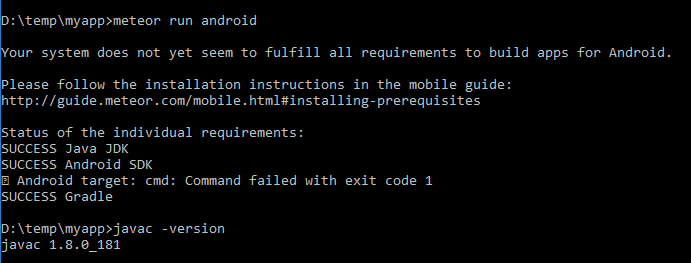
It seems a rollback is in order. I believe I was using Java SE 8 Update 172 when I wrote the last guide. It would be much appreciated if someone could post the last working systems combination to make this work.
DrLonnieJonesPFMP
on 16 Sep 2018
Related issues
 zarub2k
·
3Comments
zarub2k
·
3Comments
 bnewland
·
3Comments
bnewland
·
3Comments
 sahanDissanayake
·
3Comments
sahanDissanayake
·
3Comments
 AnthonyAstige
·
3Comments
AnthonyAstige
·
3Comments
 civako227
·
3Comments
civako227
·
3Comments
Most helpful comment
In the official tutorial it is still written to run
meteor install-sdk android, it is very confusing, is it possible to remove it? or at least to give a link to the instruction how to install the beta?Thanks