Meteor-files: onReconnect currently sets x_mtok based on outdated session id
I'm having an issue:
ostrio:[email protected][email protected]- client issue
- v1.9 docs but also v1.11 docs state verbatim:
wrong assumptions based on confounding server vs client code
Currently when a client reconnects to the server (such as after temporarily losing its Internet connection), it will get a new connection each time. The onConnection callbacks will be called again, and the new connection will have a new connection id.
In the future, when client reconnection is fully implemented, reconnecting from the client will reconnect to the same connection on the server: the onConnection callback won’t be called for that connection again, and the connection will still have the same connection id.
That future has not yet come. Though
https://github.com/veliovgroup/Meteor-Files/blob/2035b63db313096388010d99a5ee4f56b04069f3/client.js#L120-L122
set's the old session on the cookie:
https://github.com/veliovgroup/Meteor-Files/blob/2035b63db313096388010d99a5ee4f56b04069f3/client.js#L111-L116
For reasons I don't yet understand, the concrete application at hand seems to trigger a reconnect on each _browser reload_. So after the first browser reload all protected Meteor-Files (aka images) are gone (and kept loaded as blank in the corresponding page — even after navigating back and forth).
/cc @xet7
 blaggacao
All 32 comments
This seems to block https://github.com/wekan/wekan/pull/3273
blaggacao
on 20 Oct 2020
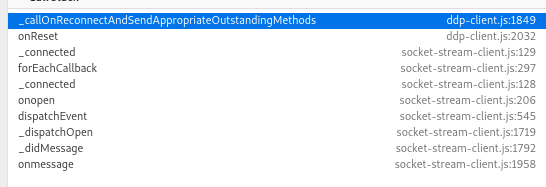
  _callOnReconnectAndSendAppropriateOutstandingMethods() {
    var self = this;
    var oldOutstandingMethodBlocks = self._outstandingMethodBlocks;
    self._outstandingMethodBlocks = [];
    self.onReconnect && self.onReconnect();  // this is sometimes `null` and sometimes `setTokenCookie`
...

access denied appears _before_ hitting (for the first time):

(with value null)
blaggacao
on 20 Oct 2020
<div class="minicard-cover" style="background-image: url('/cdn/storage/attachments/34hRCatqeercsayQm/original/34hRCatqeercsayQm.png');"></div>
The file is called via css:
#stacktrace of the failing query
curCSS http://localhost:3000/packages/jquery.js:6773:29
css http://localhost:3000/packages/jquery.js:7240:10
css/< http://localhost:3000/packages/jquery.js:7417:12
access http://localhost:3000/packages/jquery.js:4484:13
css http://localhost:3000/packages/jquery.js:7399:10
_isFloating http://localhost:3000/packages/mquandalle_jquery-ui-drag-drop-sort.js:2644:37
$.widget/</proxiedPrototype[prop]</< http://localhost:3000/packages/mquandalle_jquery-ui-drag-drop-sort.js:440:29
refreshPositions http://localhost:3000/packages/mquandalle_jquery-ui-drag-drop-sort.js:3299:41
$.widget/</proxiedPrototype[prop]</< http://localhost:3000/packages/mquandalle_jquery-ui-drag-drop-sort.js:440:29
refresh http://localhost:3000/packages/mquandalle_jquery-ui-drag-drop-sort.js:3196:10
$.widget/</proxiedPrototype[prop]</< http://localhost:3000/packages/mquandalle_jquery-ui-drag-drop-sort.js:440:29
_create http://localhost:3000/packages/mquandalle_jquery-ui-drag-drop-sort.js:2652:10
$.widget/</proxiedPrototype[prop]</< http://localhost:3000/packages/mquandalle_jquery-ui-drag-drop-sort.js:440:29
_createWidget http://localhost:3000/packages/mquandalle_jquery-ui-drag-drop-sort.js:610:10
$.widget/$[namespace][name] http://localhost:3000/packages/mquandalle_jquery-ui-drag-drop-sort.js:401:12
$.widget.bridge/$.fn[name]/< http://localhost:3000/packages/mquandalle_jquery-ui-drag-drop-sort.js:556:35
each http://localhost:3000/packages/jquery.js:426:19
each http://localhost:3000/packages/jquery.js:193:17
$.widget.bridge/$.fn[name] http://localhost:3000/packages/mquandalle_jquery-ui-drag-drop-sort.js:548:12
onRendered list.js:36:11
onRendered http://localhost:3000/packages/peerlibrary_blaze-components.js:838:48
fireCallbacks/< template.js:119:21
module/Template._withTemplateInstanceFunc template.js:490:13
fireCallbacks template.js:115:11
module/Template.prototype.constructView/< template.js:208:18
fire/</< view.js:107:13
module/Blaze._withCurrentView view.js:533:11
fire/< view.js:106:14
module/Tracker._runFlush tracker.js:511:10
onGlobalMessage http://localhost:3000/packages/meteor.js:515:23
After implementing the work around I get two round trips for the same resource

I did not implement any server side code, since it is not triggered anyway. Adding the session as query parameters does reload the image once the session is set and that seems to be enough.
What is wrong here?
blaggacao
on 21 Oct 2020
@blaggacao were you able to solve it?
 dr-dimitru
on 23 Oct 2020
dr-dimitru
on 23 Oct 2020
@dr-dimitru Thanks for chiming in. Not yet, just the unsatisfying workarround. Is this issue orthogonal to meteor-files? If you're confident this is the case, then we should close. However, why is the token renewed only well into the reload? And is it really the applications responsibility to ensure no loading of protected resources take place until that happens? And even if it is, how the application would discover this state? And if it's discoverable how would such application then implement it in a "blessed" way?
blaggacao
on 23 Oct 2020
I believe other threads you refer to only related to Cordova? Are you on Cordova? You gave a very little detail, and I didn't get much of the problem from what describing.
Please
- Enable
debugmode and follow our issue template - speak code
- Without caring about
x_mtoktell us what's isn't working:
2.1. image isn't opening?
2.2. In what case?
2.3. How it was uploaded?
2.4. Can you locate image on the server? - If you believe it's authorization/permissions issue:
3.1. Did you managed to debugprotectedhook?
3.2. Isuseravailable inprotectedhook?
dr-dimitru
on 24 Oct 2020
Thank you for corresponding.
Based on my debugging efforts, I can very confidently frame the problem without overloading you with (unrelated) context. I wished I had figured out an isolated replication case, but I'm not very familiar with meteor and was hit by this while making a (not-so-anymore) drive-by contribution to the wekan project.
So here is the abstract problem:
On _page reloads_ (F5), (image) assets that are served through meteor-files are fetched _before_ the xmtok is renewed. As a direct consequence the request hits the server with the reference of an outdated (ceased to exist) session and hence authorization of protected files fail. A necesary precondition for this to unfold is that the session is cycled (on the server).
So there are two research questions to this:
- Why does the server cycle session? As I understand it, this is the current documented meteor behavior on reconnect — while future versions of meteor will preserve the session on reconnect, the current (1.11) and the used (1.9) version does not.
- Why does the client not wait for the new xmtok to be established before sending _any meteor-files related_ fetches? Surely, for non protected assets, the problem does not manifest. But that only seems to be a happy coincidence. To my understanding, the client should await established authentication before fetching potentially protected assets.
Point 2 induces a variety of alternative claims, that I can think of:
- _The application_ should be responsible of ensuring correct sequence of events.
- _meteor-files_ should be responsible of ensuring correct sequence of events.
- _meteor_ ...
If the application (wekan) is deemed responsible for doing so, then I would percieve great value in a code example (since I wouldn't be able to figure it out based on my current skills).
Since the problem appears in the context of how fetchers are called client side, I can think of relevant contextual information rooting in the way the html is constructed. But maybe I'm on the wrong path:
- I can imagine the position in the html page might be relevant, since as I understand it the html evaluation follows parsing left-to-right.
- I can imagine that the way how assets are called is relevant (css url vs img src). Because I don't know the exact workings of those, I don't want to exclude this possibility.
I hope this "intepreted" report is serving us better to find the root cause, than a noisy dump of global state.
_Wekan does not use cordova, but I don't consider it has causality to this issue. i have seen the diverging code path here in meteor-files: as a leaf code path, it does not seem to have side effects on the general sequencing of events on reconnects._
blaggacao
on 24 Oct 2020
On page reloads (F5), (image) assets that are served through meteor-files are fetched before the xmtok is renewed. As a direct consequence the request hits the server with the reference of an outdated (ceased to exist) session and hence authorization of protected files fail. A necesary precondition for this to unfold is that the session is cycled (on the server).
Yes, it's architectural responsibility to make sure user properly logged in before showing the image or offering a download link.
Why does the server cycle session?
This is part of Meteor's security measures
Why does the client not wait for the new xmtok to be established before sending any meteor-files related fetches?
I guess you fetch it over HTTP which is blind to auth-session and has no "wait" option. Again, since protected assets would require protected context and parts of UI, as well as extra-work on UI and UX. Why would you let unauthorized (yet) user to access protected pages?
For the rest of questions: I offer remote "pair" programming sessions explaining how things work and navigating you through solving tasks using Meteor/Node.js/JavaScript (3+ years of consulting and mentoring experience 😊)
dr-dimitru
on 26 Oct 2020
I guess you fetch it over HTTP which is blind to auth-session and has no "wait" option. Again, since protected assets would require protected context and parts of UI, as well as extra-work on UI and UX. Why would you let unauthorized (yet) user to access protected pages?
@xet7 Can you fill in the missing (architectural) bit's about wekan, here? (or even transact this into a wekan issue proper?)
blaggacao
on 26 Oct 2020
@blaggacao

dr-dimitru
on 26 Oct 2020
That's me as well :smile: — reason being that I'm not very familiar with wekan's overall architecture and just happen to have implement the migration to ostrio:files without knowing what I was getting myself into. I would hope that in triangulation with @xet7 we can figure out what needs to be done.
blaggacao
on 26 Oct 2020
At Wekan v0.32 2017-07-30 was security fix for Files accessible without authorization. In that fix, there is added check from database is that file at public board before allowing to download file.
In that PR from @blaggacao similar check is done here.
@dr-dimitru What would be correct way to handle this in Meteor-Files ?
 xet7
on 27 Oct 2020
xet7
on 27 Oct 2020
@xet7 @blaggacao sorry guys, I didn't knew that "wekan" is OSS project. First time I hear about it.
All that time I was "what the wekan he is taking about?".
Feels like your question is about implementation decision, which is the way beyond this package.
As said before: "Check user authentication before serving the file in the Browser".
Using different hooks provided by meteor-files collection like interceptDownload you can implement your own authentication. For example with signed token, or any other.
Feel free to close it in case if the issue is solved on your end.
dr-dimitru
on 27 Oct 2020
@xet7 @blaggacao let me know if this issue is solved
dr-dimitru
on 3 Nov 2020
To be honest, I think this is a friction kind of issue rather than a question kind.
The supposed-to-work user identification is not working in non-obvious ways due to circumstances of the meteor (files) way of session renewing (on page reloads) that seem as they are still not yet fully understood.
I would wish to be able to help bring about a canonical solution to that problem.
blaggacao
on 8 Nov 2020
@blaggacao Minimal reproduction repo would help to solve it.
But, it's still sounds to me as an implementation issue. What you describing is some kind of signed URL, so it would be served in a single response.
Or you can implement access via Authorization HTTP header.
There are a lot of options, I know very limited details about Wekan and can't select the best solution
dr-dimitru
on 8 Nov 2020
Minimal reproduction repo would help to solve it.
Yep, I know this is on wekan's side. I predict this might be a very asynchronous deliverable, if at all. @xet7 what is your feeling? Would you be able and willing to extract a minimal reproduction case out of wekan — based on the tacit assumption, that I interpret from this discussion and my own research so far, that wekan has been doing something wrong orthogonal to my implementation of meteor files that breaks some system behaviour which meteor files does reasonably expect from it's implementations.
What you describing is some kind of signed URL, so it would be served in a single response.
I'm sorry, I can't parse this phrase. What I believe I know is that the client sends an outdated x_mtok when trying to authenticate. If this is a true observation, then it is still hard to understand why no mechanisms are in place that ensure that the correct x_mtok is sent in all instances. It is also not clear to me as of now how wekan _might_ be involved in braking things or whether it isn't involved.
blaggacao
on 8 Nov 2020
@blaggacao @xet7 Please, send links to the Wekan's codebase where meteor-files is used.
I'll review it
dr-dimitru
on 8 Nov 2020
In progress changes are here: https://github.com/wekan/wekan/pull/3273
Some current code is here: https://github.com/wekan/wekan/blob/master/models/attachments.js
xet7
on 8 Nov 2020
@dr-dimitru Oh, thank you a lot! That's extraordinary!
  protected(fileObj) {
    const board = Boards.findOne(fileObj.meta.boardId);
    if (board.isPublic()) {
      return true;
    }
    return board.hasMember(this.userId); // this.userId is null only upon browser reload
    // as a consequence of artifact caching, after an initial reload the files (images)
    // here are continued to be served by the browser as blank placeholders
  },
https://github.com/wekan/wekan/pull/3273/files#diff-dd541b39e101b82386f5b97512c8fd15704f43b8f4dad12061cf6f0e4280658eR62
This is my current _work around_ which loads the image twice:
- using the old
mtokcookie on the?dummyReloadAfterSessionEstablished=query and - with the new
mtokcookie on the?dummyReloadAfterSessionEstablished=sessionreloadedquery
https://github.com/wekan/wekan/pull/3273/files#diff-43f2c0da9bbdf290cc25e4f3e7a865da90ba13c2adb81297878dd254c48bb60fR14
.minicard-cover(style="background-image: url('{{cover.link 'original' '/'}}?dummyReloadAfterSessionEstablished={{sess}}');")
See also:
https://github.com/wekan/wekan/pull/3273/files#diff-7359d71cd221feb349197bd7611854a3dca7ae589f2c4293e72184b43b6d69d6
It this.userId is null because, Meteor.server.sessions.has(xmtok) fails as the detected xmtok does not correspond to the currently available server session ids available as keys within the map (xmtok expired).
blaggacao
on 8 Nov 2020
I would somehow expect a canonical way to hold back the loading of protected images (resources) until a (anonymous) session is established: something that mimics the work around without issuing a first futile request.
Or maybe it shall be sufficient to destroy the cookie on page reloads? — since the problem does not occur on first loads: suspecting that the existence of a mtok cookie is facading somehow to the client a valid authenticated session (which in reality is expired).
blaggacao
on 8 Nov 2020
@blaggacao
I would somehow expect a canonical way to hold back the loading of protected images (resources) until a (anonymous) session is established: something that mimics the work around without issuing a first futile request.
This part is open to be controlled by developer. Usually it's done via "please, wait download will start in a moment..." page-wall. Where you can properly authenticate user and double-check session expiration.
Or maybe it shall be sufficient to destroy the cookie on page reloads?
So far this is the first time when Meteor-session-token is got "broken", I'd take a look on its settings.
Another reason on my mind can be multi-server or multi-instance backend — let me know if this is your case.
dr-dimitru
on 9 Nov 2020
@dr-dimitru
Usually only one Meteor server is in use.
Some Wekan users have setup multi-server setups with docker containers.
xet7
on 9 Nov 2020
Usually only one Meteor server is in use.
Then it should be fine
Some Wekan users have setup multi-server setups with docker containers.
they got to implement sticky-session if it's not already there, as every server in a cluster would have its own token.
I assume it isn't the case in this thread
dr-dimitru
on 9 Nov 2020
This part is open to be controlled by developer. Usually it's done via "please, wait download will start in a moment..." page-wall. Where you can properly authenticate user and double-check session expiration.
True, that works relatively straight forward in a "download action" context. However, in this particular context, the fetch is done by the browser itself via a fobj.link() on behalf of the DOM at a (yet) uncontrolled point in session state.
I know very little about how meteor or react manipulates the DOM, but I would somehow expect that it only places a component involving a potentially protected resource into the DOM after the condition is met that meteor / meteor-files authentication middleware is in a working state.
In theory, the client could know the necesary metadata of a fetch judging by if protected cb is implemented. In theory, the client would thereby be capable of queing and holding back the fetch until a valid session is established.
What I personally don't understand at all, but might be helpful to know on the road to devise a canonical solution is why it only breaks on reloads and not on first loads? I mean somehow on first load, the system manages to do the fetch only after a valid session is established. While this might well be arbitrary chance, to my understanding, it somehow suggestst that there might already be the above described signaling mechanism in place and that the system is somehow fooled on reload by inconsistent state and/or signalling. (Maybe by means of the existence of a browser cookie?)
Or on another "tabula rasa" angle to the problem: shouldn't the client refuse to render the DOM in general until any sort of authentication is established? Or is this what meteor does anyways, but it's fooled by the existence of a browser cookie?
blaggacao
on 9 Nov 2020
@blaggacao
- This library based on pure JS-logic without interaction with DOM;
FileCursor#link()andFilesCollection#link()methods are only returning "downloadable" link without checking for permissions and other conditions, that's whyprotectedand other hooks implemented in the Server codebase;x_mtokcookie is the session cookie should expire when browser window closed/reloaded;- What browsers are you testing on?
I'd recommend to make sure you're on the latest Meteor and ostrio:files release. Otherwise since you're on [email protected] I'd try to downgrade to v1.14.0
Keep me updated and let me know if any of suggestions does make any difference
dr-dimitru
on 10 Nov 2020
What browsers are you testing on?
FireFox - 77.0.1
However, I don't have an understanding how that could have a side effect on this issue, so I'm not confident this is going to further the investigation.
Let me rephrase the problem:
- browser reload
- during fetch, old cookies are used
- _eventually_, cookies are renewed
→ Problem: 2. & 3. are happening in the wrong order. Is that expected behaviour? — I couldn't deduce a clear answer as of yet. So far, it seems to be a generic issue of the meteor or meteor-files problem domain, rather than of the wekan problem domain. What motivates me to dig in is the idea that it will be fixed in the right solution domain (current workaround would actually "do the job"). Looking through past issues, I got the impression that it is a recurring issue pattern, so shouldn't we make it right?
blaggacao
on 11 Nov 2020
@blaggacao
FireFox - 77.0.1
Does this behavior consistent across all top 4 browsers?
browser reload
What page/url/address you're on when page is reloaded.
during fetch, old cookies are used
What is fetch?
Have you tried v1.14.0?
You are providing very limited details, it's difficult to guess what's is going on.
I recommend to go back and update this issue following out ISSUE_TEMPLATE
- Give an expressive description of what is went wrong
- Version of
Meteor-Filesyou're experiencing this issue - Version of
Meteoryou're experiencing this issue - Where this issue appears? OS (Mac/Win/Linux)? Browser name and its version?
- Is it Client or Server issue?
- Post Client and/or Server logs with enabled
debugoption, you can enable "debug" mode in Constructor
dr-dimitru
on 11 Nov 2020
Hey @blaggacao 👋 this is friendly ping 👉
Did you found a solution?
dr-dimitru
on 20 Nov 2020
Closed due to silence at issue owner end.
Feel free to reopen it in case if the issue still persists on your end.
dr-dimitru
on 4 Feb 2021
Related issues
 tuarrep
·
4Comments
tuarrep
·
4Comments
 pdshah3690
·
3Comments
pdshah3690
·
3Comments
 mking200
·
4Comments
mking200
·
4Comments
 sabedinia
·
3Comments
sabedinia
·
3Comments
 mklueh
·
3Comments
mklueh
·
3Comments