Meteor-files: Using AWS S3 with Lambda gives "No Such Key" error on getObject
I am using AWS S3 for storing images with Lambda functions (for resizing images on request).
When I try getting the resized image after uploading the original it gives error as "No Such Key" (The specified key does not exist)
How my lambda function works
I have hosted my S3 bucket with redirect rules.
When a file URL (http://**.s3-website.ap-south-1.amazonaws.com/4cpLYeFK4oxPSYQJi-original.jpg) is hit it returns the file.
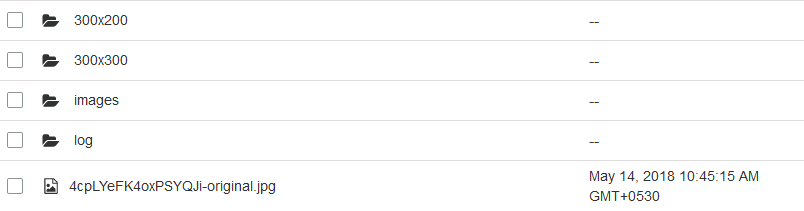
Whenever a file's URL with width x height specifications is visited it runs the lambda function and creates the file in a folder named with the same resolution.
eg: http://*.s3-website.ap-south-1.amazonaws.com/300x300/4cpLYeFK4oxPSYQJi-original.jpg
this creates 4cpLYeFK4oxPSYQJi-original.jpg with 300x300 specification in a folder named "300x300".
Typically my bucket looks like
I grabbed ideas for the above from here
Image Upload & Download Server Functions
/* Few Lines Skipped */

if (s3Conf && s3Conf.key && s3Conf.secret && s3Conf.bucket && s3Conf.region) {
  // Create a new S3 object
  const s3 = new S3({
    secretAccessKey: s3Conf.secret,
    accessKeyId: s3Conf.key,
    region: s3Conf.region,
    // sslEnabled: true, // optional
    httpOptions: {
      timeout: 6000,
      agent: false
    }
  });

  // Declare the Meteor file collection on the Server
  Images = new FilesCollection({
    collectionName: 'Images',
  storagePath:Meteor.settings.public.imagesPath,
  allowClientCode: false, // Disallow remove files from Client
  onBeforeUpload(file) {
    // Allow upload files under 10MB, and only in png/jpg/jpeg formats
    if (file.size <= 10485760 && /png|jpg|jpeg/i.test(file.extension)) {
      return true;
    }
    return 'Please upload image, with size equal or less than 10MB';
  },
    // Start moving files to AWS:S3
    // after fully received by the Meteor server
    onAfterUpload(fileRef) {
      // Run through each of the uploaded file
      _.each(fileRef.versions, (vRef, version) => {
        // We use Random.id() instead of real file's _id
        // to secure files from reverse engineering on the AWS client
        const filePath =  (Random.id()) + '-' + version + '.' + fileRef.extension;

        // Create the AWS:S3 object.
        // Feel free to change the storage class from, see the documentation,
        // `STANDARD_IA` is the best deal for low access files.
        // Key is the file name we are creating on AWS:S3, so it will be like files/XXXXXXXXXXXXXXXXX-original.XXXX
        // Body is the file stream we are sending to AWS
        s3.putObject({
          // ServerSideEncryption: 'AES256', // Optional
          StorageClass: 'STANDARD',
          Bucket: s3Conf.bucket,
          Key: filePath,
          Body: fs.createReadStream(vRef.path),
          ContentType: vRef.type,
        }, (error) => {
          bound(() => {
            if (error) {
              console.error(error);
            } else {
              // Update FilesCollection with link to the file at AWS
              const upd = { $set: {} };
              upd['$set']['versions.' + version + '.meta.pipePath'] = filePath;
              //cloning original for thumbnail
              var thumbnail = fileRef.versions.original;
              thumbnail.meta={};
             // thumbnail.path = thumbnail.path.substr(0,thumbnail.path.indexOf("."))+"-300x200."+thumbnail.extension;
              thumbnail["meta"]['pipePath'] = "300x200/"+filePath;
              upd['$set']['versions.300x200']=thumbnail;
              console.log(thumbnail);
              this.collection.update({
                _id: fileRef._id
              }, upd, (updError) => {
                if (updError) {
                  console.error(updError);
                } else {
                  // Unlink original files from FS after successful upload to AWS:S3
                  this.unlink(this.collection.findOne(fileRef._id), version);
                }
              });
            }
          });
        });
      });
    },


    // Intercept access to the file
    // And redirect request to AWS:S3
    interceptDownload(http, fileRef, version) {
      let path;

      if (fileRef && fileRef.versions && fileRef.versions[version] && fileRef.versions[version].meta && fileRef.versions[version].meta.pipePath) {
        path = fileRef.versions[version].meta.pipePath;
      }
      if (path) {
        // If file is successfully moved to AWS:S3
        // We will pipe request to AWS:S3
        // So, original link will stay always secure

        // To force ?play and ?download parameters
        // and to keep original file name, content-type,
        // content-disposition, chunked "streaming" and cache-control
        // we're using low-level .serve() method
        const opts = {
          Bucket: s3Conf.bucket,
          Key: path
        };

        if (http.request.headers.range) {
          const vRef  = fileRef.versions[version];
          let range   = _.clone(http.request.headers.range);
          const array = range.split(/bytes=([0-9]*)-([0-9]*)/);
          const start = parseInt(array[1]);
          let end     = parseInt(array[2]);
          if (isNaN(end)) {
            // Request data from AWS:S3 by small chunks
            end       = (start + this.chunkSize) - 1;
            if (end >= vRef.size) {
              end     = vRef.size - 1;
            }
          }
          opts.Range   = `bytes=${start}-${end}`;
          http.request.headers.range = `bytes=${start}-${end}`;
        }
      const fileColl = this;

        s3.getObject(opts, function (error,data) {
          if (error) {
            console.error(error); //Here Im Struck with the error
            if (!http.response.finished) {
              http.response.end();
            }
          } else {
            if (http.request.headers.range && this.httpResponse.headers['content-range']) {
              // Set proper range header in according to what is returned from AWS:S3
              http.request.headers.range = this.httpResponse.headers['content-range'].split('/')[0].replace('bytes ', 'bytes=');
            }

            const dataStream = new stream.PassThrough();
            fileColl.serve(http, fileRef, fileRef.versions[version], version, dataStream);
            dataStream.end(this.data.Body);
          }
        });

        return true;
      }
      // While file is not yet uploaded to AWS:S3
      // It will be served file from FS
      return false;
    }
  });
On the above code, when I upload the file I clone the version.original object to an another version "300x200".
Error Object

What goes behind?
When I visit the local URL (created by meteor files) for the version 300x300, the sdk is trying to get the object which is not physically present there (when we request for the file in URL it invokes the Lambda fn and creates the file) and returns the No such key Error Code.
I need the lambda function to be invoked when I request for the file which then creates the file and returns as a response.
Is it an Issue ?? or Am I doing it wrong?
 jacksonrufusk
All 17 comments
Hello @jacksonrufusk ,
As you can see we send/request files to/from AWS:S3 by its key which stored as filePath variable.
But when you create thumbnail object you simply set its key to "300x200/"+filePath while it's okay, you also should associate this key with thumb which would be created only in a future upon request.
What should you do, - find a way to add a key to thumb's object at AWS:S3 after it's created at Lambda.
 dr-dimitru
on 17 May 2018
dr-dimitru
on 17 May 2018
Here is my Image object

The problem is the Lambda function is invoked and then creates the file (which is on the key) only when we visit the URL on the browser, but not when we access it through the SDK.
Is there any way to achieve it..??
jacksonrufusk
on 17 May 2018
The problem is the Lambda function is invoked and then creates the file (which is on the key) only when we visit the URL on the browser, but not when we access it through the SDK.
Well, then instead of accessing a file via SDK, request it via HTTP. Something like:
request.get({ url: '<URL to the FILE>' }).pipe(http.response);
Where can I get the exact file URL in the bucket??!!
jacksonrufusk
on 17 May 2018
@jacksonrufusk above you've said:
only when we visit the URL on the browser
I assume you can access it via URL
dr-dimitru
on 17 May 2018
I have added the End Point URL of my S3 bucket hosting into my settings (S3 Config)file.
Then when user uploads the file, after putObject a HTTP get request is made for the resize to a URL. The request will create the resized file in the bucket. later when it accessed through the SDK it displays the image perfectly.
here is my code
settings.json
{
    "s3": {
    "key": "Key here",
    "secret": "Secrect Key Goes Here",
    "bucket": "*****",
    "region": "ap-south-1",
    "endPoint":"http://*****.s3-website.ap-south-1.amazonaws.com"
  }
}
onAfterUpload
onAfterUpload(fileRef) {
      // Run through each of the uploaded file
      _.each(fileRef.versions, (vRef, version) => {
        // We use Random.id() instead of real file's _id
        // to secure files from reverse engineering on the AWS client
        const filePath =  (Random.id()) + '-' + version + '.' + fileRef.extension;

        // Create the AWS:S3 object.
        // Feel free to change the storage class from, see the documentation,
        // `STANDARD_IA` is the best deal for low access files.
        // Key is the file name we are creating on AWS:S3, so it will be like files/XXXXXXXXXXXXXXXXX-original.XXXX
        // Body is the file stream we are sending to AWS
        s3.putObject({
          // ServerSideEncryption: 'AES256', // Optional
          StorageClass: 'STANDARD',
          Bucket: s3Conf.bucket,
          Key: filePath,
          Body: fs.createReadStream(vRef.path),
          ContentType: vRef.type,
        }, (error) => {
          bound(() => {
            if (error) {
              console.error(error);
            } else {
              // Update FilesCollection with link to the file at AWS
              const upd = { $set: {} };
              upd['$set']['versions.' + version + '.meta.pipePath'] = filePath;
              //cloning original for thumbnail
              var thumbnail = fileRef.versions.original;
              thumbnail.meta={};
             // thumbnail.path = thumbnail.path.substr(0,thumbnail.path.indexOf("."))+"-300x200."+thumbnail.extension;
              thumbnail["meta"]['pipePath'] = "300x200/"+filePath;
              upd['$set']['versions.300x200']=thumbnail;

              HTTP.call('GET', s3Conf.endPoint+"/"+thumbnail["meta"]['pipePath']);

              this.collection.update({
                _id: fileRef._id
              }, upd, (updError) => {
                if (updError) {
                  console.error(updError);
                } else {
                  // Unlink original files from FS after successful upload to AWS:S3
                  this.unlink(this.collection.findOne(fileRef._id), version);
                }
              });
            }
          });
        });
      });
    }
Thank you for your time.
Hope I am doing it right on my way, If not let me know..
jacksonrufusk
on 17 May 2018
@jacksonrufusk LGTM 🎉
I'm glad you've solved it.
You may call HTTP.call asynchronously, and place this.collection.update into its callback.
Everything else looks good to me.
Feel free to close it in case if the issue is solved on your end.
dr-dimitru
on 17 May 2018
@jacksonrufusk Hi there,
would there be any advantage for you to create the thumb right when the original file is written to S3? This is how I do it and if you want the same, I have the Lambda function for this using ImageMagic, optimized pretty well for small file size.
Regards,
Paul
 paulincai
on 17 May 2018
paulincai
on 17 May 2018
@paulincai @jacksonrufusk shall we create a tutorial and add it to Wiki?
dr-dimitru
on 17 May 2018
Thanks, @paulincai Can you share them.. !!
Currently what I do is, Create the file in S3 and call the URL for resizing right below, to create the resized file.
The function I use for resizing is grabbed from here.
@dr-dimitru Definitely that would be the better Idea as the resources are very limited (it took 3 days for me to reach the solution) right now.
jacksonrufusk
on 17 May 2018
@paulincai let me know if you want to send a PR to our Wiki, or just post script and your thoughts/notes here, and someone from the team will manage it.
dr-dimitru
on 18 May 2018
@dr-dimitru Let me first try a PR please.
paulincai
on 18 May 2018
Hi @dr-dimitru, not sure you noticed, a PR was sent the same day.
paulincai
on 21 May 2018
@paulincai sorry, for delay.
Yes, I saw it, and forgot to ask to re-send it to dev branch 😬
And now I see you've change it.
I'll review and merge it tonight.
Thank you, and sorry again for delay.
dr-dimitru
on 21 May 2018
@dr-dimitru there is no delay at all. I actually use that in production
paulincai
on 21 May 2018
@paulincai thank you a lot for contribution 🎉
Pardon me for delay on it. Docs are live at Wiki.
Added minor styling fixes. Added fix for this comment, could you take a look at it?
I'll merge dev to master with next release.
dr-dimitru
on 29 May 2018
@paulincai could you please quickly take a look on this comment?
dr-dimitru
on 7 Jun 2018
Related issues
 mking200
·
4Comments
mking200
·
4Comments
 tobitech
·
3Comments
tobitech
·
3Comments
 RE-N-Y
·
3Comments
RE-N-Y
·
3Comments
 JanSchuermannPH
·
3Comments
JanSchuermannPH
·
3Comments
 mklueh
·
3Comments
mklueh
·
3Comments
Most helpful comment
@jacksonrufusk Hi there,
would there be any advantage for you to create the thumb right when the original file is written to S3? This is how I do it and if you want the same, I have the Lambda function for this using ImageMagic, optimized pretty well for small file size.
Regards,
Paul