Meteor-files: File Not Found :(
I'm having an issue:
Hello everybody, thanks for this explicit and user friendly upload utilities !
I have a strange problem that I can't explain: sometimes, ImagesFiles are not found anymore.
ostrio:files 1.9.7
Meteor 1.6.1
Linux Mint 18.3 Sylvian,
Mozilla Firefox 58.0.2
There is no bug, no error except that when I open the image, it say "file not found :("
I declare my Collection like that:
ImagesFiles = new FilesCollection({
    collectionName: 'imagesFiles',
    allowClientCode: false,
    onAfterUpload(fileRef){
        createThumbnails(this, fileRef, (error, thumbnail) => {
            if (error) {
                console.error("error during thumbnail creation",error);
            }else{
                console.log("thumbnail created for " +fileRef.name);
            }
        });
    }
});
Publish:
Meteor.publish('ImagesFiles', function (searchObj) {
    if (!searchObj) searchObj = {};
    console.log("I publish ImagesFiles",searchObj);
    return ImagesFiles.find(searchObj).cursor;
});
Use in template helpers:
    src(){
        return ImagesFiles.findOne(this.id).link(); // (where this is an object containing the id of the file)
    },
The strange things is that It give me the link:
"http://localhost:3000/cdn/storage/imagesFiles/4sFy8e8Tdr3EMFTE2/original/4sFy8e8Tdr3EMFTE2.jpg"
The stranger things (haha), is that the "thumbnail" version is correctly displayed.
An other strange things is that it begin by working, all images are displayed, and after some time, after refreshing, the are gone...
Surely I do something wrong but I can't understand what...
(I'm a lilttle noob maybe it's why...)
Thanks for your help !
 marcelastrapi
All 21 comments
Hello @marcelastrapi ,
I believe you have run into the issue described in our FAQ:
Note: __All files will be removed as soon as your application rebuilds__ or you run
meteor reset. To keep your storage persistent during development use an absolute path outside of your project folder, e.g./datadirectory.
 dr-dimitru
on 13 Feb 2018
dr-dimitru
on 13 Feb 2018
Hello @dr-dimitru ,
I don't think so because I didn't reset my app, and the element inside my Collection ImagesFiles are still here.
But I can't reproduce the error, at the moment I've reInsert image, and for the moment they are here...
If the problem reappear, I will put the image inside an other directory.
Thanks for your help
I will post later if I have new infos
marcelastrapi
on 13 Feb 2018
@marcelastrapi ,
As I understood you're creating thumbs, make sure you're leaving original file as it is.
The best way to make sure file exists, - go to folder where files are saved and check it all.
dr-dimitru
on 13 Feb 2018
Okay, I've found the folder where images are stored, so when the problem will come back, I will know where and what to check.
Thanks again !
marcelastrapi
on 13 Feb 2018
Okay so you were right @dr-dimitru , I don't reset the project but just restart meteor, and all the files were gone, so I will put them somewhere else.
Thanks a lot !
I add the way to implement storagePath, because it was not easy easy for me :) :
ImagesFiles = new FilesCollection({
    collectionName: 'imagesFiles',
    storagePath: () => {
        return `${process.env.PWD}/uploads`;
    },
});
@marcelastrapi I'm glad you've solved this issue.
I add the way to implement storagePath, because it was not easy easy for me :) :
Feel free to provide a suggestion to our docs, or send a PR. We're always looking forward to make our docs more clear.
Please, support this project by:
- Star on GitHub
- Star on Atmosphere
- Check other packages we have made
- Share on Facebook and Twitter
- Donate via PayPal
dr-dimitru
on 14 Feb 2018
Hello @dr-dimitru , I don't know if it's really good to write again inside a closed issue but my issue look like the same above so....
I explain:
I've a peace of server that I rent on ovh (it's called a VPS), so I clone my meteor project on it and run it.
My problem is that everything works, the ImagesFiles looks to be pointing where the images are actually stored but, I don't know why I can't see them on the website
I've clean it:
> ImagesFiles.find().fetch()
[ {
    path: '/home/pi/timsWebSite/uploads/images/BvoQKvqD3nFyuw3bw.png',
    _storagePath: '/home/pi/timsWebSite/uploads/images',
    public: false
} ]
have you got an idea ? Surely it's simple....
marcelastrapi
on 19 Mar 2018
Hello @marcelastrapi
I don't know if it's really good to write again inside a closed issue but my issue look like the same above
Sure, it's fine
I clone my meteor project on it and run it
Was it working before cloning?
Some more questions:
- Could you confirm file existence listing them with
lscommand? Like:ls -lah /home/pi/timsWebSite/uploads/images - The code sample you gave above, is it from Client or Server? Look like some data (fields) are missing from FileCollection Object
dr-dimitru
on 19 Mar 2018
Wonderful, you are so reactive and nice, what a wonderful world :smiley:
Was it working before cloning?
Yes it was (is), on my local computer.
I verify existence of images inside ls -lah /home/pi/timsWebSite/uploads/images
ls -lah /home/pi/timsWebSite/uploads/images
total 80K
drwxr-xr-x 2 pi pi 4.0K Mar 19 11:06 .
drwxr-xr-x 4 pi pi 4.0K Mar 19 10:56 ..
-rw-r--r-- 1 pi pi  50K Mar 19 11:06 BvoQKvqD3nFyuw3bw.png
-rw-r--r-- 1 pi pi  18K Mar 19 11:06 thumbnail-BvoQKvqD3nFyuw3bw.png
pi@vps526315:~ $
The code sample you gave above, is it from Client or Server? Look like some data (fields) are missing from FileCollection Object
It was inside meteor shell, and I volontary remove infos but I put the whole thing right now
> ImagesFiles.find().fetch()
[ { _id: 'BvoQKvqD3nFyuw3bw',
    size: 50678,
    type: 'image/png',
    name: 'jammanRecu.png',
    meta: { width: 957, height: 361 },
    ext: 'png',
    extension: 'png',
    extensionWithDot: '.png',
    mime: 'image/png',
    'mime-type': 'image/png',
    userId: '2LAD978CbdYkq5vH3',
    path: '/home/pi/timsWebSite/uploads/images/BvoQKvqD3nFyuw3bw.png',
    versions: { original: [Object], thumbnail: [Object] },
    _downloadRoute: '/cdn/storage',
    _collectionName: 'imagesFiles',
    isVideo: false,
    isAudio: false,
    isImage: true,
    isText: false,
    isJSON: false,
    isPDF: false,
    _storagePath: '/home/pi/timsWebSite/uploads/images',
    public: false } ]
>
Thanks to help me !
marcelastrapi
on 19 Mar 2018
@marcelastrapi thank you for update.
Well, we need more info:
- Post Server logs with enabled
debugoption, you can enable "debug" mode in Constructor - Screenshot of "Network" tab (in DevTools), with shown status code error, and http headers
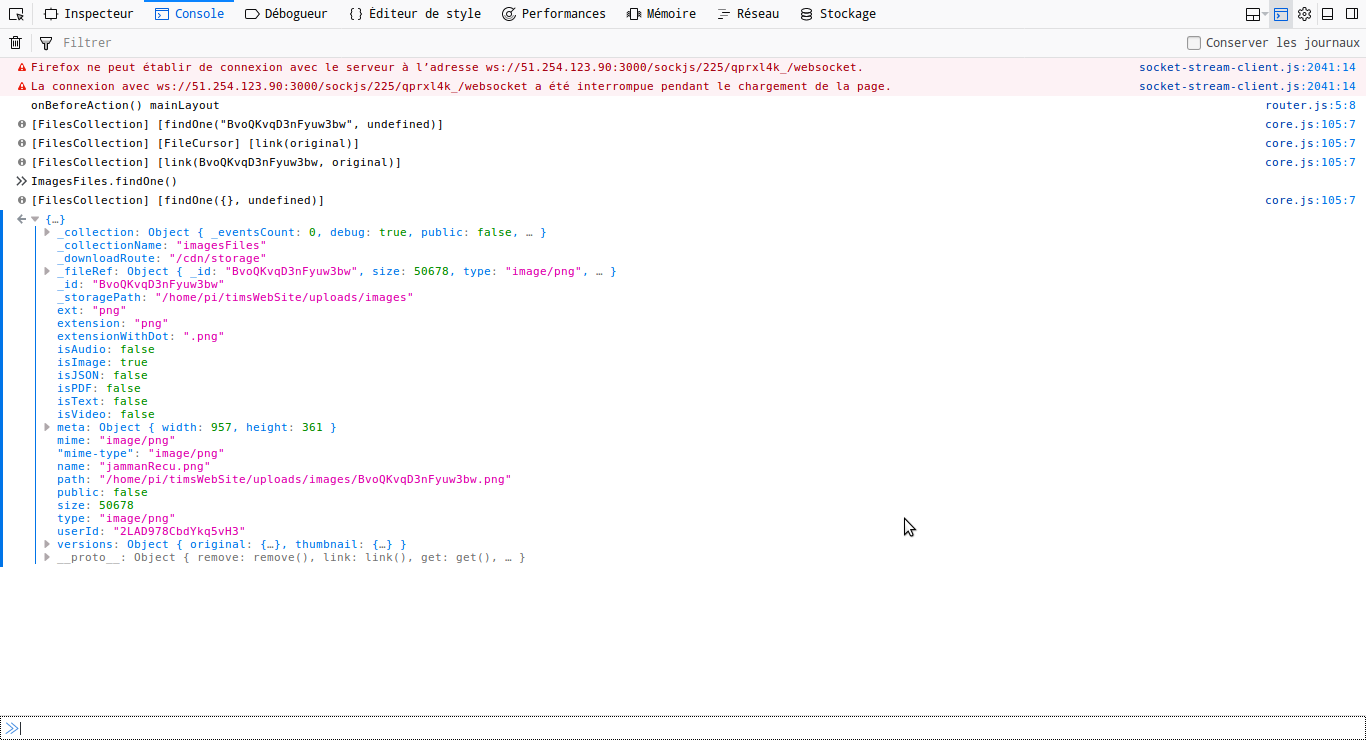
- Is there any error message in Server/Browser console?
dr-dimitru
on 19 Mar 2018
Ok let's go
Post Server logs with enabled debug option, you can enable "debug" mode in Constructor
I20180319-13:17:18.312(1)? I publish Home
I20180319-13:18:17.941(1)? I publish MainLayout
**I20180319-13:18:17.949(1)? I publish ImagesFiles {}
I20180319-13:18:17.949(1)? [FilesCollection] [find({}, undefined)]**
I20180319-13:18:17.954(1)? I publish ScoresFiles {}
I20180319-13:18:17.958(1)? I publish ProjectsNames
I20180319-13:18:17.961(1)? I publish AlbumsNames
I20180319-13:18:17.965(1)? I publish Home
Screenshot of "Network" tab (in DevTools), with shown status code error, and http headers
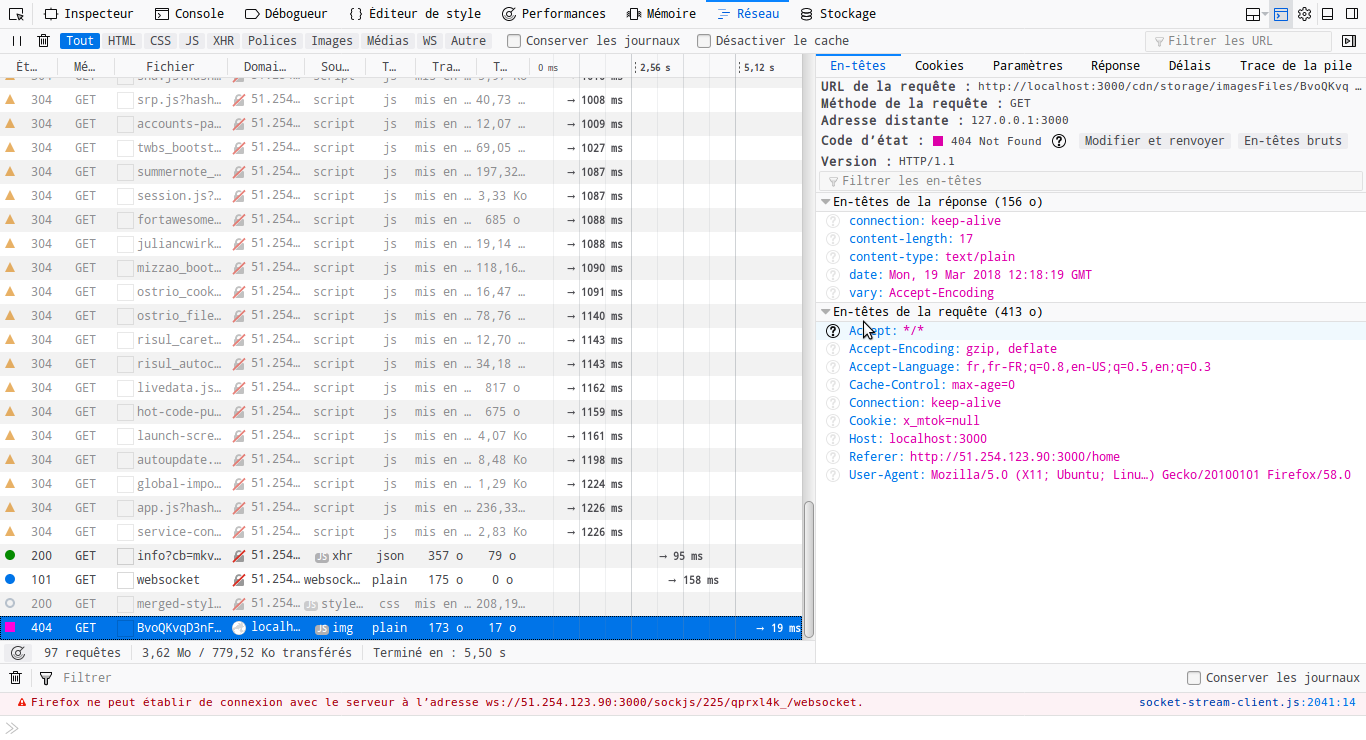
Is there any error message in Server/Browser console?
No error message....
marcelastrapi
on 19 Mar 2018
@marcelastrapi the issue, is your link are to localhost.
Have you set ROOT_URL env.var?
dr-dimitru
on 19 Mar 2018
@marcelastrapi have you solved it?
dr-dimitru
on 19 Mar 2018
Sorry I was eating,
Maybe I don't know how set this environnement variable, I try to put it inside methods.js in my server folder
Meteor.startup( function() {
 process.env.ROOT_URL = "http://51.254.123.90";
});
And I try to put it inside settings.json and call meteor --settings settings.json as well with no different result.
But maybe it's not correct ways.....
marcelastrapi
on 19 Mar 2018
@marcelastrapi this might work, but this isn't right way.
Setting env.var depends from how you launch your app. How do you launch your app now?
And ROOT_URL must include port
dr-dimitru
on 19 Mar 2018
Sorry I edited when you were writing, so I launch with meteor command
marcelastrapi
on 19 Mar 2018
Okay, then simply:
ROOT_URL="http://51.254.123.90:3000" meteor
And ROOT_URL must include port
Oh! I try that right now
marcelastrapi
on 19 Mar 2018
Yes it's working thank you !
Wonderful :smile:
Maybe it's not a good for production is it ?
Anyway, really thank you again for your time
marcelastrapi
on 19 Mar 2018
Maybe it's not a good for production is it ?
@marcelastrapi no, for production you should use some kind of process manager (I always recommend Phusion Passenger), and set env.vars within it
dr-dimitru
on 19 Mar 2018
Ok thank you I wil save it for later.
Bye
marcelastrapi
on 24 Mar 2018
Related issues
 RE-N-Y
·
3Comments
RE-N-Y
·
3Comments
 sidkdbl07
·
4Comments
sidkdbl07
·
4Comments
 stefanve
·
4Comments
dr-dimitru
·
3Comments
stefanve
·
4Comments
dr-dimitru
·
3Comments
 rlhk
·
4Comments
rlhk
·
4Comments
Most helpful comment
Okay so you were right @dr-dimitru , I don't reset the project but just restart meteor, and all the files were gone, so I will put them somewhere else.
Thanks a lot !
I add the way to implement storagePath, because it was not easy easy for me :) :