Meteor-files: Failed to load resource: the server responded with a status of 404 (Not Found)
Hi.
I'm using version 1.9.0 and Meteor 1.5.2.2
In development, everything work well. Now i deployed to ngInx and Passenger. When i upload file, i saw it in the storePath in server (Ubuntu 16.04 LTS). But the file not display in client and i see this error in console: _Failed to load resource: the server responded with a status of 404 (Not Found)_
I rerun the application locally and i try to access it with other computer (myIp:3000), same error. So, i need help.
Sorry for my english.
 inromualdo
All 16 comments
Hello @inromualdo ,
Please update your ticket in accordance to our issue template:
- Post Client and/or Server logs with enabled
debugoption, you can enable "debug" mode in Constructor
 dr-dimitru
on 19 Oct 2017
dr-dimitru
on 19 Oct 2017
Okay. I will do it soon. Thanks you.
inromualdo
on 19 Oct 2017
@inromualdo make sure you've read the FAQ, especially this one:
__Note: All files will be removed as soon as your application rebuilds or you run meteor reset.__ To keep your storage persistent during development use an absolute path outside of your project folder, e.g.
/datadirectory.
dr-dimitru
on 19 Oct 2017
@inromualdo any news on this one?
dr-dimitru
on 23 Oct 2017
@inromualdo Take a look at this thread, it's related to your case, something might take a place in middleware in front of FilesCollection.
dr-dimitru
on 23 Oct 2017
Hi. This is some details:
My .meteor/packages look:
ostrio:[email protected]
[email protected]
[email protected]
[email protected]
[email protected]
zzz-core
My zzz-core packages.js file:
api.use([
'ostrio:[email protected]',
'[email protected]',
...
api.imply([
'ostrio:[email protected]',
'[email protected]',
....
I deployed with ngInx and passenger following this:
https://www.phusionpassenger.com/library/walkthroughs/deploy/meteor/ownserver/nginx/oss/trusty/deploy_app.html
My /etc/nginx/sites-enabled/zzz.conf
...
passenger_env_var METEOR_SETTINGS '{
"public": {},
"database":{
"core": "mongodb://localhost:27017/coredb",
"_image_path": "/data/zzz/app-files/_images"
}
}';
...
My Images.js collection file:
///server
var database = new MongoInternals.RemoteCollectionDriver(Meteor.settings.database.core);
Images = new FilesCollection({
collectionName: "_images",
collection: new Mongo.Collection("_images",{_driver: database}),
storagePath: Meteor.settings.database._image_path,
permissions: 0777,
debug: true,
....
///Client
Images = new FilesCollection({
collectionName: "_images",
collection: new Mongo.Collection("_images",{_driver: database}),
permissions: 0777
})
The problem is:
When i upload image, it is upload to
/data/zzz/app-files/_images
But this image is not displaying.
Failed to load resource: the server responded with a status of 404 (Not Found)
inromualdo
on 25 Oct 2017
Hello @inromualdo ,
Thank you for update. I'm afraid this is not enough.
I'm still would like to see logs:
- Post Client and/or Server logs with enabled
debugoption, you can enable "debug" mode in Constructor
dr-dimitru
on 25 Oct 2017
This is logs when i try to display:
Client:

Server: /var/log/nginx/error.log
App 29189 stdout: [FilesCollection] [Upload] [DDP] Got #1/1 chunks, dst: frustration.jpg
App 29189 stdout: [FilesCollection] [Upload] [DDP] Got #-1/1 chunks, dst: frustration.jpg
App 29189 stdout: [FilesCollection] [Upload] [finish(ing)Upload] -> /data/eezeelee/app-files/_images/snL7ruHYYtbs2oxMs.jpg
App 29189 stdout: [FilesCollection] [Upload] [finish(ed)Upload] -> /data/eezeelee/app-files/_images/snL7ruHYYtbs2oxMs.jpg
App 29189 stdout: [FilesCollection] [remove({"_id":{"$ne":"snL7ruHYYtbs2oxMs"},"meta.reference":"JNF9b76Zf2PzzahbT"})]
App 29189 stdout: [FilesCollection] [_preCollectionCursor.observe] [changed]: snL7ruHYYtbs2oxMs
App 29189 stdout: [FilesCollection] [unlink(6CaBmeNHfJPAYoEAD, undefined)]
App 29189 stdout: [FilesCollection] [_preCollectionCursor.observe] [removed]: snL7ruHYYtbs2oxM
inromualdo
on 26 Oct 2017
Hello @inromualdo thank you for update.
According to your logs (hopefully you've posted all logs), a request hasn't reached a Server.
This is only may happen if something catch-all registers network handler in front of Meteor-Files package.
But, you've already checked .meteor/packages for the correct order. At the same time, you've mentioned what zzz-core (I assume your internal package) is using Meteor-Files package too.
Could you try to move zzz-core up in the .meteor/packages file?
dr-dimitru
on 26 Oct 2017
I change package order:
.meteor/packages
[email protected] # Packages every Meteor app needs to have
ostrio:[email protected]
zzz-core
zzz-core/packages.js
api.use([
'ostrio:[email protected]',
'[email protected]', //# Packages for a great mobile UX
'[email protected]',
...api.imply([
'ostrio:[email protected]',
'[email protected]', //# Packages for a great mobile UX
'[email protected]',
...
This is console error:
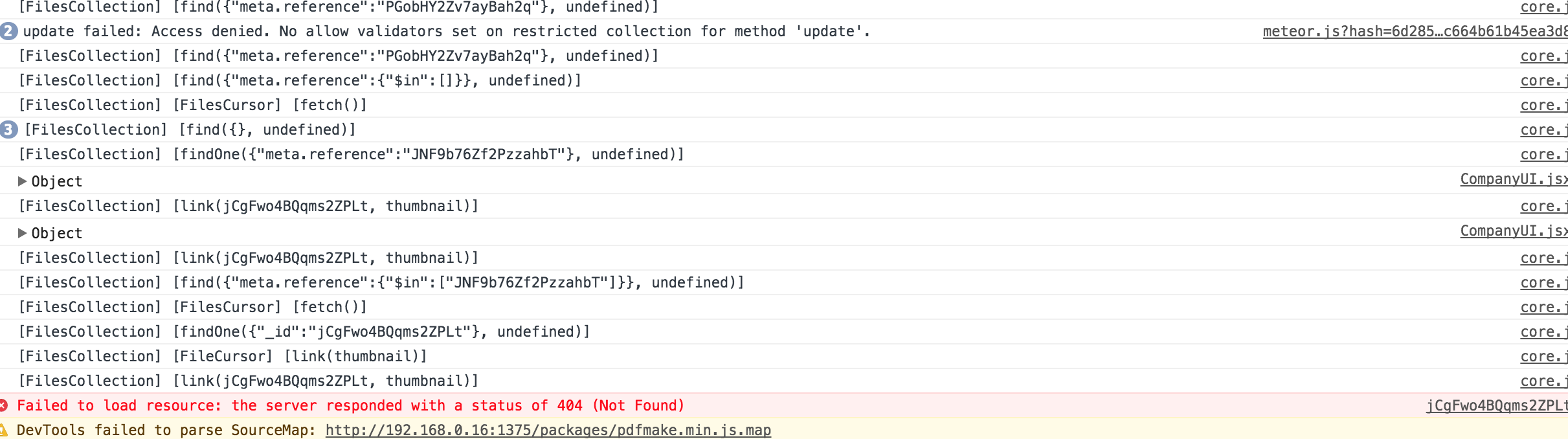
It would not be a problem from ngInx or Passenger? Because every thing work well in development mode...
inromualdo
on 26 Oct 2017
In development and on my computer, everything works. But when I try to access my computer with another using the ip address (192.168.0.111:3000), the picture does not appear. I can not display any file (Failed to load resource: the server responded with a status of 404 (Not Found)).
inromualdo
on 26 Oct 2017
What is your Nginx setup? Do you have try block?
dr-dimitru
on 26 Oct 2017
When i try it locally it not work too. Look:
I develop in
-PC A: {
ip: 192.168.0.111,
meteor: 1.5.2.2
}
I have another
-PC B: {
ip: 192.168.0.112,
meteor: null
}
I launch app on PC A so when i go to: localhost:3000, every thing work. I can upload and display picture.
On PC B, when i go to: 192.168.0.111:3000, every thing work well when i try to upload, but i can not display it.
inromualdo
on 26 Oct 2017
Oh... what is your ROOT_URL variable?
dr-dimitru
on 26 Oct 2017
In development??? I don't set ROOT_URL....
But in production:
server {
listen 1375;
server_name 192.168.0.16;# Tell Nginx and Passenger where your app's 'public' directory is root /var/www/zzz-store/bundle/public; # Turn on Passenger passenger_enabled on; # Tell Passenger that your app is a Meteor app passenger_app_type node; passenger_startup_file main.js; # Tell your app where MongoDB is passenger_env_var MONGO_URL mongodb://localhost:27017/storedb; # Tell your app what its root URL is passenger_env_var ROOT_URL http://192.168.0.16;
inromualdo
on 26 Oct 2017
It work finally. I add the port do ROOT_URL
passenger_env_var ROOT_URL http://192.168.0.16:1375;
inromualdo
on 26 Oct 2017
Related issues
 rlhk
·
4Comments
rlhk
·
4Comments
 sidkdbl07
·
4Comments
sidkdbl07
·
4Comments
 menelike
·
3Comments
menelike
·
3Comments
 sylido
·
3Comments
sylido
·
3Comments
 tobitech
·
3Comments
tobitech
·
3Comments
Most helpful comment
It work finally. I add the port do ROOT_URL