Meteor-files: Specify a relative subfolder on individual uploads
Yes, I have seen #99 and #190.
But let me rephrase our problem... (which is similar to the above).
We want to store files as kind of attachments to JSON documents we store in MongoDB (in our case meeting minutes grouped by meeting series, see https://github.com/4minitz/4minitz). We use Meteor-Files and really like the feature set (Big thanks, man for all the work!!!) and good demo documentation.
But we are a bit concerned that over the years quite some thousand attachments will populate the one-and-only global upload directory (aka storagePath) that is attached to the FilesCollection (e.g. the file system might get slow, everything in one big messy dir, etc.).
We have the FileCollection storagePath. Now we would like all uploads to meetingseries XYZ to go into /global/storage/path/XYZ and all uploads for meeting series ABC go into /global/storage/path/ABC
Is this possible - and if yes: how?!
If no: What about an option for FileCollection.insert({relativeSubFolder: "XYZ"})
Thanks for any helpful hint.
 derwok
All 16 comments
Hi @derwok
I'm glad you found my work useful, thank you.
storagePath is a function, you're free to return any path.
Here is an example how to generate deep path from _id:
const fs = Npm.require('fs-extra');
const files = new FilesCollection({
  storagePath: function (fileObj) {
    // Do not use "fat arrow" as context is matters
    if (fileObj && fileObj._id) {
      let path = 'assets/app/uploads/defaultPath/' + fileObj._id.split('').join('/');
      fs.ensureDirSync(path);
      return path;
    } else {
      return 'assets/app/uploads/defaultPath';
    }
  }
});
 dr-dimitru
on 20 Dec 2016
dr-dimitru
on 20 Dec 2016
Hey! Wow!
That sounds really promising. Thanks für the lightning-fast answer!
I was not aware that storagePath is a function.
Thanks - I'll give it a try and report.
derwok
on 21 Dec 2016
Your code did the trick.
fs.ensureDirSync was also a great idea!
I only had to do a npm install --save fs-extra and in my code:
let fs;
if (Meteor.isServer) {
    fs = require('fs-extra');   // throws an error on client
}
Thanks again for premium-class support and a great package!
derwok
on 21 Dec 2016
@derwok great, I'm glad it's solved.
dr-dimitru
on 21 Dec 2016
@dr.dimitru, extremely useful staff!
I urge all donate him!
thanks to its function, I made splitting folders by names of first's "_id" symbols:
 storagePath: function(fileObj) {
      let fs = require('fs-extra');
      if (Meteor.isServer) {
         if (fileObj && fileObj._id) {
      let path = Meteor.settings.public.IMG_PATH + fileObj._id.substr(0,3);
      fs.ensureDirSync(path);
      return path;
      } else {
      return Meteor.settings.public.IMG_PATH;
        }
    }
  }
 valorloff
on 4 Feb 2017
valorloff
on 4 Feb 2017
Thank you, @valorloff
About this line: let fs = require('fs-extra');
With efficiency in mind - better to place require out of the functions (more here and here).
It's best practice is to place all require/import out of the function and conditional blocks.
I urge all donate him!
Star/like any of my projects is highly appreciated too.
dr-dimitru
on 4 Feb 2017
Yes, of course! Thanks for this point
valorloff
on 5 Feb 2017
recently some android browsers crash with
'Uncaught SyntaxError: Use of const in strict mode'
perhaps because of require('fs-extra'), that contain 'use strict' with 'const ....'
and declared in /lib/collections.js:
const fs = require('fs-extra');
Images = new FilesCollection({
  collectionName: 'Images',
  allowClientCode: false,
  storagePath: function(fileObj) {
      if (Meteor.isServer) {
          if (fileObj && fileObj._id) {
      const path = Meteor.settings.private.IMG_PATH + fileObj._id.substr(0,3);
      fs.ensureDirSync(path);
      return path;
      } else {
      return Meteor.settings.private.IMG_PATH;
        }
    }
  },
It means, fs-extra by some way gets to the client?
How i can isolate storagePath with fs from client?
valorloff
on 13 Jun 2017
@valorloff
recently some android browsers crash with
'Uncaught SyntaxError: Use of const in strict mode'
Looks like related to #445 and probably #444
How i can isolate storagePath with fs from client?
Initiate FilesCollection separately for Server and Client, see "Locus" column here
dr-dimitru
on 13 Jun 2017
yes, looks like it,
If fs placed in a Meteor.isServer block, this is not a separation?
so, wait for upgrade?
valorloff
on 14 Jun 2017
If fs placed in a Meteor.isServer block, this is not a separation?
No, library will be anyways preloaded.
dr-dimitru
on 14 Jun 2017
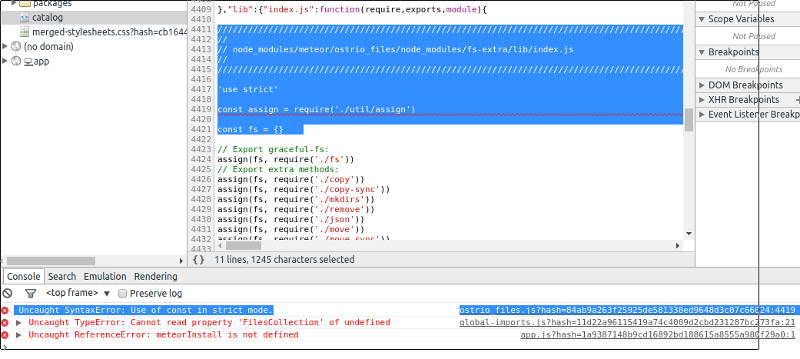
after separate pathStorage to server:
Uncaught SyntaxError: Use of const in strict mode.ostrio_files.js?hash=84ab9a263f25925de581338ed9648d3c07c66024:4419
expand it:
/////////////////////////////////////////////////////////////////////////////////////////////////////////////////////////
//                                                                                                                     //
// node_modules/meteor/ostrio_files/node_modules/fs-extra/lib/index.js                                                 //
//                                                                                                                     //
/////////////////////////////////////////////////////////////////////////////////////////////////////////////////////////
                                                                                                                       //
'use strict'                                                                                                           // 1
                                                                                                                       // 2
const assign = require('./util/assign')                                                                                // 3
                                                                                                                       // 4
const fs = {}
............
Uncaught SyntaxError: Use of const in strict mode.ostrio_files.js?hash=84ab9a263f25925de581338ed9648d3c07c66024:4419
Is this on the Client?
dr-dimitru
on 14 Jun 2017
This is errors, generated by Android default browsers,
look this screen shot
valorloff
on 14 Jun 2017
This is errors, generated by Android default browsers,
It's definitely #445
What you can do now for quick fix is fork this package, and locally set fs-extra to v2.1.2
dr-dimitru
on 14 Jun 2017
thanks for excellent support!
no problems, I'll wait upgrade
valorloff
on 14 Jun 2017
Related issues
 ck23onGithub
·
3Comments
ck23onGithub
·
3Comments
 owenhoskins
·
3Comments
owenhoskins
·
3Comments
 tuarrep
·
4Comments
tuarrep
·
4Comments
 RE-N-Y
·
3Comments
RE-N-Y
·
3Comments
 msgfxeg
·
3Comments
msgfxeg
·
3Comments
Most helpful comment
Hey! Wow!
That sounds really promising. Thanks für the lightning-fast answer!
I was not aware that storagePath is a function.
Thanks - I'll give it a try and report.