Metasploit-framework: win10 screenshot problem
12819 System stuff
Metasploit version
Centos7 x64
Framework: 5.0.83-dev-
Console : 5.0.83-dev-
I installed Metasploit with:
Omnibus installer (nightly)
OS
What OS are you running Metasploit on?
win10 x64
Problem Description
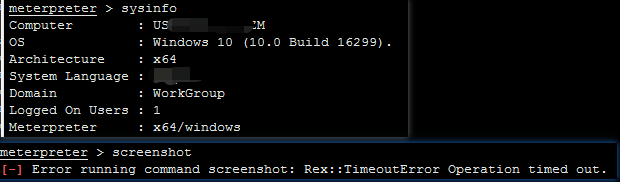
If the client is Windows 10, using the screenshot command will log off the system and the session will not be lost.
Logs
[04/02/2020 22:06:03] [e(0)] meterpreter: Error running command screenshot: Rex::TimeoutError Operation timed out.
[04/02/2020 22:06:03] [d(0)] meterpreter: Call stack:
/opt/metasploit-framework/embedded/framework/lib/rex/post/meterpreter/packet_dispatcher.rb:177:in `send_request'
/opt/metasploit-framework/embedded/framework/lib/rex/post/meterpreter/extensions/stdapi/ui.rb:191:in `screenshot'
/opt/metasploit-framework/embedded/framework/lib/rex/post/meterpreter/ui/console/command_dispatcher/stdapi/ui.rb:176:in `cmd_screenshot'
/opt/metasploit-framework/embedded/framework/lib/rex/ui/text/dispatcher_shell.rb:523:in `run_command'
/opt/metasploit-framework/embedded/framework/lib/rex/post/meterpreter/ui/console.rb:105:in `run_command'
/opt/metasploit-framework/embedded/framework/lib/rex/ui/text/dispatcher_shell.rb:474:in `block in run_single'
/opt/metasploit-framework/embedded/framework/lib/rex/ui/text/dispatcher_shell.rb:468:in `each'
/opt/metasploit-framework/embedded/framework/lib/rex/ui/text/dispatcher_shell.rb:468:in `run_single'
/opt/metasploit-framework/embedded/framework/lib/rex/post/meterpreter/ui/console.rb:68:in `block in interact'
/opt/metasploit-framework/embedded/framework/lib/rex/ui/text/shell.rb:153:in `run'
/opt/metasploit-framework/embedded/framework/lib/rex/post/meterpreter/ui/console.rb:66:in `interact'
/opt/metasploit-framework/embedded/framework/lib/msf/base/sessions/meterpreter.rb:583:in `_interact'
/opt/metasploit-framework/embedded/framework/lib/rex/ui/interactive.rb:51:in `interact'
/opt/metasploit-framework/embedded/framework/lib/msf/ui/console/command_dispatcher/core.rb:1384:in `cmd_sessions'
/opt/metasploit-framework/embedded/framework/lib/rex/ui/text/dispatcher_shell.rb:523:in `run_command'
/opt/metasploit-framework/embedded/framework/lib/rex/ui/text/dispatcher_shell.rb:474:in `block in run_single'
/opt/metasploit-framework/embedded/framework/lib/rex/ui/text/dispatcher_shell.rb:468:in `each'
/opt/metasploit-framework/embedded/framework/lib/rex/ui/text/dispatcher_shell.rb:468:in `run_single'
/opt/metasploit-framework/embedded/framework/lib/rex/ui/text/shell.rb:158:in `run'
/opt/metasploit-framework/embedded/framework/lib/metasploit/framework/command/console.rb:48:in `start'
/opt/metasploit-framework/embedded/framework/lib/metasploit/framework/command/base.rb:82:in `start'
/opt/metasploit-framework/bin/../embedded/framework/msfconsole:17:in `<main>'
 sunlewuyou
All 48 comments
Hello @sunlewuyou I just tested this out on my local Windows 10 x64 machine and I'm not having any issues:
msf5 > use multi/handler
msf5 exploit(multi/handler) > set payload windows/x64/meterpreter_bind_tcp
payload => windows/x64/meterpreter_bind_tcp
msf5 exploit(multi/handler) > set RHOST 172.22.112.1
RHOST => 172.22.112.1
msf5 exploit(multi/handler) > exploit

[*] Started bind TCP handler against 172.22.112.1:4444
[*] Meterpreter session 2 opened (0.0.0.0:0 -> 172.22.112.1:4444) at 2020-04-02 14:11:31 -0500

meterpreter > sysinfo
Computer        : *censored*
OS              : Windows 10 (10.0 Build 19577).
Architecture    : x64
System Language : ar_SA
Domain          : WORKGROUP
Logged On Users : 2
Meterpreter     : x64/windows
meterpreter > screenshot
Screenshot saved to: /*censored*/metasploit-framework/oULZXdLf.jpeg
meterpreter > exit
[*] Shutting down Meterpreter...

[*] 172.22.112.1 - Meterpreter session 2 closed.  Reason: User exit
msf5 exploit(multi/handler) > exploit

[*] Started bind TCP handler against 172.22.112.1:4444
[*] Meterpreter session 3 opened (0.0.0.0:0 -> 172.22.112.1:4444) at 2020-04-02 14:14:31 -0500

meterpreter > background
[*] Backgrounding session 3...
msf5 exploit(multi/handler) > version
Framework: 5.0.83-dev-791b51228f
Console  : 5.0.83-dev-791b51228f
msf5 exploit(multi/handler) > wait a bit....
[-] Unknown command: wait.
msf5 exploit(multi/handler) > sessions -i 3
[*] Starting interaction with 3...

meterpreter > sysinfo
Computer        : *censored*
OS              : Windows 10 (10.0 Build 19577).
Architecture    : x64
System Language : ar_SA
Domain          : WORKGROUP
Logged On Users : 2
Meterpreter     : x64/windows
meterpreter > screenshot
Screenshot saved to: /*censored*/metasploit-framework/VJyhKRgQ.jpeg
meterpreter >
Do you have any earlier console output that might be able to provide some more insight into what exactly is going wrong?
 tekwizz123
on 2 Apr 2020
tekwizz123
on 2 Apr 2020
After testing, I found that the problem should be: After anti-virus processing of the payload
sunlewuyou
on 3 Apr 2020
I suspect the injection part of the screenshot command: https://github.com/rapid7/metasploit-payloads/blob/master/c/meterpreter/source/extensions/stdapi/server/ui/desktop.c#L472 is somehow (sometimes?) flagged by Windows Defender on Windows 10?
 timwr
on 3 Apr 2020
timwr
on 7 Apr 2020
timwr
on 3 Apr 2020
timwr
on 7 Apr 2020
Yeah the screenshot DLL injection is definitely deemed suspicious, not surprised to see AV of various kinds killing sessions when it sees it happen.
 OJ
on 7 Apr 2020
OJ
on 7 Apr 2020
The cause of this problem was not killed by AV.
sunlewuyou
on 7 Apr 2020
@sunlewuyou Sorry were you saying that AV _was_ killing it? Or are you saying AV _wasn't_ killing it, and instead you think the error is something else? Last sentence used a double negative terminology so its hard for us to tell what you meant.
tekwizz123
on 8 Apr 2020
sorry ! AV wasn't killing it .
sunlewuyou
on 8 Apr 2020
@tekwizz123
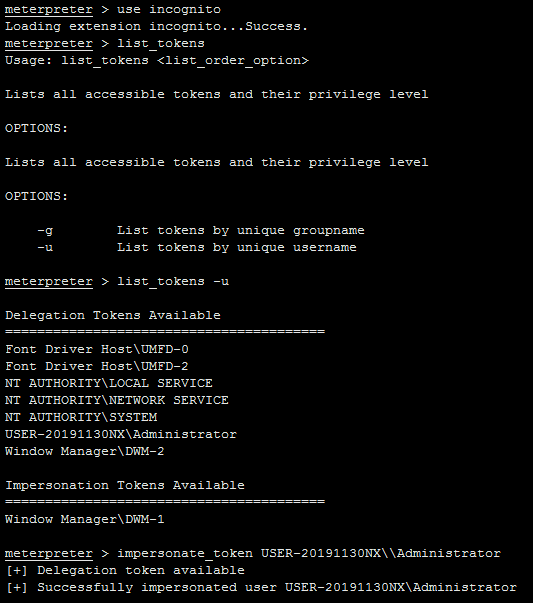
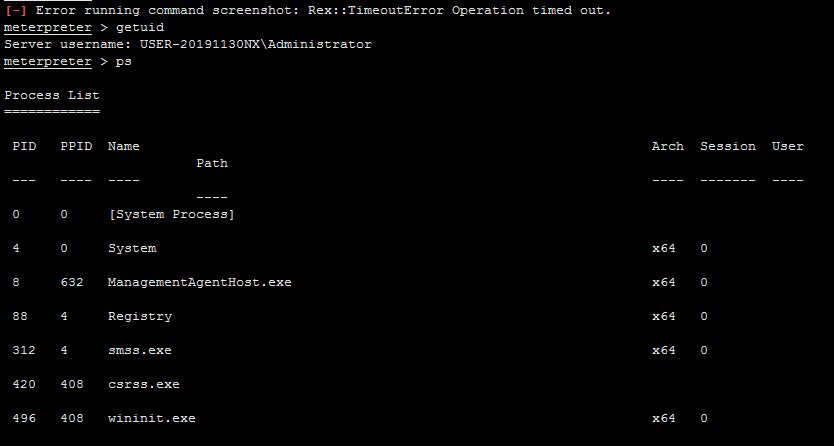
reappear question
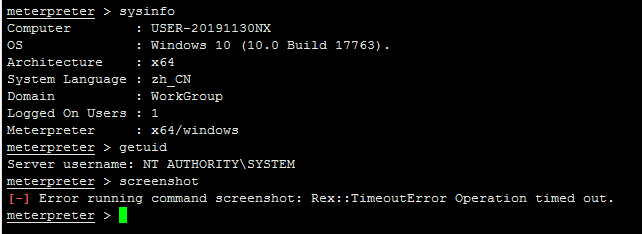
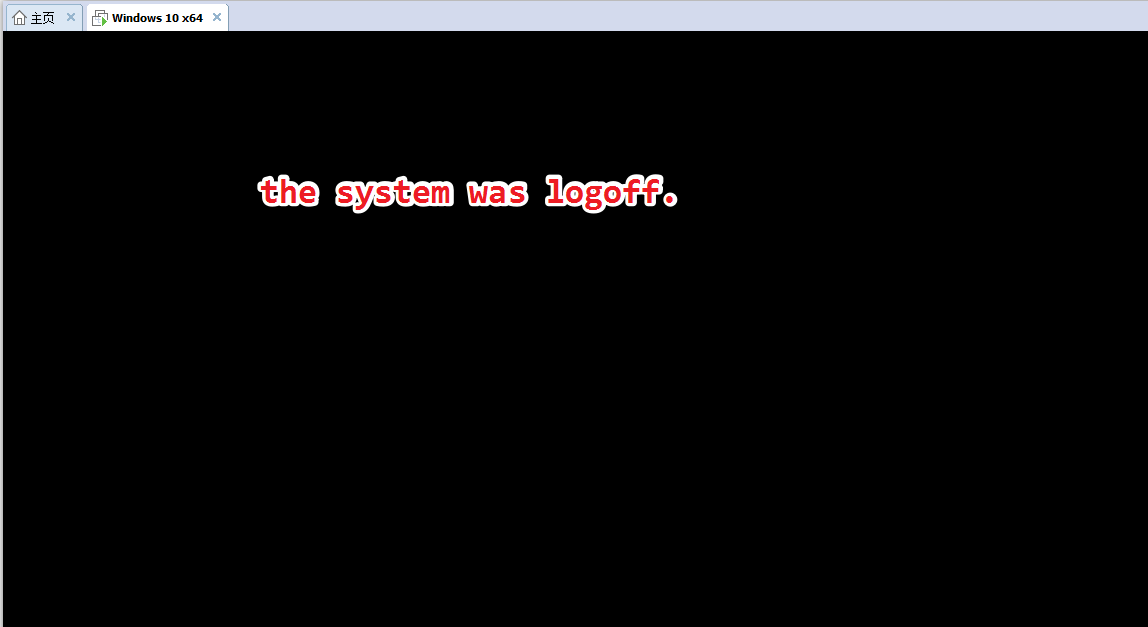
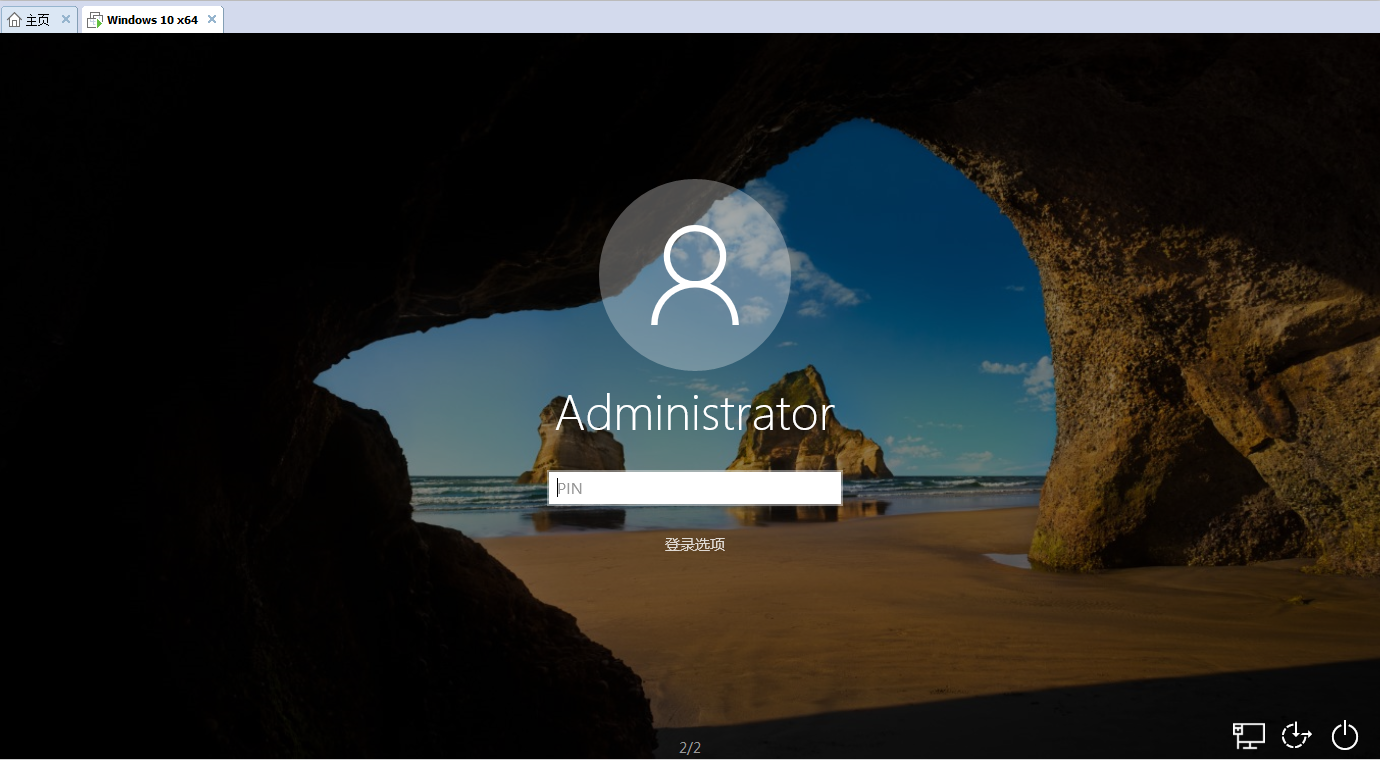
After executing "screenshot", the system will be logoff.

sunlewuyou
on 8 Apr 2020
@sunlewuyou Hmm, out of interest have you tried running this after the user is logged in? I have a feeling that Windows has additional protections on its lock screen to prevent people from potentially snooping on users when they are entering their password. I know I was able to successfully take a screenshot once the user had logged in, so if your able to take a screenshot after the user has logged in but not on the lock screen, then this might be why?
Just a thought though. The timeout could be for a variety of reason. If taking a screenshot doesn't work after the host is unlocked, can you also confirm for me via a screenshot that Windows Defender is disabled when your testing?
We can try proceed after you have attempted those two tasks and provided your feedback on what occurred via screenshots.
tekwizz123
on 8 Apr 2020
@tekwizz123
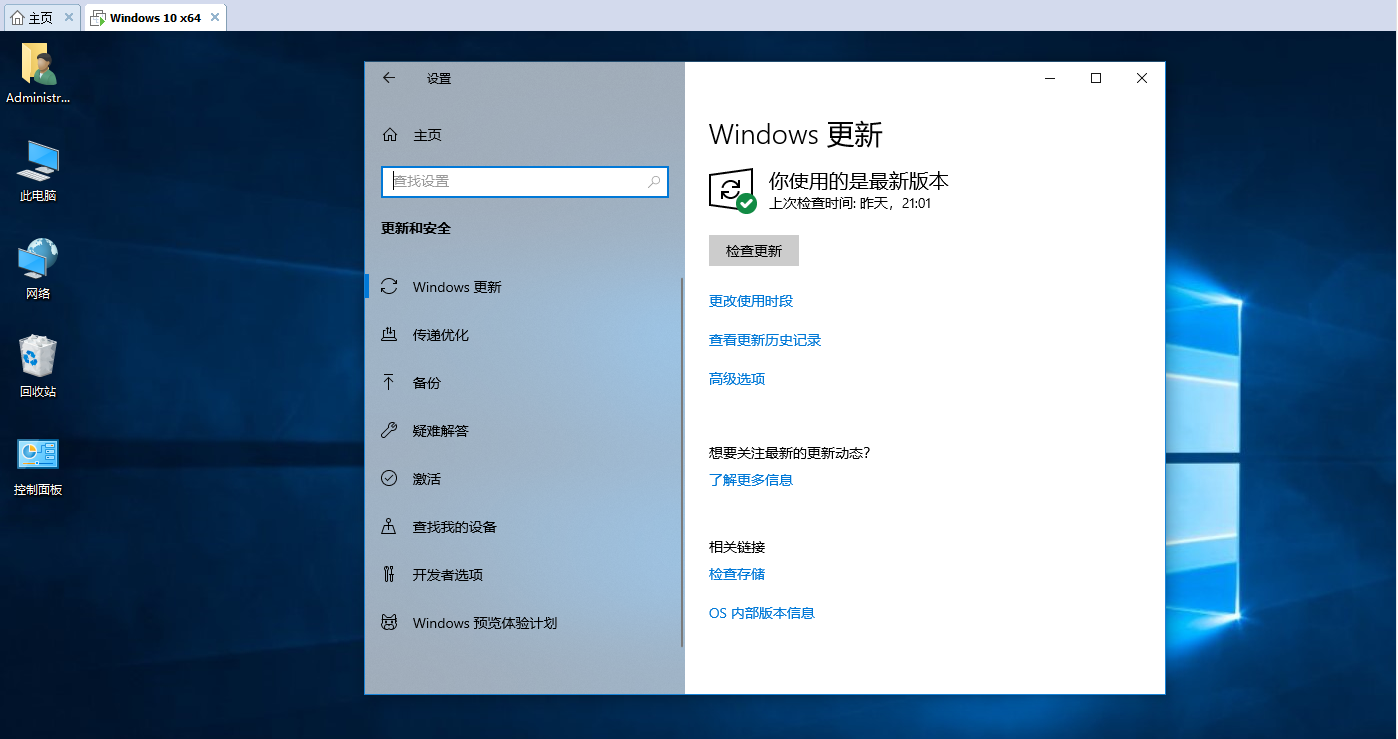
I have removed the "Windows Defender" component and executed the command after logging in to the system.
sunlewuyou
on 8 Apr 2020
@sunlewuyou What was the output after logging into the system? Also that screenshot does not show Windows Defender disabled, it simply shows that your system is up to date.
tekwizz123
on 8 Apr 2020
@tekwizz123
Is it a problem with user permissions? Can the "screenshot" command be executed only under the current user in win10 system?
sunlewuyou
on 8 Apr 2020
@sunlewuyou I don't think so? Honestly, I'm not sure how the internals of screenshot work, I would need to take a look through the source code first. @OJ or @timwr would likely know more than me.
With that being said let me take a quick look into the source code and see if I can't find an answer for you :)
tekwizz123
on 8 Apr 2020
So looks like the source code for this function is at https://github.com/rapid7/metasploit-framework/blob/6703e9b06b1e17863c49fa5473bc998ea3d2ddb3/lib/rex/post/meterpreter/extensions/stdapi/ui.rb#L154. @OJ and @timwr are right in that DLLs will be dropped to perform this functionality.
From the looks of things, the line at https://github.com/rapid7/metasploit-framework/blob/6703e9b06b1e17863c49fa5473bc998ea3d2ddb3/lib/rex/post/meterpreter/extensions/stdapi/ui.rb#L191 is sending the request to the client and is likely where the time out is occurring.
Whilst you may have Windows Defender disabled as a component, I have heard that it can be particularly tricky to fully disable 😢 Can you send me a screenshot showing that you have disabled "Real Time Protection" in the settings? It should look something like the following:

tekwizz123
on 8 Apr 2020
@tekwizz123
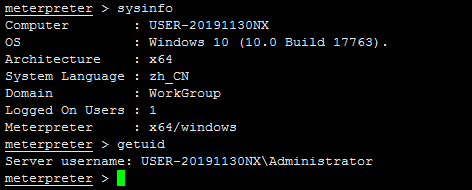

sunlewuyou
on 8 Apr 2020
Nice @sunlewuyou! What did you end up having to change to get it to work?
tekwizz123
on 8 Apr 2020
@tekwizz123
I'm sure it's not a "Windows Defender" issue, I have streamlined it. By testing the situation, you should also get some information.
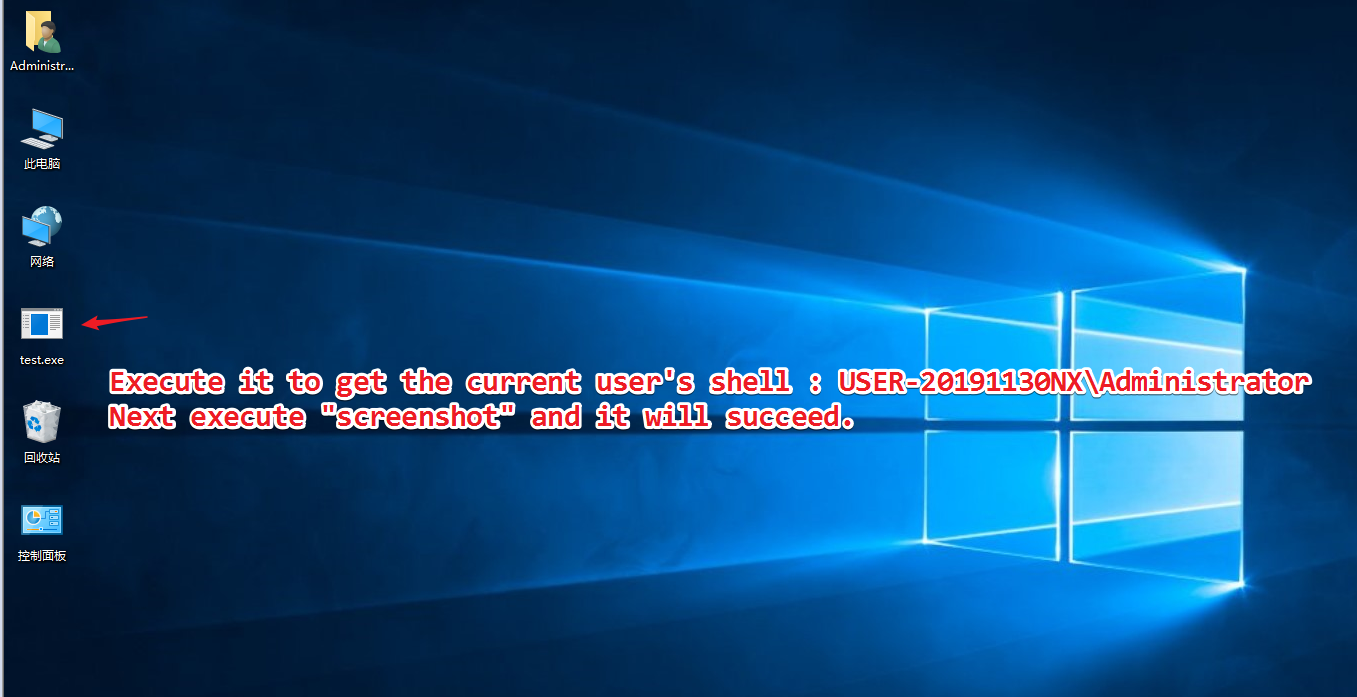
sunlewuyou
on 8 Apr 2020
@tekwizz123
If I add the program to the self-starting service, the shell permission I get after the system restarts will be: NT AUTHORITY \ SYSTEM. At this time, when I execute "screenshot" again, the problem described above will occur.
sunlewuyou
on 8 Apr 2020
@tekwizz123
Although I still don't know why this happens, I still appreciate your answer. Thank you!
sunlewuyou
on 8 Apr 2020
No problem, also not sure why that is occurring; were you trying to do impersonation when you were running as NT AUTHORITY\SYSTEM or did you just run it without any impersonation? Trying to narrow down what it might have been.
Also if you have any additional details about how you set up the NT AUTHORITY\SYSTEM test, I'd be interested in hearing them. I can try test this out on my end and see if I can replicate your issues at all.
tekwizz123
on 8 Apr 2020
@tekwizz123 just run it without any impersonation
sunlewuyou
on 8 Apr 2020
@tekwizz123
This method is used to add services:https://github.com/winsw/winsw
sunlewuyou
on 8 Apr 2020
Hmm this is what happens for me at the moment after running a crafted msfvenom binary with the payload windows/x64/meterpreter/bind_tcp in as an elevated user on Windows 10 x64 version 2004 (after clicking OK on the UAC prompt):

And here is the sysinfo output:

With a standard user who is logged in at the same time on the same PC, but us running the active desktop session as an admin user and then running Metasploit in WSL2, it appears that getting a screenshot of the desktop is not possible due to lack of privileges:
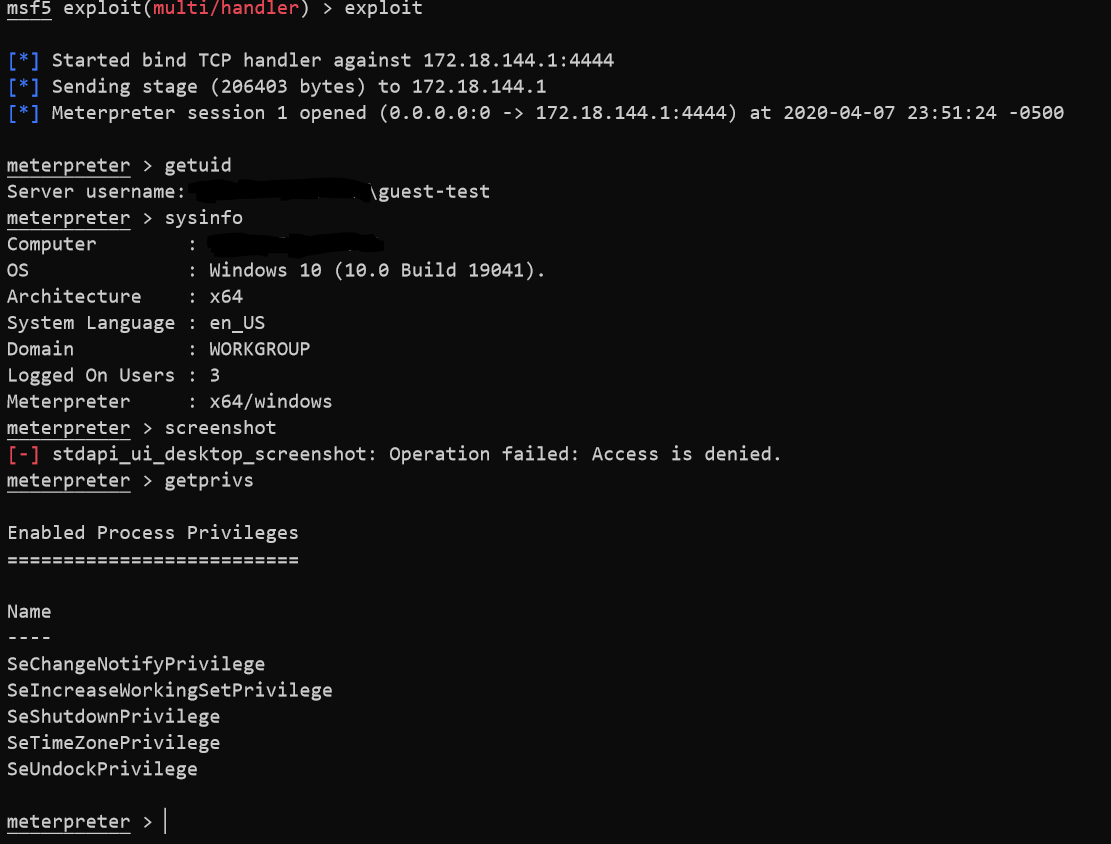
This setup is the same as the above screenshots by the way; only difference is the addition of guest-test as a user who is a standard user and who is logged in on a different session that is not currently our forgrounded session.
Interestingly, if you log in as a admin user, have a guest user on the same PC run the exploit exe as that admin user, and then attempt to grab a screenshot whilst the admin user is the active UI session, Windows 10 v2004 will crash the login session of the admin user and you will have to log in again. Not entirely sure why this happens.
Anyway this at least provides some insights.
tekwizz123
on 8 Apr 2020
@tekwizz123
You are: Operation failed: Access is denied.
Mine is: Rex :: TimeoutError Operation timed out.
Although it was all unsuccessful, it can be seen that this should not be caused by the same reason.
sunlewuyou
on 8 Apr 2020
@sunlewuyou Okay I've confirmed there is a reproduceable issue here. Here are the steps I performed:
- Grab https://github.com/winsw/winsw/releases/download/v2.7.0/WinSW.NETCore31.x64.exe, save to Downloads folder.
- Open up a PowerShell prompt as an elevated admin user.
- In same folder create a file named
WinSW.NETCore31.x64.xmlwith the following content:
<!--
    Copyright (c) 2016 Oleg Nenashev and other contributors

    Permission is hereby granted, free of charge, to any person obtaining a copy of this
    software and associated documentation files (the "Software"), to deal in the Software without
    restriction, including without limitation the rights to use, copy, modify, merge, publish,
    distribute, sublicense, and/or sell copies of the Software, and to permit persons to whom the
    Software is furnished to do so, subject to the following conditions:

    The above copyright notice and this permission notice shall be included in all copies or
    substantial portions of the Software.

    THE SOFTWARE IS PROVIDED "AS IS", WITHOUT WARRANTY OF ANY KIND, EXPRESS OR IMPLIED, INCLUDING
    BUT NOT LIMITED TO THE WARRANTIES OF MERCHANTABILITY, FITNESS FOR A PARTICULAR PURPOSE AND
    NONINFRINGEMENT. IN NO EVENT SHALL THE AUTHORS OR COPYRIGHT HOLDERS BE LIABLE FOR ANY CLAIM,
    DAMAGES OR OTHER LIABILITY, WHETHER IN AN ACTION OF CONTRACT, TORT OR OTHERWISE, ARISING FROM,
    OUT OF OR IN CONNECTION WITH THE SOFTWARE OR THE USE OR OTHER DEALINGS IN THE SOFTWARE.
-->

<!--
 This is an example of a minimal Windows Service Wrapper configuration, which includes only mandatory options.

 This configuration file should be placed near the WinSW executable, the name should be the same.
 E.g. for myapp.exe the configuration file name should be myapp.xml

 You can find more information about the configuration options here: https://github.com/kohsuke/winsw/blob/master/doc/xmlConfigFile.md
 Full example: https://github.com/kohsuke/winsw/blob/master/examples/sample-allOptions.xml
-->
<service>

  <!-- ID of the service. It should be unique across the Windows system-->
  <id>myapp</id>
  <!-- Display name of the service -->
  <name>MyApp Service (powered by WinSW)</name>
  <!-- Service description -->
  <description>This service is a service created from a minimal configuration</description>

  <!-- Path to the executable, which should be started -->
  <executable>C:\*removed*\Documents\test.exe</executable>

</service>
- Ran
.\WinSW.NETCore31.x64.exe install. Got a message that the service started successfully. - Opened up a listener with
multi/handlerto catch the shell. - Ran
.\WinSW.NETCore31.x64.exe start
Following output is from msfconsole:
msf5 > use multi/handler
msf5 exploit(multi/handler) > set payload windows/x64/meterpreter/bind_tcp
payload => windows/x64/meterpreter/bind_tcp
msf5 exploit(multi/handler) > set RHOST 172.18.144.1
RHOST => 172.18.144.1
msf5 exploit(multi/handler) > exploit

[*] Started bind TCP handler against 172.18.144.1:4444
[*] Sending stage (206403 bytes) to 172.18.144.1
[*] Meterpreter session 1 opened (0.0.0.0:0 -> 172.18.144.1:4444) at 2020-04-08 00:23:15 -0500

meterpreter > getuid
Server username: NT AUTHORITY\SYSTEM
meterpreter > exit
*quit at this point as I thought it was an old session*
[*] Shutting down Meterpreter...

[*] 172.18.144.1 - Meterpreter session 1 closed.  Reason: User exit
msf5 exploit(multi/handler) > exploit

[*] Started bind TCP handler against 172.18.144.1:4444
[*] Sending stage (206403 bytes) to 172.18.144.1
[*] Meterpreter session 2 opened (0.0.0.0:0 -> 172.18.144.1:4444) at 2020-04-08 00:24:15 -0500

meterpreter > getuid
Server username: NT AUTHORITY\SYSTEM
meterpreter > sysinfo
Computer        : DESKTOP-0SSG0KT
OS              : Windows 10 (10.0 Build 19041).
Architecture    : x64
System Language : en_US
Domain          : WORKGROUP
Logged On Users : 8
Meterpreter     : x64/windows
meterpreter >
- Try to run
screenshot. Host will show a black screen with most elements blacked out, then after 5 seconds explorer.exe will crash and you will be taken back to the login screen. No apps will be saved, so its as though everything stopped and you logged in fresh again.
tekwizz123
on 8 Apr 2020
Also whilst log files are created by WinSW, it appears that all of them are empty minus WinSW.NETCore31.x64.wrapper.log which does not appear to contain any useful info.
tekwizz123
on 8 Apr 2020
@tekwizz123
very happy! You have finally reproduced the problem, and I look forward to helping me find the problem. Thank you!
sunlewuyou
on 8 Apr 2020
@tekwizz123
You mean: The problem lies with WinSW, is that understood?
sunlewuyou
on 8 Apr 2020
@sunlewuyou Hey sorry commenting from my work account now. The issue could be any number of things, of which WinSW is just one of them. It could also be a bug in Windows itself, a bug in the way the screenshot command operates, or something else entirely. Right now I haven't gathered enough information to properly determine the root cause of this issue; only gathered info on how to reproduce it.
Therefore this will likely need more triaging to properly determine the true issue.
 gwillcox-r7
on 8 Apr 2020
gwillcox-r7
on 8 Apr 2020
@gwillcox-r7
Okay, understand.
sunlewuyou
on 8 Apr 2020
Labeling this as a Bug so long as after some discussion internally it seems like this shouldn't be occurring @sunlewuyou. Thanks for pointing this out; I'm going to do some more testing and see if we can't figure out what the root issue is :)
gwillcox-r7
on 8 Apr 2020
@sunlewuyou Ok so did some more testing; it looks like this might come down to how services on Windows are handled. On Windows services run in their own isolated GUI session, away from the user's GUI session. This prevents compromised services from being able to interact with the user's GUI session by default (there are some flags that can be set to override this behavior, but the point is by default they aren't set).
This explains why when running a Meterpreter session as an admin user and then elevating to SYSTEM I see this when running enumdesktops:

But if we instead get SYSTEM through a service starting we will see the following:

Therefore its likely that the screenshot command is trying to enumerate the desktops, it goes 'oh lets try this one', and it turns out that desktop is in session 0 so it can't perform its normal actions (environment is a lot more restricted in session 0). May also explain why it crashes if the environment is different, though not 100% sure about that one, that is just a guess.
Hope that helps :)
tekwizz123
on 8 Apr 2020
@tekwizz123
Thank you for such a professional analysis, thank you!
sunlewuyou
on 8 Apr 2020
No worries :) We are continuing to look into this issue some more, I will provide more updates when I have more information.
gwillcox-r7
on 8 Apr 2020
A service running as system likely has no desktop, so when we try to inject into a location to grab screenshots, it fails. I dislike the crashing, but the end result is not unexpected.
I think there are three steps (in increasing difficulty) to address this issue:
- Call is_system() and not let any SYSTEM session call screenshot. Check out the dispatcher to figure out where to patch that function (optional if we want to spend more time on this, and I'm happy to help run down exact locations)
- Create a method to determining if a system session is a service SYSTEM session rather than an upgraded SYSTEM session. Stop calls to screenshot from service SYSTEM sessions.
- Check to see if the session is a service SYSTEM session and allow an argument in the command to impersonate a logged in user.
 bwatters-r7
on 8 Apr 2020
bwatters-r7
on 8 Apr 2020
I think the most reliable way to solve this issue would be to somehow check if we can see any session 0 sessions using enumdesktops and then if we do, we are most likely are in a privileged service given session 0 shouldn't be visible to non-service processes.
This should provide an easy way for us to go "hey we can see session 0 sessions, something is probably wrong here as signs are pointing to this being a service rather than a normal process, lets not grab the screenshot to prevent potential issues".
Hopefully this should strike a good balance between a reliable fix and one that isn't too complex.
gwillcox-r7
on 8 Apr 2020
@sunlewuyou Sorry for delay, going to get to working on making the code edits needed to fix this :)
gwillcox-r7
on 17 Apr 2020
Missed out on quite the discussion! I should have added earlier on some commentary about not trying to screenshot while running in a SYSTEM process. We shouldn't crash when doing that, but it actually makes a bit of sense.
Keen to see your approach here Grant 👍
OJ
on 17 Apr 2020
@sunlewuyou很抱歉,请继续进行修改此错误所需的代码:)
Waiting is worth it, thank you for your hard work!
sunlewuyou
on 17 Apr 2020
Did some more testing on this using a Windows 10 v2004 machine running in VMWare Fusion to see if the WSLv2 factored into this at all, but also got the same explorer.exe crash as before. Seems something is going on with the newer Windows Insider builds that we aren't accounting for:
msf5 exploit(multi/handler) > exploit

[*] Started bind TCP handler against 192.168.205.138:4444
[*] Meterpreter session 2 opened (0.0.0.0:0 -> 192.168.205.138:4444) at 2020-04-27 10:55:35 -0500

meterpreter > getuid
Server username: NT AUTHORITY\SYSTEM
meterpreter > sysinfo
Computer        : DESKTOP-LJ5GLFQ
OS              : Windows 10 (10.0 Build 19041).
Architecture    : x64
System Language : en_US
Domain          : WORKGROUP
Logged On Users : 2
Meterpreter     : x64/windows
meterpreter > enumdesktops
Enumerating all accessible desktops

Desktops
========

    Session  Station           Name
    -------  -------           ----
    0        WinSta0           Default
    0        WinSta0           Disconnect
    0        WinSta0           Winlogon
    0        msswindowstation  mssrestricteddesk

meterpreter > screenshot
[-] Error running command screenshot: Rex::TimeoutError Operation timed out.
meterpreter >
This was then followed up by the target having explorer.exe crash, the screen go black in places for a few seconds, followed by the target then reloading the lock screen and asking the user to log in again, which will result in a clean session (aka the state of the processes from the previous session will not be preserved).
This replicates what was found already.
Also for reference here is a non-service shell on the same box:
msf5 exploit(multi/handler) > exploit

[*] Started bind TCP handler against 192.168.205.138:4444
[*] Meterpreter session 3 opened (0.0.0.0:0 -> 192.168.205.138:4444) at 2020-04-27 11:07:36 -0500

meterpreter > getuid
Server username: DESKTOP-LJ5GLFQ\insider-win10
meterpreter > sysinfo
Computer        : DESKTOP-LJ5GLFQ
OS              : Windows 10 (10.0 Build 19041).
Architecture    : x64
System Language : en_US
Domain          : WORKGROUP
Logged On Users : 4
Meterpreter     : x64/windows
meterpreter > screenshot
Screenshot saved to: /*censored*/metasploit-framework/ZZHJjtXX.jpeg
meterpreter > enumdesktops
Enumerating all accessible desktops

Desktops
========

    Session  Station  Name
    -------  -------  ----
    2        WinSta0  Default

meterpreter >
@sunlewuyou Looks like the other versions that you tested this on where it failed was on Windows 10 v1709 and Windows 10 v1809. Going to try replicate the issue over on these machines as well as Windows 10 v1909 and Windows 8.1 to try see if we can't narrow down where the issue is further. I know from testing that Windows 7 is not an issue.
gwillcox-r7
on 27 Apr 2020
And looks like this issue also happens on Windows 8.1. ISO I used was en_windows_8_1_x64_dvd_2707217.iso, fully clean install, no updates.
msf5 exploit(multi/handler) > exploit

[*] Started bind TCP handler against 192.168.205.142:4444
[*] Meterpreter session 5 opened (0.0.0.0:0 -> 192.168.205.142:4444) at 2020-04-27 12:33:55 -0500

meterpreter > getuid
Server username: NT AUTHORITY\SYSTEM
meterpreter > sysinfo
Computer        : WIN-BKVIARKG590
OS              : Windows 8.1 (6.3 Build 9600).
Architecture    : x64
System Language : en_US
Domain          : WORKGROUP
Logged On Users : 2
Meterpreter     : x64/windows
meterpreter > enumdesktops
Enumerating all accessible desktops

Desktops
========

    Session  Station           Name
    -------  -------           ----
    0        WinSta0           Default
    0        WinSta0           Disconnect
    0        WinSta0           Winlogon
    0        msswindowstation  mssrestricteddesk

meterpreter > screenshot
[-] Error running command screenshot: Rex::TimeoutError Operation timed out.
meterpreter >
After this command executed user was logged out of their session as explorer.exe or something similar stopped working. Logging back in started the user again with a clean session. So same behavior as Windows 10, except no visible blackening of the screen.
And as a normal user:
msf5 exploit(multi/handler) > exploit

[*] Started bind TCP handler against 192.168.205.142:4444
[*] Meterpreter session 6 opened (0.0.0.0:0 -> 192.168.205.142:4444) at 2020-04-27 12:37:51 -0500

meterpreter > getuid
Server username: WIN-BKVIARKG590\test
meterpreter > sysinfo
Computer        : WIN-BKVIARKG590
OS              : Windows 8.1 (6.3 Build 9600).
Architecture    : x64
System Language : en_US
Domain          : WORKGROUP
Logged On Users : 4
Meterpreter     : x64/windows
meterpreter > enumdesktops
Enumerating all accessible desktops

Desktops
========

    Session  Station  Name
    -------  -------  ----
    2        WinSta0  Default

meterpreter > screenshot
Screenshot saved to: /opt/rapid7/metasploit-framework/jdVsPDRe.jpeg
meterpreter >
Also confirmed this on Windows 10 v1909:
msf5 exploit(multi/handler) > exploit

[*] Started bind TCP handler against 192.168.205.141:4444
[*] Meterpreter session 7 opened (0.0.0.0:0 -> 192.168.205.141:4444) at 2020-04-27 12:45:06 -0500

meterpreter > getuid
Server username: DESKTOP-L551HAP\test
meterpreter > sysinfo
Computer        : DESKTOP-L551HAP
OS              : Windows 10 (10.0 Build 18363).
Architecture    : x64
System Language : en_US
Domain          : WORKGROUP
Logged On Users : 2
Meterpreter     : x64/windows
meterpreter > enumdesktops
Enumerating all accessible desktops

Desktops
========

    Session  Station  Name
    -------  -------  ----
    1        WinSta0  Default

meterpreter > screenshot
Screenshot saved to: /opt/rapid7/metasploit-framework/noNHakXN.jpeg
meterpreter > exit
[*] Shutting down Meterpreter...

[*] 192.168.205.141 - Meterpreter session 7 closed.  Reason: User exit
msf5 exploit(multi/handler) > exploit

[*] Started bind TCP handler against 192.168.205.141:4444
[*] Meterpreter session 9 opened (0.0.0.0:0 -> 192.168.205.141:4444) at 2020-04-27 12:50:07 -0500

meterpreter > getuid
Server username: NT AUTHORITY\SYSTEM
meterpreter > sysinfo
Computer        : DESKTOP-L551HAP
OS              : Windows 10 (10.0 Build 18363).
Architecture    : x64
System Language : en_US
Domain          : WORKGROUP
Logged On Users : 4
Meterpreter     : x64/windows
meterpreter > enumdesktops
Enumerating all accessible desktops

Desktops
========

    Session  Station           Name
    -------  -------           ----
    0        WinSta0           Default
    0        WinSta0           Disconnect
    0        WinSta0           Winlogon
    0        msswindowstation  mssrestricteddesk

meterpreter > screenshot
[-] Error running command screenshot: Rex::TimeoutError Operation timed out.
meterpreter >
The timeout occurred and like other Windows 10 machines, there was a noticeable period whereby the screen went black in places whilst the apps appeared to still be interactive, then the user was logged off and the session closed.
gwillcox-r7
on 27 Apr 2020
And looks like Windows 10 v1809 is also affected by this error:
msf5 exploit(multi/handler) > exploit

[*] Started bind TCP handler against 192.168.205.140:4444
[*] Meterpreter session 10 opened (0.0.0.0:0 -> 192.168.205.140:4444) at 2020-04-27 13:04:16 -0500

meterpreter > getuid
Server username: DESKTOP-1V6RIKP\test
meterpreter > sysinfo
Computer        : DESKTOP-1V6RIKP
OS              : Windows 10 (10.0 Build 17763).
Architecture    : x64
System Language : en_US
Domain          : WORKGROUP
Logged On Users : 2
Meterpreter     : x64/windows
meterpreter > enumdesktops
Enumerating all accessible desktops

Desktops
========

    Session  Station  Name
    -------  -------  ----
    1        WinSta0  Default

meterpreter > screenshot
Screenshot saved to: /opt/rapid7/metasploit-framework/TmQXPYVR.jpeg
meterpreter > exit
[*] Shutting down Meterpreter...

[*] 192.168.205.140 - Meterpreter session 10 closed.  Reason: User exit
msf5 exploit(multi/handler) > exploit

[*] Started bind TCP handler against 192.168.205.140:4444
[*] Meterpreter session 11 opened (0.0.0.0:0 -> 192.168.205.140:4444) at 2020-04-27 13:11:51 -0500

meterpreter > getuid
Server username: NT AUTHORITY\SYSTEM
meterpreter > sysinfo
Computer        : DESKTOP-1V6RIKP
OS              : Windows 10 (10.0 Build 17763).
Architecture    : x64
System Language : en_US
Domain          : WORKGROUP
Logged On Users : 2
Meterpreter     : x64/windows
meterpreter > enumdesktops
Enumerating all accessible desktops

Desktops
========

    Session  Station           Name
    -------  -------           ----
    0        WinSta0           Default
    0        WinSta0           Disconnect
    0        WinSta0           Winlogon
    0        msswindowstation  mssrestricteddesk

meterpreter > screenshot
[-] Error running command screenshot: Rex::TimeoutError Operation timed out.
meterpreter >
Same effects of current desktop session being terminated and user being forcibly logged out as has been experienced on the other hosts that were tested above.
gwillcox-r7
on 27 Apr 2020
All of this evidence so far seems to be pointing to the theory that this may be due to the restricted desktop as I mentioned earlier. For confirmation, lets try this again on a Windows 7 SP1 host:
msf5 exploit(multi/handler) > exploit

[*] Started bind TCP handler against 192.168.205.128:4444
[*] Meterpreter session 1 opened (0.0.0.0:0 -> 192.168.205.128:4444) at 2020-04-27 13:30:59 -0500

meterpreter > getuid
Server username: WIN-TVGVCB2FCN4\test
meterpreter > sysinfo
Computer        : WIN-TVGVCB2FCN4
OS              : Windows 7 (6.1 Build 7601, Service Pack 1).
Architecture    : x86
System Language : en_US
Domain          : WORKGROUP
Logged On Users : 2
Meterpreter     : x86/windows
meterpreter > enumdesktops
Enumerating all accessible desktops

Desktops
========

    Session  Station  Name
    -------  -------  ----
    1        WinSta0  Default

meterpreter > screenshot
Screenshot saved to: /opt/rapid7/metasploit-framework/qpmHlFkS.jpeg
meterpreter > exit
[*] Shutting down Meterpreter...

[*] 192.168.205.128 - Meterpreter session 1 closed.  Reason: User exit
msf5 exploit(multi/handler) > exploit

[*] Started bind TCP handler against 192.168.205.128:4444
[*] Meterpreter session 2 opened (0.0.0.0:0 -> 192.168.205.128:4444) at 2020-04-27 13:35:26 -0500

meterpreter > getuid
Server username: NT AUTHORITY\SYSTEM
meterpreter > sysinfo
Computer        : WIN-TVGVCB2FCN4
OS              : Windows 7 (6.1 Build 7601, Service Pack 1).
Architecture    : x86
System Language : en_US
Domain          : WORKGROUP
Logged On Users : 2
Meterpreter     : x86/windows
meterpreter > enumdesktops
Enumerating all accessible desktops

Desktops
========

    Session  Station           Name
    -------  -------           ----
    0        WinSta0           Default
    0        WinSta0           Disconnect
    0        WinSta0           Winlogon
    0        msswindowstation  mssrestricteddesk

meterpreter > screenshot
Screenshot saved to: /opt/rapid7/metasploit-framework/IgliWjJq.jpeg
meterpreter >
Looks like its working fine, so its likely the screenshot error is caused by the new restricted desktop enforcement on services that was introduced with Windows 8/8.1
gwillcox-r7
on 27 Apr 2020
@gwillcox-r7
Yes, there is no problem testing on windows 7.
sunlewuyou
on 28 Apr 2020
Fixed with #13281. Thanks for reporting this @sunlewuyou and thanks for testing @smcintyre-r7!
gwillcox-r7
on 28 Apr 2020
Related issues
 bugshere
·
3Comments
bugshere
·
3Comments
 wvu-r7
·
3Comments
wvu-r7
·
3Comments
 Funeoz
·
3Comments
Funeoz
·
3Comments
 Acidical
·
3Comments
Acidical
·
3Comments
 adrianmihalko
·
3Comments
adrianmihalko
·
3Comments
Most helpful comment
I think the most reliable way to solve this issue would be to somehow check if we can see any session 0 sessions using
enumdesktopsand then if we do, we are most likely are in a privileged service given session 0 shouldn't be visible to non-service processes.This should provide an easy way for us to go "hey we can see session 0 sessions, something is probably wrong here as signs are pointing to this being a service rather than a normal process, lets not grab the screenshot to prevent potential issues".
Hopefully this should strike a good balance between a reliable fix and one that isn't too complex.