Metasploit-framework: msfdb init fails when attempting to start MSF web service on Windows
Steps to reproduce
- I ran msfdb.bat init on Windows 10 (Build 17763.316) with latest version of metasploit framework. Result of the command:
Creating database at C:/Users/username/.msf4/db
Starting database at C:/Users/username/.msf4/db...success
Creating database users
Writing client authentication configuration file C:/Users/username/.msf4/db/pg_hba.conf
Stopping database at C:/Users/username/.msf4/db
Starting database at C:/Users/username/.msf4/db...success
Creating initial database schema
Generating SSL key and certificate for MSF web service
Attempting to start MSF web service...failed
Failed to start MSF web service
I already comment out the msfdb file for run_cmd function like other issues had but no success.
This is what write into the file pg_hba.conf
host "msf" "msf" 127.0.0.1/32 md5
host "msftest" "msftest" 127.0.0.1/32 md5
host "postgres" "msftest" 127.0.0.1/32 md5
host "template1" all 127.0.0.1/32 trust
host all all 127.0.0.1/32 trust
host all all ::1/128 trust
Expected behavior
MSF web service started and online.
Current behavior
Database initialization failed and PostgreSQL doesn't start.
System stuff
Windows 10 (Build 17763.316)
Metasploit version
Framework: 5.0.9-dev-d78a9978e065a38dae185a38832eb8ff14431d64
Console : 5.0.9-dev-d78a9978e065a38dae185a38832eb8ff14431d64
I installed Metasploit with:
The Windows installer at: https://windows.metasploit.com/metasploitframework-latest.msi
OS
Windows 10 (Build 17763.316)
 delfaaan
All 11 comments
use WSL Windows work fine
1- sudo apt-get install metasploit-framework
2- service postgresql start
 GreenEYESSS
on 27 Feb 2019
GreenEYESSS
on 27 Feb 2019
thanks for the suggestion, so there's no way to fix this with the windows installer?
delfaaan
on 28 Feb 2019
Look at this topic = https://github.com/rapid7/metasploit-framework/issues/11295
GreenEYESSS
on 28 Feb 2019
To solve this, we would need to have add an option to not daemonize the thin server. Confirmed an issue.
 busterb
on 28 Feb 2019
busterb
on 28 Feb 2019
but I think it's best to use WSL. It's nice to see linux on windows
GreenEYESSS
on 28 Feb 2019
@busterb Thanks for the help.
@GreenEYESSS Yeah, I tried that too, still struggling a little bit. Thanks though.
delfaaan
on 1 Mar 2019
is this fixed or is there a workaround, or does the web interface just not work on Windows at this point (unless you pay Rapid7 for Pro), thanks in advance.
 MadCoderOne
on 28 Jul 2019
MadCoderOne
on 28 Jul 2019
Did you leave the "[?] Initial MSF web service account username? [username]:" blank?
That has to have a value or it will fail as above.
 calebTree
on 28 Nov 2019
calebTree
on 28 Nov 2019
I have run into same error
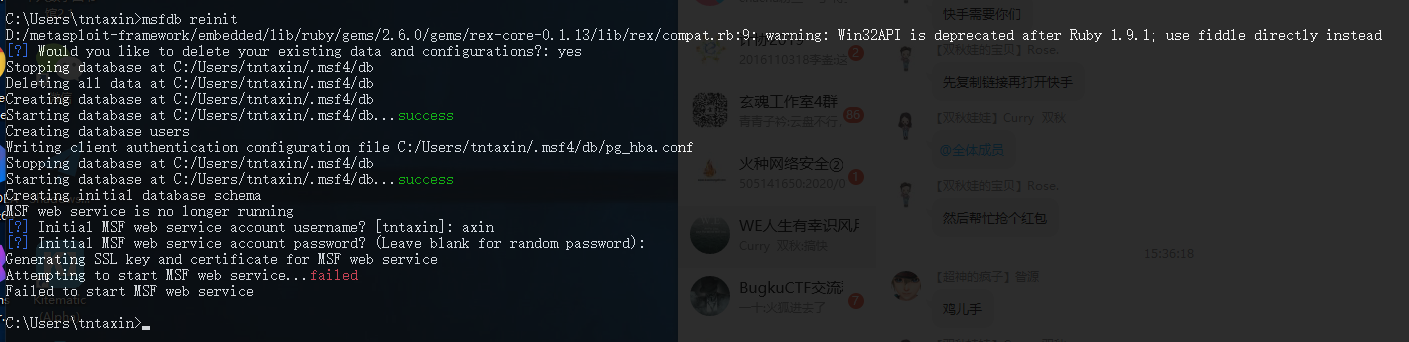
 Maskhe
on 14 Jan 2020
Maskhe
on 14 Jan 2020
Trying to get "msfdb init" to run on Windows 10 using the latest installer, which at this point is "metasploit v6.0.3-dev-2228cef857434a0ea5cf557abc37defa0cd15c81"
C:/metasploit-framework/embedded/lib/ruby/gems/2.6.0/gems/rex-core-0.1.13/lib/rex/compat.rb:9: warning: Win32API is deprecated after Ruby 1.9.1; use fiddle directly instead
[?] Would you like to delete your existing data and configurations?: yes
Found a database at C:/Users/Iwan/.msf4/db, checking to see if it is started
Starting database at C:/Users/Iwan/.msf4/db...success
[?] Initial MSF web service account username? [Iwan]: Iwan
[?] Initial MSF web service account password? (Leave blank for random password):
Generating SSL key and certificate for MSF web service
Attempting to start MSF web service...failed
Failed to start MSF web service
I've got Postgres running on all default settings, as a Windows service.
Would have guessed this would be fixed by now, unfortunately.
Trying the WSL route using Kali as my distro, but that fails on a dependency on an Oracle dependency.
Reading package lists... Done
Building dependency tree
Reading state information... Done
Some packages could not be installed. This may mean that you have
requested an impossible situation or if you are using the unstable
distribution that some required packages have not yet been created
or been moved out of Incoming.
The following information may help to resolve the situation:

The following packages have unmet dependencies:
 metasploit-framework : Depends: oracle-instantclient-basic (>= 19.6.0.0.0) but it is not installable
E: Unable to correct problems, you have held broken packages.
 ThreeAxis
on 23 Aug 2020
ThreeAxis
on 23 Aug 2020
someone found the solution for this?
 1UC1F3R616
on 30 Aug 2020
1UC1F3R616
on 30 Aug 2020
Related issues
 Acidical
·
3Comments
Acidical
·
3Comments
 verapex
·
3Comments
verapex
·
3Comments
 fluit105
·
3Comments
fluit105
·
3Comments
 wvu-r7
·
3Comments
wvu-r7
·
3Comments
 handsomebeast
·
3Comments
handsomebeast
·
3Comments
Most helpful comment
I have run into same error