Metasploit-framework: Failed to connect to the database: could not connect to server: Connection refused
Hi all,
I need some help here with this metasploit db issue on a kali box.
When I start metasploit, here are the error messages that comes up..
root@localhost:/home# msfconsole
[-] Failed to connect to the database: could not connect to server: Connection refused
Is the server running on host "localhost" (127.0.0.1) and accepting
TCP/IP connections on port 5432?
and
msf > db_status
[*] postgresql selected, no connection
I realise this might be a common issue but all the steps to resolve it after almost 2 days of googling has not yielded results..
Other commands I have run and their output below
root@localhost:/# service postgresql status
● postgresql.service - PostgreSQL RDBMS
Loaded: loaded (/lib/systemd/system/postgresql.service; enabled; vendor preset: disabled)
Active: active (exited) since Mon 2018-01-08 02:23:44 GMT; 10h ago
Process: 6344 ExecStart=/bin/true (code=exited, status=0/SUCCESS)
Main PID: 6344 (code=exited, status=0/SUCCESS)
CGroup: /system.slice/postgresql.service
Jan 08 02:23:44 localhost.localdomain systemd[1]: Starting PostgreSQL RDBMS...
Jan 08 02:23:44 localhost.localdomain systemd[1]: Started PostgreSQL RDBMS.
Jan 08 13:22:53 localhost.localdomain systemd[1]: Started PostgreSQL RDBMS.
Jan 08 13:23:00 localhost.localdomain systemd[1]: Started PostgreSQL RDBMS.
This command gives a blank output
root@localhost:/# ss -lntp | grep post
Here, it seems the postgresql is not listening
root@localhost:/# ps -aux | grep post
root 6402 0.0 0.3 6224 3496 pts/0 S 12:39 0:00 su postgres
postgres 6403 0.0 0.3 5704 3576 pts/0 S 12:39 0:00 bash
root 6868 0.0 0.0 4756 864 pts/0 S+ 13:24 0:00 grep post
You might also want to check the last ~1k lines of ~/.msf4/logs/framework.log for relevant stack traces
TCP/IP connections on port 5432?
[01/08/2018 13:20:46] [i(0)] core: Trying to continue despite failed database creation: could not connect to server: Connection refused
Is the server running on host "127.0.0.1" and accepting
TCP/IP connections on port 5432?
[01/08/2018 13:20:46] [e(0)] core: DB.connect threw an exception: could not connect to server: Connection refused
Is the server running on host "127.0.0.1" and accepting
TCP/IP connections on port 5432?
System stuff
Metasploit version
Framework: 4.16.31-dev-
Console : 4.16.31-dev
OS
What OS are you running Metasploit on? Kali Linux
Can someone please help me resolve this and identify what I am not doing correctly ?
 me009
me009
All 23 comments
 busterb
on 8 Jan 2018
busterb
on 8 Jan 2018
Hi @busterb,
Thanks for the link but when I run ss-ant I see port 5432 is not listening. How do I resolve this ?
root@localhost:/# ss -ant
State Recv-Q Send-Q Local Address:Port Peer Address:Port
LISTEN 0 128 0.0.0.0:57436 0.0.0.0:*
LISTEN 0 128 0.0.0.0:111 0.0.0.0:*
LISTEN 0 128 [::]:111 [::]:*
LISTEN 0 128 [::]:55345 [::]:*
me009
on 8 Jan 2018
same problem bro
 sizar3x
on 7 Mar 2018
sizar3x
on 7 Mar 2018
The error is :-
msfconsole
[-] Failed to connect to the database: could not connect to server: Connection refused
Is the server running on host "localhost" (::1) and accepting
TCP/IP connections on port 5432?
could not connect to server: Connection refused
Is the server running on host "localhost" (127.0.0.1) and accepting
TCP/IP connections on port 5432?
FULLY WORKING SOLUTION
Type the following commands
1.root@kali:~# cd /usr/share/metasploit-framework/config/
2.root@kali:/usr/share/metasploit-framework/config# ls
application.rb database.yml database.yml.vagrant
boot.rb database.yml.example environment.rb
cucumber.yml database.yml.travis environments
3.root@kali:/usr/share/metasploit-framework/config# cat database.yml
development:
adapter: postgresql
database: msf
username: msf
password: 2OjgyhT0tacdnxrYIKC8BgDel7tbY=
host: localhost
port: 5432
pool: 5
timeout: 5
production:
adapter: postgresql
database: msf
username: msf
password: 2O/UYGBP3jgyjgYuIT0tacdnxrYIKC8BgDel7tbY=
host: localhost
port: 5432
pool: 5
timeout: 5
test:
adapter: postgresql
database: msf_test
username: msf
password: 2O/UYGBP3nAhfhffhhyfh0tacdnxrYIKC8BgDel7tbY=
host: localhost
port: 5432
pool: 5
timeout: 5
NOW CHANGE THE PORT NUMBER FROM 5432 TO 5433 ,THIS IS THE MAIN STEP SO DON'T MISS IT
4.root@kali:/usr/share/metasploit-framework/config# nano database.yml
5.root@kali:/usr/share/metasploit-framework/config# cp database.yml /root/.msf4/
6.root@kali:/usr/share/metasploit-framework/config# cd ~/.msf4/
7.root@kali:~/.msf4# ls
database.yml history local logos logs loot modules plugins
8.root@kali:~# /etc/init.d/postgresql start
9.root@kali:~# msfconsole
CONGO YOUR DONE
 nilay121
on 12 Jun 2018
nilay121
on 12 Jun 2018
Problem still remain doesnt work if i change the port to 5433
It is still throwning same error
 sinistergeek
on 14 Jul 2018
sinistergeek
on 14 Jul 2018
Don't change the port.
Copy database.yaml /root/.msf4
Restart the postgre
 yehgdotnet
on 20 Jul 2018
yehgdotnet
on 20 Jul 2018
yes!! i did but still having error
On Fri, Jul 20, 2018 at 9:05 AM, Myo Soe notifications@github.com wrote:
Don't change the port.
Copy database.yaml /root/.msf4
Restart the postgre—
You are receiving this because you commented.
Reply to this email directly, view it on GitHub
https://github.com/rapid7/metasploit-framework/issues/9386#issuecomment-406477437,
or mute the thread
https://github.com/notifications/unsubscribe-auth/AcyNENMgzWnrpBKsPgwRHgd__Uje-zndks5uIUxsgaJpZM4RWYEz
.
sinistergeek
on 31 Jul 2018
solution from nilay worked for me thanks a lot
 jacksparrow01495
on 28 Sep 2018
jacksparrow01495
on 28 Sep 2018
i need help on the same issue. the database connection problem
and if i may ask is it important to connect to the database
 thereavercode
on 16 Nov 2018
thereavercode
on 16 Nov 2018
@thereavercode the database is useful for storing things like credentials, identified hosts, identified network services, etc. It's not strictly a requirement.
Rather than use a .yml configuration file, you can also connect to the database manually, provided you know the username, password, and database name:
msf > db_connect msf:[email protected]:5432/msf
 bcoles
on 16 Nov 2018
bcoles
on 16 Nov 2018
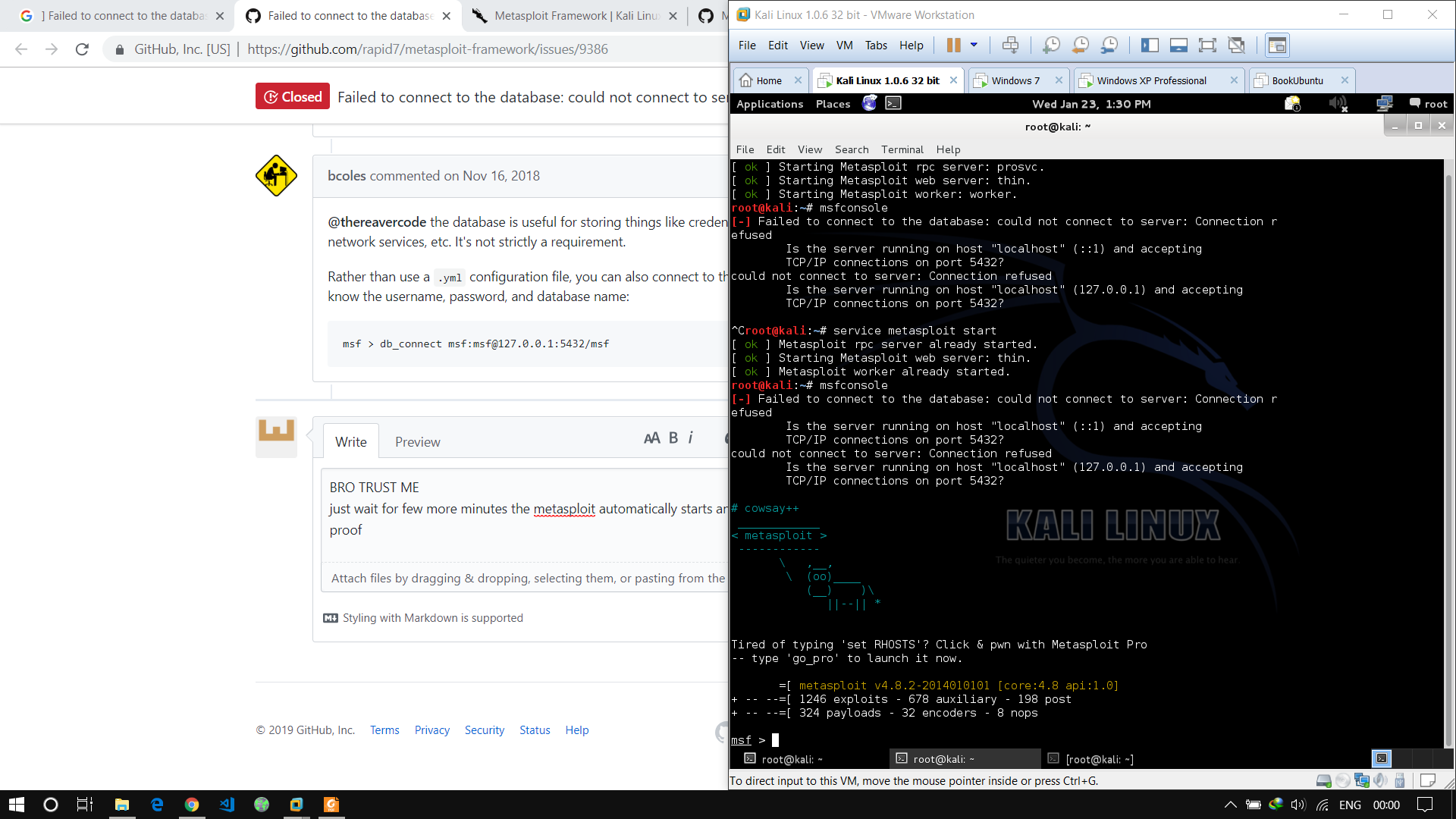
BRO TRUST ME
just wait for few more minutes the metasploit automatically starts and you can start using msfconsole
proof
 jamesblond47
on 23 Jan 2019
jamesblond47
on 23 Jan 2019
Thanks... Post helped a lot...
 Rushabhgedam
on 5 May 2019
Rushabhgedam
on 5 May 2019
Im trying to see if my wife is cheating on me but i dont understand this that well. Ive installed phonesploit but unabe to connect her ip
 clintryan413211
on 30 Aug 2019
clintryan413211
on 30 Aug 2019
Unless your target has consented, this would be a violation of law. Another violation of law is posting an unrelated question for guidance to a closed issue on GitHub.
 h00die
on 30 Aug 2019
h00die
on 30 Aug 2019
Im trying to see if my wife is cheating on me but i dont understand this that well. Ive installed phonesploit but unabe to connect her ip
bcoles
on 30 Aug 2019
service postgresql start
 gkhan496
on 10 Sep 2019
gkhan496
on 10 Sep 2019
Thanks alot
Problem solved
 divstech
on 23 Sep 2019
divstech
on 23 Sep 2019
Perfect Solution
- Start PostGreSQL: # systemctl _restart_ postgresql
- Make sure it is working properly: # systemctl _status_ postgresql
- Now you should be listening on ports 5432 & 5433: # ss -ant
- Reinitialize DB Settings (user, config files, msfdb): # msfdb _reinit_
- Finally, launch MSF: # msfconsole
 nzanoa
on 27 Sep 2019
nzanoa
on 27 Sep 2019
I've done everything listed in here, nothing worked.
 havilson
on 30 Sep 2019
havilson
on 30 Sep 2019
I have tried everything here and followed numerous videos, but can't seem to resolve this. Any other suggestions?
Below are some pics of results from after following steps:


 JoeAJLaw
on 7 Mar 2020
JoeAJLaw
on 7 Mar 2020
Put the Postgresql service to start with the boot:
sudo update-rc.d postgresql enable
And start the postgresql service:
service postgresql start or /etc/init.d/postgresql start.
 jhfmiguel
on 16 Apr 2020
jhfmiguel
on 16 Apr 2020
@nilay121
I solved the problem exactly by following the guide, it's perfect !!
;)
 Lorenz11x
on 26 Apr 2020
Lorenz11x
on 26 Apr 2020
But I am using windows 10 to use metasploit (I also got same problem....) , what should I do
 Rengend
on 25 May 2020
Rengend
on 25 May 2020
Related issues
bcoles
·
3Comments
 wvu-r7
·
3Comments
wvu-r7
·
3Comments
 Sonya2010
·
3Comments
Sonya2010
·
3Comments
 felipee07
·
3Comments
felipee07
·
3Comments
 Funeoz
·
3Comments
Funeoz
·
3Comments
Most helpful comment
The error is :-
msfconsole
[-] Failed to connect to the database: could not connect to server: Connection refused
Is the server running on host "localhost" (::1) and accepting
TCP/IP connections on port 5432?
could not connect to server: Connection refused
Is the server running on host "localhost" (127.0.0.1) and accepting
TCP/IP connections on port 5432?
FULLY WORKING SOLUTION
Type the following commands
1.root@kali:~# cd /usr/share/metasploit-framework/config/
2.root@kali:/usr/share/metasploit-framework/config# ls
application.rb database.yml database.yml.vagrant
boot.rb database.yml.example environment.rb
cucumber.yml database.yml.travis environments
3.root@kali:/usr/share/metasploit-framework/config# cat database.yml
development:
adapter: postgresql
database: msf
username: msf
password: 2OjgyhT0tacdnxrYIKC8BgDel7tbY=
host: localhost
port: 5432
pool: 5
timeout: 5
production:
adapter: postgresql
database: msf
username: msf
password: 2O/UYGBP3jgyjgYuIT0tacdnxrYIKC8BgDel7tbY=
host: localhost
port: 5432
pool: 5
timeout: 5
test:
adapter: postgresql
database: msf_test
username: msf
password: 2O/UYGBP3nAhfhffhhyfh0tacdnxrYIKC8BgDel7tbY=
host: localhost
port: 5432
pool: 5
timeout: 5
NOW CHANGE THE PORT NUMBER FROM 5432 TO 5433 ,THIS IS THE MAIN STEP SO DON'T MISS IT
4.root@kali:/usr/share/metasploit-framework/config# nano database.yml
5.root@kali:/usr/share/metasploit-framework/config# cp database.yml /root/.msf4/
6.root@kali:/usr/share/metasploit-framework/config# cd ~/.msf4/
7.root@kali:~/.msf4# ls
database.yml history local logos logs loot modules plugins
8.root@kali:~# /etc/init.d/postgresql start
9.root@kali:~# msfconsole
CONGO YOUR DONE