Metasploit-framework: Cannot launch msfconsole on windows 10
Steps to reproduce
Install msf for windows
Run msfconsole from cmd
Expected behavior
What should happen?
Msf console runs
What happens instead?
Get the error : C:/MSF/metasploit-framework/embedded/framework/lib/msf/core/modules/loader/directory.rb:78:in `initialize': Invalid argu
ment @ rb_sysopen - C:/MSF/metasploit-framework/embedded/framework/modules/exploits/windows/browser/zenworks_helplaunche
r_exec.rb (Errno::EINVAL)
System stuff
Metasploit version
Framework Version: 4.16.29-dev-2b96f8e272c744c5c595aac179a1738a8d4aba45
I installed Metasploit with:
- [ ] Commercial/Community installer (from http://www.rapid7.com/products/metasploit/download.jsp)
OS
Windows 10
 ngoctung46
All 21 comments
I got exact same error
 daxu7509
on 19 Jan 2018
daxu7509
on 19 Jan 2018
This does not seem to be a path that exists in the commercial installer. Are you sure you don't have it confused with the omnibus installer?
I cannot reproduce this with the current version. Did you perhaps move the installation from c:\metasploit-framework to c:\MSF\metasploit-framework?
 busterb
on 22 Jan 2018
busterb
on 22 Jan 2018
Clear system windows 10, just installed ruby and metasploit-framework and msfconsole.bat produces same error.
 radarsu
on 23 Jan 2018
radarsu
on 23 Jan 2018
I'd love to help, but no one has answered my questions.
Did any of you install from here? https://windows.metasploit.com
busterb
on 23 Jan 2018
@busterb: Yes, I did use the link you provided for installation. My issue was fixed by running the msf console on administrator.
ngoctung46
on 23 Jan 2018
Ah, thanks @ngoctung46 ! @radarsu / @daxu7509 sounds like you both may have a similar permissions issue perhaps. Locally I don't have to run as admin (see screenshot below), but I might have my user setup a little differently:

busterb
on 23 Jan 2018
@busterb same - I installed it using metasploitframework-latest.msi.
Trying to run msfconsole using administrator rights was first thing I've done, but it didn't work for me.
I have ruby 2.5.0 though. May it be the issue?
radarsu
on 23 Jan 2018
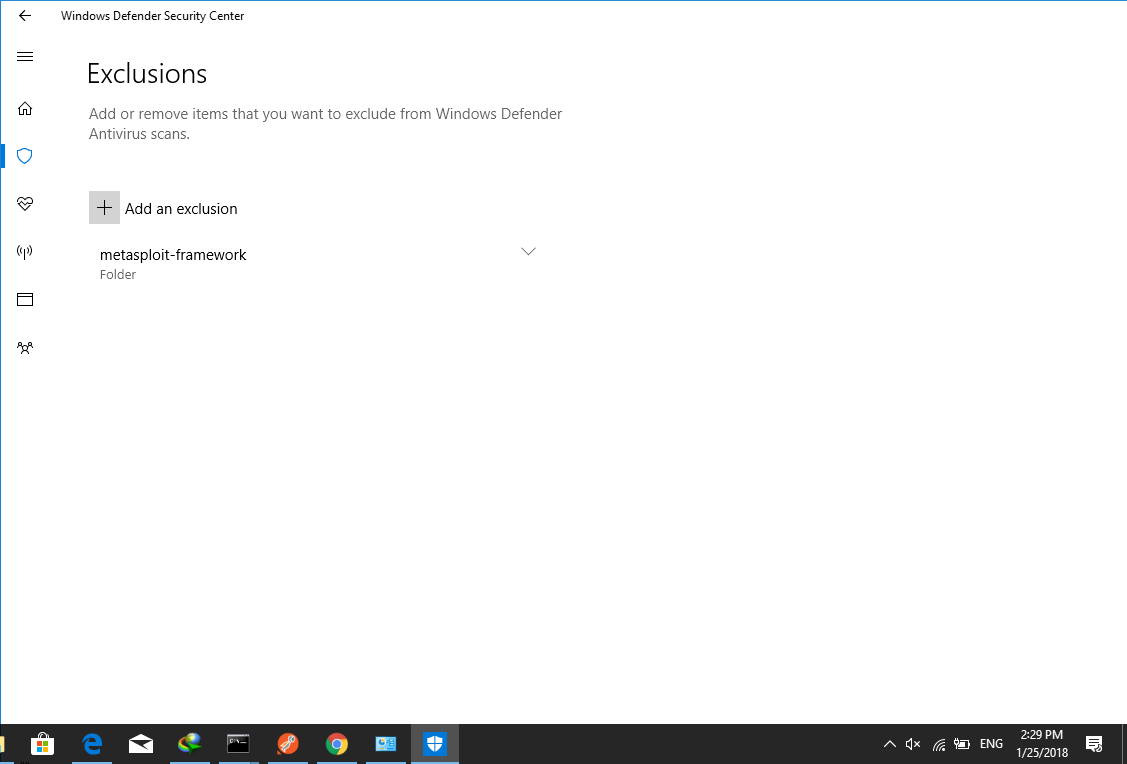
Hi all! Please note that you have to exclude the metasploit-framework folder from microsoft windows defender. Open Windows Defender Security Center -> Virus & Threads protection -> Exceptions and add the folder where you have installed the msf. Good luck!
ngoctung46
on 25 Jan 2018
Thanks @ngoctung46 worked for me!
 ironstine
on 21 Feb 2018
ironstine
on 21 Feb 2018

i have msf installed but i get this error, what could be the problem
 bited3stroyer
on 3 Aug 2018
bited3stroyer
on 3 Aug 2018
@bited3stroyer you are spelling the command wrong. type just msfconsole, not msfclonsole.bat
 rrroyal
on 7 Aug 2018
rrroyal
on 7 Aug 2018
it's been more than 10 minutes and nothing is happening
On Tue, Aug 7, 2018 at 8:14 PM, 0-1-0-1 notifications@github.com wrote:
@bited3stroyer https://github.com/bited3stroyer you are spelling the
command wrong. type just msfconsole—
You are receiving this because you were mentioned.
Reply to this email directly, view it on GitHub
https://github.com/rapid7/metasploit-framework/issues/9385#issuecomment-411151407,
or mute the thread
https://github.com/notifications/unsubscribe-auth/AmU2_IOK8Bpq-67ZUjx91Mi3kX1o3SJYks5uOdkdgaJpZM4RV39K
.
bited3stroyer
on 8 Aug 2018
Try Linux or OS X.
 wvu-r7
on 8 Aug 2018
wvu-r7
on 8 Aug 2018
Thanks it's now working
On 8 Aug 2018 03:50, "0-1-0-1" notifications@github.com wrote:
@wvu-r7 https://github.com/wvu-r7 what a great idea!
@bited3stroyer https://github.com/bited3stroyer uninstall metasploit,
disable the antivirus, install it again in default directory, run the cmd
as administrator and then try to launch it—
You are receiving this because you were mentioned.
Reply to this email directly, view it on GitHub
https://github.com/rapid7/metasploit-framework/issues/9385#issuecomment-411257293,
or mute the thread
https://github.com/notifications/unsubscribe-auth/AmU2_KDGP1kCDHiBcWl_LYevfS9oqIuyks5uOkPIgaJpZM4RV39K
.
bited3stroyer
on 10 Aug 2018
https://www.youtube.com/watch?v=fHM8kEEd080
watch this video guys if you are still getting error or msfconsole is taking time to load
 ghost
on 23 Feb 2019
ghost
on 23 Feb 2019
how to fix error installation in windows 10 console.bat isn't reconized
 hendriksinaga13
on 18 Sep 2019
hendriksinaga13
on 18 Sep 2019
@hendriksinaga13 there is no console.bat, I think you might be referring to msfconsole.bat, which you can activate in the C:\metasploit-framework\bin if you installed with the default path. If you want to be able to pop the "metasploit shell" without going to the C:\metasploit-framework\bin folder, you need to add the path to the environment variables.
hope it helps :)
 Alf0nso
on 10 Apr 2020
Alf0nso
on 10 Apr 2020
I run the metasploit framework in the windows terminal. After running "console.bat" which should take me to the console, I always get this string:

 Joshie905
on 11 May 2020
Joshie905
on 11 May 2020
@Joshie905 #12899 #12564 #11981
This issue typically happens while installing Metasploit with anti-virus enabled. Try either reinstalling with anti-virus disabled or try installing Framework within a vm and use it from there.
 bcoles
on 11 May 2020
bcoles
on 11 May 2020
msfconsole
Traceback (most recent call last):ork console...-
25: from /opt/metasploit-framework/bin/../embedded/framework/msfconsole:23:in <main>'
24: from /opt/metasploit-framework/embedded/framework/lib/metasploit/framework/command/base.rb:82:instart'
23: from /opt/metasploit-framework/embedded/framework/lib/metasploit/framework/command/console.rb:48:in start'
22: from /opt/metasploit-framework/embedded/framework/lib/metasploit/framework/command/console.rb:62:indriver'
21: from /opt/metasploit-framework/embedded/framework/lib/metasploit/framework/command/console.rb:62:in new'
20: from /opt/metasploit-framework/embedded/framework/lib/msf/ui/console/driver.rb:159:ininitialize'
19: from /opt/metasploit-framework/embedded/framework/lib/msf/base/simple/framework/module_paths.rb:49:in init_module_paths'
18: from /opt/metasploit-framework/embedded/framework/lib/msf/base/simple/framework/module_paths.rb:49:ineach'
17: from /opt/metasploit-framework/embedded/framework/lib/msf/base/simple/framework/module_paths.rb:50:in block in init_module_paths'
16: from /opt/metasploit-framework/embedded/framework/lib/msf/core/module_manager/module_paths.rb:40:inadd_module_path'
15: from /opt/metasploit-framework/embedded/framework/lib/msf/core/module_manager/module_paths.rb:40:in each'
14: from /opt/metasploit-framework/embedded/framework/lib/msf/core/module_manager/module_paths.rb:41:inblock in add_module_path'
13: from /opt/metasploit-framework/embedded/framework/lib/msf/core/module_manager/loading.rb:133:in load_modules'
12: from /opt/metasploit-framework/embedded/framework/lib/msf/core/module_manager/loading.rb:133:ineach'
11: from /opt/metasploit-framework/embedded/framework/lib/msf/core/module_manager/loading.rb:135:in block in load_modules'
10: from /opt/metasploit-framework/embedded/framework/lib/msf/core/modules/loader/base.rb:256:inload_modules'
9: from /opt/metasploit-framework/embedded/framework/lib/msf/core/modules/loader/base.rb:256:in each'
8: from /opt/metasploit-framework/embedded/framework/lib/msf/core/modules/loader/base.rb:259:inblock in load_modules'
7: from /opt/metasploit-framework/embedded/framework/lib/msf/core/payload_set.rb:109:in recalculate'
6: from /opt/metasploit-framework/embedded/framework/lib/msf/core/payload_set.rb:109:ineach_pair'
5: from /opt/metasploit-framework/embedded/framework/lib/msf/core/payload_set.rb:122:in block in recalculate'
4: from /opt/metasploit-framework/embedded/framework/lib/msf/core/payload_set.rb:122:ineach_pair'
3: from /opt/metasploit-framework/embedded/framework/lib/msf/core/payload_set.rb:186:in block (2 levels) in recalculate'
2: from /opt/metasploit-framework/embedded/framework/lib/msf/core/payload.rb:212:insize'
1: from /opt/metasploit-framework/embedded/framework/lib/msf/core/payload/android.rb:42:in generate'
/opt/metasploit-framework/embedded/framework/lib/msf/core/payload/android.rb:123:ingenerate_jar': android/apk/classes.dex not found (RuntimeError)
 drhoudz
on 24 May 2020
drhoudz
on 24 May 2020
@drhoudz #12899 #12564 #11981
This issue typically happens while installing Metasploit with anti-virus enabled. Try either reinstalling with anti-virus disabled or try installing Framework within a vm and use it from there.
bcoles
on 24 May 2020
Related issues
wvu-r7
·
3Comments
 adrianmihalko
·
3Comments
adrianmihalko
·
3Comments
 jecoliho
·
3Comments
jecoliho
·
3Comments
 verapex
·
3Comments
verapex
·
3Comments
 Funeoz
·
3Comments
Funeoz
·
3Comments
Most helpful comment
Hi all! Please note that you have to exclude the metasploit-framework folder from microsoft windows defender. Open Windows Defender Security Center -> Virus & Threads protection -> Exceptions and add the folder where you have installed the msf. Good luck!
