Metamask-extension: cannot use ledger with uniswap
Describe the bug
as of this morning i tried to use ledger with uniswap and metamask on linux chrome + firefox and mac chrome across 3 different computers
clicking "confirm" never shows the approval prompt on the ledger
i am still able to use my ledger with other services that interact with the ledger directly e.g. MEW and 1inch.exchange
To Reproduce (REQUIRED)
Steps to reproduce the behavior, libraries used with version number, and/or any setup information to easily reproduce:
- Go to uniswap
- try to trade or add liquidity to pool
- click "confirm" with a ledger address attached to metamask
Expected behavior
A clear description of what you expected to happen.
need to see an approval prompt on ledger so i can confirm interactions with uniswap
Screenshots
If applicable, add screenshots to help explain your problem.
Browser details (please complete the following information):
- OS: linux + mac
- ledger nano s: latest firmware + ethereum app
- browser: chrome + firefox
Additional context (Error Messages, etc.)
Add any other context about the problem here.
i didn't see any error messages, the prompt simply never displayed
 thedavidmeister
All 19 comments
I think this applies to all dapps. I am also no longer getting ledger prompts when trying to interact with it through meta-mask. Windows (Chrome/Brave). Ledger works with direct non Metamask integration.
 tobutridaz
on 3 Mar 2020
tobutridaz
on 3 Mar 2020
Also having trouble with Ledger, for me I cannot even get MetaMask to recognize the Ledger when attempting to add an account:
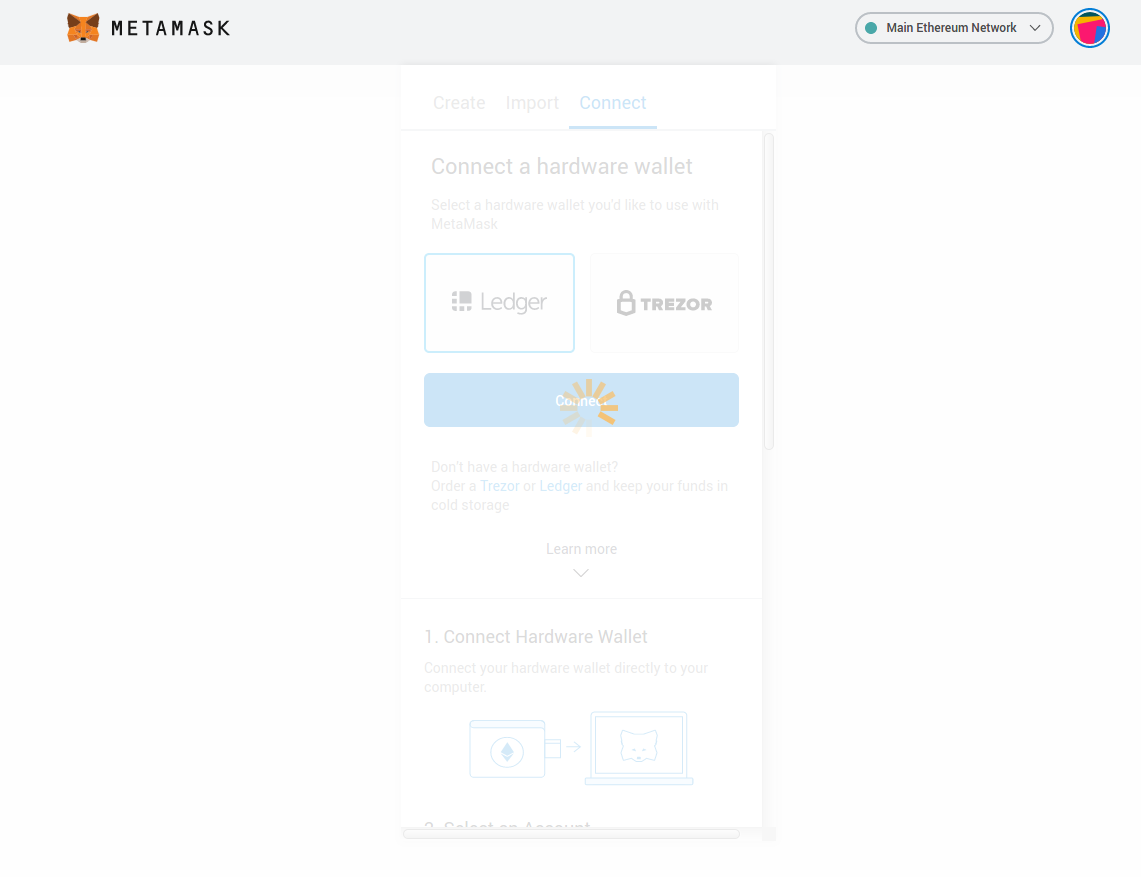
I tried using Ledger with Frame (frame.sh) and it works so it seems to be a MetaMask specific issue.
 john-light
on 3 Mar 2020
john-light
on 3 Mar 2020
I am experiencing the same problem with Metamask version 7.7.5
 Clearwood
on 3 Mar 2020
Clearwood
on 3 Mar 2020
The issue was DNS configuration related, so it may take a little while for the changes to reach all users. Seriously sorry for the inconvenience, everyone!
 tmashuang
on 3 Mar 2020
tmashuang
on 3 Mar 2020
I have same problem, but when I use Ledger directly in MyCrypto, Kyberswap, Ledger Live it is working.
 lamart1
on 4 Mar 2020
lamart1
on 4 Mar 2020
It is still unsolved for me, I also can not record any kind of network activity when trying to connect the ledger
Clearwood
on 4 Mar 2020
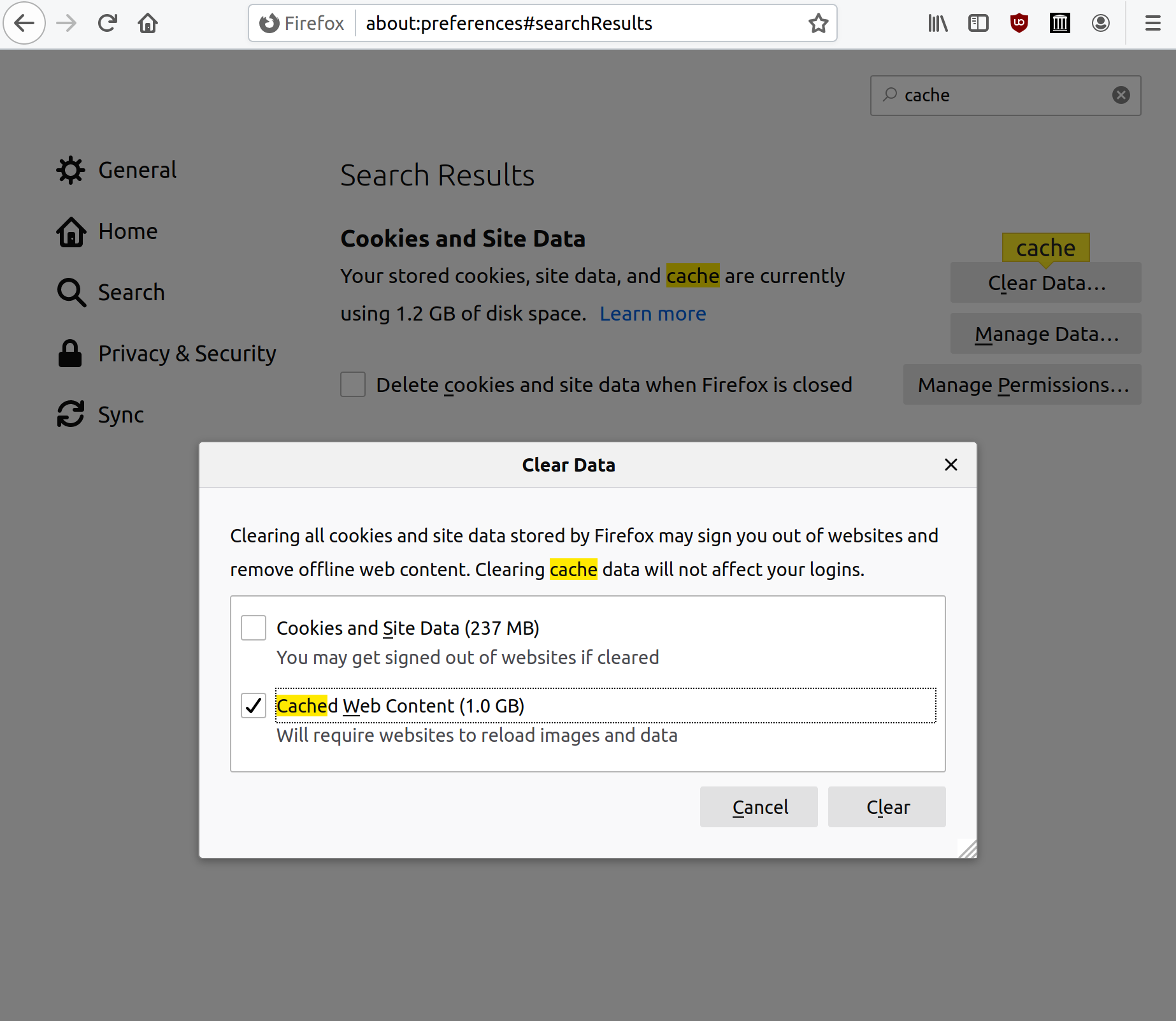
The underlying issue has been resolved, however there seems to be an incorrect redirect that has been cached in some users browsers. This problem should disappear on its own when the cache expires, or you can manually clear it yourself.
please let us know if clearing the cache solved your issue or not
chrome:

firefox:
 kumavis
on 4 Mar 2020
kumavis
on 4 Mar 2020
Created a support article for this https://metamask.zendesk.com/hc/en-us/articles/360040084492-How-to-clear-your-browser-s-cache
 dpazdan
on 4 Mar 2020
dpazdan
on 4 Mar 2020
The underlying issue has been resolved, however there seems to be an incorrect redirect that has been cached in some users browsers. This problem should disappear on its own when the cache expires, or you can manually clear it yourself.
please let us know if clearing the cache solved your issue or not
chrome:
firefox:
For me this is working now for Brave, Firefox, Chrome
lamart1
on 4 Mar 2020
This was a problem with a fix to another Ledger bug that we released.
We've fixed this issue in version 7.7.7 as of yesterday, which all clients should auto-update to now.
If your client is not auto-updating, you can manually install the build from this page:
https://github.com/MetaMask/metamask-extension/releases/tag/v7.7.7
Using these instructions:
https://metamask.zendesk.com/hc/en-us/articles/360015489471-How-to-Install-MetaMask-Manually
 danfinlay
on 5 Mar 2020
danfinlay
on 5 Mar 2020
it's working for me now thanks
thedavidmeister
on 8 Mar 2020
Hi,
I have encountered the same issue and clearing the cache doesn't work. Should I remove my Ledger and connect it again to Metamask? I am quite new with this feature, so I have never experienced this feature working.
 Tbduc
on 8 Aug 2020
Tbduc
on 8 Aug 2020
Please visit support.metamask.io for support. We have articles and a form for getting individual help.
danfinlay
on 8 Aug 2020
@Tbduc Make sure you are allowing contract data in transactions on the Ethereum app on your ledger!
To enable contract data in transactions, perform the following steps:
- Start the Ethereum app on you ledger
- Navigate to
settings - Navigate to the
Contract Datatab - Enable it by pressing down both buttons
- Exit
settings
Now you should be able to interact with any DApp using your ledger through metamask!
 Conviley
on 8 Aug 2020
Conviley
on 8 Aug 2020
Hello, I am having the same problem and nothing seems to help. I cleared the cache, reseted the metamask but still doesnt work. It is scary because I provided liquidity to uniswap and now I can't acces to it. I see it but can do any transaction in my metamask 🥴🥴
thanks for the help.
 alexgiraldom
on 1 Oct 2020
alexgiraldom
on 1 Oct 2020
Still occuring in 8.0.10. Issue needs to be re-opened.
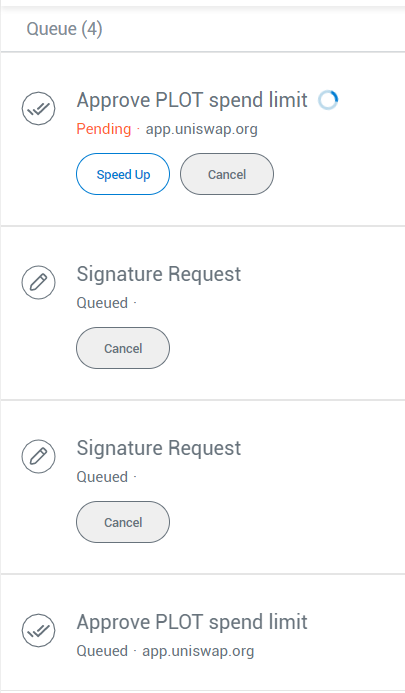
 joesixpack
on 13 Oct 2020
joesixpack
on 13 Oct 2020
using metamask, uniswap, ledger nano s. Everything works on my metamask account 1 but nothing works on my metamask ledger
account.
 tmsail
on 4 Nov 2020
tmsail
on 4 Nov 2020
I am going to try Conviley's enable contract data and see if that works.
tmsail
on 7 Nov 2020
well i cleared the cache in ledger live by doing the following:
- click on settings
- click on help
- click on "clear cache" button
it worked! i can now sign transactions
tmsail
on 19 Nov 2020
Related issues
dpazdan
·
3Comments
 rossbulat
·
3Comments
kumavis
·
3Comments
rossbulat
·
3Comments
kumavis
·
3Comments
 whyrusleeping
·
3Comments
whyrusleeping
·
3Comments
 bdresser
·
3Comments
bdresser
·
3Comments
Most helpful comment
The underlying issue has been resolved, however there seems to be an incorrect redirect that has been cached in some users browsers. This problem should disappear on its own when the cache expires, or you can manually clear it yourself.
please let us know if clearing the cache solved your issue or not
chrome:

firefox:
