Metamask-extension: Cannot click radio button for address when setting up Ledger.
Describe the bug
When going through the process of connecting a Ledger to MetaMask, I am prompted to Select HD Path (I chose Legacy), and then Select an Account. When I click on the radio buttons for the accounts in the list, nothing happens, the radio button does not become selected and the unlock button does not become enabled.
To Reproduce
Steps to reproduce the behavior:
- Click to setup a new ledger.
- Change HD Path to Legacy.
- Try to click on the first account.
- Notice that clicking does nothing.
Expected behavior
I can select an account.
Browser details (please complete the following information):
- OS: Windows 10
- Browser: Brave
- MetaMask Version: 6.2.2
 MicahZoltu
All 16 comments
Can't reproduce on Chrome, so it's either a Brave or Windows specific issue:

@tmashuang can you give it a try?
 brunobar79
on 28 Mar 2019
brunobar79
on 28 Mar 2019
In your video you already had address 2 selected upon initially connecting to the ledger. This suggests to me you have something cached locally or something. For me, by default no radio option is selected.
MicahZoltu
on 28 Mar 2019
@MicahZoltu Fair enough. Just tried it again in a fresh state I still can't reproduce.

I'll check if anyone in the team running windows has a ledger device.
brunobar79
on 2 Apr 2019
I also cannot reproduce today. Maybe fixed via a recent release?
MicahZoltu
on 16 Apr 2019
That’s good news! We can reopen if it happens in the future.
brunobar79
on 16 Apr 2019
Im experience this issue today.
 racabu
on 16 Aug 2019
racabu
on 16 Aug 2019
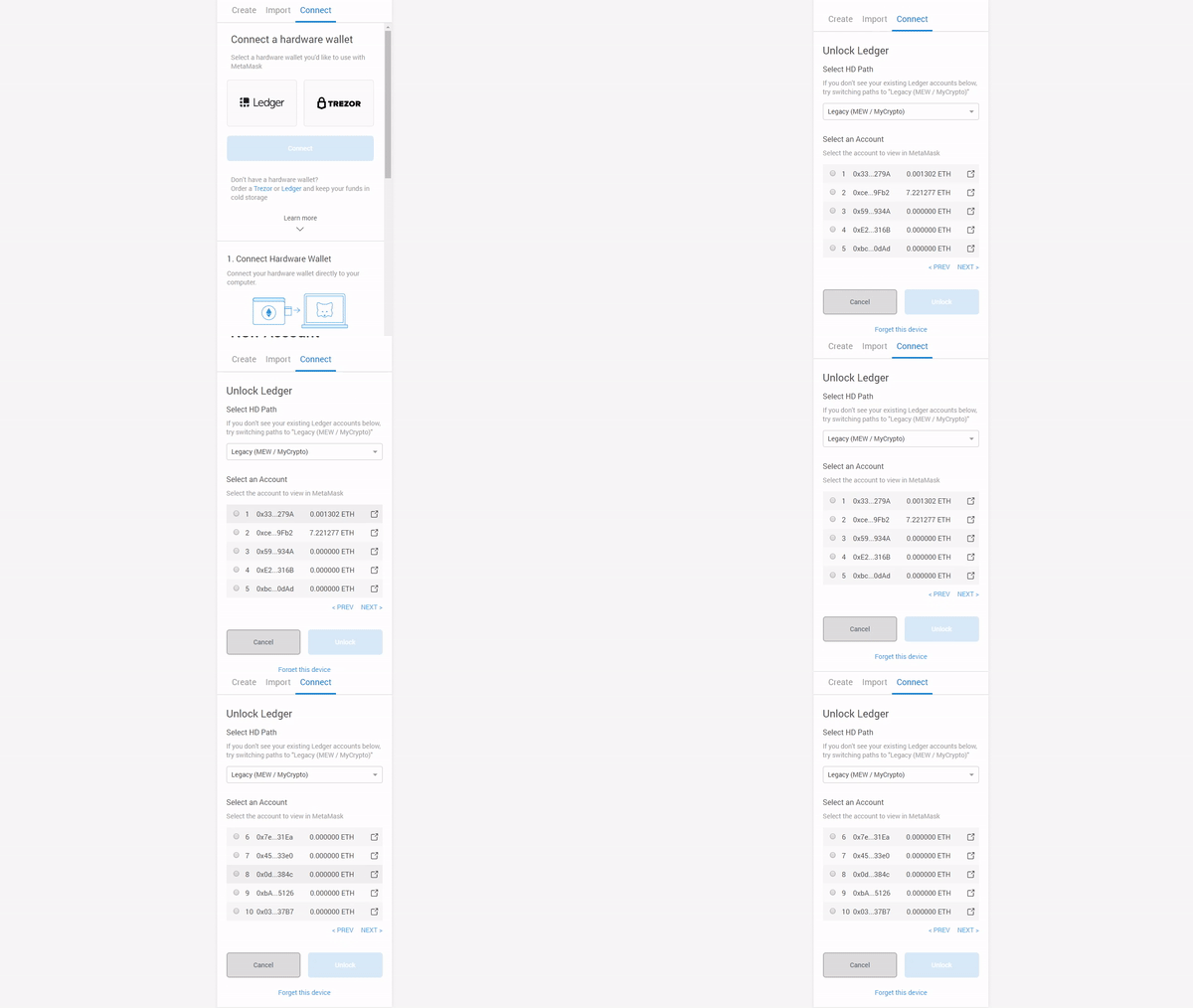
I am experiencing this issue today with Chrome Version 77.0.3865.120 (Official Build) (64-bit)
 Mkneeshaw
on 19 Oct 2019
Mkneeshaw
on 19 Oct 2019
Metamask overview screen was the active tab. I tried later going through the metamask icon and it worked.
Mkneeshaw
on 19 Oct 2019
@Mkneeshaw thanks for that workaround.
But it looks like a bug not like a feature.
 rbmilch
on 4 Dec 2019
rbmilch
on 4 Dec 2019
This issue is still present.
Version 79.0.3945.130 (Official Build) (64-bit)
Metamask 7.7.5
To reproduce:
- click on Metamask icon
- click
... - click
Expand View - click on identicon
- click
Connect Hardware Wallet - click
Ledger - try to click on the radio buttons to select an address. you can't!
It works fine if I do this without expanding Metamask into a tab.
 brandoncurtis
on 29 Feb 2020
brandoncurtis
on 29 Feb 2020
Thank you!
Am Sa., 29. Feb. 2020 um 04:29 Uhr schrieb Brandon Curtis <
[email protected]>:
This issue is still present.
Version 79.0.3945.130 (Official Build) (64-bit)
Metamask 7.7.5To reproduce:
- click on Metamask icon
- click ...
- click Expand View
- click on identicon
- click Connect Hardware Wallet
- click Ledger
- try to click on the radio buttons to select an address. you can't!
It works fine if I do this without expanding Metamask into a tab.
—
You are receiving this because you commented.
Reply to this email directly, view it on GitHub
https://github.com/MetaMask/metamask-extension/issues/6343?email_source=notifications&email_token=ACBF53636BGJ2FGVL3MQ62DRFHJALA5CNFSM4HA2TPR2YY3PNVWWK3TUL52HS4DFVREXG43VMVBW63LNMVXHJKTDN5WW2ZLOORPWSZGOENLBFZQ#issuecomment-592843494,
or unsubscribe
https://github.com/notifications/unsubscribe-auth/ACBF535LERSNIIDMQGKMESTRFHJALANCNFSM4HA2TPRQ
.
rbmilch
on 29 Feb 2020
Still an issue. Going through the metamask icon instead of expanding into a tab fixes it (windows 10 with Chrome browser)
 DiceDemon
on 3 May 2020
DiceDemon
on 3 May 2020
This bug is still active on MetaMask Version 7.7.9. During the initial setup for the chrome extension, the radio buttons are non functional. Closing the extension configuration page, and accessing again though the icon allows the buttons to be selected successfully.
 akda5id
on 8 Jun 2020
akda5id
on 8 Jun 2020
I also just ran into this in version 8.0.8.
The workaround mentioned by @Mkneeshaw above worked for me and I was able to select the right account.
 tylerlevine
on 17 Sep 2020
tylerlevine
on 17 Sep 2020
Can also confirm the problem and working workaround for Brave 1.14.84 and MetaMask 8.0.10.
 senselessDev
on 3 Oct 2020
senselessDev
on 3 Oct 2020
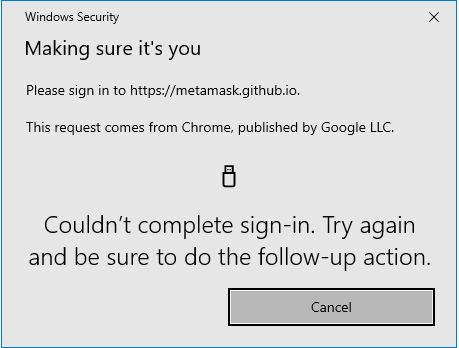
Can also confirm the problem. Workaround does not work for me. Windows security somehow blocks access to ledger Nano.
 stoecki222
on 9 Oct 2020
stoecki222
on 9 Oct 2020
Related issues
 dpazdan
·
3Comments
dpazdan
·
3Comments
 1blockologist
·
3Comments
1blockologist
·
3Comments
 danfinlay
·
3Comments
danfinlay
·
3Comments
 kumavis
·
3Comments
kumavis
·
3Comments
 whyrusleeping
·
3Comments
whyrusleeping
·
3Comments
Most helpful comment
I am experiencing this issue today with Chrome Version 77.0.3865.120 (Official Build) (64-bit)