Metamask-extension: MetaMask not connecting to local Parity node
Describe the bug
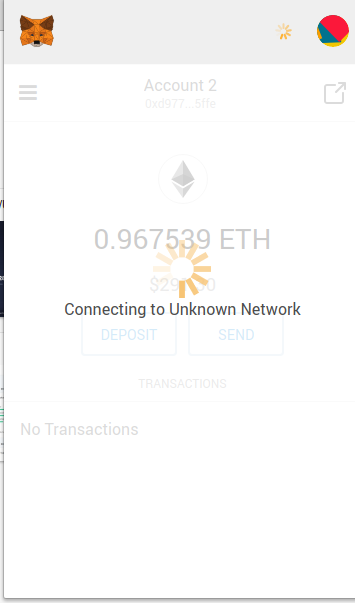
When I select Localhost 8545 in my network dropdown, MetaMask shows the message Connecting to Unknown Private Network... and never completes the connection to my fully-synced local Parity node. This is happening on both the old UI and the new UI, in both up-to-date Firefox and Chromium.
To Reproduce
Steps to reproduce the behavior:
- Open MetaMask
- Open Parity, let it fully sync
- Select Localhost 8545 in MetaMask dropdown
- See
Connecting to Unknown Private Network...message and notice that it does not finish connecting.
Expected behavior
I expect MetaMask to connect to Parity node and allow me to continue using MetaMask while connected to Parity.
Screenshots
Browser details (please complete the following information):
- OS: Linux Mint 18.3 64-bit
- Browser: Firefox and Chromium
- MetaMask Version: 4.9.3
- Old UI or New / Beta UI? Both
Additional context
Trying to connect to Parity UI full node Parity-Ethereum v2.0.1-20180726 beta
 john-light
All 10 comments
What port is Parity open as? Are you using it via command line or as a executable?
 tmashuang
on 21 Aug 2018
tmashuang
on 21 Aug 2018
@tmashuang not sure, I haven't changed any settings in the node. I am just following the instructions MetaMask published here: https://consensys.zendesk.com/hc/en-us/articles/360004060451-Using-a-Local-Node
john-light
on 21 Aug 2018
The article described focuses on Geth, and could be outdated. From what I see, Parity uses a default port of http://localhost:8180. Try switching back to one of the default networks, select Custom RPC from the dropdown network menu, and enter http://localhost:8180 in the Custom RPC URL field.
tmashuang
on 21 Aug 2018
Thank you for the suggestion @tmashuang. After trying with localhost:8180 MetaMask still shows the error: Connecting to Unknown Network until I change it back to mainnet or testnet.
Edit: I am using Parity via the Parity-UI. The node is fully synced with 24 peer connections.
john-light
on 22 Aug 2018
Try using the IP instead of localhost, the one specifically in the url that Parity opens as. If the issue persists, provide background logs, and the network tab, to see what kinds of errors might be coming from the server.
tmashuang
on 23 Aug 2018
Try using the IP instead of localhost, the one specifically in the url that Parity opens as.
I do not understand what you mean or know how to do this.
provide background logs, and the network tab, to see what kinds of errors might be coming from the server.
Where do I find the background logs and network tab?
john-light
on 25 Aug 2018
@john-light I have got it working at my end by starting the parity node as below :
parity --chain=ropsten --jsonrpc-cors="all" --jsonrpc-apis="all" --jsonrpc-interface=all
I am sure this won't be a recommended way of starting the node, but you can get started atleast
 mannutech
on 28 Aug 2018
mannutech
on 28 Aug 2018
Thanks @mannutech I might try taking this issue up with the Parity team too and see what their recommended method is. I would prefer to do this from the UI in a way that is known to be safe. In the mean time perhaps the MetaMask documentation around this could be updated to prevent a poor experience for Parity users.
john-light
on 29 Aug 2018
Hi guys, Thibaut from Parity.
@mannutech is opening a little bit too much the node so that it's not secure, but the idea goes in the right direction. Since Parity only allows local HTTP RPC per default, you need to specifically whitelist the domain used by Metamask using the flag jsonrpc-cors. The domain used can be figured out by opening Metamask in a new tab (top right icon in the beta version). You will find the domain in the address bar. I have it working on Firefox using parity --chain kovan --jsonrpc-cors moz-extension://ae62fc16-c916-4c24-9a36-97f5a850f25c
 Tbaut
on 29 Aug 2018
Tbaut
on 29 Aug 2018
I have MetaMask connected to local Parity node following @Tbaut instructions. Thanks everyone for your help!
john-light
on 4 Sep 2018
Related issues
 1blockologist
·
3Comments
1blockologist
·
3Comments
 aakilfernandes
·
3Comments
aakilfernandes
·
3Comments
 BassBauman
·
3Comments
BassBauman
·
3Comments
 kumavis
·
3Comments
kumavis
·
3Comments
 bdresser
·
3Comments
bdresser
·
3Comments
Most helpful comment
Hi guys, Thibaut from Parity.
@mannutech is opening a little bit too much the node so that it's not secure, but the idea goes in the right direction. Since Parity only allows local HTTP RPC per default, you need to specifically whitelist the domain used by Metamask using the flag
jsonrpc-cors. The domain used can be figured out by opening Metamask in a new tab (top right icon in the beta version). You will find the domain in the address bar. I have it working on Firefox usingparity --chain kovan --jsonrpc-cors moz-extension://ae62fc16-c916-4c24-9a36-97f5a850f25c