Metamask-extension: Blank Extension Screen on Chrome/Firefox/Brave/etc.
Bounty: some users have reported experiencing a blank screen when the open the MetaMask extension in Chrome. This bounty is to identify a root cause of the issue that matches the symptoms and errors described below & to write a patch that fixes it.
I just downloaded and installed the Chrome Extension. However, when I click the fox in the upper right it opens a box/window to the right that is completely empty. It does not appear that the extension is operating correctly.
I'm on a Mac and using Chrome (most recent update).
Thanks,
ERC
 ERC1975
All 75 comments
@ERC1975 sorry to hear that. Could you help us debug by sending your background logs? There are instructions about halfway down this support article. You can post them here, or send to [email protected] and mention this issue URL.
 bdresser
on 26 Jul 2018
bdresser
on 26 Jul 2018
Getting same issue on my Mac too.
 myn
on 28 Jul 2018
myn
on 28 Jul 2018

myn
on 28 Jul 2018
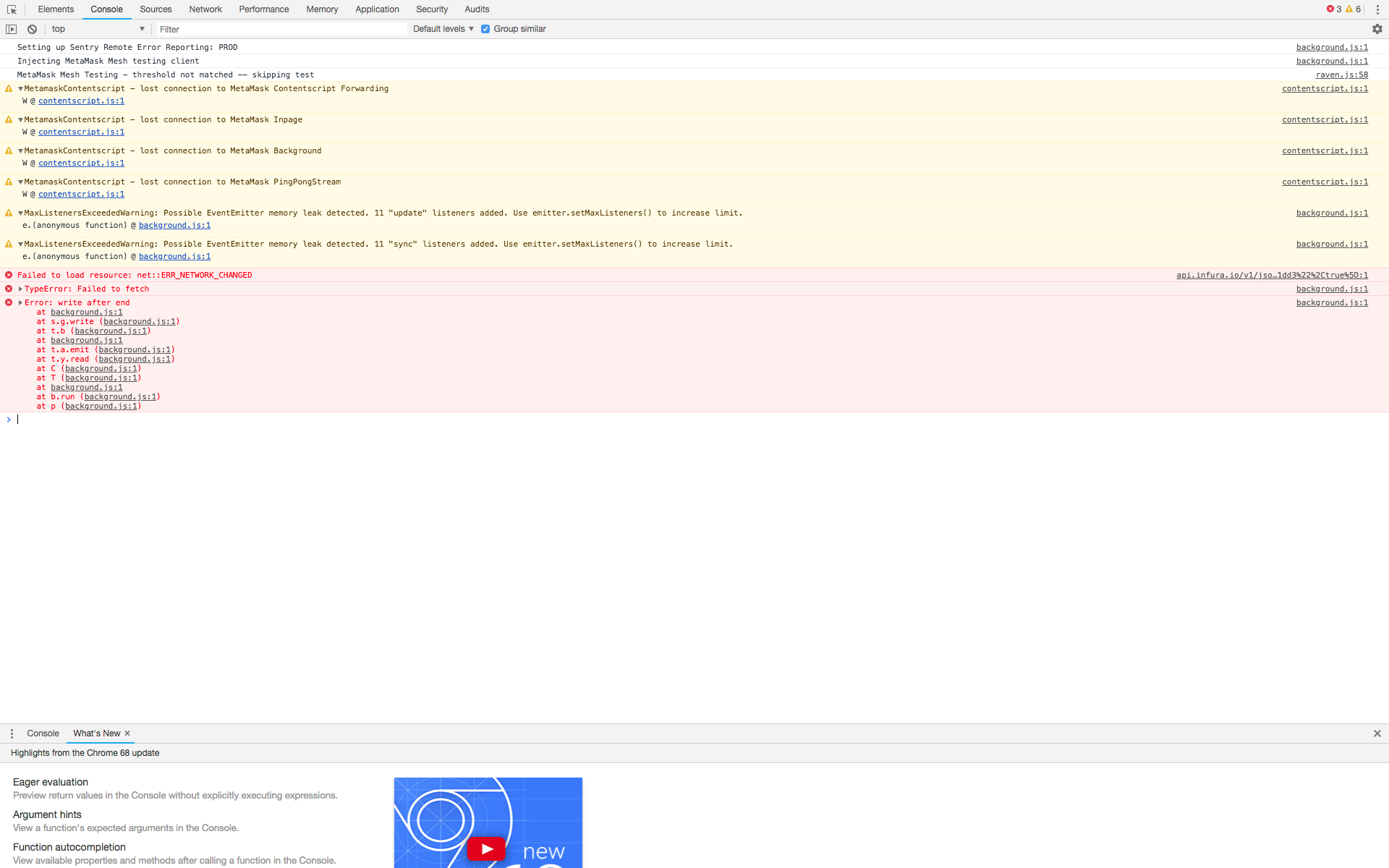
Background Page
myn
on 28 Jul 2018
Got this same issue on Chrome, Brave and Firefox.
https://github.com/MetaMask/metamask-extension/issues/4782
 Strernd
on 30 Jul 2018
Strernd
on 30 Jul 2018
Reinstalling Metamask fixed it for me on Chrome
Strernd
on 30 Jul 2018
somehow I was able to reproduce the last error showed in the picture. From development I got this

It corresponds to the method setupPublicConfig of metamaskController. The app did crash but I tried to reopen it and it worked fine.
 estebanmino
on 2 Aug 2018
estebanmino
on 2 Aug 2018
@Strernd next time you experience this, could you check the popup logs and background logs? Curious if you're getting the same error Esteban found, or something different. Sorry for the trouble & thanks for your help!
bdresser
on 4 Aug 2018
Same problems here, on Chrome on Windows 10, I managed to produce this error with the background logs

I hope this helps somehow, these crashes are haunting me since 2 weeks
 tritone11
on 6 Aug 2018
tritone11
on 6 Aug 2018
Similar as above

EDIT:
Inspecting the extension while running, it freezes and it stays white when there is any call to the infura API. Althought the chrome inspector says the various calls like eth_getBlockByNumber, eth_getTransactionByHash, mainnet, blacklist ecc. take from 50ms to 200ms, most of the time I see them in pending for 20-30 seconds.
After blocking the domain api.infura.io the extension run smoothly without freezing or without showing the blank screen (without being able to log in or use it, obviously).
Not able to change the network
tritone11
on 6 Aug 2018
I managed to recover my seed phrase from the crashing, whitescreening Metamask, then reinstall Metamask to get everything fixed.
I set up a private ethereum network with geth and rpc enabled, then stop the internet connection of my computer. Launching metamask, it wasn't able to find infura, so it started without problems and I set up a custom RPC from the metamask dropdown pointing to my ethereum node. Metamask connected to it, I logged in and took my seed phrase from the settings.
Then, I reinstalled Metamask and restored my wallet with the seed phrase.
I guess this would work with any public ethereum node, even testnet nodes, just disable your internet connection or block the infura api, open metamask, re-establish the connection and connect with custom rpc
EDIT: for anybody unable to find a public node to recover your seed or unable to set up your own node, I can open mine shortly to let you recover your seed, just contact me.
tritone11
on 6 Aug 2018
from standup:
- often happens when a process (like the background process) ends unexpectedly, sometimes a stream from the UI to background
- worth cross-referencing with Sentry to see if there's anything insightful
bdresser
on 6 Aug 2018
could be related to https://sentry.io/metamask/metamask/issues/562285240/?query=is:unresolved (cc @jennypollack)
bdresser
on 6 Aug 2018
@tritone11 thanks for the detailed rundown. Could I ask you to also send along your state logs to [email protected]? They'll help us identify the latest version of a particular migration that might be causing issues.
Instructions on how to get your state logs are here, assuming you're still able to access the UI as you described. Make sure you mention this issue number (4894) in your note. Thanks again for the help!
cc @whymarrh @alacrity26
bdresser
on 6 Aug 2018
Issue Status: 1. Open 2. Started 3. Submitted 4. Done
__This issue now has a funding of 0.45 ETH (181.59 USD @ $403.53/ETH) attached to it.__
- If you would like to work on this issue you can 'start work' on the Gitcoin Issue Details page.
- Want to chip in? Add your own contribution here.
- Questions? Checkout Gitcoin Help or the Gitcoin Slack
- $24,966.41 more funded OSS Work available on the Gitcoin Issue Explorer
 gitcoinbot
on 6 Aug 2018
gitcoinbot
on 6 Aug 2018
💰 A crowdfund contribution worth 0.05000 ETH (20.5 USD @ $409.98/ETH) has been attached to this funded issue from @.💰
Want to chip in also? Add your own contribution here.
gitcoinbot
on 7 Aug 2018
@shad-k Hello from Gitcoin Core - are you still working on this issue? Please submit a WIP PR or comment back within the next 3 days or you will be removed from this ticket and it will be returned to an ‘Open’ status. Please let us know if you have questions!
- [x] warning (3 days)
- [ ] escalation to mods (6 days)
Funders only: Snooze warnings for 1 day | 3 days | 5 days | 10 days | 100 days
gitcoinbot
on 11 Aug 2018
@bdresser can you send me any logs that you might have received regarding this. I have been trying to recreate this issue but have failed to do so thus far.
 shad-k
on 12 Aug 2018
shad-k
on 12 Aug 2018
@shad-k haven't received any reliable state logs on this.
above in this thread, most folks either see error: write after end or Error: PortDuplexStream -disconnected.
@estebanmino any detail to add?
bdresser
on 13 Aug 2018
@shad-k the PortDuplexStream error is generated here https://github.com/MetaMask/metamask-extension/blob/e2be22a4b722df608cb764042cc8ade6664414d8/app/scripts/lib/port-stream.js#L67 and it seems to be a disconnection between background and UI.
The write after end error is originated here https://github.com/MetaMask/metamask-extension/blob/e2be22a4b722df608cb764042cc8ade6664414d8/app/scripts/metamask-controller.js#L1272
estebanmino
on 13 Aug 2018
@estebanmino can you also point out from where does PortDuplexStream.prototype._write get called and where do we "end" the stream. May be the solution could be something like ending within a callback to the write operation.
shad-k
on 14 Aug 2018
I haven't seen that deeply, according to the comments there it says that the _write method is called internally somehow. That could be one way to go with the research and it's why this bug has been difficult to catch, also because there are not clear reproduction steps.
estebanmino
on 16 Aug 2018
@shad-k Hello from Gitcoin Core - are you still working on this issue? Please submit a WIP PR or comment back within the next 3 days or you will be removed from this ticket and it will be returned to an ‘Open’ status. Please let us know if you have questions!
- [x] warning (3 days)
- [ ] escalation to mods (6 days)
Funders only: Snooze warnings for 1 day | 3 days | 5 days | 10 days | 100 days
gitcoinbot
on 20 Aug 2018
Since I wasn't able to find the root cause of this I would like to stop work on Gitcoin and let someone else claim it if they have a solution for this. Will keep looking for the root cause in the meanwhile.
shad-k
on 20 Aug 2018
I am in trouble with the same symptoms
Is the solution reininstalled metamask?
I can not lose the seed

 starmankiti
on 22 Aug 2018
starmankiti
on 22 Aug 2018
@starmankiti you can try killing the extension from your Chrome Task Manager - this shouldn't require you to re-enter your seed phrase, but no promises. For more questions like this please reach out to [email protected].
And to anyone else experiencing this issue - any errors present in your background logs or UI logs might be helpful in diagnosing! Feel free to post them here.
bdresser
on 22 Aug 2018
@meghanasarikonda Hello from Gitcoin Core - are you still working on this issue? Please submit a WIP PR or comment back within the next 3 days or you will be removed from this ticket and it will be returned to an ‘Open’ status. Please let us know if you have questions!
- [x] warning (3 days)
- [ ] escalation to mods (6 days)
Funders only: Snooze warnings for 1 day | 3 days | 5 days | 10 days | 100 days
gitcoinbot
on 24 Aug 2018
@meghanasarikonda Hello from Gitcoin Core - are you still working on this issue? Please submit a WIP PR or comment back within the next 3 days or you will be removed from this ticket and it will be returned to an ‘Open’ status. Please let us know if you have questions!
- [x] warning (3 days)
- [ ] escalation to mods (6 days)
Funders only: Snooze warnings for 1 day | 3 days | 5 days | 10 days | 100 days
gitcoinbot
on 27 Aug 2018
yeah working to reproduce the problem!
 meghanasarikonda
on 28 Aug 2018
meghanasarikonda
on 28 Aug 2018
@meghanasarikonda Hello from Gitcoin Core - are you still working on this issue? Please submit a WIP PR or comment back within the next 3 days or you will be removed from this ticket and it will be returned to an ‘Open’ status. Please let us know if you have questions!
- [x] warning (3 days)
- [ ] escalation to mods (6 days)
Funders only: Snooze warnings for 1 day | 3 days | 5 days | 10 days | 100 days
gitcoinbot
on 2 Sep 2018
@starmankiti if you are still in trouble with the extension and you don't have the seed to recover your wallet, do not reinstall the extension or you will lose it. If restarting the extension didn't work, please refer to this solution to recover your seed phrase using offline metamask and a custom ethereum node https://github.com/MetaMask/metamask-extension/issues/4894#issuecomment-410664381
tritone11
on 5 Sep 2018
Issue Status: 1. Open 2. Started 3. Submitted 4. Done
@meghanasarikonda due to inactivity, we have escalated this issue to Gitcoin's moderation team. Let us know if you believe this has been done in error!
- [x] warning (3 days)
- [x] escalation to mods (6 days)
Funders only: Snooze warnings for 1 day | 3 days | 5 days | 10 days | 100 days
gitcoinbot
on 5 Sep 2018
Issue Status: 1. Open 2. Started 3. Submitted 4. Done
__Work has been started__.
These users each claimed they can complete the work by 2 months, 2 weeks ago.
Please review their action plans below:
1) tiro6090 has started work.
I already spent a couple hours researching this issue, and am confident that I know what the problem is. I tweaked the code to reproduce the problem consistently, and researched the error to find possible causes and fixes. If approved, I'll fix the issue and post a PR this weekend. If the PR doesn't get approved (or I don't get approved for this bounty), I can at least share with the community what the root cause is, and speculation on how it could be fixed.
2) ianfinn1994 has started work.
Quickly, efficiently and expertly solve this issue.
Learn more on the Gitcoin Issue Details page.
gitcoinbot
on 8 Sep 2018
Ah, thought the "submit a plan" was to get approved to get the bounty or not, my bad! I'll get a PR up this weekend!
 tj-ro
on 8 Sep 2018
tj-ro
on 8 Sep 2018
Just wanted to keep you guys updated, did some more research, but haven't yet gotten together something PR ready. Working on it, and will finish it up this week.
tj-ro
on 11 Sep 2018
@tiro6090 Hello from Gitcoin Core - are you still working on this issue? Please submit a WIP PR or comment back within the next 3 days or you will be removed from this ticket and it will be returned to an ‘Open’ status. Please let us know if you have questions!
- [x] warning (3 days)
- [ ] escalation to mods (6 days)
Funders only: Snooze warnings for 1 day | 3 days | 5 days | 10 days | 100 days
gitcoinbot
on 14 Sep 2018
Let me know what you guys think about this and if you think I'm on the right track (a lot of this is new to me so I'm making a pretty wild guess).
I'm 99.9% sure the problem is happening in setupControllerConnection in metamask-controller.js (1212).
It creates a dNode with the api. As you can see here: http://status.infura.io/ the infura api isn't perfect, so if it tries to connect to infura, and infura drops the connection our dNode will get an EPIPE error (maybe).
If that's the case, dNode "eats" the error: In the dnode connect method:
if (err && err.code === 'EPIPE') return; // eat EPIPEs
If we hit that and the controller connection fails then we'll get the blank window (this I'm sure about).
So we just need a more graceful way of handling this error instead of just throwing it away and not telling the user anything? That may explain the write after end error.
tj-ro
on 15 Sep 2018
Also, might be worth mentioning that eating EPIPE errors is blocking it from emitting an error that would be handled elsewhere.
tj-ro
on 15 Sep 2018
@danfinlay @whymarrh ^
bdresser
on 17 Sep 2018
@tiro6090 Hello from Gitcoin Core - are you still working on this issue? Please submit a WIP PR or comment back within the next 3 days or you will be removed from this ticket and it will be returned to an ‘Open’ status. Please let us know if you have questions!
- [x] warning (3 days)
- [ ] escalation to mods (6 days)
Funders only: Snooze warnings for 1 day | 3 days | 5 days | 10 days | 100 days
gitcoinbot
on 20 Sep 2018
Hi @tiro6090, interesting theory thanks for sharing it. As you mentioned we also think that this is a problem that comes from the background connection somehow.
Related to infura, we've had reports that this is failing for users until they reinstall the app entirely, so it doesn't seem to be related specifically to a time period of users dealing with this. What do you think?
Also curious to know how is related to this errors.
estebanmino
on 21 Sep 2018
Issue Status: 1. Open 2. Started 3. Submitted 4. Done
@tiro6090 due to inactivity, we have escalated this issue to Gitcoin's moderation team. Let us know if you believe this has been done in error!
- [x] warning (3 days)
- [x] escalation to mods (6 days)
Funders only: Snooze warnings for 1 day | 3 days | 5 days | 10 days | 100 days
gitcoinbot
on 23 Sep 2018
Still digging around on this! @estebanmino I'm not convinced by the uninstall reinstall being the solution and not just a coincidence, only because someone above said they had it happening on several different browsers at the same time.
I haven't looked into the port stream error in too much detail, the write after end just made sense so I assumed the port stream one was a symptom of the same problem. Let me dig into that specifically a little more.
tj-ro
on 23 Sep 2018
💰 A crowdfund contribution worth 0.50000 ETH (107.08 USD @ $214.17/ETH) has been attached to this funded issue from @.💰
Want to chip in also? Add your own contribution here.
gitcoinbot
on 26 Sep 2018
Increasing the bounty - 1 ETH for a successful patch, 0.4 ETH for reliable reproduction steps that can consistently generate the blank screen.
bdresser
on 26 Sep 2018
some more errors in the console for a user experiencing the blank screen (via support)

bdresser
on 23 Oct 2018
Hi there, I'm was also experiencing this on _one_ of my Chrome user profiles. Attached background logs:

If I opened the Metamask extension and wait a few minutes, eventually the extension would load properly, albeit it would be very slow (approx 1 minute for every click or action, even the animation of the fox head animated at 1 frame per minute or so). However once I switched the network away from Mainnet (tested with Rinkeby and Ropsten), then Metamask magically worked as normal. When I switched back to the Mainnet, the same slow buggy-ness occured (including initially opening the extension with a blank screen which last for ~2min).
Funnily as I was trying to get some more logs for this issue and switched back and forth between Rinkeby and Mainnet a few times, the bug somehow resolved itself. Now my Metamask extension works as normal on Mainnet... 🤷♂️
 mrdavey
on 25 Oct 2018
mrdavey
on 25 Oct 2018
Hi there, I'm was also experiencing this on _one_ of my Chrome user profiles. Attached background logs:
If I opened the Metamask extension and wait a few minutes, eventually the extension would load properly, albeit it would be very slow (approx 1 minute for every click or action, even the animation of the fox head animated at 1 frame per minute or so). However once I switched the network away from Mainnet (tested with Rinkeby and Ropsten), then Metamask magically worked as normal. When I switched back to the Mainnet, the same slow buggy-ness occured (including initially opening the extension with a blank screen which last for ~2min).
Funnily as I was trying to get some more logs for this issue and switched back and forth between Rinkeby and Mainnet a few times, the bug somehow resolved itself. Now my Metamask extension works as normal on Mainnet... 🤷♂️
I am pretty sure this is a problem only with the Infura API (api.infura.io), as if I set their domain in my /hosts to point to my Ethereum node, it works
 gioelecer
on 26 Oct 2018
gioelecer
on 26 Oct 2018
I solved this by opening Metamask and patiently waiting for it to load, then 'Account Settings' --> 'Reset Account'.
Therefore I assume it has something to do with the way old transaction histories are being loaded (?)
mrdavey
on 28 Oct 2018
I solved this by opening Metamask and patiently waiting for it to load, then 'Account Settings' --> 'Reset Account'.
Therefore I assume it has something to do with the way old transaction histories are being loaded (?)
After fixing it 4 days ago how did you replicate the bug yesterday? I am having trouble replicating it
tritone11
on 29 Oct 2018
@tritone11 sorry i forgot to mention that the 'accidental' fix 4 days ago did not fix it permanently. It ended up coming back again.
However now that i've 'reset' the accounts Metamask seems to be working as it should!
mrdavey
on 29 Oct 2018
@tritone11 sorry i forgot to mention that the 'accidental' fix 4 days ago did not fix it permanently. It ended up coming back again.
However now that i've 'reset' the accounts Metamask seems to be working as it should!
I noticed that accumulating pending transactions in Metamask slow down the load of the extension, causing the white screen.
In particular, I entered cryptokitties and made the same transaction multiple times, transactions never submitted to the network. Now my Metamask got these transactions pending forever, and the loading slows down a lot
tritone11
on 31 Oct 2018
Anything suspicious considering memory leaks, here? https://github.com/MetaMask/metamask-extension/blob/e2be22a4b722df608cb764042cc8ade6664414d8/app/scripts/lib/port-stream.js#L34
 valerysntx
on 2 Nov 2018
valerysntx
on 2 Nov 2018
also reported on Opera https://github.com/MetaMask/metamask-extension/issues/5755, but worth noting Opera is on a much earlier version.
bdresser
on 14 Nov 2018
@bdresser you keep mentioning this support article.
I'd like to read it, however it is behind a sign-up/login wall and I got tired of guessing fire hydrants, front stores etc. (reCAPTCHA has stopped to consider me a human by default).
About the issue: In our team this issue keeps appearing and disappearing (mostly only after re-installing Metamask) somewhat randomly. Seems to be unrelated to a specific browser or operating system (so far we've seen it on Mac/Firefox and Linux/Chrome).
Now I'm for the first time experiencing it myself and would like to contribute to figuring out the cause instead of just re-installing.
I start the browser. No tab is open. I click the Metamask icon. White frame. CPU spikes to 100-200% and remains there (caused by the Chrome process). When the Metamask frame is backgrounded, the CPU goes back to idle.
If I wait long enough (can be minutes, the unlock password entry view eventually appears. Very sluggish, but with enough patience I'm able to unlock.
In general Metamask seems to still be operational (I was even able to get a tx signing view triggered by a Dapp), but extremely slow. So slow that normal humans will give up before seeing anything else than a white frame.
In order to track RPC calls, I've switched from a remote RPC node (via http) to a local one (http too), remaining on the same network.
Didn't change anything in the behaviour btw.
This RPC calls are issued by Metamask before it's unlocked:
- polling for
eth_blockNumber eth_getBlockByNumberfor every new block
(once unlocked, it also checks all account's balances per block. But since it's stuck already before, that seems to not be so relevant).
Doesn't look abnormal to me (althought I never observed it while operating normally).
strace on the Chrome process shows an endless log of futex invocations, e.g.
futex(0xc4553e012e8, FUTEX_WAKE_PRIVATE, 1) = 0
futex(0xc4553e012e8, FUTEX_WAKE_PRIVATE, 1) = 0
futex(0xc4553e012e8, FUTEX_WAKE_PRIVATE, 1) = 0
futex(0xc4553e012e8, FUTEX_WAKE_PRIVATE, 1) = 0
futex(0xc4553e012e8, FUTEX_WAIT_PRIVATE, 2, NULL) = -1 EAGAIN (Resource temporarily unavailable)
futex(0xc4553e012e8, FUTEX_WAKE_PRIVATE, 1) = 0
futex(0xc4553e012e8, FUTEX_WAKE_PRIVATE, 1) = 0
futex(0xc4553e012e8, FUTEX_WAIT_PRIVATE, 2, NULL) = -1 EAGAIN (Resource temporarily unavailable)
futex(0xc4553e012e8, FUTEX_WAKE_PRIVATE, 1) = 0
futex(0xc4553dd1854, FUTEX_WAIT_PRIVATE, 0, NULL) = -1 EAGAIN (Resource temporarily unavailable)
I guess this is the Metamask process. Because if I disable the extension via chrome://extensions/, the process with that pid is nomore.
I'd gladly provide more info if I get instructions. Would also be ok with trying to debug the extension, but need instructions for that too (have never dealt with browser extensions before).
Btw. I'm not sure if what I'm writing fits into this issue, just a guess. Tell me if not.
update
In my case, resetting a specific account (all but the primary accounts in my Metamask were imported) just caused the issue to disappear. That account had several pending transactions listed (both simple transfers and contract interactions).
 d10r
on 28 Dec 2018
d10r
on 28 Dec 2018
Thanks for the thorough writeup @d10r
My bad on the link, we recently migrated our support center and not everything is redirecting. The article I'm mentioning is https://metamask.zendesk.com/hc/en-us/articles/360015290092-How-To-Get-Logs-And-Help-MetaMask-Support-and-Diagnose-Your-Issue
It would be super helpful to see the contents of your popup console, background console, and state logs. You can post any UI & background console errors on this issue, and feel free to email your state logs to [email protected] (and reference this issue number). Instructions in the article above.
Are you on v5.2.2? We've had some issues with our block tracker crashing, which caused some freezes & other performance issues, but it's cleaned up in this most recent version.
I start the browser. No tab is open. I click the Metamask icon. White frame. CPU spikes to 100-200% and remains there
Is it an entirely blank white frame, or is there a small orange spinner at the center?
@tmashuang @danfinlay anything else you'd like to check out?
bdresser
on 2 Jan 2019
@bdresser thx for info!
At the moment I don't have the issue (disappeared after doing Settings -> Reset Account).
I'm pretty sure in my case it was just blank, without the orange spinner.
Right now I'm on 5.3. Not sure if that was the case at the time of writing (it's auto-updating).
d10r
on 9 Jan 2019
I've had this issue for a few months now but haven't bothered reporting it, hoping an update would fix it.
- Ubuntu 18.04
- On MetaMask for Chrome 5.3.1
Ublock Origin and Privacy Badger extensions installed, but disabled.
Contents of the popup console: a white square (entirely blank, no spinner) with a scrollbar. If I wait ~2 minutes, the UI pops up. Had to wait 1-2 mins between each UI click to even get to the state logs. Only got about 1 UI update per 2 minutes. CPU is definitely working harder than normal but not at 100%, like 40-70%.

UI state logs: Emailed, referred to this issue. I see a lot of failed transactions with insufficient funds errors.
Popup logs:
ui.js:1 Setting up Sentry Remote Error Reporting: SENTRY_DSN_PROD
- Background logs:
background.js:1 Setting up Sentry Remote Error Reporting: SENTRY_DSN_PROD
background.js:1 Injecting MetaMask Mesh testing client
inpage.js:1 ATTENTION: In an effort to improve user privacy, MetaMask stopped exposing user accounts to dapps if "privacy mode" is enabled on November 2nd, 2018. Dapps should now call provider.enable() in order to view and use accounts. Please see https://bit.ly/2QQHXvF for complete information and up-to-date example code.
(anonymous) @ inpage.js:1
partialRollout.js:28 MetaMask Mesh Testing - threshold not matched -- skipping test
contentscript.js:1 MetamaskContentscript - lost connection to MetaMask Contentscript Forwarding
a @ contentscript.js:1
contentscript.js:1 MetamaskContentscript - lost connection to MetaMask Inpage
a @ contentscript.js:1
contentscript.js:1 MetamaskContentscript - lost connection to MetaMask Background
a @ contentscript.js:1
contentscript.js:1 MetamaskContentscript - lost connection to MetaMask PingPongStream
a @ contentscript.js:1
- Crash logs: N/A
The state log is pretty huge (47mb??) and contains a lot of failed transactions, and honestly I haven't used metamask for much other than a handful of transactions and a few wallet creations.
 ajhodges
on 28 Jan 2019
ajhodges
on 28 Jan 2019
Hi All, great thread and progress! @ianfinn1994 have you begun any work on this bounty? Otherwise, @ajhodges , thanks for your recent comment, have you considered apply to work on this bounty? (if not, no worries, thanks for your feedback). To everyone else: Here is the link to apply to work on this bounty, where if your submitted work is accepted - you can earn the MetaMask bounty reward funded by @bdresser (who can also confirm that it is still valid): https://gitcoin.co/issue/MetaMask/metamask-extension/4894/911 Thanks all!
 hatgit
on 31 Jan 2019
hatgit
on 31 Jan 2019
Hello @ERC1975, this is Alisa from the Gitcoin team. is this issue still valid?
 PixelantDesign
on 31 May 2019
PixelantDesign
on 31 May 2019
I'm now experiencing this too. I agree with @tritone11 in that old pending transactions seem to trigger this. I had one from beta testing ERC20 token swapping on Totle and within days Metamask became utterly slow to open or do anything. Still works, but takes 5-10 seconds to react to any click.
Recently I attempted a low gas tx which is still pending after 12h and MetaMask became even slower. Curiously, it doesn't display this 2nd pending tx at all (EtherChain happily sees it though).
Looking at this thread it seems interest in this bug disappeared around Jan 2019. Was it because it was fixed or folks lost interest?
 aleqx
on 9 May 2020
aleqx
on 9 May 2020
@aleqx what version of MM are you using? Do you have a stuck pending transaction?
 whymarrh
on 9 May 2020
whymarrh
on 9 May 2020
7.7.9. Yes, I had two pending transaction (see my post), not necessarily stuck but they were there for many hours due to low gas nowadays. I cancelled them both half an hour ago with a higher nonce and higher gas, then I reset MM accounts. MM is now snappy again. I just wanted to confirm that I saw the same behavior as @tritone11 regarding pending transactions.
aleqx
on 9 May 2020
I wonder if those transactions could have been submitted during 7.7.8 then the update to 7.7.9 migrated over the pending transactions in a way that created a crash (and so a blank screen).
If that was the case then reinstalling MetaMask should fix this for anyone, and hopefully it only affected a few people during the transition.
But glad you noticed the speed improvement! The update should help performance a lot!
 danfinlay
on 9 May 2020
danfinlay
on 9 May 2020
But it never crashed, it was just slow. After 5-10 seconds it was responding and working as expected.
I think I had been running 7.7.9 for a while but I'm not sure - I don't know when it updated itself. Is there a way to find out?
The reset of accounts will seems to fix it but may be deceptive, because it removes all outgoing transactions, so any pending ones will no longer show. Will keep an eye out.
aleqx
on 9 May 2020
7.7.9 just got rolled out in the last 5 days, so it's a very recent change.
We don't have a way to tell when exactly you receive an update, but that's a good idea for a future log. If you'd taken a state log file at two points we'd know the version that stored those.
danfinlay
on 9 May 2020
I still have this problem. My ETHs stuck in MetaMask because of this, I can't export pk
 mqklin
on 21 Aug 2020
mqklin
on 21 Aug 2020
EDIT: this error is not related to the issue
I have these errors in my console:
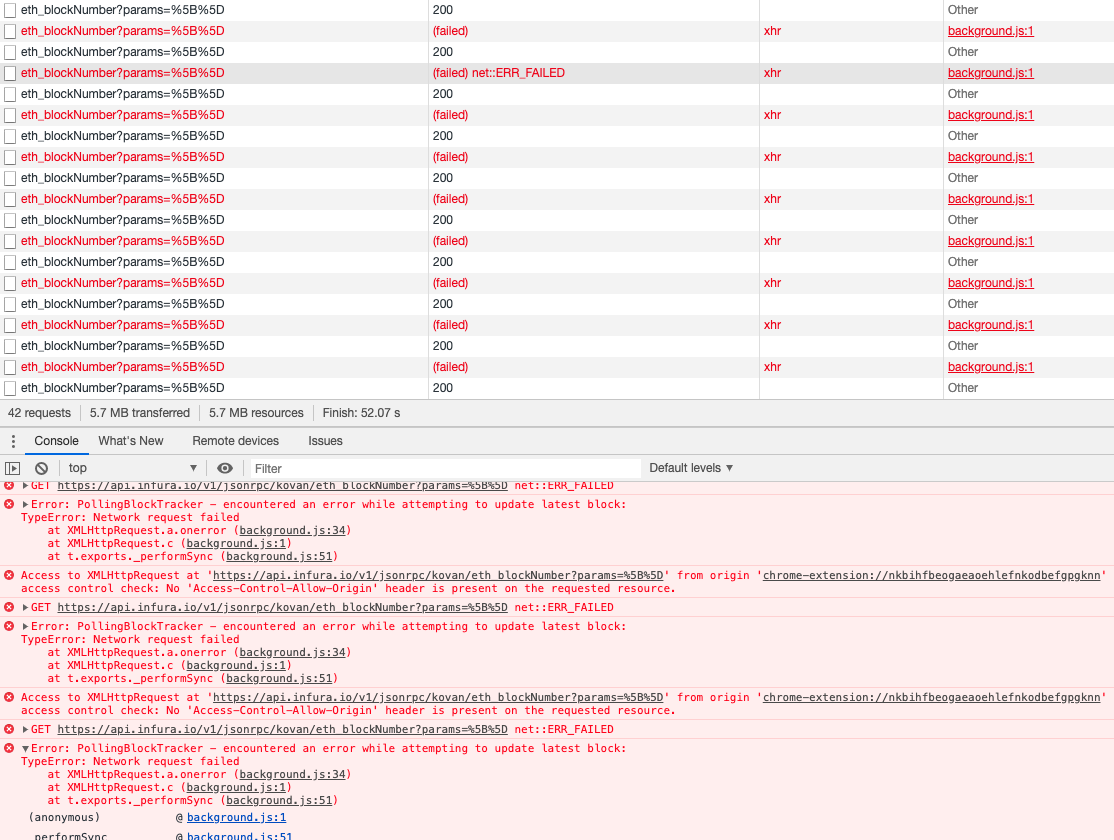
Does anyone know how to fix this?
mqklin
on 21 Aug 2020
@mqklin i haven't had that error, but it seems it's related to the node that metamask is trying to connect to, not metamask itself.
If you want to get your pk and have access to your eth, then you can use ian coleman's bip39 tool together with your mnemonic: https://iancoleman.io/bip39 (downloading it for offline use is a good idea so that you don't send your mnemonic over the net, https or not, to Ian Coleman or not: https://github.com/iancoleman/bip39/). Let me know if you struggle (but don't give me any personal info!).
aleqx
on 21 Aug 2020
@aleqx actually the screenshot i sent is not related to the issue. I have this problem because of old pending transactions, I'm 100% sure about it. I don't remember my mnemonic, only passphrase. So I'm waiting for the fix of this issue, then I will be able to send my money out of accounts in the extension.
mqklin
on 21 Aug 2020
Hi, I'm getting this issue, is there a process for getting the private key or seed phrase out when the UI is unusable?
 ThomasRedstone
on 26 Aug 2020
ThomasRedstone
on 26 Aug 2020
@ThomasRedstone did you end up fixing your issue?
 AdvaithD
on 31 Aug 2020
AdvaithD
on 31 Aug 2020
Uninstalling, and reinstalling got the extension working again, but did result in the loss of the data, which I was able to extract using developer tools (using a process I found in the documentation, I don't have the URL to hand I'm afraid).
ThomasRedstone
on 1 Sep 2020
I tried to fix extension code but broke something and lost all ETHs, fortunately I didn't have much there
mqklin
on 1 Sep 2020
Hi, I'm getting this issue, is there a process for getting the private key or seed phrase out when the UI is unusable?
Here I disabled infura and connected metamask to another node, recovering the private key
https://github.com/MetaMask/metamask-extension/issues/4894#issuecomment-410664381
tritone11
on 2 Sep 2020
Related issues
 glitch003
·
3Comments
glitch003
·
3Comments
 beether
·
4Comments
beether
·
4Comments
 kumavis
·
3Comments
kumavis
·
3Comments
 dpazdan
·
3Comments
dpazdan
·
3Comments
 aecc
·
3Comments
aecc
·
3Comments