Metamask-extension: Firefox plugin does not connect to private network
Expected Behavior
Connect to private network that is not localhost should work in firefox.
Actual Behavior
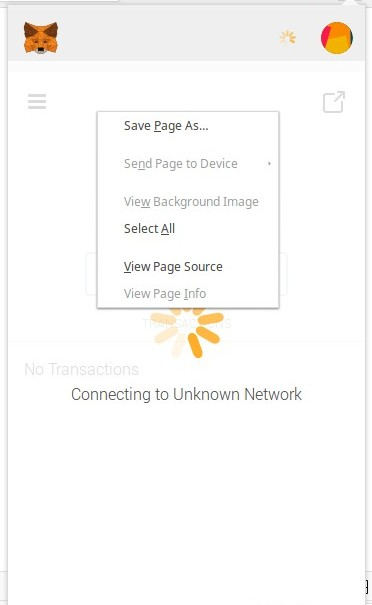
Loads infinitely.
Browser
Firefox
Operating System
Mac OS X 10.12.6
Extra
Testing in chrome and it works. Only a firefox issue.
 generalpiston
All 24 comments
You'll have to look at the Network tab of the background inspector to see why the request is failing:
 danfinlay
on 26 Mar 2018
danfinlay
on 26 Mar 2018
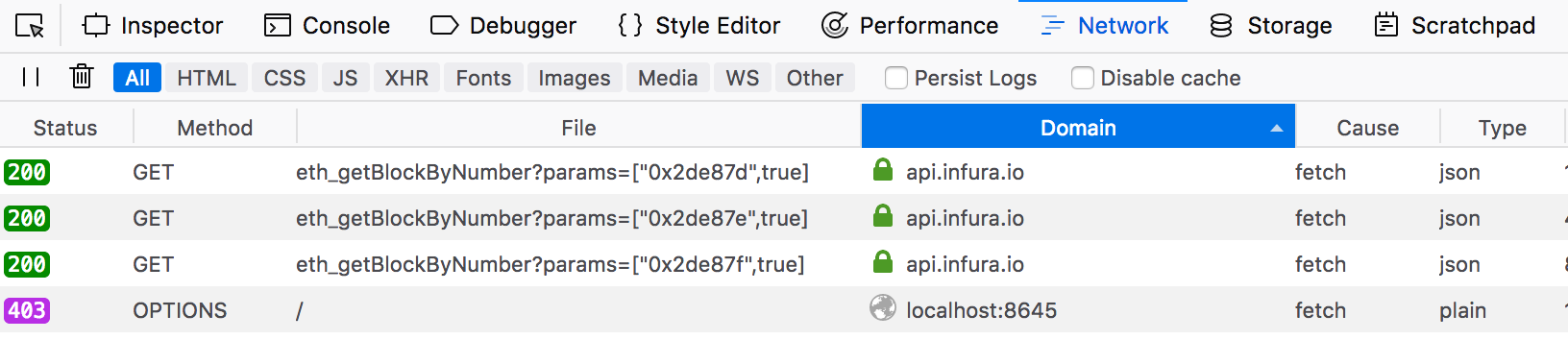
@danfinlay apparenty you need to turn on debugging in firefox to see network events. Here's are the logged network events:

Apparently there's an OPTIONS request which isn't completing.
Request Headers
OPTIONS / HTTP/1.1
Host: mobidex.io:8545
User-Agent: Mozilla/5.0 (Macintosh; Intel Mac OS X 10.12; rv:59.0) Gecko/20100101 Firefox/59.0
Accept: text/html,application/xhtml+xml,application/xml;q=0.9,*/*;q=0.8
Accept-Language: en-US,en;q=0.5
Accept-Encoding: gzip, deflate, br
Access-Control-Request-Method: POST
Access-Control-Request-Headers: content-type
Origin: moz-extension://e3f3eef1-98b4-fe43-ab50-db2eb160bd7d
Connection: keep-alive
Could you also try switching your network provider in MetaMask? Just try switching the network to another one (like "Main") and back again.
danfinlay
on 26 Mar 2018
The OPTIONS request seems to be going to mobidex.io, and that's strange, I don't know of any requests we make to mobidex.
@danjm @kumavis look familiar to you?
danfinlay
on 26 Mar 2018
@danfinlay I set it up to point to mobidex. That endpoint is just a parity node.
I've switched back and forth between several networks, but connecting to a non-local parity node does not work in Firefox. It works just fine in chrome.
generalpiston
on 27 Mar 2018
Same problem here with the beta version, running Parity locally. I can't show you my logs because I don't have the ability to show the console from the popup (ctrl+shift+i opens it but asks to reload... and I couldn't manage to get the tab reload without closing)
 Tbaut
on 4 Apr 2018
Tbaut
on 4 Apr 2018
Same issue here, running Parity locally as well. Connecting to it using Metamask on Chrome works fine, and connecting to other networks works fine in both.
 petri
on 9 Apr 2018
petri
on 9 Apr 2018
Same here, local parity, it's the OPTIONS request that doesn't go through
I will try to see if we can simply allow the OPTIONS request in parity
 vincentserpoul
on 10 Apr 2018
vincentserpoul
on 10 Apr 2018
Since this works in Chrome and not Firefox, I think this may be fixed on our master branch.
The problem is that Mozilla has stopped merging our new versions, because they've had some issues reproducing our builds (our builds are not perfectly deterministic).
We are making Firefox publication a high priority, but in the meanwhile, for proper behavior, you may need to use another browser.
danfinlay
on 17 Apr 2018
@kumavis thinks this looks like a CORS issue. We should write a blog post about that.
danfinlay
on 23 Apr 2018
definitely a CORS issue.
Is there anything we can do to help?
vincentserpoul
on 24 Apr 2018
On Geth, there's a flag for setting the CORS setting. I don't know what local client you're using, you'll have to configure it correctly:
https://metamask.helpscoutdocs.com/article/29-using-a-local-node
danfinlay
on 24 Apr 2018
Perhaps relevant (when using Parity): https://github.com/paritytech/parity/issues/7541
petri
on 24 Apr 2018
Launching parity with --jsonrpc-cors all allows metamask to connect indeed, it would be safer by only allowing metamask's domain, may someone point me to the right one? (Reminder, I can't check myself and open the dev console on metamask for some reason)
Tbaut
on 25 Apr 2018
The cors domain will vary depending on the browser you're using. In Chrome, it's chrome-extension://nkbihfbeogaeaoehlefnkodbefgpgknn. Let us know if you research and find the domain for other browsers.
https://metamask.helpscoutdocs.com/article/29-using-a-local-node
danfinlay
on 25 Apr 2018
Hey Dan, the issue is for Firefox.
Tbaut
on 26 Apr 2018
parity --jsonrpc-cors all indeed works.
I tried to set it with other values, according to the request I make (for instance http://localhost:8545), but no success.
I'm running in docker, so that might be the reason.
I only use this for dev, so I don't really mind the --jsonrpc-cors all
vincentserpoul
on 26 Apr 2018
@danfinlay could you please provide me the domain for firefox, I wouldn't want for security reasons to tell users to leave --jsonrpc-cors open to any app.
Tbaut
on 6 May 2018
@Tbaut --rpccorsdomain=moz-extension://36ff4990-4bdd-4d81-bbd7-91fcbcae8d06
vincentserpoul
on 7 May 2018
Thanks, however, it didn't work with this domain. It might be architecture specific.
Tbaut
on 7 May 2018
are you using geth or parity?
If it doesn't work, just go to firefox, type about:debugging in the address
launch the debug window for metamask
Launch metamask and click on the network panel.
Click on any of the request, you should see the domain in the headers.
I'm using firefox 61.0b2 developer edition on archlinux
vincentserpoul
on 7 May 2018
I am using parity, and faced the same issue. I was able to connect to remote RPC using web3-console but was unable to connect to same RPC using metamask.
However, on using --jsonrpc-cors all I was able to get it working using metamask also.
 AyushyaChitransh
on 7 May 2018
AyushyaChitransh
on 7 May 2018
Thanks @vincentserpoul for the walkthrough. I'm now using successfuly --jsonrpc-cors moz-extension://ae62fc16-c916-4c24-9a36-97f5a850f25c on parity.
@AyushyaChitransh, consider specific domain rather than all as this reduces the attack surface.
Tbaut
on 7 May 2018
Is anyone here having a problem that isn't solved by running their local node with a CORs flag?
Closing until someone can confirm this is our issue.
danfinlay
on 21 May 2018
Related issues
 dpazdan
·
3Comments
dpazdan
·
3Comments
 johnerfx
·
4Comments
johnerfx
·
4Comments
 BassBauman
·
3Comments
BassBauman
·
3Comments
 DISC30
·
3Comments
DISC30
·
3Comments
 glitch003
·
3Comments
glitch003
·
3Comments