Metamask-extension: Firefox Broken UI: Popup closes immediately
1) Using Firefox, importing JSON File: When I click browse to find a file, the prompt closes.
Therefore it's impossible to import via JSON file on Firefox.
On Brave this works fine.
2) Seen similar inconsistent behavior with transaction prompts on Firefox. Sometimes a new window pops up, othertimes I have to click the fox to see it.
3) When signing for a transaction, this could mean I can't scroll down to click submit/reject.
I recognize these are 3 issues but I think they all need to be fixed together + are likely related.
 quantumproducer
All 17 comments
@quantumproducer issue 1 that you have writen about is a known bug for firefox+linux
can you provide your firefox version?
 frankiebee
on 26 Feb 2018
frankiebee
on 26 Feb 2018
56.09b
quantumproducer
on 8 Mar 2018
I also have the 2nd problem. Always when I want to send a transaction / want to sign something I have to click the fox manually as the popup is blank (see screenshot: https://imgur.com/a/bob8k ). Ubuntu 16.04 and Firefox 59.0.
Also when I want to import an account, the window disappears when I click into anything else. Meaning it's impossible to import a JSON file as the Metamask gui minimizes once I get into the JSON file selector popup, such that I can't enter the password.
 DomiDre
on 15 Mar 2018
DomiDre
on 15 Mar 2018
@DomiDre sounds like a new issue. I can reproduce it, so maybe it would be better to open that as new issue instead of continuing it here?
Or do they share a common, underlying problem?
 berkes
on 18 Apr 2018
berkes
on 18 Apr 2018
Experiencing this also:
60.0b14 (64-bit) on Linux
 rawkode
on 23 Apr 2018
rawkode
on 23 Apr 2018
Note that I can reproduce the same behaviour with another addon BitWarden. It has a feature to "pop out", but commonly runs in a menu-dialog.
So, this might be caused by a more low-level issue: handling of FF menu-dialogs in a stand-alone popup, or some common library. In any case, it might be worth comparing with BitWarden.
berkes
on 23 Apr 2018
I've experienced similar annoyances with BitWarden too, come to mention it. I tend to use the sidebar option with BitWarden now, because of that bug. Is a quick fix to allow MetaMask to open in the sidebar?
rawkode
on 23 Apr 2018
I faced the same problem with broken UI (after clicking on icon nothing showed up)
Instructions from MetaMask FAQ's did help me:
Open about:debugging in a new tab
Scroll down and find the Metamask {Internal UUID} (e.g. 12324c61-abc2-4922-a325-012697643ff5)
Open moz-extension://{Internal UUID}/popup.html in a new tab and import through the tab
After these steps I was able to open MetaMask UI in standard way.
Using Ubuntu 18.04 and Firefox
 Jurkovic
on 25 Jun 2018
Jurkovic
on 25 Jun 2018
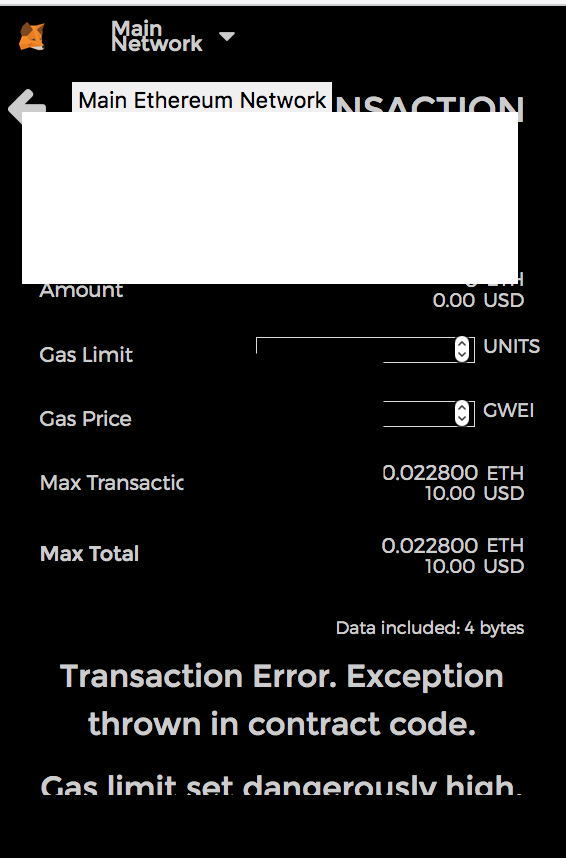
@Jurkovic I tried this, check this out -- the UI is bugged and won't show me the buttons under neath to cancel.
quantumproducer
on 26 Jun 2018
Related to the blank screen issue on Firefox / Ubuntu 18.04, there is a way to fix it
https://consensys.zendesk.com/hc/en-us/articles/360007617432
 estebanmino
on 20 Jul 2018
estebanmino
on 20 Jul 2018
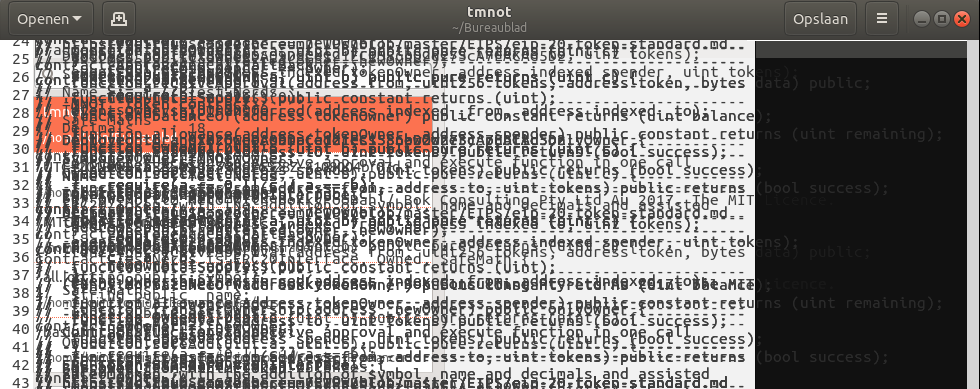
I'd like to add that the solution provided in https://github.com/MetaMask/metamask-extension/issues/3313#issuecomment-406687137 fixes the closing problem on Firefox 61.0.1 (64-bits) in Ubuntu 18.04, but makes gedit behave odd. When I use the XIM input method, my gedit becomes transparent and when reading text, the text is unreadable (see pic). So no other solution (in my case) than to revert to IBUS (I use gedit quite a lot).
I can still use metamask more or less when using moz-extension:// in the url bar.
I'll report the XIM/IBUS problem to Ubuntu as well.
 letatcest
on 5 Sep 2018
letatcest
on 5 Sep 2018
Thanks @letatcest. I've been bugged by this transparancy-issue for several weeks now. Without a clue what was causing it. See my Q on Stackoverflow (now answered) https://askubuntu.com/questions/1065953/where-can-i-find-more-information-on-a-bug-that-causes-rendering-issues-with-ubu/1072339#1072339. You gave me the information to fix a really annoying issue.
@estebanmino are you the author of that support-page? If so, please put this glitch as severe warning on there. It renders a lot of applications unusable. gedit, but also calculator, email, calendar, etc. Basically every native text-area becomes unusable, making the desktop really hard to use.
berkes
on 5 Sep 2018
The upstream issue, with ibus, is found here: https://github.com/ibus/ibus/issues/2002 .
And here is the patch for gnome-shell https://gitlab.gnome.org/GNOME/gnome-shell/issues/391
The Ubuntu bugtracker also lists this bug: https://bugs.launchpad.net/ubuntu/+source/gnome-shell/+bug/1794655
Both have not, AFAIK, landed in Ubuntu yet.
berkes
on 28 Jan 2019
I believe that I'm encountering a similar bug (https://github.com/ibus/ibus/issues/2002) in Fedora as well.
Using Firefox 65.0.2 / IBus 1.5.19 / gnome-shell 3.30.2 / Fedora 29
Tested with LastPass's extension which can be found here: https://addons.mozilla.org/ja/firefox/addon/lastpass-password-manager/ After the installation, click on the extension, then click on the password field, the UI of the extension closes immediately.
 jeffshee
on 10 Mar 2019
jeffshee
on 10 Mar 2019
Open about:debugging in a new tab
Scroll down and find the Metamask {Internal UUID} (e.g. 12324c61-abc2-4922-a325-012697643ff5)
Open moz-extension://{Internal UUID}/popup.html in a new tab and import through the tab
```
^^ this with home.html instead of popup.html ^^
 cobordism
on 4 Apr 2019
cobordism
on 4 Apr 2019
It is also possible to open full page view by clicking on "Expand view" item in "Account options" menu.

 xuhcc
on 9 Jun 2019
xuhcc
on 9 Jun 2019
Closing due to inactivity.
 tmashuang
on 31 Jan 2020
tmashuang
on 31 Jan 2020
Related issues
 glitch003
·
3Comments
glitch003
·
3Comments
 DISC30
·
3Comments
DISC30
·
3Comments
 dpazdan
·
3Comments
dpazdan
·
3Comments
 MarkOSullivan94
·
3Comments
MarkOSullivan94
·
3Comments
 kumavis
·
3Comments
kumavis
·
3Comments
Most helpful comment
I faced the same problem with broken UI (after clicking on icon nothing showed up)
Instructions from MetaMask FAQ's did help me:
After these steps I was able to open MetaMask UI in standard way.
Using Ubuntu 18.04 and Firefox