Metamask-extension: Sometimes, the mouse click position does not represent the mouse position.
Opening to connect some possibly related issues:
- #2724
- #1383
Many reports were on Windows 10 with Chrome.
 danfinlay
All 19 comments
Can anyone else confirm that:
- Everyone here is using Windows 10
- Everyone here is using Chrome
- Everyone here has two monitors set to two different resolutions.
danfinlay
on 18 Dec 2017
I confirm I'm using Win 10 with Chrome and the problem is when I move the browser to the secondary browser. The main monitor works fine.
 eeldivad
on 19 Dec 2017
eeldivad
on 19 Dec 2017
Opened issue with chromium:
https://bugs.chromium.org/p/chromium/issues/detail?id=795949&can=2&q=action%20view%20resolution&colspec=ID%20Pri%20M%20Stars%20ReleaseBlock%20Component%20Status%20Owner%20Summary%20OS%20Modified
danfinlay
on 19 Dec 2017
Can someone here try this out again with the latest Chrome, version 63.0.3239.108 or later?
danfinlay
on 4 Jan 2018
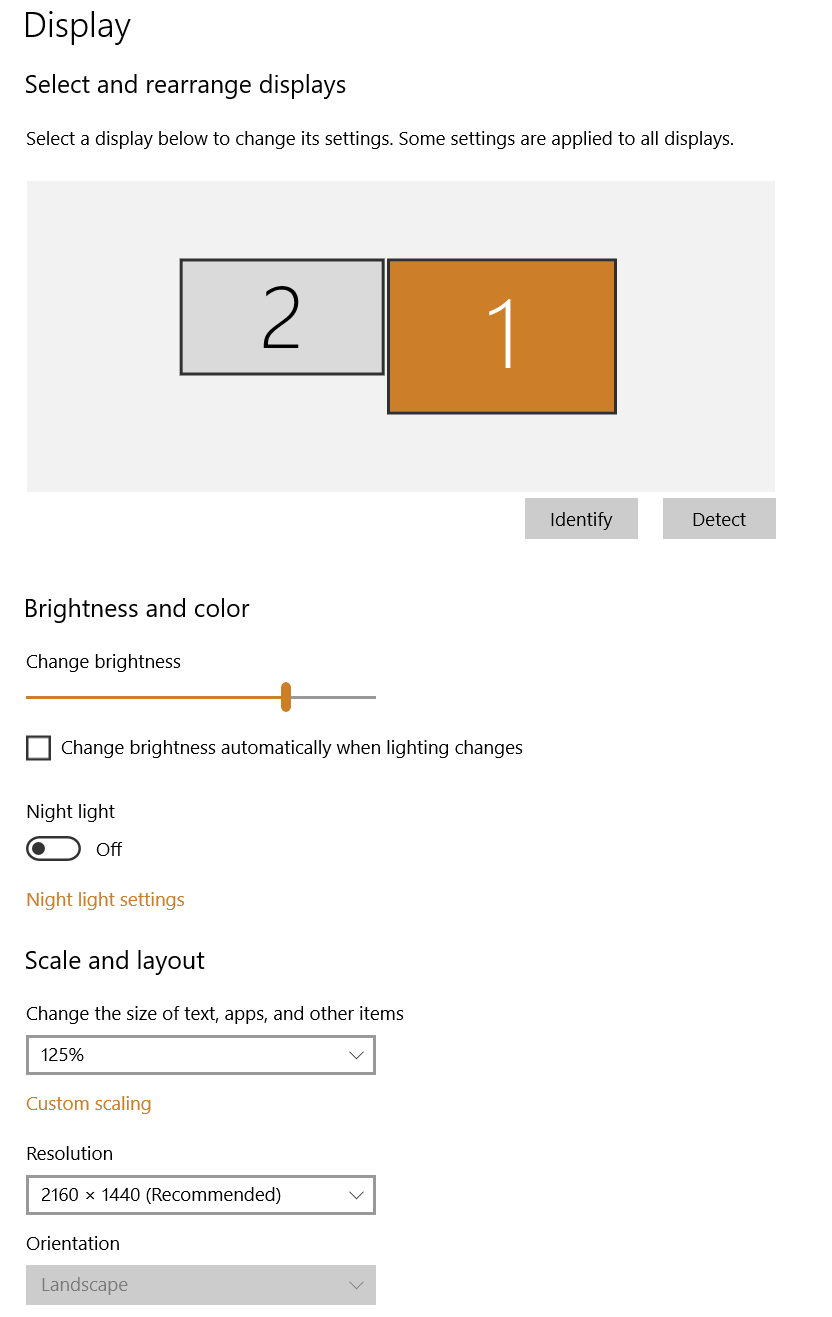
I'm still having same issue and using the latest version 63.0.3239.108. It works fine on main monitor but when I drag it over to second monitor the mouse pointer is off in metamask window. I did more testing and realize its not an issue with resolution. It's an issue with scaling. In win10 in the display settings where you change the resolution, there is an option to change "Scale and Layout" for size of text, apps, and other items. If it's set to 100% then everything works fine. Mine was set to 125%, which gives an issue with metamask on secondary monitor. I changed it between 100% and 125% and that fixes or produces the issue again.
eeldivad
on 4 Jan 2018
Specifically, they ask:
Could you please check the issue on latest stable #63.0.3239.108 by creating a new profile without any apps and extensions and please let us know if the issue still persist or not.
Could you confirm @eeldivad or @tim if you can reproduce with these instructions?
danfinlay
on 5 Jan 2018
I created a new profile using latest stable version and installed metamask and I still get the same issue when scaling is set to 125%. When I set scaling to 100% then issue is resolved. I read that the chrome team can't reproduce the issue using different resolutions. I recommend they try changing the scaling option to see the problem.
eeldivad
on 6 Jan 2018
Here's a screenshot of the scaling option so it's not mistaken for the browser scale option. Notice it's set to 125% when I have issues with secondary monitor with metamask.
eeldivad
on 6 Jan 2018
The issue is the text size, MetaMask works best in 100% text size. Any other text size can offset the positioning of the mouse position and the buttons/clickable links. Will investigate how to be compatible with other text sizes.
 tmashuang
on 11 Jan 2018
tmashuang
on 11 Jan 2018
https://productforums.google.com/forum/#!topic/chrome/tyzywUJfkQI
Found a workaround for a monitor with a different text size other than 100%.
Yes! Disabling chrome://flags/#enable-use-zoom-for-dsf "Use Blink's zoom for device scale factor" fixes the mouse offset issue for me on latest Chrome (63.0.3239.108).
tmashuang
on 11 Jan 2018
Thanks for the workaround. I don't want to modify the default settings in chrome so I'll just remember to keep chrome on my main monitor till the issue is resolved. Great find though.
eeldivad
on 11 Jan 2018
This appears to be fixed. I'm not sure what fixed it but I'm now at chrome version 65.0.3325.162. Did metamask update too? I'm at metamask 4.2.0
eeldivad
on 14 Mar 2018
Chrome did say they fixed this, we didn't fix it on our end, but it's good to hear you see it fixed!
I'll close this for now, please comment if you experience it again!
danfinlay
on 14 Mar 2018
I have the same problem on MacOs X El Capitan.
Chrome Version 71.0.3578.98.
 WebStra
on 11 Jan 2019
WebStra
on 11 Jan 2019
@WebStra could you open a new issue with reproduction steps?
 bdresser
on 11 Jan 2019
bdresser
on 11 Jan 2019
I am getting this _all_ the time
OS El capitan 10.11.6
Chrome: 72.0.3626.121
It is REALLY annoying. I have to close and open the window and it is fixed, but within an hour or so, it will revert.
Interestingly, it is not consistent in all windows. Some windows are fine, other's are not. But within a given window, ALL tabs suffer from the same offset -issue. It is offset down by ~25pixels.
I use chrome on 3-different monitors.
This is a bug and should be fixed.
 sukiakiumo
on 11 Mar 2019
sukiakiumo
on 11 Mar 2019
@sukiakiumo does this happen consistently across your monitors? do you experience the issue when not connected to any additional monitors? do you use non-standard zoom settings? does it happen on non-MetaMask windows?
we haven't been able to reproduce this, so any more information you can provide would help.
bdresser
on 12 Mar 2019
@bdresser
Checking it out a little bit more, it seems like it is purely chrome issue and beyond metamask. In that sense, I guess it can be closed here and I'll see if I can figure to whom to refer this bug to. Thanks for asking useful questions!
sukiakiumo
on 12 Mar 2019
Confirming that I have this bug also with Chrome Versions 72.0.3626.121 and 73.0.3683.86.
 ydax
on 21 Mar 2019
ydax
on 21 Mar 2019
Related issues
 estebanmino
·
3Comments
estebanmino
·
3Comments
 johnerfx
·
4Comments
johnerfx
·
4Comments
 hellobart
·
3Comments
hellobart
·
3Comments
 BassBauman
·
3Comments
BassBauman
·
3Comments
 dpazdan
·
3Comments
dpazdan
·
3Comments
Most helpful comment
I am getting this _all_ the time
OS El capitan 10.11.6
Chrome: 72.0.3626.121
It is REALLY annoying. I have to close and open the window and it is fixed, but within an hour or so, it will revert.
Interestingly, it is not consistent in all windows. Some windows are fine, other's are not. But within a given window, ALL tabs suffer from the same offset -issue. It is offset down by ~25pixels.
I use chrome on 3-different monitors.
This is a bug and should be fixed.