Metamask-extension: Metamask not injecting web3 in chrome
I'm running Metamask 3.12.0, Chrome 61.0.3163.100
When I connect from Metamask to local rpc 8545, there seems to be an issue injecting web3 object in my runtime.
Specifically this condition is never satisfied if (typeof web3 !== 'undefined')
Furthermore, I think metamask is supposed to throw a message in console of chrome that it injected web3. I don't see that either.
p.s. I'm using a react js frontend (not sure if that matters).
Can you assist please?
Thanks,
 rawadrifai
All 36 comments
I would first look for errors in the background console:
https://github.com/MetaMask/faq/blob/master/LOGS.md
 danfinlay
on 31 Oct 2017
danfinlay
on 31 Oct 2017
I found these logs
Failed to load resource: net::ERR_CONNECTION_REFUSED
background.js:17107 Uncaught (in promise) TypeError: Failed to fetch
Another behavior worth mentioning:
If I have "private network" selected, then I disable and enable metamask, Metamask is not able to connect to the test private network. It gets stuck at "Connecting to unknown private network". If I switch to Main network then back to private, then it shows the logs above in the background console.
rawadrifai
on 31 Oct 2017
Sorry this is so mysterious! Before we go further, just know you might be able to just fix this by restarting your browser.
If you're up for more debugging, we can try to get to the root of this.
That error could cause this, depending where it's happening. In that background inspector, you can check the network tab, and if you can find the red request representing the ERR_CONNECTION_REFUSED error, you can look at request + response data, and that would both be relevant to investigating this.
danfinlay
on 31 Oct 2017
No worries, and thanks for helping.
So I restarted Chrome, you're right.. that partially fixed something. The call to localhost:8545 is not coming back with 200 OK in the Network Tab. So I don't see errors in the background Console anymore.
But I still don't see web3 being injected. Is it supposed to log something in console when it gets injected? Also my custom react js app did not detect web3 either.
I'm up for debugging. I need to resolve this.
rawadrifai
on 31 Oct 2017

rawadrifai
on 31 Oct 2017

rawadrifai
on 31 Oct 2017
In that screenshot, I don't see MetaMask in the toolbar. Is it possible you're using a different chrome user profile that doesn't have MetaMask installed?
danfinlay
on 31 Oct 2017
it's there.. just in the hidden menu.
rawadrifai
on 1 Nov 2017
any updates by any chance?
rawadrifai
on 1 Nov 2017
There might be an issue with how Metamask runs after all other scripts run. Are you able to access the web3 object by typing web3 in the console? Also, how are you handling the window load for loading completion to avoid race conditions with web3 injection timing?
 tmashuang
on 1 Nov 2017
tmashuang
on 1 Nov 2017
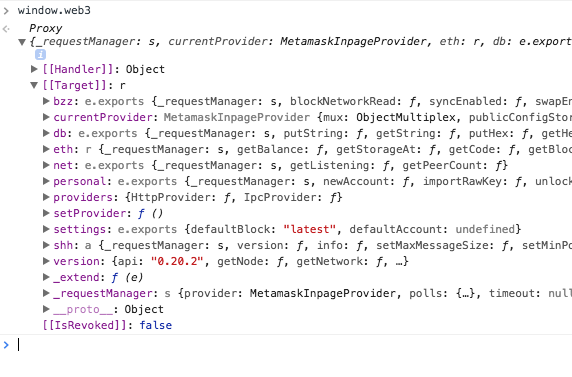
gives me this
web3
Proxy {_requestManager: s, currentProvider: MetamaskInpageProvider, eth: r, db: e.exports, shh: a, …}
[[Handler]]
:
Object
get
:
ƒ get(_web3, key)
set
:
ƒ set(_web3, key, value)
__proto__
:
Object
[[Target]]
:
r
bzz
:
e.exports {_requestManager: s, blockNetworkRead: ƒ, syncEnabled: ƒ, swapEnabled: ƒ, download: ƒ, …}
currentProvider
:
MetamaskInpageProvider {mux: ObjectMultiplex, publicConfigStore: ObservableStore, rpcEngine: RpcEngine}
db
:
e.exports {_requestManager: s, putString: ƒ, getString: ƒ, putHex: ƒ, getHex: ƒ}
eth
:
r {_requestManager: s, getBalance: ƒ, getStorageAt: ƒ, getCode: ƒ, getBlock: ƒ, …}
net
:
e.exports {_requestManager: s, getListening: ƒ, getPeerCount: ƒ}
personal
:
e.exports {_requestManager: s, newAccount: ƒ, importRawKey: ƒ, unlockAccount: ƒ, ecRecover: ƒ, …}
providers
:
{HttpProvider: ƒ, IpcProvider: ƒ}
setProvider
:
ƒ ()
settings
:
e.exports {defaultBlock: "latest", defaultAccount: undefined}
shh
:
a {_requestManager: s, version: ƒ, info: ƒ, setMaxMessageSize: ƒ, setMinPoW: ƒ, …}
version
:
{api: "0.20.2", getNode: ƒ, getNetwork: ƒ, …}
_extend
:
ƒ (e)
_requestManager
:
s {provider: MetamaskInpageProvider, polls: {…}, timeout: null}
__proto__
:
Object
[[IsRevoked]]
:
false
rawadrifai
on 1 Nov 2017
is metamask supposed to output something in console once it injects web3?
rawadrifai
on 1 Nov 2017
So this is the web3 object that is injected that is supposedly missing.
Also, how are you handling the window load for loading completion to avoid race conditions with web3 injection timing?
tmashuang
on 1 Nov 2017
This is my code for the react frontend. App.js is the main component and I'm calling initWeb3 from componentDidMount(). The condition if (typeof web3 !== 'undefined') is never satisfied. So it always creates a new web3 object and bypasses metamask.
componentDidMount() {
    this.initWeb3();
}

initWeb3() {
       if (typeof web3 !== 'undefined') {
         this.web3Provider = web3.currentProvider;
         web3 = new Web3(web3.currentProvider);
         console.log("existing web3: provider " + typeof web3);
      } else {

          this.web3Provider = new Web3.providers.HttpProvider('http://localhost:8545');
          web3 = new Web3(this.web3Provider);
          console.log("new web3");
        }

       this.displayAccountInfo();
       this.initiateContract();
  }

rawadrifai
on 1 Nov 2017
window.web3?
tmashuang
on 1 Nov 2017
rawadrifai
on 1 Nov 2017
btw this is how I'm declaring web3, according to: https://github.com/ethereum/web3.js/
var Web3 = require('web3');
var web3 = new Web3();
so do you suspect this is something with metamask or on my end?
rawadrifai
on 2 Nov 2017
Regardless if Metamask is installed or not, just calling web3 you should get the web3 object, not undefined. Try reinstalling web3 package. I suggest using [email protected] since 1.0.0 is in beta right now.
tmashuang
on 2 Nov 2017
To clarify: your script is not detecting web3, but right after you can via console?
As a curiosity, can you detect it in a timeout? Is this a race condition or a context issue?
danfinlay
on 2 Nov 2017

rawadrifai
on 2 Nov 2017
Dan, I set a timeout like this, still web3 is undefined. I'm not sure what Thomas meant.. web3 should not be undefined even if there is no Metamask present? Is that a true statement?
componentDidMount() {

    var millisecondsToWait = 1000;
    setTimeout(this.initWeb3.bind(this), millisecondsToWait);

   // this.initWeb3();
  }
Can you please confirm these simple steps would inject web3 object? I'm getting paranoid that I did something fundamentally off:
1- Run test rpc testrpc
2- Install metamask in chrome
3- log into metamask
4- connect to private network from metamask
rawadrifai
on 2 Nov 2017
That sounds fine to me. Do you have a github repo I could try reproducing on?
danfinlay
on 2 Nov 2017
I do: https://github.com/rawadrifai/ethereum
run the following after cloning repo:
cd your-repo-location/ethereum/ChainList
npm install
./starttestrpc.sh
npm run migrate
npm start
You might need these global npm installs:
[email protected]
[email protected]
you can install them inside the project, but I don't have them in package.json
npm install [email protected]
npm install [email protected]
good luck.
rawadrifai
on 2 Nov 2017
Also
Is metamask supposed to output "Metamask injected web3" in the chrome console?
as in any chrome tab that's open.
rawadrifai
on 3 Nov 2017
Solved this. ugghh.
Must declare web3 like this: var web3 = window.web3
I had it var web3 = Web3() (as suggested by Web3). Funnies.
rawadrifai
on 3 Nov 2017
I encountered the same issue, so far I have only seen this problem with React projects.
 karooolis
on 18 Dec 2017
karooolis
on 18 Dec 2017
I actually get this issue in this simple example https://citywebconsultants.co.uk/blog/blockchain/introducing-ethereum-development-part-1-metamask-and-web3
edit: Had to host the index.html with a web server, then everything works fine.
 thanikc
on 3 Jan 2018
thanikc
on 3 Jan 2018
Make sure you have <!DOCTYPE html>
 codemeit
on 15 Mar 2018
codemeit
on 15 Mar 2018
Make sure you have
<!DOCTYPE html>
This really helps.
 mawenpeng
on 9 Oct 2018
mawenpeng
on 9 Oct 2018
Basically, you will need to watch the object web3:
Using the helper script (the end of the comment), you can do the following:
    console.time('metamask');
    Observer(web3.eth, 'accounts', onChange = () => {
      console.timeEnd('metamask');
      console.log(web3.eth.accounts[0]);
    });
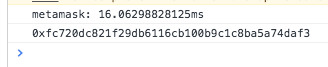
Helper script
    Object.equals = function (x, y) {
      if (x === y) return true;
      // if both x and y are null or undefined and exactly the same

      if (!(x instanceof Object) || !(y instanceof Object)) return false;
      // if they are not strictly equal, they both need to be Objects

      if (x.constructor !== y.constructor) return false;
      // they must have the exact same prototype chain, the closest we can do is
      // test there constructor.

      for (var p in x) {
        if (!x.hasOwnProperty(p)) continue;
        // other properties were tested using x.constructor === y.constructor

        if (!y.hasOwnProperty(p)) return false;
        // allows to compare x[ p ] and y[ p ] when set to undefined

        if (x[p] === y[p]) continue;
        // if they have the same strict value or identity then they are equal

        if (typeof (x[p]) !== "object") return false;
        // Numbers, Strings, Functions, Booleans must be strictly equal

        if (!Object.equals(x[p], y[p])) return false;
        // Objects and Arrays must be tested recursively
      }

      for (p in y) {
        if (y.hasOwnProperty(p) && !x.hasOwnProperty(p)) return false;
        // allows x[ p ] to be set to undefined
      }
      return true;
    }
    Observer = (object, key, onChange) => {
      var periodically = () => {
        var currentValue = object[key];
        setTimeout(() => {
          if (!Object.equals(object[key], currentValue)) {
            onChange(object, key);
          }
        }, 3);
      };
      setInterval(periodically, 7);
    };
 abdennour
on 27 Oct 2018
abdennour
on 27 Oct 2018

I am having the same issue here.
if (typeof web3 !== 'undefined') {
    App.web3Provider = web3.currentProvider;
  }
this evaluates to false and web3 is undefined and it bypasses the metamask and it goes to the rinkeby provider. I can not resolve it with window.web3.
 saadibrahimiv
on 5 Jun 2020
saadibrahimiv
on 5 Jun 2020
I am having the same issue here.
if (typeof web3 !== 'undefined') { App.web3Provider = web3.currentProvider; }
this evaluates to false and web3 is undefined and it bypasses the metamask and it goes to the rinkeby provider. I can not resolve it withwindow.web3.
solved. Apparently i was running my html on local file method.
"Due to browser security restrictions, we can't communicate with dapps running on file://. Please use a local server for development."
Run the file in local server and allow the connection manually to the website from metamask settings and it will work.
saadibrahimiv
on 6 Jun 2020
Solved this. ugghh.
Must declare web3 like this:var web3 = window.web3
I had itvar web3 = Web3()(as suggested by Web3). Funnies.
Could you give an updated code? I'm very new to web3 and I cannot figure out what to change.
 Hrithiksh28
on 18 Jun 2020
Hrithiksh28
on 18 Jun 2020
Related issues
 1blockologist
·
3Comments
1blockologist
·
3Comments
 BassBauman
·
3Comments
BassBauman
·
3Comments
 aakilfernandes
·
3Comments
aakilfernandes
·
3Comments
 dpazdan
·
3Comments
dpazdan
·
3Comments
 estebanmino
·
3Comments
estebanmino
·
3Comments
Most helpful comment
Make sure you have
<!DOCTYPE html>