Describe the bug
Using the latest snapshot, if you start a brand new sbt project and attempt to do a build import, it will fail since no metals.sbt is getting created. It looks like we may have introduced a regression in https://github.com/scalameta/metals/commit/8157ed99f4d9e815ed87be773490ca091b5c7c78
To Reproduce
Steps to reproduce the behavior:
sbt new scala/scala-seed.g8- Open the project in VS Code or
coc-metals - Select to import the build
- See error
INFO  started: Metals version 0.8.0+57-24847afb-SNAPSHOT in workspace '/Users/ckipp/Documents/scala-workspace/sbt-test'
INFO  time: initialize in 0.81s
INFO  running '/Users/ckipp/.sdkman/candidates/java/current/bin/java -Djline.terminal=jline.UnsupportedTerminal -Dsbt.log.noformat=true -Dfile.encoding=UTF-8 -jar /var/folders/fq/nx_jsnyd6550xp03czx898d40000gn/T/metals4875267291081833986/sbt-launch.jar -Dbloop.export-jar-classifiers=sources bloopInstall'
INFO  [info] Loading settings for project global-plugins from credentials.sbt,plugins.sbt ...
INFO  [info] Loading global plugins from /Users/ckipp/.sbt/1.0/plugins
INFO  [info] Loading project definition from /Users/ckipp/Documents/scala-workspace/sbt-test/project
INFO  [info] Compiling 1 Scala source to /Users/ckipp/Documents/scala-workspace/sbt-test/project/target/scala-2.12/sbt-1.0/classes ...
INFO  [info] Done compiling.
INFO  [info] Loading settings for project root from build.sbt ...
INFO  [info] Set current project to sbt-test (in build file:/Users/ckipp/Documents/scala-workspace/sbt-test/)
INFO  [error] Expected ';'
INFO  [error] Not a valid command: bloopInstall
INFO  [error] Not a valid project ID: bloopInstall
INFO  [error] Expected ':'
INFO  [error] Not a valid key: bloopInstall
INFO  [error] bloopInstall
INFO  [error]             ^
INFO  build tool exit: 1
INFO  time: ran 'sbt bloopInstall' in 10s
ERROR sbt command failed: /Users/ckipp/.sdkman/candidates/java/current/bin/java -Djline.terminal=jline.UnsupportedTerminal -Dsbt.log.noformat=true -Dfile.encoding=UTF-8 -jar /var/folders/fq/nx_jsnyd6550xp03czx898d40000gn/T/metals4875267291081833986/sbt-launch.jar -Dbloop.export-jar-classifiers=sources bloopInstall
Then upon looking in the project directory, no metals.sbt is created. If I then attempt the same thing with 0.8.0, everything works as expected
Expected behavior
The metals.sbt should be created correctly and the build imported.
Installation:
- Operating system: macOS
- Editor: Visual Studio Code and Vim
- Metals version: 0.8.0+57-24847afb-SNAPSHOT
Search terms
sbt, build import, metals.sbt
 ckipp01
All 8 comments
2020.06.07 23:00:17 INFO  [info] Non-compiled module 'compiler-bridge_2.12' for Scala 2.12.10. Compiling...
2020.06.07 23:00:32 INFO  [info]   Compilation completed in 14.952s.
2020.06.07 23:00:34 INFO  [info] Done compiling.
2020.06.07 23:00:37 INFO  [info] Loading settings for project root from build.sbt ...
2020.06.07 23:00:37 INFO  [info] Set current project to hello-world (in build file:/C:/Users/Dell/hello-world/)
2020.06.07 23:00:38 INFO  [error] Expected ';'
2020.06.07 23:00:38 INFO  [error] Not a valid command: bloopInstall
2020.06.07 23:00:38 INFO  [error] Not a valid project ID: bloopInstall
2020.06.07 23:00:38 INFO  [error] Expected ':'
2020.06.07 23:00:38 INFO  [error] Not a valid key: bloopInstall
2020.06.07 23:00:38 INFO  [error] bloopInstall
2020.06.07 23:00:38 INFO  [error]             ^
2020.06.07 23:00:38 INFO  build tool exit: 1
2020.06.07 23:00:39 INFO  time: ran 'sbt bloopInstall' in 34s
2020.06.07 23:00:39 ERROR sbt command failed: C:\Program Files\Java\jdk1.8.0_251\bin\java -Djline.terminal=jline.UnsupportedTerminal -Dsbt.log.noformat=true -Dfile.encoding=UTF-8 -jar C:\Users\Dell\AppData\Local\Temp\metals1576765575079134702\sbt-launch.jar -Dbloop.export-jar-classifiers=sources bloopInstall
I know this is closed, but a followed the same steps and get the same error, anyone can help me?
 JahirMorenoA
on 8 Jun 2020
JahirMorenoA
on 8 Jun 2020
Hi @JahirMorenoA, what version of Metals are you using?
ckipp01
on 8 Jun 2020
Hi @ckipp01. I'm using 1.9.0, and this version creates an Icon in the left hand side in VS Code and I did not find mention of this icon elsewhere
JahirMorenoA
on 9 Jun 2020
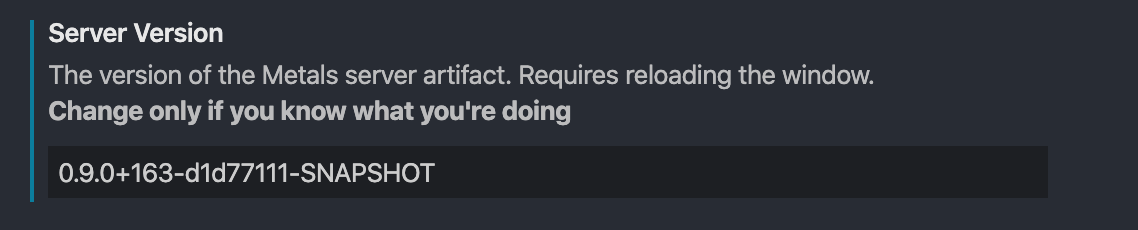
1.9.0 is the VS Code extension version. Are you able to check to see if you have a hard coded older version of Metals in your settings?
ckipp01
on 9 Jun 2020
Okay, this is my server version config in settings.

JahirMorenoA
on 9 Jun 2020
Hmm, so I just tested with a fresh project to make sure and it does seem to work. Is this something you can reproduce consistently with sbt projects locally?
ckipp01
on 9 Jun 2020
@JahirMorenoA What is the setting set to?
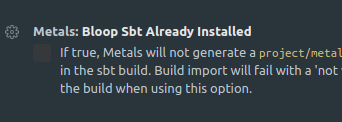
Is it possible that you enabled it by mistake? Also, are there any other logs about any issues outside of the sbt import itself?
 tgodzik
on 9 Jun 2020
tgodzik
on 9 Jun 2020
Thank you so much that was my fault, indeed it was enabled by mistake. Now everything works perfect. 👍 Sorry for taking your time guys, sometimes we don't see the simplest things.!
JahirMorenoA
on 9 Jun 2020
Related issues
 laughedelic
·
4Comments
laughedelic
·
4Comments
 olafurpg
·
4Comments
olafurpg
·
4Comments
 oscarvarto
·
3Comments
oscarvarto
·
3Comments
 tanishiking
·
4Comments
tanishiking
·
4Comments
 m4dc4p
·
4Comments
m4dc4p
·
4Comments
Most helpful comment
@JahirMorenoA What is the setting set to?

Is it possible that you enabled it by mistake? Also, are there any other logs about any issues outside of the sbt import itself?